
android:使用RemoteView自定义Notification
//网上相关内容较少,遂记录下来,备忘.
//依然以音乐播放器demo为例.
效果截图
//锤子手机上的效果
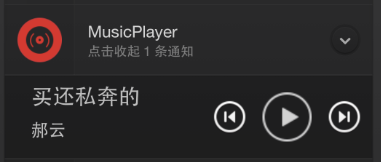
step1 准备自定义layout
常规的实现方式,并不会因为是用于notification的而在实现上有所不同.
<?xml version="1.0" encoding="utf-8"?>

<LinearLayout xmlns:android="http://schemas.android.com/apk/res/android"

              android:orientation="horizontal"

              android:layout_margin="10dp"

              android:layout_width="match_parent"

              android:layout_height="match_parent">

    <LinearLayout

        android:layout_gravity="center"

        android:layout_marginLeft="10dp"

        android:orientation="vertical"

        android:layout_width="170dp"

        android:layout_height="wrap_content">

        <TextView

            android:layout_marginLeft="10dp"

            android:id="@+id/music_name"

            android:textSize="20dp"

            android:text="要怎么办"

            android:maxLines="1"

            android:ellipsize="end"

            android:layout_width="wrap_content"

            android:layout_height="wrap_content"/>

        <TextView

            android:layout_marginLeft="10dp"

            android:layout_marginTop="6dp"

            android:id="@+id/singer_name"

            android:textSize="16dp"

            android:text="李柏凝"

            android:layout_width="wrap_content"

            android:layout_height="wrap_content"/>

    </LinearLayout>

    <LinearLayout

        android:layout_gravity="center"

        android:layout_marginTop="5dp"

        android:orientation="horizontal"

        android:layout_width="match_parent"

        android:layout_height="wrap_content"

        android:gravity="center">

        <ImageButton

            android:id="@+id/btn_prev"

            android:background="@drawable/desk_pre"

            android:layout_width="40dp"

            android:layout_height="40dp"/>

        <ImageButton

            android:layout_marginLeft="10dp"

            android:id="@+id/btn_play"

            android:src="@drawable/note_btn_play"

            android:background="#00ffffff"

            android:layout_width="wrap_content"

            android:layout_height="wrap_content"/>

        <ImageButton

            android:layout_marginLeft="10dp"

            android:id="@+id/btn_next"

            android:background="@drawable/desk_next"

            android:layout_width="40dp"

            android:layout_height="40dp"/>

    </LinearLayout>

</LinearLayout>
//以下内容均为service中的实现
step2 使用以上layout文件创建一个RemoteView实例
    private void initRemoteView() {

        //创建一个RemoteView实例

        mRemoteViews = new RemoteViews(getPackageName(), R.layout.music_notification);

        mRemoteViews.setTextViewText(R.id.music_name, mMusicDatas.get(i).getName());

        mRemoteViews.setTextViewText(R.id.singer_name, mMusicDatas.get(i).getSinger());

        //实例化一个指向MusicService的intent

        Intent intent = new Intent(this, MusicService.class);

        intent.setAction(ACTION_NOTIFICATION);

        //设置play按钮的点击事件

        intent.putExtra(BUTTON_INDEX, BUTTON_PLAY);

        PendingIntent pendingIntent = PendingIntent.getService(this, 2, intent, PendingIntent.FLAG_CANCEL_CURRENT);

        mRemoteViews.setOnClickPendingIntent(R.id.btn_play, pendingIntent);

        //设置next按钮的点击事件

        intent.putExtra(BUTTON_INDEX, BUTTON_NEXT);

        pendingIntent = PendingIntent.getService(this, 3, intent, PendingIntent.FLAG_CANCEL_CURRENT);

        mRemoteViews.setOnClickPendingIntent(R.id.btn_next, pendingIntent);

        //设置prev按钮的点击事件

        intent.putExtra(BUTTON_INDEX, BUTTON_PREV);

        pendingIntent = PendingIntent.getService(this, 1, intent, PendingIntent.FLAG_UPDATE_CURRENT);

        mRemoteViews.setOnClickPendingIntent(R.id.btn_prev, pendingIntent);

    }
step3 使用RemoteView实例创建Nitification
    private void initNotification() {

        //实例化一个Builder

        mBuilder = new NotificationCompat.Builder(this);

        mBuilder.setSmallIcon(R.drawable.default_pic);

        //将remoteView设置进去

        mBuilder.setContent(mRemoteViews);

        //获取NotificationManager实例

        mNotificationManager = (NotificationManager) getSystemService(Context.NOTIFICATION_SERVICE);

        mNotificationManager.notify(NOTIFICATION_ID, mBuilder.build());

    }
step4 重写onStartCommand()用于处理Notification中按钮的点击事件,举例如下:
 @Override

    public int onStartCommand(Intent intent, int flags, int startId) {

        String action = intent.getAction();

        String stringExtra = intent.getStringExtra(BUTTON_INDEX);

        //校验action

        if(TextUtils.equals(action, ACTION_NOTIFICATION)) {

            //校验stringExtra

            if (TextUtils.equals(stringExtra, BUTTON_NEXT)) {

                i = (i+1)>=mMusicDatas.size()? 0 : i+1;

                mMediaPlayer.stop();

                mMediaPlayer = MediaPlayer.create(MusicService.this, mMusicDatas.get(i).getSrc());

                if(isPlaying) {

                    mMediaPlayer.start();

                }

                //重置Notification显示的内容

                mRemoteViews.setTextViewText(R.id.music_name, mMusicDatas.get(i).getName());

                mRemoteViews.setTextViewText(R.id.singer_name, mMusicDatas.get(i).getSinger());

                mNotificationManager.notify(NOTIFICATION_ID, mBuilder.build());

            } else if(TextUtils.equals(stringExtra, BUTTON_PLAY)) {

               //...

            } else {

               //...

            }

        }

        return super.onStartCommand(intent, flags, startId);

    }
以上.
github地址:https://github.com/zhangbz/MusicPlayer
android:使用RemoteView自定义Notification的更多相关文章
- Android -- 系统和自定义Notification
Notification是一种让你的应用程序在不使用Activity的情况下警示用户,Notification是看不见的程序组件警示用户有需要注意的事件发生的最好途径. 作为UI部分,Notifica ...
- Android自定义Notification并没有那么简单
背景 最近需要实现一个自定义Notification的功能.网上找了找代码,解决方案就是通过RemoteViews来实现.但是在实现过程中遇到不少问题,网上也没有很好的文章描述这些问题,所以在这里做个 ...
- Android消息通知(notification)和PendingIntent传值
通知栏的自定义布局:转:http://blog.csdn.net/vipzjyno1/article/details/25248021 拓展 实现自定义的通知栏效果: 这里要用到RemoteViews ...
- Android自定义控件之自定义ViewGroup实现标签云
前言: 前面几篇讲了自定义控件绘制原理Android自定义控件之基本原理(一),自定义属性Android自定义控件之自定义属性(二),自定义组合控件Android自定义控件之自定义组合控件(三),常言 ...
- Android自定义控件之自定义组合控件
前言: 前两篇介绍了自定义控件的基础原理Android自定义控件之基本原理(一).自定义属性Android自定义控件之自定义属性(二).今天重点介绍一下如何通过自定义组合控件来提高布局的复用,降低开发 ...
- Android新旧版本Notification
Android新旧版本Notification 在notification.setLatestEventInfo() 过时了 以前: NotificationManager mn = (Notific ...
- android开发之自定义组件
android开发之自定义组件 一:自定义组件: 我认为,自定义组件就是android给我们提供的的一个空白的可以编辑的图片,它帮助我们实现的我们想要的界面,也就是通过自定义组件我们可以把我们要登入的 ...
- [Android Tips] 9. framework notification layout font size
android 4.4 framework notification layout 相关字体大小 * title: notification_title_text_size: 18dp * conte ...
- Android中制作自定义dialog对话框的实例
http://www.jb51.net/article/83319.htm 这篇文章主要介绍了Android中制作自定义dialog对话框的实例分享,安卓自带的Dialog显然不够用,因而我们要继 ...
随机推荐
- 使用maven来管理java项目
初学maven,简单总结一下学习心得,若有不对的地方,欢迎各位大神给我指正~ 总结分为6个部分 maven概述 maven安装 maven项目结构和创建方法 maven配置文件settings.xml ...
- Rust初步(二):使用Visual Studio Code编写Rust程序(猜猜看游戏)
我是照着下面这篇帮助文档,完成了第一个完整的Rust程序: 猜猜看 游戏 http://kaisery.gitbooks.io/rust-book-chinese/content/content/3. ...
- Sybase数据库,普通表修改分区表步骤
本文目标:指导项目侧人员再遇到此类改动需求时可以自己参照更改.需求:Sybase数据库,普通表t_jingyu修改为按天分区的分区表. 1.sp_help查看t_jingyu的表结构,索引等信息 sp ...
- norflash驱动编写笔记
[部分转自]http://blog.csdn.net/ziyiyunmen/article/details/9744901 1. 读数据 md.b 0 2. 读ID NOR手册上: 往地址555H写A ...
- 浅谈2D游戏设计模式--游戏剧情设计(1)
博主不才,人生有2大爱好,写程序和玩游戏,本人玩的又是一款2D的在旁人看来弱智的网络游戏. 这款游戏在中国的名称叫做冒险岛,不知道园子里有没有人玩过. 我打算有空的话,就把我玩游戏中的心得和程序结合起 ...
- POST方式提交表单时,后台接受实体如果继承了父类,将无法映射表单对应数据
引言 刚才在做一个post提交表单时,我在表单里放了几个隐藏域用来存放数据,表单name属性和后台实体属性签名保持一致.只是后台Action参数包含继承关系,所以无法获取到表单对应的值.刚开始一直纳闷 ...
- 【原创】轻量级移动设备即时通讯技术MobileIMSDK的常见问题解答
申明:MobileIMSDK 目前为个人原创开源工程且已发布,现整理了一些有关MobileIMSDK的常见的问题,希望对需要的人有用,谢谢.如需与作者交流,见文章底部个人签名处,互相学习. Mobil ...
- 关于jqGrig如何写自定义格式化函数将JSON数据的字符串转换为表格各个列的值
首先介绍一下jqGrid是一个jQuery的一个表格框架,现在有一个需求就是将数据库表的数据拿出来显示出来,分别有id,name,details三个字段,其中难点就是details字段,它的数据是这样 ...
- iOS页面间传值的一些方式总结
废话不多说,直接进入主题: 这里要说的方式有6种:1.属性传值 2.block 3.delegate 4.UserDefault 5.单例 6.通知(篇幅原因我只写核心代码,如果看不懂可以直接在最下面 ...
- 获取form对象
<!DOCTYPE html PUBLIC "-//W3C//DTD XHTML 1.0 Transitional//EN" "http://www.w3.org/ ...