
Vue - 动态组件 & 异步组件
动态组件
<div id="app">

	<components :is="com[2]"></components>

	<components :is="com[1]"></components>

	<components :is="com[0]"></components>

</ul>

</div>

<script>

var comA = {

	template: '<p>永远相信美好的事情即将发生</p>'

}

var comB = {

	template: '<p>javascript学个简单的精通</p>'

}

var comC = {

	template: '<p>学个php都没时间 妈的</p>'

}

new Vue({

    el: '#app',

    components: {

    	comA,

    	comB,

    	comC

    },

    data: {

       	com: ['com-a', 'com-b', 'com-c']

    }

})

</script>

动态组件 keep-alive
当在这些组件之间切换的时候,你有时会想保持这些组件的状态,以避免反复重渲染导致的性能问题。
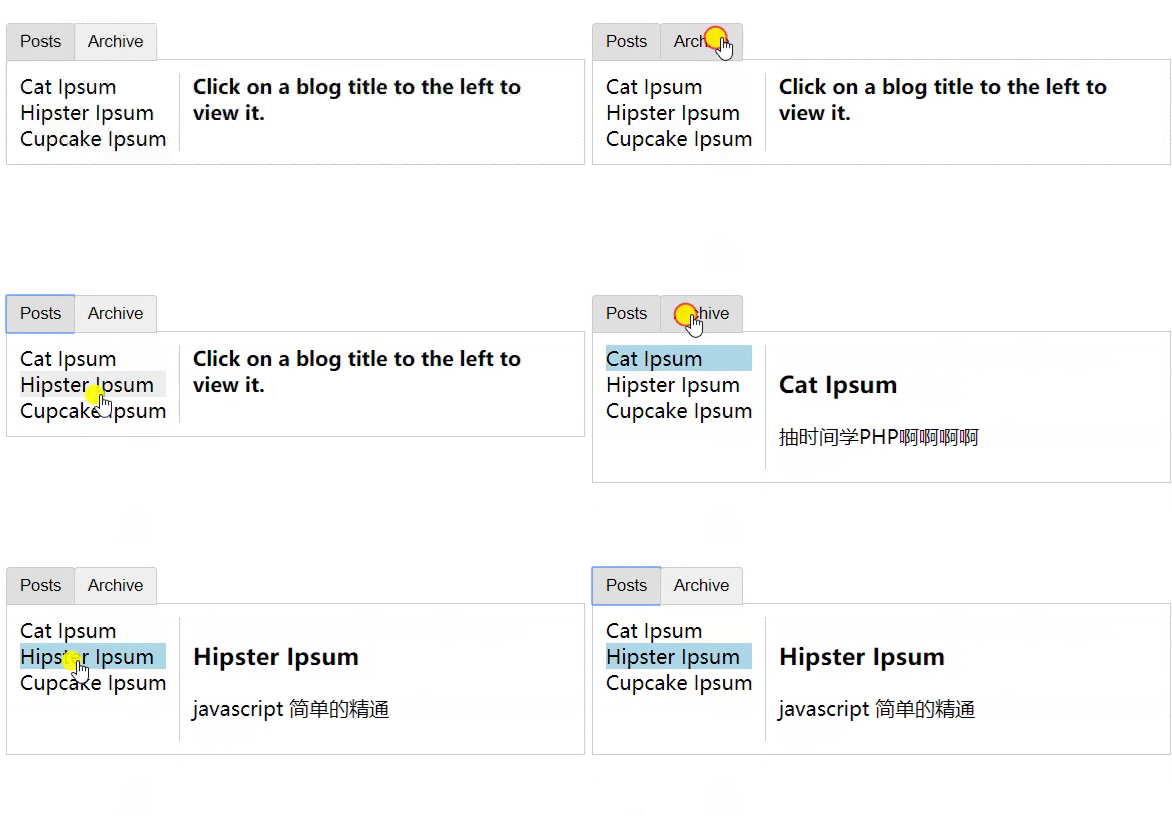
重新创建动态组件的行为通常是非常有用的,但是在这个案例中,我们更希望那些标签的组件实例能够被在它们第一次被创建的时候缓存下来。为了解决这个问题,我们可以用一个 <keep-alive> 元素将其动态组件包裹起来。
<style>

.tab-button {

  padding: 6px 10px;

  border-top-left-radius: 3px;

  border-top-right-radius: 3px;

  border: 1px solid #ccc;

  cursor: pointer;

  background: #f0f0f0;

  margin-bottom: -1px;

  margin-right: -1px;

}

.tab-button:hover {

  background: #e0e0e0;

}

.tab-button.active {

  background: #e0e0e0;

}

.tab {

  border: 1px solid #ccc;

  padding: 10px;

}

.posts-tab {

  display: flex;

}

.posts-sidebar {

  max-width: 40vw;

  margin: 0;

  padding: 0 10px 0 0;

  list-style-type: none;

  border-right: 1px solid #ccc;

}

.posts-sidebar li {

  white-space: nowrap;

  text-overflow: ellipsis;

  overflow: hidden;

  cursor: pointer;

}

.posts-sidebar li:hover {

  background: #eee;

}

.posts-sidebar li.selected {

  background: lightblue;

}

.selected-post-container {

  padding-left: 10px;

}

.selected-post > :first-child {

  margin-top: 0;

  padding-top: 0;

}

</style>

<div id="app">

	<button

		v-for="tab in tabs"

		v-bind:key="tab"

		v-bind:class="['tab-button', {active: currentTab === tab}]"

		v-on:click="currentTab = tab"

	>{{tab}}</button>

	<keep-alive>

		<components

			v-bind:is="currentTabComponent"

			class="tab"

		></components>

	</keep-alive>

</div>

<script>

var Posts = {

	data: function(){

		return{

			posts: [

				{

					id: 1,

					title: 'Cat Ipsum',

					content: '<p>抽时间学PHP啊啊啊啊</p>'

				},

				{

					id: 2,

					title: 'Hipster Ipsum',

					content: '<p>javascript 简单的精通</p>'

				},

				{

					id: 3,

					title: 'Cupcake Ipsum',

					content: '<p>时间啊 我的朋友 让我们好好相处 珍惜时光 好不好</p>'

				}

			],

			selectedPost: true

		}

	},

	template: `

		<div class="posts-tab">

			<ul class="posts-sidebar">

				<li

					v-for="post in posts"

					v-bind:class="{selected: post === selectedPost}"

					@click="selectedPost = post"

				>{{post.title}}</li>

			</ul>

			<div class="selected-post-container">

				<div v-if="selectedPost">

					<h3>{{selectedPost.title}}</h3>

					<div v-html="selectedPost.content"></div>

				</div>

				<strong v-else>

					Click on a blog title to the left to view it.

				</strong>

			</div>

		</div>

	`

}

var Archive = {

	template: '<p>javascript学个简单的精通</p>'

}

new Vue({

    el: '#app',

    components: {

    	Posts,

    	Archive

    },

    data: {

       	tabs: ['Posts', 'Archive'],

       	// 默认是显示第一个组件

       	currentTab: 'Posts'

    },

    computed: {

    	currentTabComponent: function(){

    		// 转换为小写

    		return this.currentTab.toLowerCase()

    	}

    }

})

</script>
## 异步组件
XXXXXX
Vue - 动态组件 & 异步组件的更多相关文章
- Vue动态注册异步组件(非同一个工程的组件)
前言:最近在掘金逛的时候,无意中看到前滴滴前端架构黄轶大佬,看到了大佬分享的一篇博客滴滴 webapp 5.0 Vue 2.0 重构经验分享 ,对于其中第5个问题(异步加载的业务线组件,如何动态注册? ...
- vue动态加载组件
vue动态加载组件,可以使用以下方式 <component :is="propertyname" v-for="tab in tabs"></ ...
- vue深入了解组件——动态组件&异步组件
一.在动态组件上使用 keep-alive 我们之前曾经在一个多标签的界面中使用 is 特性来切换不同的组件: <component v-bind:is="currentTabComp ...
- vue组件---动态组件&异步组件
(1)在动态组件上使用keep-alive 之前曾经在一个多标签的界面中使用 is 特性来切换不同的组件.接下来简单回顾下 <component>元素是vue 里面的一个内置组件.在里面使 ...
- Vue动态组件&异步组件
在动态组件上使用keep-alive 我们之前曾经在一个多标签的界面中使用is特性来切换不同的组件: Vue.js的动态组件模板 <component v-bind:is="curre ...
- 七、vue语法补充二(动态组件 & 异步组件、访问元素 & 组件、混入)
1..sync 修饰符 2.3.0+ 新增 vue 修饰符sync的功能是:当一个子组件改变了一个 prop 的值时,这个变化也会同步到父组件中所绑定.类似于v-model的效果 例子: this.$ ...
- 学习笔记:Vue——动态组件&异步组件
动态组件 01.在动态组件上使用keep-alive,保持组件的状态,以避免反复重渲染导致的性能问题. <!-- 失活的组件将会被缓存!--> <keep-alive> < ...
- 深入了解组件- -- 动态组件 & 异步组件
gitHub地址:https://github.com/huangpna/vue_learn/example里面的lesson11 一 在动态组件上使用keep-alive 在这之前我们已经有学习过用 ...
- vue -- 动态加载组件 (tap 栏效果)
在 vue 中,实现 Tab 切换主要有三种方式:使用动态组件,使用 vue-router 路由,使用第三方插件. 因为这次完成的功能只是简单切换组件,再则觉得使用路由切换需要改变地址略微麻烦,所以使 ...
随机推荐
- 大型数据库技术实验六 实验6:Mapreduce实例——WordCount
现有某电商网站用户对商品的收藏数据,记录了用户收藏的商品id以及收藏日期,名为buyer_favorite1. buyer_favorite1包含:买家id,商品id,收藏日期这三个字段,数据以“\t ...
- 斜率优化 DP
CF311B Cats Transport 暑假到现在终于过了这道题
- Redis 数据总结(1 数据导入)
理论基础部分:http://www.redis.cn/topics/mass-insert.html 几百上千万的数据建议使用pipe来完成导入. 1.windows 下数据导入命令: type ou ...
- linux - mysql 异常:MySQL Daemon failed to start.
报错内容 MySQL Daemon failed to start. 如果直接输入 mysql -root -p 登陆会出现 [mysql]ERROR 2002 (HY000): Can't conn ...
- IDEA更换背景颜色与字体
打开IDEA 选择左上角的File -> Setting -> Editor -> Color Scheme 就可以设置 黑白背景 默认为白色 可以选择 Darcul ...
- 计蒜客 - A1603.天上的星星
二维差分,理论上很简单,虽然我实际上做的时候一堆问题 1.边界的星星包含在内,需要在减去的时候往前挪一个 2.我是从0开始的,循环的时候非常不方便 3.x1, x2, y1, y2总是弄混 #incl ...
- resample matlab实现
使用线性插值实现sample rate转换. function output = simpleResample(input, inputfs, outputfs) inputLen = length( ...
- layer iframe 设置关闭按钮 和刷新
layer.open({ type: 2, title: 'XXXX网吧历史更多数据', shade:0, // closeBtn:0, resize:false, move:false, shade ...
- EF中的查询方法
1.Linq to Entity(L2E)查询 默认返回IQueryable类型 2.原生SQL查询和操作 ①DbSet.SqlQuery()和Database.SqlQuery() 返回DbSqlQ ...
- Wannafly Camp 2020 Day 2C 纳新一百的石子游戏
为什么为了这么个简单题发博客呢? 因为我又因为位运算运算符优先级的问题血了 #include <bits/stdc++.h> using namespace std; #define in ...