
DAC重置max server memory
15:44 2014-01-24 08R2,一次通过GUI更改'最大服务器内存(MB)'为16MB,errorlog显示信息如下
2014-01-23 15:49:49.71 spid55      Configuration option 'show advanced options' changed from 0 to 1. Run the RECONFIGURE statement to install.

2014-01-23 15:49:49.88 spid55      FILESTREAM: effective level = 0, configured level = 0, file system access share name = 'MSSQLSERVER'.

2014-01-23 15:49:49.92 spid55      Configuration option 'max server memory (MB)' changed from 2147483647 to 16. Run the RECONFIGURE statement to install.

2014-01-23 15:49:49.92 spid55      FILESTREAM: effective level = 0, configured level = 0, file system access share name = 'MSSQLSERVER'.

2014-01-23 15:49:49.96 spid55      SQL Server has encountered 1 occurrence(s) of cachestore flush for the 'Object Plans' cachestore (part of plan cache) due to some database maintenance or reconfigure operations.

2014-01-23 15:49:49.99 spid55      SQL Server has encountered 1 occurrence(s) of cachestore flush for the 'SQL Plans' cachestore (part of plan cache) due to some database maintenance or reconfigure operations.

2014-01-23 15:49:49.99 spid55      SQL Server has encountered 1 occurrence(s) of cachestore flush for the 'Bound Trees' cachestore (part of plan cache) due to some database maintenance or reconfigure operations.

2014-01-23 15:49:50.06 spid55      Configuration option 'show advanced options' changed from 1 to 0. Run the RECONFIGURE statement to install.

2014-01-23 15:49:50.06 spid55      FILESTREAM: effective level = 0, configured level = 0, file system access share name = 'MSSQLSERVER'.

2014-01-23 15:50:26.37 spid55

Memory Manager                                   KB

---------------------------------------- ----------

VM Reserved                                 1619672

VM Committed                                  44800

AWE Allocated                                     0

Reserved Memory                                1024

Reserved Memory In Use                            0

2014-01-23 15:50:26.39 spid55

Memory node Id = 0                               KB

---------------------------------------- ----------

VM Reserved                                 1616856

VM Committed                                  42096

AWE Allocated                                     0

MultiPage Allocator                           14312

SinglePage Allocator                          15944

2014-01-23 15:50:26.40 spid55

Memory node Id = 32                              KB

---------------------------------------- ----------

VM Reserved                                    1728

VM Committed                                   1672

AWE Allocated                                     0

MultiPage Allocator                            1600

SinglePage Allocator                          15944

2014-01-23 15:50:26.40 spid55

MEMORYCLERK_SQLGENERAL (node 0)                  KB

---------------------------------------- ----------

VM Reserved                                       0

VM Committed                                      0

AWE Allocated                                     0

SM Reserved                                       0

SM Committed                                      0

SinglePage Allocator                           1216

MultiPage Allocator                            3528

2014-01-23 15:50:26.39 Server       Failed allocate pages: FAIL_PAGE_ALLOCATION 1
执行查询语句报错
2014-01-23 16:47:08.80 spid54      错误: 701,严重性: 17,状态: 130。

2014-01-23 16:47:08.80 spid54      There is insufficient system memory in resource pool 'default' to run this query.

2014-01-23 16:47:08.80 spid55      错误: 701,严重性: 17,状态: 123。

2014-01-23 16:47:08.80 spid55      There is insufficient system memory in resource pool 'default' to run this query.
第二天在对象资源管理器下连接数据库报错(重启过)--08下想重现错误,没能成功
通过DAC连接重置max server memory,重启数据库服务,正常登录
 sqlcmd -E -S 127.0.0.1,1434

 sp_configure 'show advanced options',1

 go

 reconfigure with override

 go

 sp_configure 'max server memory',1024

 go

 reconfigure with override

 go
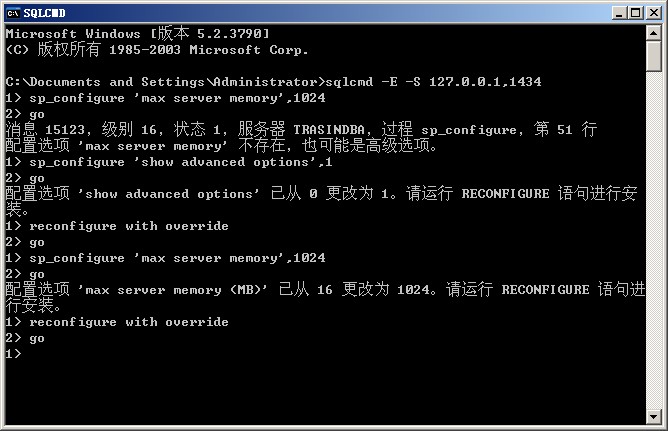
--附DAC连接
1、单用户模式启动数据库
开启一个命令窗口,输入以下命令,并保持窗口打开
 d:

 cd D:\Program Files\Microsoft SQL Server\MSSQL10_50.MSSQLSERVER\MSSQL\Binn

 sqlservr.exe mssqlserver -m
查看返回的日志信息,找到类似下面两行
 Server is listening on [ 127.0.0.1 <ipv4> 1434] .

 Dedicated admin connection support was established for listening locally on port 1434.
2、使用DAC连接到数据库
在另一个命令窗口运行
 sqlcmd -A -d master

 sqlcmd -E -S 127.0.0.1,1434或

 sqlcmd -Usa -Ppassword -S 127.0.0.1,1434
DAC重置max server memory的更多相关文章
- max server memory
MS SQL Server 2008 R2,主要是用作ERP的数据库,但它的内存使用率非常高: 经查资料,原来数据库有默认的情况之下,使用内存时它是尽可能使用完有效内存.如果你不想这样,你可以手动分配 ...
- 限制sqlserver最大内存后无法连接-EXEC sp_configure max server memory
在sql server 中设置了过小的 "max server memory"最大内存后,sqlserver可启动,但是无法连接. 网络上流行的"sqlserver 内存 ...
- SQL Server误设置max server memory处理小结
昨天网上一网友说,由于他同事误将"max server memory"设置为10M后,SQL Server数据库登录不了,当时我简单测试了一下,今天有空就顺手将整个过程整理一下,记 ...
- SQL Server ->> Memory Allocation Mechanism and Performance Analysis(内存分配机制与性能分析)之 -- Minimum server memory与Maximum server memory
Minimum server memory与Maximum server memory是SQL Server下配置实例级别最大和最小可用内存(注意不等于物理内存)的服务器配置选项.它们是管理SQL S ...
- Server Memory Server Configuration Options 服务器内存服务配置选项
Server Memory Server Configuration Options https://docs.microsoft.com/en-us/sql/database-engine/conf ...
- SolrCore Initialization Failures - Max direct memory is likely too low
org.apache.solr.common.SolrException:org.apache.solr.common.SolrException: The max direct memory is ...
- Buffer Pool--SQL Server:Memory Manager 对象
--=================================================================SELECT * FROM sys.sysperfinfoWHER ...
- ArcGIS Server10.2忘记密码怎么办?重置ArcGIS Server Manager密码
忘记了ArcGIS Server Manager的密码不要慌张,下面简单的几步就可以重置密码. 第一步:找到ArcGIS Server的安装目录,然后找到..\ArcGIS\Server\tools\ ...
- max virtual memory areas vm.max_map_count [65530] likely too low, increase to at least [262144]
sh- /etc/sysctl.conf vm.max_map_count = #在/etc/sysctl.conf追加上面一条 #并执行命令: sysctl -p
随机推荐
- beta-2阶段组员贡献分分配
组名:天天向上 组长:王森 组员:张政.张金生.林莉.胡丽娜 bera-2阶段各组员的贡献分分配如下: 姓名 个人工作量 组长评价 个人评价 团队贡献总分 胡丽娜 9 4 4 4.25 林莉 9 4 ...
- jQuery系列:N种方法大总结
jquery自定义属性,区分prop()和attr() jQueryObject.prop( propertyName [, value ] ):为添加,获取属性(property),并非attrib ...
- EasyUI datagrid 在ie8和360兼容模式兼容性问题
问题:easyui中的datagrid在ie8和360兼容模式下显示不出来. 答案:不是easyui的问题.是引入的jquery版本问题.jquery-1.5.1抛异常,这个版本是mvc3自带的jqu ...
- CSS权威指南 - 基本视觉格式化 1
定位 定位的想法很简单元素框相对于正常位置出现在哪里. 定位:static,相对, 绝对, fixed, 继承 static就是默认的位置 相对就是相对于默认位置的偏移.原来的static定位位置依然 ...
- 用MSoffice里的绘图工具
试过一些绘图表的工具,在xbeta推荐的替代visio一文中介绍的一些软件.之前用得最多的就是Dia,在linux下也有.现在才发现在微软的office下的绘图工具已经足够我使用了,不需要专业的图形符 ...
- mysql没有delete操作,那是delete from操作,
1.mysql没有delete操作,那是delete from操作, 2.DELETE FROM table_name [WHERE Clause]
- bash shell命令行选项与修传入参数处理
在编写shell程序时经常需要处理命令行参数,本文描述在bash下的命令行处理方式.选项与参数:如下命令行: ./test.sh -f config.conf -v --prefix=/home -f ...
- jsp页面揣出现Invalid action class configuration that references an unknown class解决方案
jsp页面中,增加和修改用了同一个页面,能正常增加,却不能修改,后来发现页面中有一个hidden的id, 这个input的name写成name="designType.id"时就会 ...
- Linux命令echo -e
在Linux命令中 echo -e 这个参数e是什么意思. echo –e “I will use ‘touch’ command to create 3 files.” 这里参数e的作用是什么 ma ...
- java FileWriter and FileReader
import java.io.FileReader; import java.io.FileWriter; import java.io.IOException; public class FWFRD ...