
ICO图标在线生成,php生成ICO图标在线制作源码
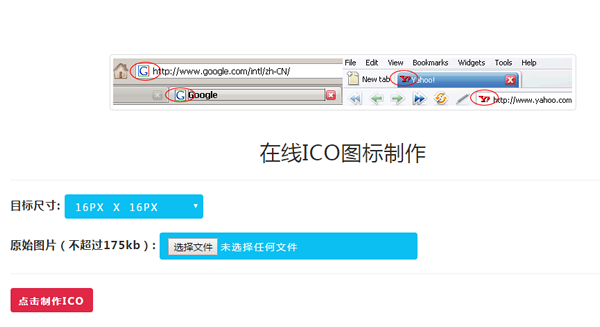
我们做web系统的时候,每个浏览器的tab这里都会有一个图标,这个图标叫favicon图标,favicon.ico文件放在系统的根目录
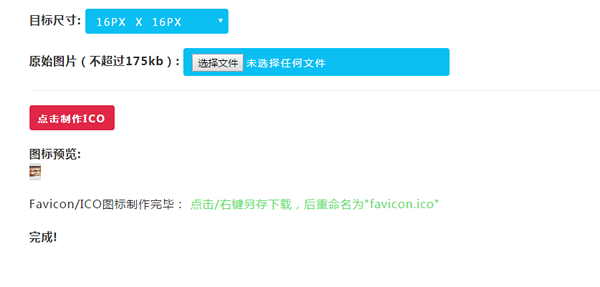
如果程序员没有ICO制作工具,那么要如何生成图标呢?可以用程序来实现生成啊!也可以把图标裁剪好,选择在线生成,在线生成测试地址:www.vsoyo.com/ico
下面和大家一起探讨下,php生成ICO图标在线制作源码,很简单的原理,请看如下代码
下面是ICO图标在线生成的主要代码
<?php

if(!function_exists("generate_favicon")){

function generate_favicon(){

    // Create favicon.

    $postvars = array(

        "image"             => trim($_FILES["image"]["name"]),

        "image_tmp"            => $_FILES["image"]["tmp_name"],

        "image_size"        => (int)$_FILES["image"]["size"],

        "image_dimensions"    => (int)$_POST["image_dimensions"]);

    // Provide valid extensions and max file size

    $valid_exts = array("jpg","jpeg","gif","png");

    $max_file_size = 179200; // 175kb

    $filenameParts = explode(".",$postvars["image"]);

    $ext = strtolower(end($filenameParts));

    $directory = "./favicon/"; // Directory to save favicons. Include trailing slash.

    $rand = rand(1000,9999);

    $filename = $rand.$postvars["image"];

    // Check not larger than max size.

    if($postvars["image_size"] <= $max_file_size){

        // Check is valid extension.

        if(in_array($ext,$valid_exts)){

            if($ext == "jpg" || $ext == "jpeg"){

                $image = imagecreatefromjpeg($postvars["image_tmp"]);

            }

            else if($ext == "gif"){

                $image = imagecreatefromgif($postvars["image_tmp"]);

            }

            else if($ext == "png"){

                $image = imagecreatefrompng($postvars["image_tmp"]);

            }

            if($image){

                list($width,$height) = getimagesize($postvars["image_tmp"]);

                $newwidth = $postvars["image_dimensions"];

                $newheight = $postvars["image_dimensions"];

                $tmp = imagecreatetruecolor($newwidth,$newheight);

                // Copy the image to one with the new width and height.

                imagecopyresampled($tmp,$image,0,0,0,0,$newwidth,$newheight,$width,$height);

                // Create image file with 100% quality.

                if(is_dir($directory)){

                    if(is_writable($directory)){

                        imagejpeg($tmp,$directory.$filename,100) or die('Could not make image file');

                        if(file_exists($directory.$filename)){

                            // Image created, now rename it to its

                            $ext_pos = strpos($rand.$postvars["image"],"." . $ext);

                            $strip_ext = substr($rand.$postvars["image"],0,$ext_pos);

                            // Rename image to .ico file

                            rename($directory.$filename,$directory.$strip_ext.".ico");

                            return '<strong>图标预览:</strong><br/>

                            <img src="'.$directory.$strip_ext.'.ico" border="0" title="Favicon 完毕预览" style="padding: 4px 0px 4px 0px;background-color:#e0e0e0" /><br/>

                            Favicon/ICO图标制作完毕: <a href="'.$directory.$strip_ext.'.ico" target="_blank" name="右键另存为下载!">点击/右键另存下载,后重命名为"favicon.ico"</a>';

                        } else {

                            "File was not created.";

                        }

                    } else {

                        return 'The directory: "'.$directory.'" is not writable.';

                    }

                } else {

                    return 'The directory: "'.$directory.'" is not valid.';

                }

                imagedestroy($image);

                imagedestroy($tmp);

            } else {

                return "Could not create image file.";

            }

        } else {

            return "图标过大,不能超过175KB";

        }

    } else {

        return "图片格式只能是后面几种 (jpg, jpeg, gif, png).";

    }

}

}

?>
需要进一步技术交流的朋友 ,请加我微信吧:15889726201
ICO图标在线生成,php生成ICO图标在线制作源码的更多相关文章
- Linq生成操作之DefautIfEmpty,Empty,Range,Repeat源码分析
Linq生成操作之DefautIfEmpty,Empty,Range,Repeat源码分析 Linq的四种生成运算 DefautIfEmpty,Empty,Range,Repeat 也就是给我们初始化 ...
- C#使用Xamarin开发可移植移动应用进阶篇(8.打包生成安卓APK并精简大小),附源码
前言 系列目录 C#使用Xamarin开发可移植移动应用目录 源码地址:https://github.com/l2999019/DemoApp 可以Star一下,随意 - - 说点什么.. 嗯,前面讲 ...
- 一个web图片热点生成工具(winform开发) 附源码
给图片加热点是web开发中经常用到的一个功能.这方面的工具也不少. 为了更好的满足自己的需求,写了一个winform程序. 可以方便的给图片加热点,更方便灵活! 源码下载 http://downloa ...
- JAVA WEB项目中生成验证码及验证实例(附源码及目录结构)
[我是一个初学者,自己总结和网上搜索资料,代码是自己敲了一遍,亲测有效,现将所有的目录结构和代码贴出来分享给像我一样的初学者] 作用 验证码为全自动区分计算机和人类的图灵测试的缩写,是一种区分用户是计 ...
- MYSQL在线注释文档--- 在gdb中显示源码(gdbtui使用方法)----赖明星的个人博客
http://mingxinglai.com/cn/2013/07/gdbtui/ MySQL源码注释与类图 http://mingxinglai.com/cn/2015/08/mysql-annot ...
- uSurvival 1.41多人在线生存逃杀吃鸡类游戏源码
uSurvival - the new Multiplayer Survival Asset from the creator of uMMORPG. Features:* Kill Zombies ...
- Mybatis Generator的model生成中文注释,支持oracle和mysql(通过修改源码的方式来实现)
在看本篇之前,最好先看一下上一篇通过实现CommentGenerator接口的方法来实现中文注释的例子,因为很多操作和上一篇基本是一致的,所以本篇可能不那么详细. 首先说一下上篇通过实现Comment ...
- favicon.ico显示,favicon显示,favicon图标显示
favicon.ico显示,favicon显示,favicon图标显示 >>>>>>>>>>>>>>>> ...
- VS2013 更改MFC标题栏图标和生成的执行文件图标
创建一个新工程,可以什么都不加.打开.rc, 创建或打开Icon资源(以下都以Icon为例). 单击工程窗口的资源视图标签,选中资源ID为IDR_MAINFRAME图标资源,然后按Delet ...
随机推荐
- 洛谷——P1022 计算器的改良
https://www.luogu.org/problem/show?pid=1022#sub 题目背景 NCL是一家专门从事计算器改良与升级的实验室,最近该实验室收到了某公司所委托的一个任务:需要在 ...
- [D3] Better Code Organization with selection.call() with D3 v4
Most of D3’s native selection APIs also return the selection (or a new selection), to enable multipl ...
- js和jquery实现页面滚动监听
js和jquery实现页面滚动监听 一.总结 一句话总结:onscroll方法和监听页面元素的高度都可以实现滚动监听. 1.onscroll方法实现滚动监听的核心代码是什么? <body ons ...
- HDU 1287 破译密码 异或运算
http://acm.hdu.edu.cn/showproblem.php?pid=1287 题目: 有个叫"猪头帮"的国家,采用一种简单的文法加密,他们所用的语言里面只有大写字母 ...
- Socket编程模型之完毕port模型
转载请注明来源:viewmode=contents">http://blog.csdn.net/caoshiying?viewmode=contents 一.回想重叠IO模型 用完毕例 ...
- js进阶 12-4 jquery键盘事件如何使用
js进阶 12-4 jquery键盘事件如何使用 一.总结 一句话总结:键盘和鼠标都是外设输入设备,所以函数很像,所以使用就像鼠标事件click一样 1.jquery键盘事件有哪三个? 1(up和do ...
- gcc编译选项--转
gcc提供了大量的警告选项,对代码中可能存在的问题提出警告,通常可以使用-Wall来开启以下警告: -Waddress -Warray-bounds (only with -O2) ...
- 使用pprof及Go 程序的性能优化
使用Golang 程序的性能优化及 Pprof 程序的性能优化无非就是对程序占用资源的优化.对于服务器而言,最重要的两项资源莫过于 CPU 和内存.性能优化,就是在对于不影响程序数据处理能力的情况下, ...
- <Linux> Xen虚拟机下挂载
//创建源vdisk挂载目录: mkdir vd1 //创建目标vdisk挂载目录: mkdir vd2 //只需第一次执行: iscsiadm -m discovery --type sendta ...
- Word2010中插入多级列表编号
https://jingyan.baidu.com/article/3ea5148901919752e61bbafe.html Word2010中插入多级列表编号的三种方法 听语音 | 浏览:8719 ...