
Grafana监控OracleDB的完整过程
Grafana监控OracleDB的完整过程
背景
两年前曾经写过一个进行Oracle 监控的简单blog

但是周天晚上尝试进行处理时发现很不完整了.

很多数据获取不到.

晚上又熬夜了好久进行处理. 感觉还是需要总结一下,不然就忘记了
获取镜像
还是使用 docker 的方式来暴露Oracle的服务

使用的镜像为:

docker pull ghcr.io/iamseth/oracledb_exporter:0.4.3

需要注意这个镜像比较大, 压缩完还 270MB 左右
注意事项-1
镜像内的监控事项比较少. 可能只是非常简单的.

我这边想监控的是一些性能相关的内容, 仅看一些简单内容, 感觉没有任何意义.

然后继续从github上面找相关的资料:

https://github.com/saitiger008/oracledb_exporter_metrics/blob/main/default-metrics.toml

这个哥们自己加了一些监控事项挺好的.

我这边将他的监控与默认的default进行合并. 内容放到最下面.

然后通过-v 的方式在容器内加载默认的metrics的监控事项.

可以通过docker logs --tail=100 containername的方式进行查看具体内容.
注意事项-2
正常启用之后发现还是无法进行相关的监控信息.

主要是无法获取一些系统的监控信息.

日志里面很多这样的提示信息:

 msg="Error scraping for" context=resource metricsDesc="unsupported value type" s

 msg="Error scraping for" context=sysmetric metricsDesc="unsupported value type"

 msg="Error scraping for" context=wait_time metricsDesc="unsupported value type"

 msg="Error scraping for" context=rman_info metricsDesc="unsupported value type"

提示无法获取对应的监控信息.
注意事项-2
这个地方耗时很久进行处理. 发现总是比较难易解决问题.

主要问题是 只有 sys 账户会查询 select * from v$sysmetirc的视图.

并且必须要sysdba的账户进行登录, 如果不是sysdba 查询此视图都是空的.

所以问题的核心是用Docker的语法实现 sysdba 角色的登录.

我这边尝试 / as sysdba 发现是没有效果的.

查看官方文档是发现有一个解决方法为:

在 DATA_SOURCE_NAME 的和面添加 ?as=sysdba 的方式来指定角色.

# 清理之前的容器

docker rm -f oracledb_exporter

# 创建对应的容器进行监听

docker run -d --name oracledb_exporter  --restart=always --net=host \

-e DATA_SOURCE_NAME='sys/MYpassword@10.110.xx.xx/gscdb?as=sysdba' \

-v /oracledb/default-metrics.toml:/default-metrics.toml ghcr.io/iamseth/oracledb_exporter:0.4.3

# 查看日志信息.

docker logs -f  oracledb_exporter
注意事项-3
使用 桥接网络 也可以 但是需要注意写法为:

docker rm -f oracledb_exporter2

docker run -d --name oracledb_exporter2  --restart=always -p 9162:9161 --privileged \

-e DATA_SOURCE_NAME='sys/Mypassword@10.110.136.37/ora19c?as=sysdba' \

-v /oracledb/default-metrics.toml:/default-metrics.toml ghcr.io/iamseth/oracledb_exporter:0.4.3

docker logs -f  oracledb_exporter2
注意事项-4
Prometheus的设置为:

scrape_configs:

  - job_name: '116Oracle_ora19c' # job_name默认写入timeseries的labels中,可以用于查询使用

    static_configs: # 静态配置

      - targets: ['10.110.136.xxx:9162']

注意 需要重启Prometheus使之生效.

另外 yaml 格式一定注意空格和格式.
注意事项-5
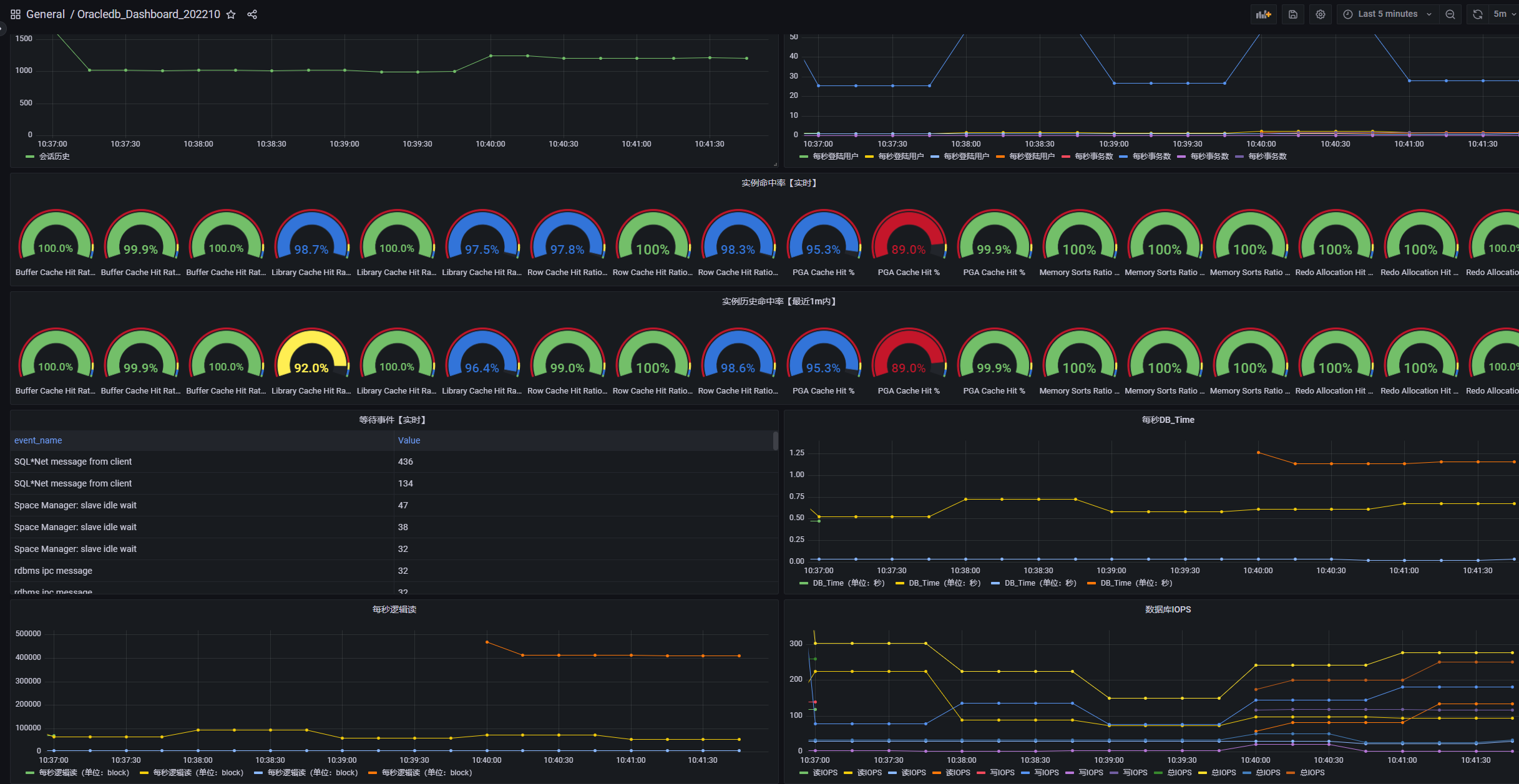
Grafana的设置

注意 这次选用的是国人开发的一个配置:

编号为: 17136

具体地址为:

https://grafana.com/grafana/dashboards/17136-oracledb-new-202210/
效果为
自己的公众号不定期更新内容

监控配置脚本
[[metric]]

context = "sessions"

labels = [ "status", "type" ]

metricsdesc = { value= "Gauge metric with count of sessions by status and type." }

request = "SELECT status, type, COUNT(*) as value FROM v$session GROUP BY status, type"

[[metric]]

context = "resource"

labels = [ "resource_name" ]

metricsdesc = { current_utilization= "Generic counter metric from v$resource_limit view in Oracle (current value).", limit_value="Generic counter metric from v$resource_limit view in Oracle (UNLIMITED: -1)." }

request="SELECT resource_name,current_utilization,CASE WHEN TRIM(limit_value) LIKE 'UNLIMITED' THEN '-1' ELSE TRIM(limit_value) END as limit_value FROM v$resource_limit"

[[metric]]

context = "asm_diskgroup"

labels = [ "name" ]

metricsdesc = { total = "Total size of ASM disk group.", free = "Free space available on ASM disk group." }

request = "SELECT name,total_mb*1024*1024 as total,free_mb*1024*1024 as free FROM v$asm_diskgroup_stat where exists (select 1 from v$datafile where name like '+%')"

ignorezeroresult = true

[[metric]]

context = "activity"

metricsdesc = { value="Generic counter metric from v$sysstat view in Oracle." }

fieldtoappend = "name"

request = "SELECT name, value FROM v$sysstat WHERE name IN ('parse count (total)', 'execute count', 'user commits', 'user rollbacks')"

[[metric]]

context = "process"

metricsdesc = { count="Gauge metric with count of processes." }

request = "SELECT COUNT(*) as count FROM v$process"

[[metric]]

context = "wait_time"

metricsdesc = { value="Generic counter metric from v$waitclassmetric view in Oracle." }

fieldtoappend= "wait_class"

request = '''

SELECT

  n.wait_class as WAIT_CLASS,

  round(m.time_waited/m.INTSIZE_CSEC,3) as VALUE

FROM

  v$waitclassmetric  m, v$system_wait_class n

WHERE

  m.wait_class_id=n.wait_class_id AND n.wait_class != 'Idle'

'''

[[metric]]

context = "tablespace"

labels = [ "tablespace", "type" ]

metricsdesc = { bytes = "Generic counter metric of tablespaces bytes in Oracle.", max_bytes = "Generic counter metric of tablespaces max bytes in Oracle.", free = "Generic counter metric of tablespaces free bytes in Oracle.", used_percent = "Gauge metric showing as a percentage of how much of the tablespace has been used." }

request = '''

SELECT

    dt.tablespace_name as tablespace,

    dt.contents as type,

    dt.block_size * dtum.used_space as bytes,

    dt.block_size * dtum.tablespace_size as max_bytes,

    dt.block_size * (dtum.tablespace_size - dtum.used_space) as free,

    dtum.used_percent

FROM  dba_tablespace_usage_metrics dtum, dba_tablespaces dt

WHERE dtum.tablespace_name = dt.tablespace_name

ORDER by tablespace

'''

[[metric]]

context = "parameter"

labels = [ "name","param" ]

metricsdesc = { value ="Gauge metric with database parameter" }

request = "select name,value as param,1 as value from v$parameter"

[[metric]]

context = "sessions"

labels = [ "status", "type" ]

metricsdesc = { value= "Gauge metric with count of sessions by status and type." }

request = "SELECT status, type, COUNT(*) as value FROM v$session GROUP BY status, type"

[[metric]]

context = "parameter_sessions"

metricsdesc = { value ="Gauge metric with sessions parameter" }

request = "select value  from v$parameter t where t.name = 'sessions'"

[[metric]]

context = "volumns"

metricsdesc = { value= "database total volumes,size G" }

request = "SELECT sum(bytes/1024/1024/1024) as value FROM dba_segments"

[[metric]]

context = "env"

labels = [ "host_name" ]

metricsdesc = { is_rac = "if 1 then rac." }

request = '''

select host_name,

decode((select value from v$option where parameter = 'Real Application Clusters'), 'TRUE',1,0) as is_rac

from v$instance

'''

[[metric]]

context = "env"

labels = [ "version" ]

metricsdesc = { running_time = "get version and running_time" }

request = '''

select version,trunc(sysdate - startup_time) as running_time from v$instance

'''

[[metric]]

context = "env"

labels = [ "platform_name","log_mode","force_logging","flashback_on","database_role","open_mode","nls_characterset" ]

metricsdesc = { value = "get other env" }

request = '''

select platform_name,log_mode,force_logging,flashback_on,database_role,open_mode,

(select value from nls_database_parameters where parameter = 'NLS_CHARACTERSET') as nls_characterset, 1 as value  from v$database

'''

[[metric]]

context = "env"

labels = [ "name" ]

metricsdesc = { redo_value = "get redo logs info" }

request = '''

with temp as(

select count(group#) as group_num,min(members) as member_num,min(bytes/1024/1024) as log_size from v$log

)

select  'group_num' as name ,group_num as redo_value from temp

union all

select  'member_num' as name ,member_num as redo_value from temp

union all

select  'log_size' as name ,log_size as redo_value from temp

'''

[[metric]]

context = "env"

metricsdesc = { redo_switch_value = "Gauge metric with sum of segments data." }

request = '''

select max(sequence#) as redo_switch_value from v$log

'''

[[metric]]

context = "env"

metricsdesc = { vols = "Gauge metric with sum of segments data." }

request = '''

select to_char(sum(bytes)) as vols from dba_segments

'''

[[metric]]

context = "events"

labels = [ "event_name"]

metricsdesc = { value = "get events from v$session_wait" }

request = '''

select event as event_name, count(*) as value

   from v$session_wait

      where wait_time >= -1 group by event order by 2 desc

'''

[[metric]]

context = "db_time"

metricsdesc = { value="Generic counter metric from v$sys_time_model view in Oracle." }

request = '''

select value from v$sys_time_model t where t.STAT_NAME = 'DB time'

'''

[[metric]]

context = "sysmetric"

metricsdesc = { value="Get sysmetrics from v$sysmetric view in Oracle." }

fieldtoappend = "metric_name"

request = '''

select replace(metric_name,'%','') as metric_name ,value from v$sysmetric  where group_id = 2 and metric_name != 'Average Synchronous Single-Block Read Latency'

'''

[[metric]]

context = "sysstat"

metricsdesc = { value="Compute Oracle IOPS and MBPS from v$sysstat view in Oracle." }

fieldtoappend = "name"

request = '''

select name , trunc(sum(value), 2) as value

  from (select decode(name,

                      'physical read total IO requests',

                      'Oracle IOPS',

                      'physical write total IO requests',

                      'Oracle IOPS',

                      'redo writes',

                      'Oracle IOPS',

                      'physical read total bytes',

                      'Oracle MBPS',

                      'physical write total bytes',

                      'Oracle MBPS',

                      'redo size',

                      'Oracle MBPS') as name,

               decode(name,

                      'physical read total IO requests',

                      value,

                      'physical write total IO requests',

                      value,

                      'redo writes',

                      value,

                      'physical read total bytes',

                      value / 1024 / 1024,

                      'physical write total bytes',

                      value / 1024 / 1024,

                      'redo size',

                      value / 1024 / 1024) as value

          from v$sysstat

         where name in (

                        'physical read total bytes',

                        'physical write total bytes',

                        'physical read total IO requests',

                        'physical write total IO requests',

                        'redo writes',

                        'redo size'))

 where name is not null

 group by name

union all

SELECT a.name, a.value

  FROM v$sysstat a, v$statname b

 where a.statistic# = b.statistic#

   and b.name in (

                  'consistent gets',

                  'execute count',

                  'parse count (hard)',

                  'parse count (total)',

                  'redo size',

                  'redo writes',

                  'sorts (disk)',

                  'sorts (memory)',

                  'sorts (rows)',

                  'user commits',

                  'user rollbacks',

                  'logons cumulative',

                  'bytes sent via SQL*Net to client',

                  'bytes received via SQL*Net from client')

'''

[[metric]]

context = "tablespace"

labels = [ "tablespace", "type" ]

metricsdesc = { bytes = "Generic counter metric of tablespaces bytes in Oracle.", max_bytes = "Generic counter metric of tablespaces max bytes in Oracle.", free = "Generic counter metric of tablespaces free bytes in Oracle." }

request = '''

SELECT

  df.tablespace_name       as tablespace,

  df.type                  as type,

  nvl(sum(df.bytes),0)     as bytes,

  nvl(sum(df.max_bytes),0) as max_bytes,

  nvl(sum(f.free),0)       as free

FROM

  (

    SELECT

      ddf.file_id,

      dt.contents as type,

      ddf.file_name,

      ddf.tablespace_name,

      TRUNC(ddf.bytes) as bytes,

      TRUNC(GREATEST(ddf.bytes,ddf.maxbytes)) as max_bytes

    FROM

      dba_data_files ddf,

      dba_tablespaces dt

    WHERE ddf.tablespace_name = dt.tablespace_name

  ) df,

  (

    SELECT

      TRUNC(SUM(bytes)) AS free,

      file_id

    FROM dba_free_space

    GROUP BY file_id

  ) f

WHERE df.file_id = f.file_id (+)

GROUP BY df.tablespace_name, df.type

UNION ALL

SELECT

  Y.name                   as tablespace_name,

  Y.type                   as type,

  SUM(Y.bytes)             as bytes,

  SUM(Y.max_bytes)         as max_bytes,

  MAX(nvl(Y.free_bytes,0)) as free

FROM

  (

    SELECT

      dtf.tablespace_name as name,

      dt.contents as type,

      dtf.status as status,

      dtf.bytes as bytes,

      (

        SELECT

          ((f.total_blocks - s.tot_used_blocks)*vp.value)

        FROM

          (SELECT tablespace_name, sum(used_blocks) tot_used_blocks FROM gv$sort_segment WHERE  tablespace_name!='DUMMY' GROUP BY tablespace_name) s,

          (SELECT tablespace_name, sum(blocks) total_blocks FROM dba_temp_files where tablespace_name !='DUMMY' GROUP BY tablespace_name) f,

          (SELECT value FROM v$parameter WHERE name = 'db_block_size') vp

        WHERE f.tablespace_name=s.tablespace_name AND f.tablespace_name = dtf.tablespace_name

      ) as free_bytes,

      CASE

        WHEN dtf.maxbytes = 0 THEN dtf.bytes

        ELSE dtf.maxbytes

      END as max_bytes

    FROM

      sys.dba_temp_files dtf,

      sys.dba_tablespaces dt

    WHERE dtf.tablespace_name = dt.tablespace_name

  ) Y

GROUP BY Y.name, Y.type

ORDER BY tablespace

'''

[[metric]]

context = "db_recovery_file_dest"

metricsdesc = { value="sum(PERCENT_SPACE_USED) of V$RECOVERY_AREA_USAG" }

request = '''

select sum(t.PERCENT_SPACE_USED) as value from V$RECOVERY_AREA_USAGE t

'''

[[metric]]

context = "db_recovery_file_dest"

labels = [ "file_type"]

metricsdesc = { percent_space_used = "percent_space_used of V$RECOVERY_AREA_USAGE ." }

request = '''

select t.file_type,t.percent_space_used from V$RECOVERY_AREA_USAGE t

'''

[[metric]]

context = "rman_status"

metricsdesc = { value= "0 indicates rman error or no config rman job, 1 indicates rman is ok" }

request = '''

select decode(max(t.COMPLETION_TIME),

              '',

              0,

              case when sysdate-max(t.COMPLETION_TIME) > 1 then 0 else 1 end) as value

  from v$backup_piece t

 where t.STATUS = 'A'

'''

[[metric]]

context = "rman_info"

labels = [ "recid","lv_type","controlfile_included","status","device_type","start_time","completion_time","elapsed_seconds","bak_size","compressed","tag" ]

metricsdesc = { value ="list rman information" }

request = '''

select a.recid as recid,

               decode(b.incremental_level,

                      '',

                      decode(backup_type, 'L', 'Archivelog', 'ControlFile'),

                      1,

                      'Incr-1',

                      0,

                      'Incr-0',

                      b.incremental_level) as lv_type,

               b.controlfile_included as controlfile_included,

               decode(a.status,

                      'A',

                      'AVAILABLE',

                      'D',

                      'DELETED',

                      'X',

                      'EXPIRED',

                      'ERROR') as status,

               a.device_type as device_type,

               a.start_time as start_time,

               a.completion_time as completion_time,

               a.elapsed_seconds as elapsed_seconds,

               round(a.bytes / 1024 / 1024 / 1024,3) as bak_size,

               a.compressed as compressed,

               a.tag as tag,

               1 as value

          from v$backup_piece a, v$backup_set b

         where a.set_stamp = b.set_stamp

           and a.deleted = 'NO'

           and a.set_count = b.set_count

           and a.start_time > sysdate-8

         order by a.completion_time desc

'''

[[metric]]

context = "dataguard_exist"

metricsdesc = { value ="1 indicates the presence of dg, 0 indicates no dg." }

request = '''

select decode(db_unique_name, 'NONE', 0, 1) as value

  from v$archive_dest_status

 where dest_name = 'LOG_ARCHIVE_DEST_2'

'''

[[metric]]

context = "dataguard_status"

metricsdesc = { value ="0 indicates no dg, 1 indicates dg has errors, 1 indicates dg is ok;" }

request = '''

select case

         when db_unique_name = 'NONE' then

          0

         when status != 'VALID' then

          1

         else

          decode(recovery_mode,

                 'IDLE',

                 1,

                 'MANAGED',

                 2,

                 'MANAGED REAL TIME APPLY',

                 2,

                 'LOGICAL REAL TIME APPLY',

                 2,

                 'LOGICAL APPLY',

                 2,

                 1)

       end as value

  from v$archive_dest_status

 where dest_name = 'LOG_ARCHIVE_DEST_2'

'''
Grafana监控OracleDB的完整过程的更多相关文章
- cAdvisor+Prometheus+Grafana监控docker
cAdvisor+Prometheus+Grafana监控docker 一.cAdvisor(需要监控的主机都要安装) 官方地址:https://github.com/google/cadvisor ...
- [转帖]Prometheus+Grafana监控Kubernetes
原博客的位置: https://blog.csdn.net/shenhonglei1234/article/details/80503353 感谢原作者 这里记录一下自己试验过程中遇到的问题: . 自 ...
- 快速接入业务监控体系,grafana监控的艺术
做一个系统,如果不做监控,是不完善的. 如果为做一个快速系统,花力气去做监控,是不值得的. 因为,我们有必要具备一个能够快速建立监控体系的能力.即使你只是一个普通开发人员! 个人觉得,做监控有三个核心 ...
- Promethus+Grafana监控解决方案
[MySQL]企业级监控解决方案Promethus+Grafana Promethus用作监控数据采集与处理,而Grafana只是用作数据展示 一.Promethus简介 Prometheus(普罗米 ...
- Prometheus + Grafana 监控系统搭
本文主要介绍基于Prometheus + Grafana 监控Linux服务器. 一.Prometheus 概述(略) 与其他监控系统对比 1 Prometheus vs. Zabbix Zabbix ...
- Prometheus+Grafana监控Kubernetes
涉及文件下载地址:链接:https://pan.baidu.com/s/18XHK7ex_J0rzTtfW-QA2eA 密码:0qn6 文件中需要下载的镜像需要自己提前下载好,eg:prom/node ...
- 字符型图片验证码识别完整过程及Python实现
字符型图片验证码识别完整过程及Python实现 1 摘要 验证码是目前互联网上非常常见也是非常重要的一个事物,充当着很多系统的 防火墙 功能,但是随时OCR技术的发展,验证码暴露出来的安全问题也越 ...
- StartSSL免费SSL证书申请和账户注册完整过程
StartSSL算是比较早提供免费SSL证书的第三方提供商,我们可以免费申请且免费续期使用到有需要HTTPS网址的用户.关于网站使用SSL证书主要还是因为谷歌在向导说明中提到如果一个网站使用到SSL证 ...
- 转: 数字证书原理 https 完整过程解析
点评: 讲的非常的详细与全面,值得一看. 转: http://www.cnblogs.com/JeffreySun/archive/2010/06/24/1627247.html 文中首先解释了加密解 ...
- Docker部署Zabbix+Grafana监控
Docker部署Zabbix+Grafana监控 环境 centos 7 ; Docker 17.12.0-ce ; docker-compose version 1.20.1 2018-4-1 当前 ...
随机推荐
- 云小课|3种常用Git工作流推荐
本文分享自华为云社区<[云小课]应用平台第44课 常用Git工作流推荐>,作者: 应用万花筒. . 1. Git工作流-动静有法 简单来说,工作流就是开发团队预置的开发流程和解决问题时使用 ...
- css过去及未来展望—分析css演进及排版布局的考量
读初二的时候,学校有了计算机,也简单地介绍了下网页,不过那是的html 都是table,也没有去细看.到了高中,qq空间有个html模式,为了让文章好看点.也浅尝辄止地学了下css css简介 在HT ...
- 助力企业数据飞轮转起来!火山引擎云原生数仓ByteHouse全面大促中
用数据驱动业务提升,早已成为各类企业打破增长瓶颈,推动转型升级的一致共识.在大环境持续推动数字化转型的政策扶持下,企业仍然需要一个可借鉴的成熟经验模式,来彻底理解和实践数据驱动到底应该"怎么 ...
- 脑机接口 | 面向步态&神经电生理研究的非人灵长类模型与系统
近期,海南大学生物医学工程学院脑机芯片神经工程团队在Frontiers in Neuroscience期刊上发表了题为<面向步态&神经电生理研究的非人灵长类模型与系统>的学术论文. ...
- 白嫖:GPT-4
众所周知,GPT-4需要充OpenAI 的 Plus才能使用,Plus则需要每月20美金. 很多同学很想体验GPT-4,但一方面不想花钱,一方面想花也没那么容易花出去(懂的都懂) 我看到有人分享可以免 ...
- 火爆全网的条形竞赛图,Python轻松实现
这个动图叫条形竞赛图,非常适合制作随时间变动的数据. 我已经用streamlit+bar_chart_race实现了,然后白嫖了heroku的服务器,大家通过下面的网址上传csv格式的表格就可以轻松制 ...
- GitLab--安装部署
配置信息 系统:centos7.8 gitlab版本:12.8.8 1 下载gitlab wget https://mirrors.tuna.tsinghua.edu.cn/gitlab-ce/yum ...
- C# 实用第三方库
C# 实用第三方库 Autofac 依赖注入IOC框架 NuGet安装:Autofac.Autofac.Extras.DynamicProxy AutoMapper 对象映射 Mapster 对象映射 ...
- POJ:Arbitrage (搜索,汇率换算是否赚?)
POJ 2240 http://poj.org/problem?id=2240 题意:判断是否存在使得汇率增多的环 [任意一个点的汇率增多都可以] Floyd 简单变形 \(w[i][j] = max ...
- 使用Python实现基本的学生管理系统
本篇文章主要分享python学生管理系统的使用,文章非常详细地介绍了通过示例代码实现的学生管理系统,该系统对每个人的研究或工作都有一定的参考学习价值,希望你能在其中有所收获. 这个是用python实现 ...