
Android物联网应用程序开发(智慧城市)—— 查询购物信息界面开发
效果:
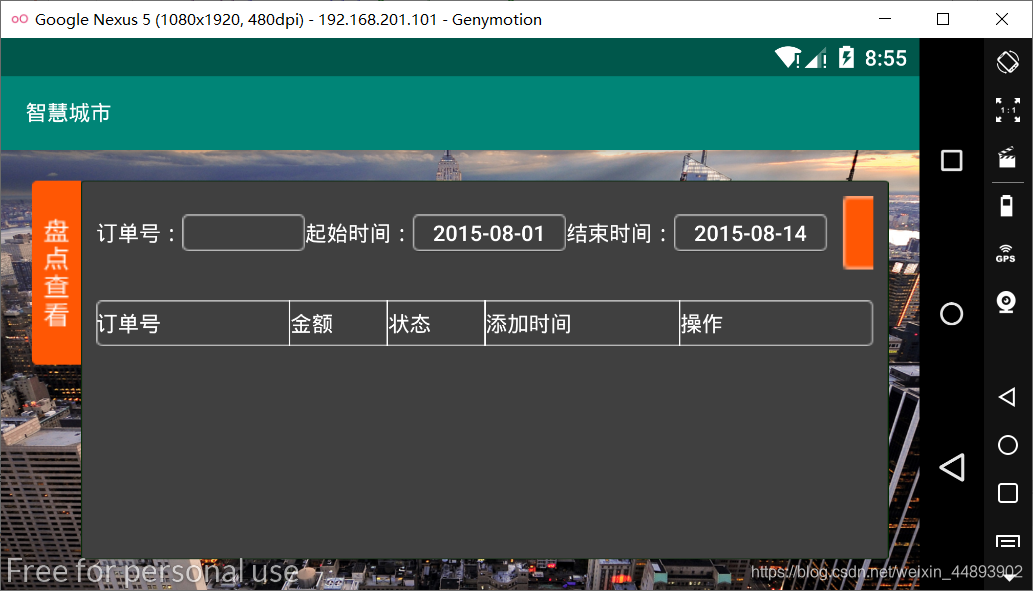
布局代码:
<RelativeLayout xmlns:android="http://schemas.android.com/apk/res/android"

    xmlns:tools="http://schemas.android.com/tools"

    android:layout_width="fill_parent"

    android:layout_height="fill_parent"

    android:background="@drawable/bg_environment"

    tools:context=".QueryShopping">

    <ImageView

        android:id="@+id/imageView1"

        android:layout_width="wrap_content"

        android:layout_height="wrap_content"

        android:layout_alignParentLeft="true"

        android:layout_alignParentTop="true"

        android:layout_marginLeft="20dp"

        android:layout_marginTop="20dp"

        android:src="@drawable/btn_inventory_select" />

    <LinearLayout

        android:layout_width="match_parent"

        android:layout_height="match_parent"

        android:layout_alignTop="@id/imageView1"

        android:layout_marginBottom="20dp"

        android:layout_marginRight="20dp"

        android:layout_toRightOf="@id/imageView1"

        android:background="@drawable/bg_frame_descend_setting"

        android:gravity="center_horizontal"

        android:orientation="vertical"

        android:padding="10dip" >

        <LinearLayout

            android:layout_width="match_parent"

            android:layout_height="wrap_content"

            android:gravity="center_vertical" >

            <TextView

                android:id="@+id/textView1"

                android:layout_width="wrap_content"

                android:layout_height="wrap_content"

                android:text="订单号:"

                android:textColor="@color/white" />

            <EditText

                android:id="@+id/editText1"

                android:layout_width="80dp"

                android:layout_height="24dip"

                android:background="@drawable/input"

                android:padding="2dp"

                android:singleLine="false"

                android:textColor="@color/white" >

                <requestFocus />

            </EditText>

            <TextView

                android:layout_width="wrap_content"

                android:layout_height="wrap_content"

                android:text="起始时间:"

                android:textColor="#ffffff" />

            <Button

                android:id="@+id/btnStartTime"

                android:layout_width="100dip"

                android:layout_height="24dip"

                android:background="@drawable/input"

                android:gravity="center"

                android:text="2015-08-01"

                android:textColor="#ffffff" />

            <TextView

                android:layout_width="wrap_content"

                android:layout_height="wrap_content"

                android:text="结束时间:"

                android:textColor="#ffffff" />

            <Button

                android:id="@+id/btnEndTime"

                android:layout_width="100dip"

                android:layout_height="24dip"

                android:background="@drawable/input"

                android:gravity="center"

                android:text="2015-08-14"

                android:textColor="#ffffff" />

            <Button

                android:id="@+id/btnSearch"

                android:layout_width="142dp"

                android:layout_height="wrap_content"

                android:layout_marginLeft="10dp"

                android:background="@drawable/btn_search" />

        </LinearLayout>

        <LinearLayout

            android:layout_width="match_parent"

            android:layout_height="30dp"

            android:layout_marginTop="20dp"

            android:background="@drawable/input"

            android:gravity="center_vertical"

            android:orientation="horizontal" >

            <TextView

                android:id="@+id/tvNo"

                android:layout_width="0.0dp"

                android:layout_height="wrap_content"

                android:layout_weight="2"

                android:text="订单号"

                android:textColor="@color/white" />

            <View

                android:layout_width="1dp"

                android:layout_height="match_parent"

                android:background="#ffffff" />

            <TextView

                android:id="@+id/tvAmount"

                android:layout_width="0.0dp"

                android:layout_height="wrap_content"

                android:layout_weight="1"

                android:text="金额"

                android:textColor="@color/white" />

            <View

                android:layout_width="1dp"

                android:layout_height="match_parent"

                android:background="#ffffff" />

            <TextView

                android:id="@+id/tvState"

                android:layout_width="0.0dp"

                android:layout_height="wrap_content"

                android:layout_weight="1"

                android:text="状态"

                android:textColor="@color/white" />

            <View

                android:layout_width="1dp"

                android:layout_height="match_parent"

                android:background="#ffffff" />

            <TextView

                android:id="@+id/tvTime"

                android:layout_width="0.0dp"

                android:layout_height="wrap_content"

                android:layout_weight="2"

                android:text="添加时间"

                android:textColor="@color/white" />

            <View

                android:layout_width="1dp"

                android:layout_height="match_parent"

                android:background="#ffffff" />

            <TextView

                android:id="@+id/tvOperate"

                android:layout_width="0.0dp"

                android:layout_height="wrap_content"

                android:layout_weight="2"

                android:text="操作"

                android:textColor="@color/white" />

        </LinearLayout>

        <ListView

            android:id="@+id/listView1"

            android:layout_width="match_parent"

            android:layout_height="wrap_content"

            android:cacheColorHint="#00000000"

            android:fadingEdgeLength="0dp" >

        </ListView>

    </LinearLayout>

</RelativeLayout>
引用布局:items.xml
<?xml version="1.0" encoding="utf-8"?>

<LinearLayout xmlns:android="http://schemas.android.com/apk/res/android"

    android:layout_width="match_parent"

    android:layout_height="match_parent"

    android:orientation="vertical" >

    <LinearLayout

        android:layout_width="match_parent"

        android:layout_height="30dp"

        android:gravity="center_vertical"

        android:background="@drawable/input"

        android:orientation="horizontal" >

        <TextView

            android:id="@+id/tvNo"

            android:layout_width="0.0dp"

            android:layout_height="wrap_content"

            android:layout_weight="2"

            android:textColor="@color/white"

            android:text="订单号" />

        <View

            android:layout_width="1dp"

            android:layout_height="match_parent"

            android:background="#ffffff"

            />

        <TextView

            android:id="@+id/tvAmount"

            android:layout_width="0.0dp"

            android:layout_height="wrap_content"

            android:layout_weight="1"

            android:textColor="@color/white"

            android:text="金额" />

        <View

            android:layout_width="1dp"

            android:layout_height="match_parent"

            android:background="#ffffff"

            />

        <TextView

            android:id="@+id/tvState"

            android:layout_width="0.0dp"

            android:layout_height="wrap_content"

            android:layout_weight="1"

            android:textColor="@color/white"

            android:text="状态" />

        <View

            android:layout_width="1dp"

            android:layout_height="match_parent"

            android:background="#ffffff"

            />

        <TextView

            android:id="@+id/tvTime"

            android:layout_width="0.0dp"

            android:layout_height="wrap_content"

            android:layout_weight="2"

            android:textColor="@color/white"

            android:text="添加时间" />

        <View

            android:layout_width="1dp"

            android:layout_height="match_parent"

            android:background="#ffffff"

            />

        <TextView

            android:id="@+id/tvOperate"

            android:layout_width="0.0dp"

            android:layout_height="wrap_content"

            android:layout_weight="2"

            android:textColor="@color/white"

            android:text="操作" />

    </LinearLayout>

</LinearLayout>
Java类进行列表项内容的添加
import android.content.Context;

import android.view.LayoutInflater;

import android.view.View;

import android.view.ViewGroup;

import android.widget.BaseAdapter;

import android.widget.TextView;

public abstract class MyAdapter extends BaseAdapter {

    private Context context;

    public MyAdapter(Context context){

        this.context = context;

    }

    @Override

    public View getView(int position, View convertView, ViewGroup parent) {

        ViewHoller v;

        if(convertView==null){

            v = new ViewHoller();

            convertView = LayoutInflater.from(context).inflate(R.layout.items, null);

            v.mTvNo = (TextView) convertView.findViewById(R.id.tvNo);

            v.mTvAmount = (TextView) convertView.findViewById(R.id.tvAmount);

            v.mTvState = (TextView)convertView.findViewById(R.id.tvState);

            v.mTvTime = (TextView)convertView.findViewById(R.id.tvTime);

            v.mTvOperate = (TextView)convertView.findViewById(R.id.tvOperate);

            convertView.setTag(v);

        }else{

            v = (ViewHoller) convertView.getTag();

        }

        v.mTvNo.setText("201508281043");

        v.mTvAmount.setText("168");

        v.mTvState.setText("已发货");

        v.mTvTime.setText("2015-08-28 10:43");

        v.mTvOperate.setText("");

        return convertView;

    }

    class ViewHoller{

        TextView mTvNo,mTvAmount,mTvState,mTvTime,mTvOperate;

    }

}
加载列表项
import android.support.v7.app.AppCompatActivity;

import android.os.Bundle;

import android.widget.ListView;

public class QueryShopping extends AppCompatActivity {

private ListView mlistView;

private MyAdapter myAdapter;

    @Override

    protected void onCreate(Bundle savedInstanceState) {

        super.onCreate(savedInstanceState);

        setContentView(R.layout.activity_query_shopping);

        mlistView = (ListView)findViewById(R.id.listView1);

    }

}
Android物联网应用程序开发(智慧城市)—— 查询购物信息界面开发的更多相关文章
- Android物联网应用程序开发(智慧城市)—— 摄像头监控界面开发
效果: 布局代码: <?xml version="1.0" encoding="utf-8"?> <RelativeLayout xmlns: ...
- Android物联网应用程序开发(智慧城市)—— 火焰监控界面开发
效果: 布局代码: <?xml version="1.0" encoding="utf-8"?> <RelativeLayout xmlns: ...
- Android物联网应用程序开发(智慧城市)—— 购物信息的存储界面开发
效果: 布局代码: <?xml version="1.0" encoding="utf-8"?> <LinearLayout xmlns:an ...
- 【可视化大屏教程】用Python开发智慧城市数据分析大屏!
目录 一.开发背景 二.讲解代码 2.1 大标题+背景图 2.2 各区县交通事故统计图-系列柱形图 2.3 图书馆建设率-水球图 2.4 当年城市空气质量aqi指数-面积图 2.5 近7年人均生产总值 ...
- JAVA 图形开发中组件对齐方法及界面开发
/*文章中用到的代码只是一部分,需要源码的可通过邮箱联系我 1978702969@qq.com*/ 在上篇博客中提到了JAVA图形界面开发时的两种布局,流式布局和边框布局. 在实际使用中可能会发现,往 ...
- Android物联网应用程序开发(智慧城市)—— 用户注册界面开发
效果: 布局代码: <?xml version="1.0" encoding="utf-8"?> <RelativeLayout xmlns: ...
- Android物联网应用程序开发(智慧城市)—— 环境状态值范围设置界面开发
效果图: 代码: 布局: <?xml version="1.0" encoding="utf-8"?> <LinearLayout xmlns ...
- Android物联网应用程序开发(智慧园区)—— 图片预览界面
效果图: 实现步骤: 1.首先在 build.gradle 文件中引入 RecycleView implementation 'com.android.support:recyclerview-v7: ...
- Android物联网应用程序开发(智慧园区)—— 设置传感器阈值对话框界面
效果图: 自定义对话框布局: <?xml version="1.0" encoding="utf-8"?> <LinearLayout xml ...
随机推荐
- C++ 写出这个数
题目如下: 读入一个正整数 n,计算其各位数字之和,用汉语拼音写出和的每一位数字. 输入格式: 每个测试输入包含 1 个测试用例,即给出自然数 n 的值.这里保证 n 小于 1. 输出格式: 在一行内 ...
- 100个Shell脚本——【脚本4】自定义rm命令
[脚本4]自定义rm命令 linux系统的rm命令太危险,一不小心就会删除掉系统文件. 写一个shell脚本来替换系统的rm命令,要求当删除一个文件或者目录时,都要做一个备份,然后再删除.下面分两种情 ...
- Linux学习 - 流程控制
一.if语句 1 单分支if条件语句 (1) if [ 条件判断式 ];then 程序 fi (2) if [ 条件判断式 ] then 程序 fi 例:检测根分区的使用量 2 双分支if条件语 ...
- mysql index 8.0
创建表 use vodb; drop table if exists test1; create table test1(id int NOT NULL AUTO_INCREMENT primary ...
- 10、Redis三种特殊的数据类型
一.Geospatail地理位置 1.Geospatail的应用 朋友的位置,附近的人,打车距离 2.相关命令 1.geoadd:增加某个地理位置的坐标(可批量添加). 语法: GEOADD key ...
- 转:Sed使用
awk于1977年出生,今年36岁本命年,sed比awk大2-3岁,awk就像林妹妹,sed就是宝玉哥哥了.所以 林妹妹跳了个Topless,他的哥哥sed坐不住了,也一定要出来抖一抖. sed全名叫 ...
- ciscn_2019_s_9
很简单的一道题 例行检查 没有开启nx保护,就想到了shellcode来做 很明显的栈溢出 唯一的要求就是shellcode长度不能超过0x24 通过jump跳转到shellcode的位置 完整exp ...
- png crc讲解
我太难了. 我真的是为你们着想,你们学姐说misc太简单了,可就是这么简单我相信你们也不会做...我还得给你们讲解... 加油吧!!! 工具:010editor 这个我想给你放下载链接来着,后来 ...
- 开源企业平台Odoo 15社区版之项目管理应用模块功能简介
项目管理无论是各类证书的认证,如PMP.软考高级的信息系统项目管理师.中级的系统集成项目管理工程师等,还是企业实践都有着广泛的实际应用中,至今还是处于热门的行业,合格的或优化的项目经理还是偏少,对于I ...
- C51单片机0~60计数器
源码 #include<reg51.h> unsigned char code table[]={0x3f,0x06,0x5b,0x4f,0x66,0x6d,0x7d,0x07,0x7f, ...