
重新整理 .net core 实践篇—————中间件[十九]
前言
简单介绍一下.net core的中间件。
正文
官方文档已经给出了中间件的概念图:
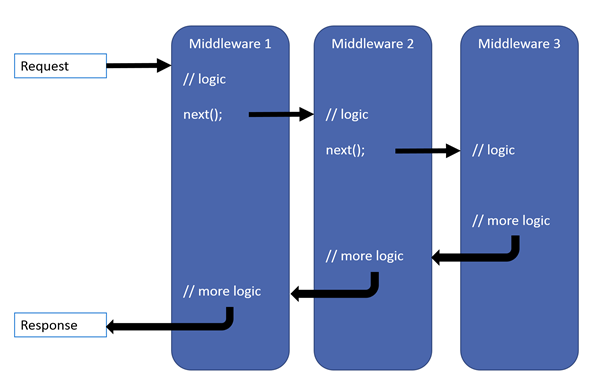
和其密切相关的是下面这两个东西:
IApplicationBuilder 和 RequestDelegate(HttpContext context)
IApplicationBuilder :
public interface IApplicationBuilder

{

IServiceProvider ApplicationServices { get; set; }

IFeatureCollection ServerFeatures { get; }

IDictionary<string, object> Properties { get; }

IApplicationBuilder Use(Func<RequestDelegate, RequestDelegate> middleware);

IApplicationBuilder New();

RequestDelegate Build();

}
RequestDelegate:
namespace Microsoft.AspNetCore.Http

{

  public delegate Task RequestDelegate(HttpContext context);

}
举一个 中间件的例子:
app.Use(async (context, next) => {

                await context.Response.WriteAsync("hello word");

});
效果:
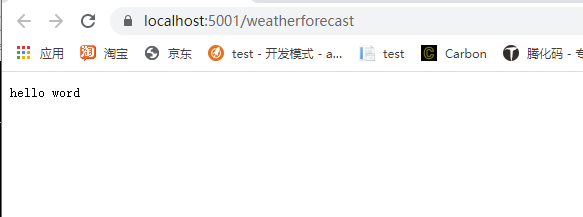
这里我没有执行next,故而在这里就终止了。
来看下这个Use,干了什么:
public static class UseExtensions

{

public static IApplicationBuilder Use(

  this IApplicationBuilder app,

  Func<HttpContext, Func<Task>, Task> middleware)

{

  return app.Use((Func<RequestDelegate, RequestDelegate>) (next => (RequestDelegate) (context =>

  {

	Func<Task> func = (Func<Task>) (() => next(context));

	return middleware(context, func);

  })));

}

}
是的,他是对IApplicationBuilder 的一个扩展。
如果不想使用这个扩展方法,那么你要这么写:
app.Use((Func<RequestDelegate, RequestDelegate>)  (next=> (RequestDelegate)((context)=>

{

	Func<Task> func = (Func<Task>)(() => next(context));

	Func<HttpContext, Func<Task>, Task> middleware = async (context1, next2) =>

	{

		await context1.Response.WriteAsync("hello word");

	};

	return middleware(context, func);

})));
有些人可能看不惯这样写哈,换一种写法:
app.Use((Func<RequestDelegate, RequestDelegate>)  (next =>

{

	return (RequestDelegate)((context) =>

	{

		Func<Task> func = (Func<Task>)(() => next(context));

		Func<HttpContext, Func<Task>, Task> middleware = async (context1, next2) =>

		{

			await context1.Response.WriteAsync("hello word");

		};

		return middleware(context, func);

	});

}));
又或者,这样写:
app.Use((Func<RequestDelegate, RequestDelegate>)  (next =>

{

	return (RequestDelegate)((context) =>

	{

		Func<HttpContext, RequestDelegate, Task> middleware = async (context1, next2) =>

		{

			await context1.Response.WriteAsync("hello word");

		};

		return middleware(context, next);

	});

}));
还可以这样写:
public async Task WriteAsync(HttpContext context, RequestDelegate requestDelegate)

{

	await context.Response.WriteAsync("hello word");

}

app.Use((Func<RequestDelegate, RequestDelegate>)  (next =>

            {

                return (RequestDelegate)((context) => WriteAsync(context, next));

            }));
上面没有用到这个next,那么这个next是干什么的呢?从上面的传参推断出,就是我们的下一步。
如果没有执行下一步,那么下一步是不会执行的。
来看一下IApplicationBuilder的实现类ApplicationBuilder的use方法:
private readonly IList<Func<RequestDelegate, RequestDelegate>> _components = (IList<Func<RequestDelegate, RequestDelegate>>) new List<Func<RequestDelegate, RequestDelegate>>();

public IApplicationBuilder Use(

  Func<RequestDelegate, RequestDelegate> middleware)

{

  this._components.Add(middleware);

  return (IApplicationBuilder) this;

}
会将我们传入的middleware,加入到_components 中。
ApplicationBuilder看下build 方法:
public RequestDelegate Build()

{

  RequestDelegate requestDelegate = (RequestDelegate) (context =>

  {

	Endpoint endpoint = context.GetEndpoint();

	if (endpoint?.RequestDelegate != null)

	  throw new InvalidOperationException("The request reached the end of the pipeline without executing the endpoint: '" + endpoint.DisplayName + "'. Please register the EndpointMiddleware using 'IApplicationBuilder.UseEndpoints(...)' if using routing.");

	context.Response.StatusCode = 404;

	return Task.CompletedTask;

  });

  foreach (Func<RequestDelegate, RequestDelegate> func in this._components.Reverse<Func<RequestDelegate, RequestDelegate>>())

	requestDelegate = func(requestDelegate);

  return requestDelegate;

}
这个就是套娃工程,把后面一个的requestDelegate,作为前面一个requestDelegate的参数。最后返回第一个requestDelegate。
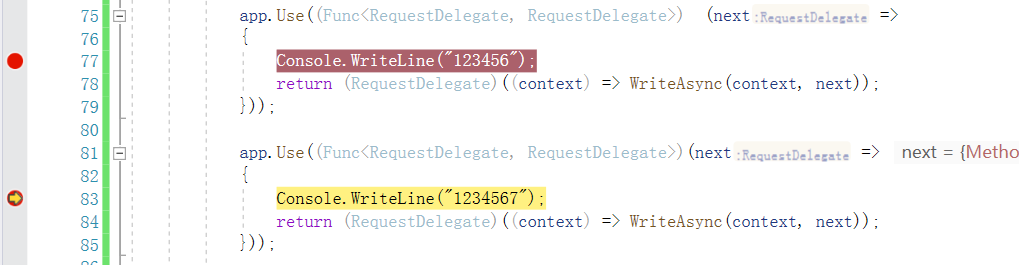
断点验证,我打了两个断点,下面是断点的顺序。
第一个断点停留的位置:
第二个断点停留的位置:
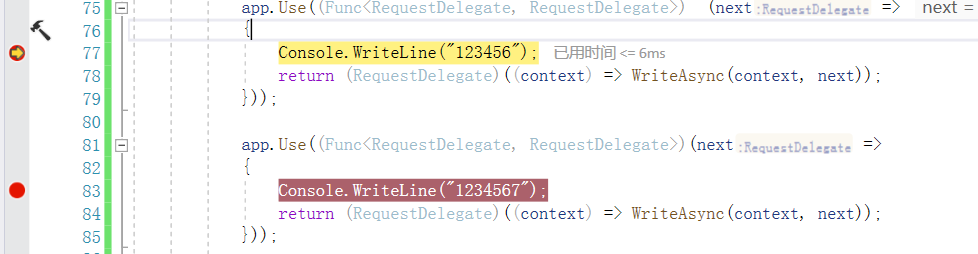
第二个断点里面的next就是第一个断点返回的结果。
因为返回的是第一个中间件的返回的RequestDelegate,那么运行。
那么运行顺序就是第一个返回的RequestDelegate开始运行,且参数是第二个中间件返回的RequestDelegate。
返回的RequestDelegate运行顺序如下:
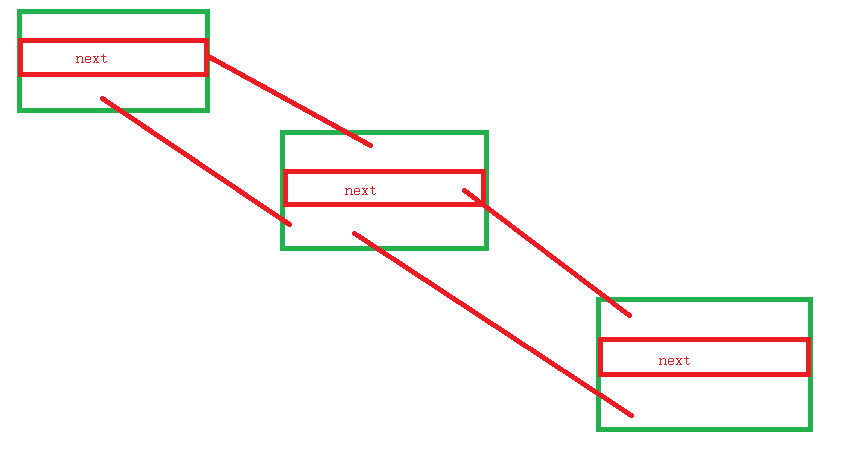
这大概就是中间件的原理了。
下面看一下动态中间件:
app.Map("/abc", builder =>

{

	app.Use((Func<RequestDelegate, RequestDelegate>)(next =>

	{

		return (RequestDelegate)((context) => WriteAsync(context, next));

	}));

});
如上面这样,如果匹配到了/abc,那么就走里面的中间件。
看下源码吧,Map的。
public static class MapExtensions

{

public static IApplicationBuilder Map(

  this IApplicationBuilder app,

  PathString pathMatch,

  Action<IApplicationBuilder> configuration)

{

  if (app == null)

	throw new ArgumentNullException(nameof (app));

  if (configuration == null)

	throw new ArgumentNullException(nameof (configuration));

  if (pathMatch.HasValue && pathMatch.Value.EndsWith("/", StringComparison.Ordinal))

	throw new ArgumentException("The path must not end with a '/'", nameof (pathMatch));

  IApplicationBuilder applicationBuilder = app.New();

  configuration(applicationBuilder);

  RequestDelegate requestDelegate = applicationBuilder.Build();

  MapOptions options = new MapOptions()

  {

	Branch = requestDelegate,

	PathMatch = pathMatch

  };

  return app.Use((Func<RequestDelegate, RequestDelegate>) (next => new RequestDelegate(new MapMiddleware(next, options).Invoke)));

}

}
里面做的主要是两件事,一件事是另外 app.New();弄出一条分支出来。然后调用Build()独立走出一条新的中间件链。
New方法如下:
public IApplicationBuilder New()

{

  return (IApplicationBuilder) new ApplicationBuilder(this);

}
第二件事就是返回了一个新的中间件RequestDelegate,传入了两个参数一个是next,这个是用来走老的分支,估摸着不匹配的时候走旧的分支。
还有一个参数是options,这个参数有两个属性,一个是Branch 就是新的分支。一个是PathMatch 是匹配字符,那么就是如果是匹配的话,就走新的分支。
事实证明果然如此:
public class MapMiddleware

{

private readonly RequestDelegate _next;

private readonly MapOptions _options;

public MapMiddleware(RequestDelegate next, MapOptions options)

{

  if (next == null)

	throw new ArgumentNullException(nameof (next));

  if (options == null)

	throw new ArgumentNullException(nameof (options));

  this._next = next;

  this._options = options;

}

public async Task Invoke(HttpContext context)

{

  if (context == null)

	throw new ArgumentNullException(nameof (context));

  PathString matched;

  PathString remaining;

  if (context.Request.Path.StartsWithSegments(this._options.PathMatch, out matched, out remaining))

  {

	PathString path = context.Request.Path;

	PathString pathBase = context.Request.PathBase;

	context.Request.PathBase = pathBase.Add(matched);

	context.Request.Path = remaining;

	try

	{

	  await this._options.Branch(context);

	}

	finally

	{

	  context.Request.PathBase = pathBase;

	  context.Request.Path = path;

	}

	path = new PathString();

	pathBase = new PathString();

  }

  else

	await this._next(context);

}

}
还可以这样自定义:
app.MapWhen(context =>

{

	return context.Request.Query.Keys.Contains("abc");

}, builder =>

{

	app.Use((Func<RequestDelegate, RequestDelegate>)(next =>

	{

		return (RequestDelegate)((context) => WriteAsync(context, next));

	}));

});
有了上面的简单分析,应该不难理解哈。
我这里直接贴了:
MapWhen:
public static class MapWhenExtensions

{

public static IApplicationBuilder MapWhen(

  this IApplicationBuilder app,

  Func<HttpContext, bool> predicate,

  Action<IApplicationBuilder> configuration)

{

  if (app == null)

	throw new ArgumentNullException(nameof (app));

  if (predicate == null)

	throw new ArgumentNullException(nameof (predicate));

  if (configuration == null)

	throw new ArgumentNullException(nameof (configuration));

  IApplicationBuilder applicationBuilder = app.New();

  configuration(applicationBuilder);

  RequestDelegate requestDelegate = applicationBuilder.Build();

  MapWhenOptions options = new MapWhenOptions()

  {

	Predicate = predicate,

	Branch = requestDelegate

  };

  return app.Use((Func<RequestDelegate, RequestDelegate>) (next => new RequestDelegate(new MapWhenMiddleware(next, options).Invoke)));

}

}
MapWhenMiddleware:
public class MapWhenMiddleware

{

private readonly RequestDelegate _next;

private readonly MapWhenOptions _options;

public MapWhenMiddleware(RequestDelegate next, MapWhenOptions options)

{

  if (next == null)

	throw new ArgumentNullException(nameof (next));

  if (options == null)

	throw new ArgumentNullException(nameof (options));

  this._next = next;

  this._options = options;

}

public async Task Invoke(HttpContext context)

{

  if (context == null)

	throw new ArgumentNullException(nameof (context));

  if (this._options.Predicate(context))

	await this._options.Branch(context);

  else

	await this._next(context);

}

}
上面都是异曲同工,就不做解释了。
这里再介绍一个方法,run:
app.Run(async context =>

{

	await context.Response.WriteAsync("hello word");

});
这个这个Run方法,没有传入next。
如下:
public static void Run(this IApplicationBuilder app, RequestDelegate handler)

{

  if (app == null)

	throw new ArgumentNullException(nameof (app));

  if (handler == null)

	throw new ArgumentNullException(nameof (handler));

  app.Use((Func<RequestDelegate, RequestDelegate>) (_ => handler));

}
表示这是末端。
那么下面介绍一下,将我们的中间件写入到一个独立的类里面去。
定义一个扩展类:
public static class SelfBuilderExtensions

{

	public static IApplicationBuilder UseSelfSelfMiddleware(this IApplicationBuilder app)

	{

		return app.UseMiddleware<SelfMiddleware>();

	}

}
具体的实现:
public class SelfMiddleware

{

	private readonly RequestDelegate _next;

	public SelfMiddleware(RequestDelegate next)

	{

		this._next = next;

	}

	public async Task InvokeAsync(HttpContext context)

	{

		Console.WriteLine("request handle");

		await this._next(context);

		Console.WriteLine("response handle");

	}

}
使用:
app.UseSelfSelfMiddleware();
简单看一下UseMiddleware这个方法:
public static IApplicationBuilder UseMiddleware<TMiddleware>(

  this IApplicationBuilder app,

  params object[] args)

{

  return app.UseMiddleware(typeof (TMiddleware), args);

}
继续看app.UseMiddleware:
public static IApplicationBuilder UseMiddleware(

  this IApplicationBuilder app,

  Type middleware,

  params object[] args)

{

  if (typeof (IMiddleware).GetTypeInfo().IsAssignableFrom(middleware.GetTypeInfo()))

  {

	if (args.Length != 0)

	  throw new NotSupportedException(Resources.FormatException_UseMiddlewareExplicitArgumentsNotSupported((object) typeof (IMiddleware)));

	return UseMiddlewareExtensions.UseMiddlewareInterface(app, middleware);

  }

  IServiceProvider applicationServices = app.ApplicationServices;

  return app.Use((Func<RequestDelegate, RequestDelegate>) (next =>

  {

	MethodInfo[] array = ((IEnumerable<MethodInfo>) middleware.GetMethods(BindingFlags.Instance | BindingFlags.Public)).Where<MethodInfo>((Func<MethodInfo, bool>) (m => string.Equals(m.Name, "Invoke", StringComparison.Ordinal) || string.Equals(m.Name, "InvokeAsync", StringComparison.Ordinal))).ToArray<MethodInfo>();

	if (array.Length > 1)

	  throw new InvalidOperationException(Resources.FormatException_UseMiddleMutlipleInvokes((object) "Invoke", (object) "InvokeAsync"));

	if (array.Length == 0)

	  throw new InvalidOperationException(Resources.FormatException_UseMiddlewareNoInvokeMethod((object) "Invoke", (object) "InvokeAsync", (object) middleware));

	MethodInfo methodInfo = array[0];

	if (!typeof (Task).IsAssignableFrom(methodInfo.ReturnType))

	  throw new InvalidOperationException(Resources.FormatException_UseMiddlewareNonTaskReturnType((object) "Invoke", (object) "InvokeAsync", (object) "Task"));

	ParameterInfo[] parameters = methodInfo.GetParameters();

	if (parameters.Length == 0 || parameters[0].ParameterType != typeof (HttpContext))

	  throw new InvalidOperationException(Resources.FormatException_UseMiddlewareNoParameters((object) "Invoke", (object) "InvokeAsync", (object) "HttpContext"));

	object[] objArray = new object[args.Length + 1];

	objArray[0] = (object) next;

	Array.Copy((Array) args, 0, (Array) objArray, 1, args.Length);

	object instance = ActivatorUtilities.CreateInstance(app.ApplicationServices, middleware, objArray);

	if (parameters.Length == 1)

	  return (RequestDelegate) methodInfo.CreateDelegate(typeof (RequestDelegate), instance);

	Func<object, HttpContext, IServiceProvider, Task> factory = UseMiddlewareExtensions.Compile<object>(methodInfo, parameters);

	return (RequestDelegate) (context =>

	{

	  IServiceProvider serviceProvider = context.RequestServices ?? applicationServices;

	  if (serviceProvider == null)

		throw new InvalidOperationException(Resources.FormatException_UseMiddlewareIServiceProviderNotAvailable((object) "IServiceProvider"));

	  return factory(instance, context, serviceProvider);

	});

  }));

}
一段一段分析:
if (typeof (IMiddleware).GetTypeInfo().IsAssignableFrom(middleware.GetTypeInfo()))

{

if (args.Length != 0)

  throw new NotSupportedException(Resources.FormatException_UseMiddlewareExplicitArgumentsNotSupported((object) typeof (IMiddleware)));

return UseMiddlewareExtensions.UseMiddlewareInterface(app, middleware);

}
如果middleware 继承IMiddleware,那么将会调用UseMiddlewareExtensions.UseMiddlewareInterface.
IMiddleware如下:
public interface IMiddleware

{

Task InvokeAsync(HttpContext context, RequestDelegate next);

}
然后UseMiddlewareExtensions.UseMiddlewareInterface:
private static IApplicationBuilder UseMiddlewareInterface(

  IApplicationBuilder app,

  Type middlewareType)

{

  return app.Use((Func<RequestDelegate, RequestDelegate>) (next => (RequestDelegate) (async context =>

  {

	IMiddlewareFactory middlewareFactory = (IMiddlewareFactory) context.RequestServices.GetService(typeof (IMiddlewareFactory));

	if (middlewareFactory == null)

	  throw new InvalidOperationException(Resources.FormatException_UseMiddlewareNoMiddlewareFactory((object) typeof (IMiddlewareFactory)));

	IMiddleware middleware = middlewareFactory.Create(middlewareType);

	if (middleware == null)

	  throw new InvalidOperationException(Resources.FormatException_UseMiddlewareUnableToCreateMiddleware((object) middlewareFactory.GetType(), (object) middlewareType));

	try

	{

	  await middleware.InvokeAsync(context, next);

	}

	finally

	{

	  middlewareFactory.Release(middleware);

	}

  })));
上面的大意就是封装一个中间件,里面调用的方法就InvokeAsync。这个很好理解。
MethodInfo[] array = ((IEnumerable<MethodInfo>) middleware.GetMethods(BindingFlags.Instance | BindingFlags.Public)).Where<MethodInfo>((Func<MethodInfo, bool>) (m => string.Equals(m.Name, "Invoke", StringComparison.Ordinal) || string.Equals(m.Name, "InvokeAsync", StringComparison.Ordinal))).ToArray<MethodInfo>();

if (array.Length > 1)

  throw new InvalidOperationException(Resources.FormatException_UseMiddleMutlipleInvokes((object) "Invoke", (object) "InvokeAsync"));

if (array.Length == 0)

  throw new InvalidOperationException(Resources.FormatException_UseMiddlewareNoInvokeMethod((object) "Invoke", (object) "InvokeAsync", (object) middleware));
获取Invoke和InvokeAsync方法。
如果这两个方法同时存在,抛出异常。
如果一个都没有抛出异常。
if (!typeof (Task).IsAssignableFrom(methodInfo.ReturnType))

  throw new InvalidOperationException(Resources.FormatException_UseMiddlewareNonTaskReturnType((object) "Invoke", (object) "InvokeAsync", (object) "Task"));

ParameterInfo[] parameters = methodInfo.GetParameters();

if (parameters.Length == 0 || parameters[0].ParameterType != typeof (HttpContext))

  throw new InvalidOperationException(Resources.FormatException_UseMiddlewareNoParameters((object) "Invoke", (object) "InvokeAsync", (object) "HttpContext"));

object[] objArray = new object[args.Length + 1];

objArray[0] = (object) next;

Array.Copy((Array) args, 0, (Array) objArray, 1, args.Length);
如果返回结果不是一个Task报错。
如果里面的第一个参数不是HttpContext 报错。
object[] objArray = new object[args.Length + 1];

objArray[0] = (object) next;

Array.Copy((Array) args, 0, (Array) objArray, 1, args.Length);

object instance = ActivatorUtilities.CreateInstance(app.ApplicationServices, middleware, objArray);

if (parameters.Length == 1)

  return (RequestDelegate) methodInfo.CreateDelegate(typeof (RequestDelegate), instance);

Func<object, HttpContext, IServiceProvider, Task> factory = UseMiddlewareExtensions.Compile<object>(methodInfo, parameters);

return (RequestDelegate) (context =>

{

  IServiceProvider serviceProvider = context.RequestServices ?? applicationServices;

  if (serviceProvider == null)

	throw new InvalidOperationException(Resources.FormatException_UseMiddlewareIServiceProviderNotAvailable((object) "IServiceProvider"));

  return factory(instance, context, serviceProvider);

});
上面表示含义是实例化函数的第一个参数应该是RequestDelegate。
然后通过反射生成具体的对象。
如果Invoke或者InvokeAsync 只有一个参数的话,也就是只有HttpContext参数,直接通过CreateDelegate,创建委托。
如果不止的话,就通过一系列操作进行转换,这里就不介绍了,细节篇介绍了。毕竟是实践篇。
结
以上只是个人整理,如果有错误,望请指点。
下一节异常处理中间件。
重新整理 .net core 实践篇—————中间件[十九]的更多相关文章
- ASP.NET Core 2.2 十九. 你扔过来个json,我怎么接
原文:ASP.NET Core 2.2 十九. 你扔过来个json,我怎么接 前文说道了Action的激活,这里有个关键的操作就是Action参数的映射与模型绑定,这里即涉及到简单的string.in ...
- 重新整理 .net core 实践篇————配置应用[一]
前言 本来想整理到<<重新整理.net core 计1400篇>>里面去,但是后来一想,整理 .net core 实践篇 是偏于实践,故而分开. 因为是重新整理,那么就从配置开 ...
- 重新整理 .net core 实践篇————依赖注入应用[二]
前言 这里介绍一下.net core的依赖注入框架,其中其代码原理在我的另一个整理<<重新整理 1400篇>>中已经写了,故而专门整理应用这一块. 以下只是个人整理,如有问题, ...
- 重新整理 .net core 实践篇——— 权限中间件源码阅读[四十六]
前言 前面介绍了认证中间件,下面看一下授权中间件. 正文 app.UseAuthorization(); 授权中间件是这个,前面我们提及到认证中间件并不会让整个中间件停止. 认证中间件就两个作用,我们 ...
- 重新整理 .net core 实践篇—————异常中间件[二十]
前言 简单介绍一下异常中间件的使用. 正文 if (env.IsDevelopment()) { app.UseDeveloperExceptionPage(); } 这样写入中间件哈,那么在env环 ...
- 重新整理 .net core 实践篇——— UseEndpoints中间件[四十八]
前言 前文已经提及到了endponint 是怎么匹配到的,也就是说在UseRouting 之后的中间件都能获取到endpoint了,如果能够匹配到的话,那么UseEndpoints又做了什么呢?它是如 ...
- 重新整理 .net core 实践篇—————领域事件[二十九]
前文 前面整理了仓储层,工作单元模式,同时简单介绍了一下mediator. 那么就mediator在看下领域事件启到了什么作用吧. 正文 这里先注册一下MediatR服务: // 注册中间者:Medi ...
- 重新整理 .net core 实践篇————重定向攻击[三十九]
前言 简单介绍一下重定向攻击. 正文 攻击思路: 看着上面挺复杂的,其实是一些很简单的步骤. 攻击者通过某些手段,让用户打开了一个好站点,打开的这个地址里面带有重定向信息,重定向信息就是自己伪造的站点 ...
- 重新整理 .net core 实践篇—————服务与配置之间[十一二]
前言 前面基本介绍了,官方对于asp .net core 设计配置和设计服务的框架的一些思路.看下服务和配置之间是如何联系的吧. 正文 服务: public interface ISelfServic ...
随机推荐
- 【js】Leetcode每日一题-叶子相似的树
[js]Leetcode每日一题-叶子相似的树 [题目描述] 请考虑一棵二叉树上所有的叶子,这些叶子的值按从左到右的顺序排列形成一个 叶值序列 . 举个例子,如上图所示,给定一棵叶值序列为 (6, 7 ...
- JAVA教程 Java学习路线
- React 代码共享最佳实践方式
任何一个项目发展到一定复杂性的时候,必然会面临逻辑复用的问题.在React中实现逻辑复用通常有以下几种方式:Mixin.高阶组件(HOC).修饰器(decorator).Render Props.Ho ...
- 一种巧妙的使用 CSS 制作波浪效果的思路
在之前,我介绍过几种使用纯 CSS 实现波浪效果的方式,关于它们有两篇相关的文章: 纯 CSS 实现波浪效果! 巧用 CSS 实现酷炫的充电动画 本文将会再介绍另外一种使用 CSS 实现的波浪效果,思 ...
- [网络编程之客户端/服务器架构,互联网通信协议,TCP协议]
[网络编程之客户端/服务器架构,互联网通信协议,TCP协议] 引子 网络编程 客户端/服务器架构 互联网通信协议 互联网的本质就是一系列的网络协议 OSI七层协议 tcp/ip五层模型 客户端/服务器 ...
- python3读取文件指定行的三种方案
技术背景 考虑到深度学习领域中的数据规模一般都比较大,尤其是训练集,这个限制条件对应到实际编程中就意味着,我们很有可能无法将整个数据文件的内容全部都加载到内存中.那么就需要一些特殊的处理方式,比如:创 ...
- [bug] SSM项目:Cannot load driver class: com.mysql.jdbc.Driver
检查pom文件,mysql包部分为: <dependency> <groupId>mysql</groupId> <artifactId>mysql-c ...
- [C] gcc
概述 GNU C Compiler 流程 预处理,生成.i文件(中间文件,看不到) 编译,生成.s文件(中间文件,看不到) 汇编,生成.o文件 链接,生成可执行文件 参数 -E:预处理 -S:预处理, ...
- 统一UOS操作系统 修改源地址
统一UOS操作系统 修改源地址 问题: 执行apt-get update的时候提示: root@sugon-PC:/etc/apt# apt-get update -y错误:1 https://uos ...
- Linux中find命令用法全汇总,看完就没有不会用的!
Linux中find命令用法全汇总,看完就没有不会用的! 中琦2513 马哥Linux运维 2017-04-10 糖豆贴心提醒,本文阅读时间7分钟 Linux 查找命令是Linux系统中最重要和最 ...