
NLog 自定义Target
http://nlog-project.org/2015/06/30/extending-nlog-is-easy.html
新建一个类库,命名规则为NLog.*.dll
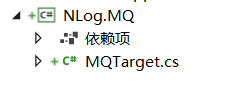
定义一个类输出日志到RabbitMQ
    [Target("MQ")]
    public class MQTarget : TargetWithLayout
    {
        public MQTarget()
        {
        }
        public string Host { get; set; }

        public string UserName { get; set; }
        public string Password { get; set; }
        public string VirtualHost { get; set; }
        protected override void Write(LogEventInfo logEvent)
        {
            string message = this.Layout.Render(logEvent);
            SendMessageToMQ(Host,message);
        }
        private void SendMessageToMQ(string host,string message)
        {
            var factory = new ConnectionFactory() { HostName = Host,UserName= UserName, Password= Password, VirtualHost= VirtualHost};
            using (var connection = factory.CreateConnection())
            using (var channel = connection.CreateModel())
            {
                channel.QueueDeclare(queue: "apicenter",
                                     durable: false,
                                     exclusive: false,
                                     autoDelete: false,
                                     arguments: null);

                //string message = "Hello World!";
                var body = Encoding.UTF8.GetBytes(message);

                channel.BasicPublish(exchange: "",
                                     routingKey: "apicenter",
                                     basicProperties: null,
                                     body: body);
                Console.WriteLine(" [x] Sent {0}", message);
            }

        }
    }
nlog.config
<?xml version="1.0" encoding="utf-8" ?>
<nlog xmlns="http://www.nlog-project.org/schemas/NLog.xsd"
      xmlns:xsi="http://www.w3.org/2001/XMLSchema-instance"
      autoReload="true"
      internalLogLevel="info"
      internalLogFile="Logs\internal-nlog.txt">

  <!-- enable asp.net core layout renderers -->
  <extensions>
    <add assembly="NLog.Web.AspNetCore"/>
    <add assembly="NLog.MQ"/>
  </extensions>

  <!-- the targets to write to -->
  <targets>
    <!-- write logs to file  -->
    <target xsi:type="File" name="allfile" fileName="Logs\nlog-all-${shortdate}.log"
            layout="${longdate}|${event-properties:item=EventId_Id}|${uppercase:${level}}|${logger}|${message} ${exception:format=tostring}" />

    <!-- another file log, only own logs. Uses some ASP.NET core renderers -->
    <target xsi:type="File" name="info" fileName="Logs\nlog-info-${shortdate}.log"
            layout="${longdate}|${event-properties:item=EventId_Id}|${uppercase:${level}}|${logger}|${message} ${exception:format=tostring}|url: ${aspnet-request-url}|action: ${aspnet-mvc-action}" />

    <target xsi:type="File" name="error" fileName="Logs\nlog-error-${shortdate}.log"
            layout="${longdate}|${event-properties:item=EventId_Id}|${uppercase:${level}}|${logger}|${message} ${exception:format=tostring}|url: ${aspnet-request-url}|action: ${aspnet-mvc-action}" />

    <target xsi:type="MQ" name="mq" host="10.202.80.196" UserName="bm" Password="bm_p@ss" VirtualHost="NIST"
            layout="${longdate}|${event-properties:item=EventId_Id}|${uppercase:${level}}|${logger}|${message} ${exception:format=tostring}|url: ${aspnet-request-url}|action: ${aspnet-mvc-action}" />
  </targets>

  <!-- rules to map from logger name to target -->
  <rules>
    <!--All logs, including from Microsoft-->
    <logger name="*" minlevel="Info" writeTo="allfile" />

    <!--Skip non-critical Microsoft logs and so log only own logs-->
    <logger name="Microsoft.*" maxLevel="Info" final="true" />
    <!-- BlackHole without writeTo -->
    <logger name="*" level="Info" writeTo="info" />

    <logger name="*" level="Error" writeTo="error" />
    <logger name="*" level="Error" writeTo="mq" />
  </rules>
</nlog>
这里需要注意一点,部署到Linux中的话,需要把nlog.config中的\ 替换成 /
Filter
定义一个日志记录sql
namespace LogExtension
{
    public class NLogSql
    {
        private static NLog.Logger logger = NLog.LogManager.GetCurrentClassLogger();

        public static void Info(string message)
        {
            logger.Info(message);
        }
    }
}
调用方法
public static void LogSql(string txt)
        {
            NLogSql.Info(txt);
        }
配置target
    <target xsi:type="File" name="sql" fileName="Logs/sql/nlog-sql-${shortdate}.log"
            layout="${longdate}|${event-properties:item=EventId_Id}|${uppercase:${level}}|${logger}|${message} ${exception:format=tostring}" />

    <target xsi:type="File" name="info" fileName="Logs/info/nlog-info-${shortdate}.log"
            layout="${longdate}|${event-properties:item=EventId_Id}|${uppercase:${level}}|${logger}|${message} ${exception:format=tostring}" />
配置rule
    <logger name="*" level="Info" writeTo="info" />
    <logger name="LogExtension.NLogSql" level="Info" writeTo="sql" />
这样日志不仅会写到sql文件中,也会写到info中
定义filter
    <logger name="*" level="Info" writeTo="info" >
      <filters>
        <when condition="equals(logger,'LogExtension.NLogSql')" action="Ignore"/>
      </filters>
    </logger>
这样就在info中排除了sql的日志。
File
<target xsi:type="
            layout="${longdate}|${event-properties:item=EventId_Id}|${uppercase:${level}}|${logger}|${message} ${exception:format=tostring}" />
文件大小每超过1M就生成一个新的文件
<?xml version="1.0" ?>
<nlog xmlns="http://www.nlog-project.org/schemas/NLog.xsd"
      xmlns:xsi="http://www.w3.org/2001/XMLSchema-instance">

    <targets>
        <!-- Log in a separate thread, possibly queuing up to
         messages. When the queue overflows, discard any
        extra messages-->

        <target name=" overflowAction="Discard">
            <target xsi:type="File" fileName="${basedir}/logs/${level}.txt" keepFileOpen="true" />
        </target>
    </targets>

    <rules>
        <logger name="*" minlevel="Debug" writeTo="file" />
    </rules>
</nlog>
支持异步写文件
wrapper
https://github.com/nlog/nlog/wiki/Configuration-file#default-wrappers
https://github.com/nlog/nlog/wiki/Configuration-file#asynchronous-processing-and-wrapper-targets
NLog 自定义Target的更多相关文章
- NLog自定义Target之MQTT
NLog是.Net中最流行的日志记录开源项目(之一),它灵活.免费.开源 官方支持文件.网络(Tcp.Udp).数据库.控制台等输出 社区支持Elastic.Seq等日志平台输出 实时日志需求 在工业 ...
- 转:NLog 自定义日志内容,写日志到数据库;修改Nlog.config不起作用的原因
转:http://www.cnblogs.com/tider1999/p/4308440.html NLog的安装请百度,我安装的是3.2.NLog可以向文件,数据库,邮件等写日志,想了解请百度,这里 ...
- NLog自定义字段写入数据库表,示例
//自定义字段写入NLog日志 private void saveNLog(InvokeLogModel model) { LogEventInfo ei = new LogEventInfo(); ...
- 为NLog自定义LayoutRenderer
长话短说 前文<解剖HttpClientFactory,自由扩展HttpMessageHandler>主要想讲如何扩展HttpMessageHandler, 示例为在每个Http请求中的 ...
- NetCore2.2使用Nlog自定义日志写入路径配置方式
在一些特定场景的业务需求下,日志需要写入到不同的路径下提供日志分析.第一种:默认Nlog可以通过日志级别来区分路径,——优点是不需要额外配置,开箱即用——缺点是不够灵活,如果超过级别数量,则不满足需求 ...
- NLog 自定义字段 写入 oracle
1.通过Nuget安装NLog 下载,简单入门 请参照 我刚才转的几篇文章,下面我直接贴代码 2.建表语句 create table TBL_LOG ( id ) not null, appname ...
- [转]NLog 自定义字段 写入 oracle
本文转自:http://www.cnblogs.com/skyapplezhao/p/5690695.html 1.通过Nuget安装NLog 下载,简单入门 请参照 我刚才转的几篇文章,下面我直接贴 ...
- 关于NLog的target和Layout
这个没啥好说的,都是用别人的东西,看文档就行了,写的很详细. https://github.com/NLog/NLog/wiki/Configuration-file https://github.c ...
- NLog 安装使用
1:安装 Install-Package NLog.Config 或 通过Nuget 2:Log levels Trace 非常详细的信息,一般在开发时使用. Debug 比Trace稍微少一点一般不 ...
随机推荐
- jquery选择器基础知识(复制w3c)
jQuery 元素选择器 jQuery 使用 CSS 选择器来选取 HTML 元素. $("p") 选取 <p> 元素. $("p.intro") ...
- Jmeter 聚合报告---测试结果分析
当我们测试完后,最关心就是结果数据了,下面一起来分析Jmeter聚合报告数据. 首先来看下Jmeter的help是如何解释这些含义的. 1.Label - The label of the sampl ...
- JavaScript判断系统语言
var lang= null; function language(){ var language=null; if (navigator.appName == 'Netscape'){ langua ...
- 学习Acegi应用到实际项目中(6)
在企业应用中,用户的用户名.密码和角色等信息一般存放在RDBMS(关系数据库)中.前面几节我们采用的是InMemoryDaoImpl,即基于内存的存放方式.这节我们将采用RDBMS存储用户信息. Us ...
- Apple Mach-O Linker Error Group 与 "_OBJC_CLASS_$_XXXXXX", referenced from: 和 clang: error: linker command failed with exit code 1 (use -v to see invocation) 问题.
此问题为链接报错,在Build Settings中的Other Linker Flags添加:-l"XXXXXX"
- (转)RandomAccessFile类使用详解
1.RandomAccessFile特点 RandomAccessFile是java Io体系中功能最丰富的文件内容访问类.即可以读取文件内容,也可以向文件中写入内容.但是和其他输入/输入流不同的 ...
- Python_day9
多继承: python支持,但不建议使用 dir(): 获取类或者对象的方法和属性 __mro__:获取类的继承顺序 class A(object): def run(self): print('ru ...
- 实践中 XunSearch(讯搜)更新索引方案对比
检测PHP-SDK的运行条件(查看是否支持XunSearch) $prefix/sdk/php/util/RequiredCheck.php $prefix #替换成你的安装目录 使用 XunSe ...
- Android Studio将引用第三方jar包的library打包成jar包
在该module的build.gradle中添加 task makeJar(type: Jar) { archiveName 'mysdk.jar' from('build/intermediates ...
- POJ - 3984 迷宫问题 bfs解法
#include<stdio.h> #include<string.h> #include<algorithm> #include<stack> usi ...