
python多线程与多进程--存活主机ping扫描以及爬取股票价格
python多线程与多进程
多线程:
案例:扫描给定网络中存活的主机(通过ping来测试,有响应则说明主机存活)
普通版本:
#扫描给定网络中存活的主机(通过ping来测试,有响应则说明主机存活)
import sys

import subprocess

import time

def ping(net,start=100,end=200,n=2,w=5):

    for i in range(start,end+1):

        ip=net+"."+str(i)

        command="ping %s -n %d -w %d"%(ip,n,w)

        print(ip,("通","不通")[subprocess.call(command,stdout=open("nul","w"))]) #stdout=open("nul","w") #不显示命令执行返回的结果

t1=time.time()

if len(sys.argv)!=2:

    print("参数输入错误!")

    print("运行示例:")

    print("test01.py 123.125.114")

elif len(sys.argv)==2:

    net=sys.argv[1]

    ping(net)

t2=time.time()

print("程序耗时%f秒!"%(t2-t1))   #195.091611秒
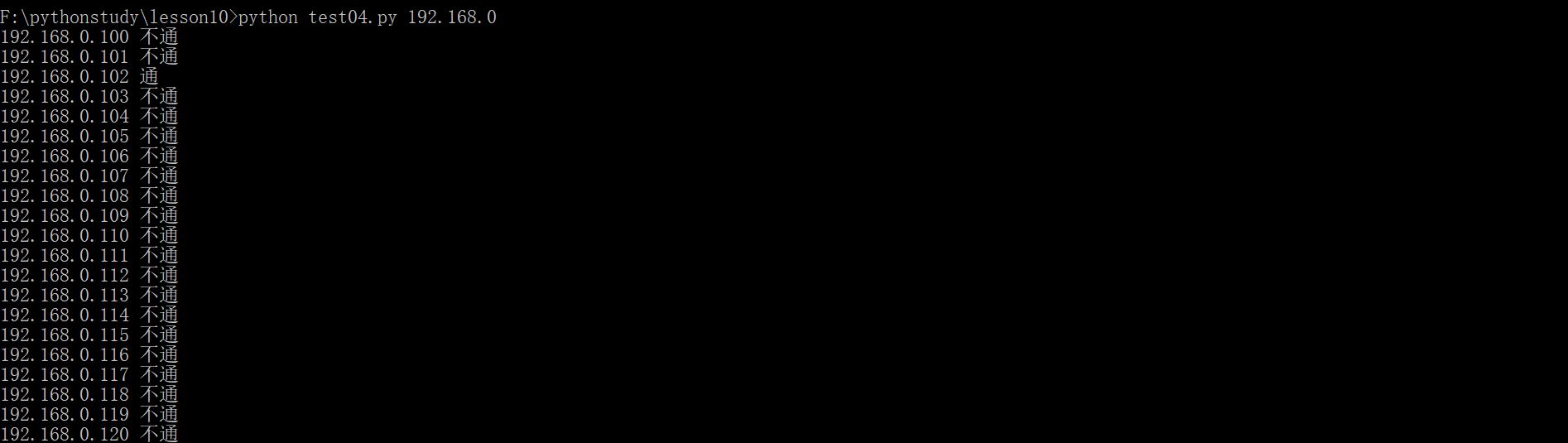
运行效果如下:
在python里面,线程的创建有两种方式,其一使用Thread类创建
导入Python标准库中的Thread模块
from threading import Thread
创建一个线程
mthread = threading.Thread(target=function_name, args=(function_parameter1, function_parameterN))
启动刚刚创建的线程
mthread .start()
function_name: 需要线程去执行的方法名
args: 线程执行方法接收的参数,该属性是一个元组,如果只有一个参数也需要在末尾加逗号。
多线程版:
import sys

import subprocess

import time

from threading import Thread

#在python里面,线程的创建有两种方式,其一使用Thread类创建

# 导入Python标准库中的Thread模块

#from threading import Thread #

# 创建一个线程

#mthread = threading.Thread(target=function_name, args=(function_parameter1, function_parameterN))

# 启动刚刚创建的线程

#mthread .start()

#function_name: 需要线程去执行的方法名

#args: 线程执行方法接收的参数,该属性是一个元组,如果只有一个参数也需要在末尾加逗号。

result=[]

def ping1(ip):

    command="ping %s -n 1 -w 20"%(ip)

    result.append([ip,subprocess.call(command)])

def ping(net,start=100,end=200):

    for i in range(start,end+1):

        ip=net+"."+str(i)

        th=Thread(target=ping1,args=(ip,))

        th.start()

def main():

    if len(sys.argv)!=2:

        print("参数输入错误!")

        print("运行示例:")

        print("test01.py 123.125.114")

    elif len(sys.argv)==2:

        net=sys.argv[1]

        ping(net)

if __name__=='__main__':

    t1=time.time()

    main()

    while len(result)!=101:

        time.sleep(1)

print(result)

t2=time.time()

print("程序耗时%f秒!"%(t2-t1))   #1.585263秒
多线程案例2:爬取股票的价格
多线程

#爬取股票的价格

import requests

import re

import time

from threading import Thread

code=[600016,600000,601939,600036,603683,600050,601890,600795,601857,600584,601231,603165,600644,603005,601198,603690,600643,600131,600776,603609,601377]

m1=re.compile(r"price: '(\d{1,3}\.\d{2}')")

def getprice(id):

    url="http://quotes.money.163.com/0%s.html"%id

    txt=requests.get(url).text

    price=m1.search(txt).group(1)

    print(id,price)

if __name__=="__main__":

    ts=[]

    start=time.time()

    for id in code:

        t=Thread(target=getprice,args=(id,))

        ts.append(t)

        t.start()

    for t in ts:

        t.join()    #等待子线程运行完,主线程再运行

    print("程序耗时:",time.time()-start)
多进程:
爬取股票的价格(多进程版)
#多进程

#爬取股票的价格

import requests

import re

import time

from multiprocessing import Process

from threading import Thread

code=[600016,600000,601939,600036,603683,600050,601890,600795,601857,600584,601231,603165,600644,603005,601198,603690,600643,600131,600776,603609,601377]

m1=re.compile(r"price: '(\d{1,3}\.\d{2}')")

def getprice(id):

    url="http://quotes.money.163.com/0%s.html"%id

    txt=requests.get(url).text

    price=m1.search(txt).group(1)

    print(id,price)

ps=[]   #进程池

if __name__=="__main__":

    start=time.time()

    for id in code:

        p=Process(target=getprice,args=(id,))

        ps.append(p) #把进程放入列表(进程池)

        p.start()   #启动进程

    for p in ps:

        p.join()

    print(time.time()-start)
爬取股票的价格(多进程版)带Pool
#爬取股票的价格

import requests

import re

import time

from multiprocessing import Pool

#多进程带Pool

code=[600016,600000,601939,600036,603683,600050,601890,600795,601857,600584,601231,603165,600644,603005,601198,603690,600643,600131,600776,603609,601377]

m1=re.compile(r"price: '(\d{1,3}\.\d{2}')")

def getprice(id):

    url="http://quotes.money.163.com/0%s.html"%id

    txt=requests.get(url).text

    price=m1.search(txt).group(1)

    print(id,price)

if __name__=="__main__":

    start=time.time()

    p=Pool(4)

    for id in code:

        p.apply_async(getprice,args=(id,))  #async异步,第一个参数是函数名,第二个是此函数的参数

    p.close()

    p.join()    #等待子线程运行完,主线程再运行

    print("程序耗时:",time.time()-start)
python多线程与多进程--存活主机ping扫描以及爬取股票价格的更多相关文章
- Python多线程和多进程谁更快?
python多进程和多线程谁更快 python3.6 threading和multiprocessing 四核+三星250G-850-SSD 自从用多进程和多线程进行编程,一致没搞懂到底谁更快.网上很 ...
- python多线程与多进程及其区别
个人一直觉得对学习任何知识而言,概念是相当重要的.掌握了概念和原理,细节可以留给实践去推敲.掌握的关键在于理解,通过具体的实例和实际操作来感性的体会概念和原理可以起到很好的效果.本文通过一些具体的例子 ...
- Python 多线程、多进程 (三)之 线程进程对比、多进程
Python 多线程.多进程 (一)之 源码执行流程.GIL Python 多线程.多进程 (二)之 多线程.同步.通信 Python 多线程.多进程 (三)之 线程进程对比.多线程 一.多线程与多进 ...
- Python 多线程、多进程 (一)之 源码执行流程、GIL
Python 多线程.多进程 (一)之 源码执行流程.GIL Python 多线程.多进程 (二)之 多线程.同步.通信 Python 多线程.多进程 (三)之 线程进程对比.多线程 一.python ...
- Python 多线程、多进程 (二)之 多线程、同步、通信
Python 多线程.多进程 (一)之 源码执行流程.GIL Python 多线程.多进程 (二)之 多线程.同步.通信 Python 多线程.多进程 (三)之 线程进程对比.多线程 一.python ...
- 基于Windows平台的Python多线程及多进程学习小结
python多线程及多进程对于不同平台有不同的工具(platform-specific tools),如os.fork仅在Unix上可用,而windows不可用,该文仅针对windows平台可用的工具 ...
- 使用 Python 查看局域网内存活主机
1 安装 (如果误用了 pip insatll nmap的话,要先 pip uninstall nmap) pip install python-nmap Nmap 是一款用于网络发现和安全审计的网络 ...
- python 多线程、多进程
一.首先说下多线程.多进程用途及异同点,另外还涉及到队列的,memcache.redis的操作等: 1.在python中,如果一个程序是IO密集的操作,使用多线程:运算密集的操作使用多进程. 但是,其 ...
- python多线程,多进程
线程是公用内存,进程内存相互独立 python多线程只能是一个cpu,java可以将多个线程平均分配到其他cpu上 以核为单位,所以GIL(全局锁,保证线程安全,数据被安全读取)最小只能控制一个核,很 ...
随机推荐
- multipart upload
org.springframework.web.multipart.MultipartException: Could not parse multipart servlet request; nes ...
- Python爬虫的N种姿势
问题的由来 前几天,在微信公众号(Python爬虫及算法)上有个人问了笔者一个问题,如何利用爬虫来实现如下的需求,需要爬取的网页如下(网址为:https://www.wikidata.org/w/ ...
- 根据传智写的SqlHelper
using System; using System.Configuration; using System.Data; using System.Data.SqlClient; namespace ...
- C#异步线程
对需要同时进行的操作进行异步线程处理:例如在一个button按钮点击事件中同时进行两种事件操作private void button_Click(object sender, EventArgs e) ...
- Syncrhonized 和 Lock的区别和使用
相信很多小伙伴们初学多线程的时候会被这两个名词搞晕,所以这里专门介绍这两种实现多线程锁的方式的区别和使用场景 Synchronized 这个关键词大家肯定都不陌生,具体的用法就是使用在对象.类.方法上 ...
- trivial and nontrivial
Trivial A solution or example that is ridiculously simple and of little interest. Often, solutions o ...
- class example of C++
#include <iostream> using namespace std; class Rectangle { int width, height; public: ...
- 面试必会之HashMap源码分析
相关文章 面试必会之ArrayList源码分析 面试必会之LinkedList源码分析 简介 HashMap最早出现在JDK1.2中,底层基于散列算法实现.HashMap 允许 null 键和 nul ...
- 事件处理程序 (DOM0级)
DOM0事件处理程序 每个元素都有自己的事件处理程序属性,那么直接获取对象,然后在对象上设置事件处理程序属性. 1:获取节点对象引用 2:在事件成员上设置处理函数,这时函数内部this指向节点对象. ...
- C#反射、方法调用、自动调用方法、根据按钮名称调用方法、C#按钮权限管理
根据按钮名称,直接调用方法,适用于用户对按钮的操作权限管理. /// <summary> /// 菜单按钮点击事件 /// </summary> void usrMenu1_U ...