
AutoCad 二次开发 文字镜像
AutoCad 二次开发 文字镜像




public class MyMirror

    {

        Document Doc = Application.DocumentManager.MdiActiveDocument;

        Editor Ed = Application.DocumentManager.MdiActiveDocument.Editor;

        Database Db = Application.DocumentManager.MdiActiveDocument.Database;

        List<Entity> list = new List<Entity>();

        List<ObjectId> listOId = new List<ObjectId>();

        [CommandMethod("testM")]

        public void MirrorTextCmd()

        {

            Document doc = Application.DocumentManager.MdiActiveDocument;

            Database db = doc.Database;

            Editor ed = doc.Editor;

            //Entity selection

            PromptEntityOptions peo = new PromptEntityOptions(

                "\nSelect a text entity:");

            peo.SetRejectMessage("\nMust be text entity...");

            peo.AddAllowedClass(typeof(DBText), true);

            PromptEntityResult perText = ed.GetEntity(peo);

            if (perText.Status != PromptStatus.OK)

                return;

            peo = new PromptEntityOptions("\nSelect a mirror line:");

            peo.SetRejectMessage("\nMust be a line entity...");

            peo.AddAllowedClass(typeof(Line), true);

            PromptEntityResult perLine = ed.GetEntity(peo);

            if (perLine.Status != PromptStatus.OK)

                return;

            using (Transaction tr = db.TransactionManager.StartTransaction())

            {

                Line line = tr.GetObject(perLine.ObjectId, OpenMode.ForRead)

                    as Line;

                Line3d mirrorLine = new Line3d(

                    line.StartPoint,

                    line.EndPoint);

                MirrorText(perText.ObjectId, mirrorLine);

                tr.Commit();

            }

        }

        void MirrorText(ObjectId oId, Line3d mirrorLine)

        {

            Database db = oId.Database;

            using (Transaction tr = db.TransactionManager.StartTransaction())

            {

                // Get text entity

                DBText dbText = tr.GetObject(oId, OpenMode.ForRead)

                    as DBText;

                // Clone original entity

                DBText mirroredTxt = dbText.Clone() as DBText;

                // Create a mirror matrix

                Matrix3d mirrorMatrix = Matrix3d.Mirroring(mirrorLine);

                // Do a geometric mirror on the cloned text

                mirroredTxt.TransformBy(mirrorMatrix);

                // Get text bounding box

                Point3d pt1, pt2, pt3, pt4;

                GetTextBoxCorners(

                    dbText,

                    out pt1,

                    out pt2,

                    out pt3,

                    out pt4);

                // Get the perpendicular direction to the original text

                Vector3d rotDir =

                    pt4.Subtract(pt1.GetAsVector()).GetAsVector();

                // Get the colinear direction to the original text

                Vector3d linDir =

                    pt3.Subtract(pt1.GetAsVector()).GetAsVector();

                // Compute mirrored directions

                Vector3d mirRotDir = rotDir.TransformBy(mirrorMatrix);

                Vector3d mirLinDir = linDir.TransformBy(mirrorMatrix);

                //Check if we need to mirror in Y or in X

                if (Math.Abs(mirrorLine.Direction.Y) >

                    Math.Abs(mirrorLine.Direction.X))

                {

                    // Handle the case where text is mirrored twice

                    // instead of doing "oMirroredTxt.IsMirroredInX = true"

                    mirroredTxt.IsMirroredInX = !mirroredTxt.IsMirroredInX;

                    mirroredTxt.Position = mirroredTxt.Position + mirLinDir;

                }

                else

                {

                    mirroredTxt.IsMirroredInY = !mirroredTxt.IsMirroredInY;

                    mirroredTxt.Position = mirroredTxt.Position + mirRotDir;

                }

                // Add mirrored text to database

                //btr.AppendEntity(mirroredTxt);

                //tr.AddNewlyCreatedDBObject(mirroredTxt, true);

                //list.Add(mirroredTxt);

                mirroredTxt.ToSpace();

                tr.Commit();

            }

        }

        #region p/Invoke

        public struct ads_name

        {

            public IntPtr a;

            public IntPtr b;

        };

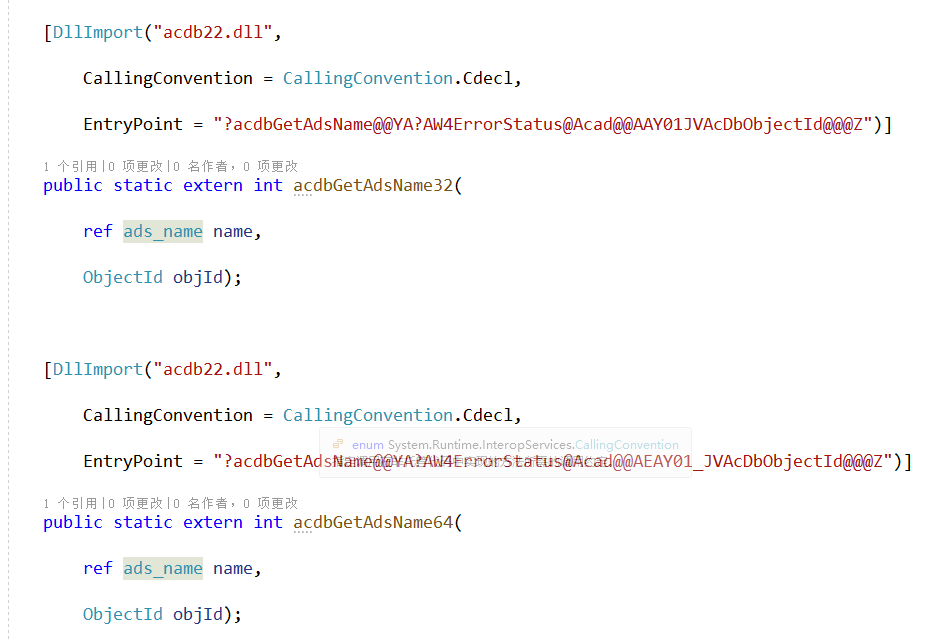
        // Exported function names valid only for R19

        [DllImport("acdb22.dll",

            CallingConvention = CallingConvention.Cdecl,

            EntryPoint = "?acdbGetAdsName@@YA?AW4ErrorStatus@Acad@@AAY01JVAcDbObjectId@@@Z")]

        public static extern int acdbGetAdsName32(

            ref ads_name name,

            ObjectId objId);

        [DllImport("acdb22.dll",

            CallingConvention = CallingConvention.Cdecl,

            EntryPoint = "?acdbGetAdsName@@YA?AW4ErrorStatus@Acad@@AEAY01_JVAcDbObjectId@@@Z")]

        public static extern int acdbGetAdsName64(

            ref ads_name name,

            ObjectId objId);

        public static int acdbGetAdsName(ref ads_name name, ObjectId objId)

        {

            if (Marshal.SizeOf(IntPtr.Zero) > )

                return acdbGetAdsName64(ref name, objId);

            return acdbGetAdsName32(ref name, objId);

        }

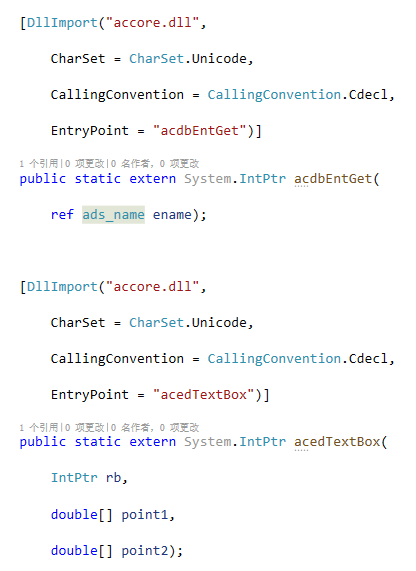
        [DllImport("accore.dll",

            CharSet = CharSet.Unicode,

            CallingConvention = CallingConvention.Cdecl,

            EntryPoint = "acdbEntGet")]

        public static extern System.IntPtr acdbEntGet(

            ref ads_name ename);

        [DllImport("accore.dll",

            CharSet = CharSet.Unicode,

            CallingConvention = CallingConvention.Cdecl,

            EntryPoint = "acedTextBox")]

        public static extern System.IntPtr acedTextBox(

            IntPtr rb,

            double[] point1,

            double[] point2);

        void GetTextBoxCorners(DBText dbText, out Point3d pt1, out Point3d pt2, out Point3d pt3, out Point3d pt4)

        {

            ads_name name = new ads_name();

            int result = acdbGetAdsName(

                ref name,

                dbText.ObjectId);

            ResultBuffer rb = new ResultBuffer();

            Interop.AttachUnmanagedObject(

                rb,

                acdbEntGet(ref name), true);

            double[] point1 = new double[];

            double[] point2 = new double[];

            // Call imported arx function

            acedTextBox(rb.UnmanagedObject, point1, point2);

            pt1 = new Point3d(point1);

            pt2 = new Point3d(point2);

            var ptX = pt1 + Vector3d.XAxis * ;

            var ptY = pt2 + Vector3d.YAxis * ;

            var lX = new Line(pt1, ptX);

            var lY = new Line(pt2, ptY);

            lX.Color= Color.FromColor(System.Drawing.Color.Green);

            lY.Color= Color.FromColor(System.Drawing.Color.Orange);

            Line line = new Line(pt1, pt2);

            line.Color = Color.FromColor(System.Drawing.Color.Red);

            line.ToSpace();

            lX.ToSpace();

            lY.ToSpace();

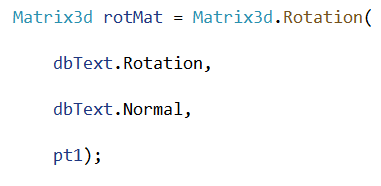
            // Create rotation matrix

            Matrix3d rotMat = Matrix3d.Rotation(

                dbText.Rotation,

                dbText.Normal,

                pt1);

            // The returned points from acedTextBox need

            // to be transformed as follow

            pt1 = pt1.TransformBy(rotMat).Add(dbText.Position.GetAsVector());

            pt2 = pt2.TransformBy(rotMat).Add(dbText.Position.GetAsVector());

            Line linetrans = new Line(pt1, pt2);

            linetrans.Color = Color.FromColor(System.Drawing.Color.Yellow) ;

            linetrans.ToSpace();

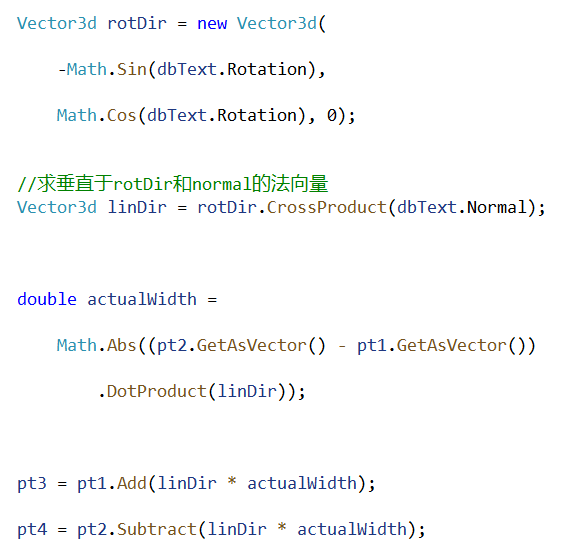
            Vector3d rotDir = new Vector3d(

                -Math.Sin(dbText.Rotation),

                Math.Cos(dbText.Rotation), );

            //求垂直于rotDir和normal的法向量

            Vector3d linDir = rotDir.CrossProduct(dbText.Normal);

            double actualWidth =

                Math.Abs((pt2.GetAsVector() - pt1.GetAsVector())

                    .DotProduct(linDir));

            pt3 = pt1.Add(linDir * actualWidth);

            pt4 = pt2.Subtract(linDir * actualWidth);

            Line linetrans2 = new Line(pt3, pt4);

            linetrans2.Color = Color.FromColor(System.Drawing.Color.Blue);

            linetrans2.ToSpace();

        }

        #endregion

    }
AutoCad 二次开发 文字镜像的更多相关文章
- AutoCAD二次开发——AutoCAD.NET API开发环境搭建
AutoCAD二次开发工具:1986年AutoLisp,1989年ADS,1990年DCL,1993年ADS-RX,1995年ObjectARX,1996年Active X Automation(CO ...
- 1,下载和部署开发环境--AutoCAD二次开发
环境需求为: AutoCAD 2020版 ObjectARX SDK 下载地址:https://www.autodesk.com/developer-network/platform-technolo ...
- AutoCad 二次开发 .net 之层表的增加 删除 修改图层颜色 遍历 设置当前层
AutoCad 二次开发 .net 之层表的增加 删除 修改图层颜色 遍历 设置当前层 AutoCad 二次开发 .net 之层表的增加 删除 修改图层颜色 遍历 设置当前层我理解的图层的作用大概是把 ...
- AutoCad 二次开发 jig操作之标注跟随线移动
AutoCad 二次开发 jig操作之标注跟随线移动 在autocad当中,我认为的jig操作的意思就是即时绘图的意思,它能够实时的显示出当前的操作,以便我们直观的感受到当前的绘图操作是什么样子会有什 ...
- AutoCAD二次开发-使用ObjectARX向导创建应用程序(HelloWorld例子)
AutoCAD2007+vs2005 首先自己去网上搜索下载AutoCAD2007的ARX开发包. 解压后如下 打开后如下 classmap文件夹为C++类和.net类的框架图,是一个DWG文件. d ...
- 我的AutoCAD二次开发之路 (一)
原帖地址 http://379910987.blog.163.com/blog/static/33523797201011184552167/ 今天在改代码的时候,遇到了AddVertexAt方法的用 ...
- Autocad中使用命令来调用python对Autocad二次开发打包后的exe程序
在Autocad中直接调用Python二次开发程序是有必要的,下面介绍一种方法来实现这个功能: 其基本思路是:先将二次开发的程序打包为可执行程序exe,然后编写lsp文件,该文件写入调用exe程序的语 ...
- 承接 AutoCAD 二次开发 项目
本人有多年的CAD开发经验,独立完成多个CAD二次开发项目.熟悉.net及Asp.net开发技术,和Lisp开发技术. 现在成立了工作室,独立承接CAD二次开发项目.结项后提供源码及开发文档,有需要的 ...
- AutoCad 二次开发 .net 之创建Table
我使用了COM对象来在cad2018中创建table表格,需要的ObjectArx开发包可以在官网上下载,并且需要使用.netframework4.6的库才行. 项目里除了引用常规的Cad开发dll, ...
随机推荐
- 利用Veeam保护SAP HANA数据库
利用Veeam保护SAP HANA数据库 前言 针对越来越多的SAP HANA备份需求,我们Team翻译.整理.借鉴了Veeam 的SAP HANA 大神 Clemens Zerbe 和 Ali Sa ...
- Python3+RobotFramework+pycharm环境搭建
我的环境为 python3.6.5+pycharm 2019.1.3+robotframework3.1.2 1.安装python3.x 略 之后在cmd下执行:pip install robot ...
- linux+jenkins+postman持续集成
环境搭建:linux上安装newman,部署好jenkins linux上war包方式安装Jenkins 以下实现jenkins上执行postman测试脚本: 1.新建一个自动风格的job 2.构建- ...
- JVM 垃圾收集与内存分配
判断对象是否还活着 引用计数法 给对象添加引用计数器,添加加1,引用失效减1,如果为0就是不可使用的.问题是不能解决互相引用带来的问题 可达性分析法 以GC Roots为起点,判断到一个对象是否有引用 ...
- Knative 实战:如何在 Knative 中配置自定义域名及路由规则
作者 | 元毅 阿里云智能事业群高级开发工程师 当前 Knative 中默认支持是基于域名的转发,可以通过域名模板配置后缀,但目前对于用户来说并不能指定全域名设置.另外一个问题就是基于 Path 和 ...
- Xbim.GLTF源码解析(四):轻量化处理
原创作者:flowell,转载请标明出处:https://www.cnblogs.com/flowell/p/10839433.html 在IFC标准中,由IfcRepresentationMap支持 ...
- 设计模式C++描述----13.代理(Proxy)模式
一. 举例说明 我们有时打开一个网站时会发现有这样的现象,网站上的文字都显示出来了,但是上面的图片还没显示,要等一会才能显示. 这些未打开的图片的位置上,还是会有图片框和一些等待的信息的,这就是代理模 ...
- 找不到 cucumber.api.cli.Main 的报错解决方案
最近玩IDEA,发现导入的项目有问题,报了一个“找不到或者不存在cucumber.api.cli.Main”的错误. 后来发现是新版的IDEA在导入时没有提示,以至于我没有配置项目对应的Tomcat服 ...
- 使用promise封装ajax
直接上代码: function Ajax(method, headers, url, data, progress = null) { return new Promise(function (res ...
- PowerBI开发 第十六篇:PowerBI Service基本概念
从总体上来看,PowerBI Service 有4个主要的构建模块,分别是dashboards.reports.workbooks 和 datasets,这四个模块都是目录,位于workspaces目 ...