
【原创】从零开始搭建Electron+Vue+Webpack项目框架,一套代码,同时构建客户端、web端(二)
导航:
(一)Electron跑起来
(二)从零搭建Vue全家桶+webpack项目框架
(三)Electron+Vue+Webpack,联合调试整个项目
(四)Electron配置润色
(五)预加载及自动更新
(六)构建、发布整个项目(包括client和web)
摘要:上篇文章说到了如何新建工程,并启动一个最简单的Electron应用。“跑起来”了Electron,那就接着把Vue“跑起来”吧。有一点需要说明的是,webpack是贯穿这个系列始终的,我也是本着学习的态度,去介绍、总结一些常用到的配置及思路,有不恰当的地方,或者待优化的地方,欢迎留言。项目完整代码:https://github.com/luohao8023/electron-vue-template
下面开始~~~

import Vue from 'vue';

import index from './views/index.vue';

//取消 Vue 所有的日志与警告

Vue.config.silent = true;

new Vue({

    el: '#app',

    render: h => h(index)

});
2、编写根组件,render>views>index.vue
<template>

    <div class="content">

        <h1>Welcome to electron-vue-template!</h1>

    </div>

</template>

<script>

export default {}

</script>

<style></style>
3、编写html模板文件,render>index.ejs,webpack解析、打包vue文件时,以此模板生成html文件
<!DOCTYPE html>

<html lang="zh-CN">

<!--template for 2019年10月30日-->

<!--<%= new Date().getFullYear()+'/'+(new Date().getMonth()+1)+'/'+new Date().getDate()+' '+new Date().getHours()+':'+new Date().getMinutes() %>-->

<head>

    <meta charset="UTF-8">

    <title>模板文件</title>

    <meta name="viewport" content="width=device-width,initial-scale=1.0,maximum-scale=1.0,user-scalable=0">

    <meta HTTP-EQUIV="pragma" CONTENT="no-cache">

    <meta HTTP-EQUIV="Cache-Control" CONTENT="no-store, must-revalidate">

    <meta HTTP-EQUIV="expires" CONTENT="Wed, 26 Feb 1997 08:21:57 GMT">

    <meta HTTP-EQUIV="expires" CONTENT="0">

</head>

<body>

    <div id="app"></div>

</body>

</html>
4、编写webpack配置文件,builder>webpack.render.config.js,建议按照本文这种方式,把配置文件单独抽出来,这样的话,本地调试和打包可以共用一套配置,只需要传递不同参数就可以了,不要把所有的配置和打包逻辑写在一个文件里,太长、太乱、太难维护
/*

Name:    渲染进程配置

Author: haoluo

Date:   2019-10-30

 */

const path = require('path');

const HtmlWebpackPlugin = require('html-webpack-plugin');

const devMode = process.env.NODE_ENV === 'development';

module.exports = {

    mode: devMode ? 'development' : 'production',

    entry: {

        main: './src/render/index.js'

    },

    output: {

        path: path.join(__dirname, '../app/'),

        publicPath: devMode ? '/' : '',

        filename: './js/[name].[hash:8].js'

    },

    module: {

        rules: [

            {

                test: /\.vue$/,

                exclude: /node_modules/,

                loader: 'vue-loader'

            }

        ]

    },

    plugins: [

        new HtmlWebpackPlugin({

            template: './src/render/index.ejs',

            filename: './index.html',

            title: 'electron-vue-template',

            inject: false,

            hash: true,

            mode: devMode

        })

    ]

}
适当解释一下:
mode:环境参数,针对不同的环境,webpack内部有一些不同的机制,并对相应环境做相应的优化
entry:入口,webpack执行构建的第一步将从入口文件开始,递归查询并解析所有依赖的模块。配置方式有多种,可参考webpack文档,这里我们配置的路径是'./src/render/index.js',意思是src目录下,render文件夹下的index.js,而webpack配置文件是在builder文件夹下,那这个“./”的相对路径到底是相对于谁呢?这就得说一下webpack中的路径问题了,context 是 webpack 编译时的基础目录,入口起点(entry)会相对于此目录查找,那这个context又是个什么东西?webpack源码有关默认配置中有这么一句话
this.set("context", process.cwd());
这就是context的默认值,工程的根目录,那这个entry的配置就很好理解了。
output:打包的输入配置,路径建议设置为绝对路径。
module和plugins就不多说了。
5、编写本地调试脚本
/**

* Tip:    调试渲染进程

* Author: haoluo

* Data:   2019-10-30

**/

process.env.NODE_ENV = 'development';

const webpack = require('webpack');

const WebpackDevServer = require('webpack-dev-server');

const webpackHotMiddleware = require('webpack-hot-middleware');

const chalk = require('chalk');
const http = require('http');
function devRender() {

    console.log('启动渲染进程调试......');

    const webpackDevConfig = require('./webpack.render.config.js');

    const compiler = webpack(webpackDevConfig);

    new WebpackDevServer(

        compiler, {

            contentBase: webpackDevConfig.output.path,

            publicPath: webpackDevConfig.output.publicPath,

            open: true,//打开默认浏览器

            inline: true,//刷新模式

            hot: true,//热更新

            quiet: true,//除第一次编译外,其余不显示编译信息

            progress: true,//显示打包进度

            setup(app) {

                app.use(webpackHotMiddleware(compiler));

                app.use('*', (req, res, next) => {

                    if (String(req.originalUrl).indexOf('.html') > 0) {

                        getHtml(res);

                    } else {

                        next();

                    }

                });

            }

        }

    ).listen(8099, function(err) {

        if (err) return console.log(err);

        console.log(`Listening at http://localhost:8099`);

    });

    compiler.hooks.done.tap('doneCallback', (stats) => {

        const compilation = stats.compilation;

        Object.keys(compilation.assets).forEach(key => console.log(chalk.blue(key)));

        compilation.warnings.forEach(key => console.log(chalk.yellow(key)));

        compilation.errors.forEach(key => console.log(chalk.red(`${key}:${stats.compilation.errors[key]}`)));

        console.log(chalk.green(`${chalk.white('渲染进程调试完毕\n')}time:${(stats.endTime-stats.startTime)/1000} s`));

    });

}

function getHtml(res) {

    http.get(`http://localhost:8099`, (response) => {

        response.pipe(res);

    }).on('error', (err) => {

        console.log(err);

    });

}

devRender();
都是一些常规操作,可以阅读一下代码。
6、配置启动命令,在package.json中新增dev命令,启动本地调试(先起了再说,报错什么的,见招拆招)
  "scripts": {

    "start": "electron ./src/main/main.js",

    "dev": "node ./builder/dev.js"

  },
然后命令行运行npm run dev。。。。。。反正我这儿是报错了。。。说是找不到html-webpack-plugin模块,那就运行npm i html-webpack-plugin -D安装一下,如果步骤一没有做的话,后面可能还会遇到很多模块找不到的情况,解决方法很简单,缺什么安装什么就好了。安装完所有的模块之后,启动,还是报错了。。。。。。
ModuleNotFoundError: Module not found: Error: Can't resolve 'vue' in ...

ModuleNotFoundError: Module not found: Error: Can't resolve 'vue-loader' in ...
检查了下package.json文件和node_modules,发现我的vue-loader没有装,然后就是装一下(如果没有遇到这个步骤,可以忽略)
再次运行

这个报错就很友好了吗,就是vue-loader告诉你,必须安装vue-template-compiler插件,不然就不工作,那就装一下。
接着运行,就知道没那么容易成功
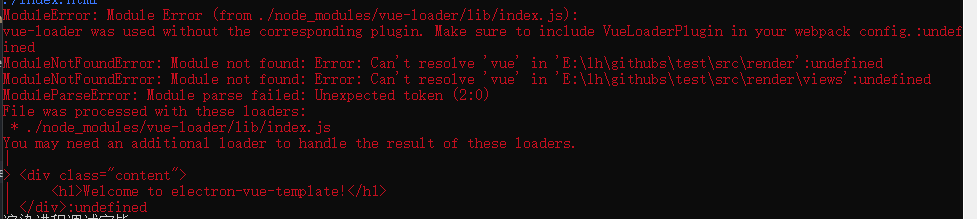
vue-loader报错说缺少了插件,让检查是否配置了VueLoaderPlugin插件,搜一下这是个什么鬼,看这里,15+版本的vue-loader需要配合VueLoaderPlugin使用,然后看了一下我使用的vue-loader版本15.7.1,那就配一下这个东西。


接着运行,终于没有报错了,但是页面为啥子是白的,我的h1标签呢?冷静下来分析一下问题,页面没有东西说明我打包时生成的html文件有问题(devServer会把打包出来的静态文件保存在内存里),而html文件是根据ejs模板生成的,那会不会是模板配置有问题?

看一下我们的模板,结构是没什么问题啊,但是,没有引用css和js文件啊,也就是我们辛辛苦苦解析vue文件,打包css和js,最后却没有引用。。。好吧,那就再配置一下ejs模板,把相应的文件引入一下
<!DOCTYPE html>

<html lang="zh-CN">

<!--template for 2019年10月30日-->

<!--<%= new Date().getFullYear()+'/'+(new Date().getMonth()+1)+'/'+new Date().getDate()+' '+new Date().getHours()+':'+new Date().getMinutes() %>-->

<%

function getFilePath(filename,libsPath){

    let _filenameSearchIndex=filename.indexOf("?");

    let _libsPathSearchIndex=libsPath.indexOf("?");

    let _filename=filename.substr(0,_filenameSearchIndex<1?filename.length:_filenameSearchIndex);

    let _libsPath=libsPath.substr(0,_libsPathSearchIndex<1?libsPath.length:_libsPathSearchIndex);

    let htmlfilename=path.relative(_filename,_libsPath);

    return libsPath;

}

let path = require('path'),jsArr = [],cssArr = [];

let filename="./index.html";

    //修正目录结构

    for(let i=0;i<htmlWebpackPlugin.files.css.length;i++){

        let name=getFilePath(filename,String(htmlWebpackPlugin.files.css[i]));

        cssArr.push(name);

    }

    for(let i=0;i<htmlWebpackPlugin.files.js.length;i++){

        let name=getFilePath(filename,String(htmlWebpackPlugin.files.js[i]));

        jsArr.push(name);

    }

%>

<head>

    <meta charset="UTF-8">

    <title><%= htmlWebpackPlugin.options.title %></title>

    <meta name="viewport" content="width=device-width,initial-scale=1.0,maximum-scale=1.0,user-scalable=0">

    <meta HTTP-EQUIV="pragma" CONTENT="no-cache">

    <meta HTTP-EQUIV="Cache-Control" CONTENT="no-store, must-revalidate">

    <meta HTTP-EQUIV="expires" CONTENT="Wed, 26 Feb 1997 08:21:57 GMT">

    <meta HTTP-EQUIV="expires" CONTENT="0">

    <% cssArr.forEach(css=>{ %><link rel="stylesheet" href="<%= css %>" />

    <% }) %>

</head>

<body>

    <div id="app"></div>

    <% jsArr.forEach(js=>{ %><script type="text/javascript" src="<%= js %>"></script>

    <% }) %>

</body>

</html>
我们可以在ejs中拿到html-webpack-plugin插件的一些信息,比如插件配置、生成的文件等,然后拿到js和css文件,并引入进来,这里建议看一下ejs模板语法。
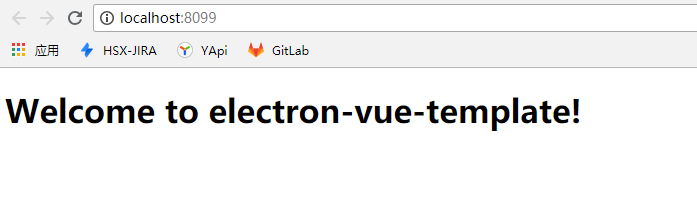
我们接着运行,终于出来了。
7、配置打包脚本
在builder文件夹下新建build.js,引入配置,直接运行webpack打包即可,不需要devServer。
/**

* Tip:    打包

* Author: haoluo

* Data:   2019-10-30

**/

process.env.NODE_ENV = 'production';

const chalk = require("chalk");

const del = require("del");

const webpack = require('webpack');

const renderConfig = require('./webpack.render.config.js');

del(["./app/*"]); //删除历史打包数据

viewBuilder().then(data => {

    console.log("打包输出===>", data)

}).catch(err => {

    console.error("打包出错,输出===>", err);

    process.exit(1);

});

function viewBuilder() {

    return new Promise((resolve, reject) => {

        console.log("打包渲染进程......");

        const renderCompiler = webpack(renderConfig);

        renderCompiler.run((err, stats) => {

            if (err) {

                console.log("打包渲染进程遇到Error!");

                reject(chalk.red(err));

            } else {

                let log = "";

                stats.compilation.errors.forEach(key => {

                    log += chalk.red(`${key}:${stats.compilation.errors[key]}`) + "\n";

                })

                stats.compilation.warnings.forEach(key => {

                    log += chalk.yellow(key) + "\n";

                })

                Object.keys(stats.compilation.assets).forEach(key => {

                    log += chalk.blue(key) + "\n";

                })

                log += chalk.green(`time:${(stats.endTime-stats.startTime)/1000} s\n`) + "\n";

                resolve(`${log}`);

            }

        })

    })

}
在package.json中新增打包命令
"scripts": {

    "start": "electron ./src/main/main.js",

    "dev": "node ./builder/dev.js",

    "build": "node ./builder/build.js"

  },
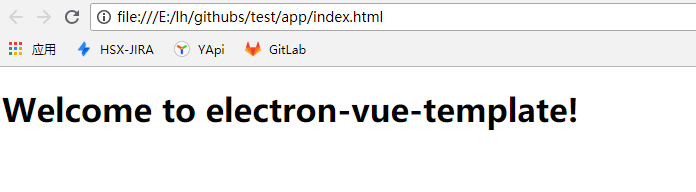
npm run build执行打包,这次还真是出奇的顺利啊,看一下app文件夹,已经生成了静态文件,然后直接在浏览器打开index.html文件,正常显示。
四、使用vuex,vue-router,axios
说好的全家桶呢,这里我们不用vue-resource了,使用axios。
1、使用vuex
安装vuex依赖,在src>render文件夹下新建store文件夹,并在store文件夹下新增:
actions.js
export default {}
index.js
import Vue from 'vue';

import Vuex from 'vuex';

import actions from './actions.js';

import mutations from './mutations.js';

Vue.use(Vuex);

// 这里为全局的,模块内的请在模块内动态注册

const store = new Vuex.Store({

    strict: true,

    state: {

        userInfo: {

            name: 'haoluo',

            address: 'beijing'

        }

    },

    getters: {},

    mutations,

    actions

});

export default store;
mutations.js
export default {

    //设置用户信息

    setUserInfo(state, config) {

        if (!config) {

            state.userInfo = {};

        }

        for (var objName in config) {

            state.userInfo[objName] = config[objName];

        }

    }

}
以上三个文件的实力代码,比官网教程还简单,可以自行研究一下文档。
文件建好之后,需要把store挂载到vue实例上,找到vue工程的入口文件,src>render>index.js
import Vue from 'vue';

import store from './store/index.js';

import index from './views/index.vue';

//取消 Vue 所有的日志与警告

Vue.config.silent = true;

new Vue({

    el: '#app',

    store: store,

    render: h => h(index)

});
然后我们就可以使用啦,找到根组件,src>render>views>index.vue
<template>

    <div class="content">

        <h1>Welcome to electron-vue-template!</h1>

        <h2>name:{{userInfo.name}}</h2>

        <h2>address:{{userInfo.address}}</h2>

    </div>

</template>

<script>

import {mapState} from 'vuex';

export default {

    computed: {

        ...mapState(['userInfo'])

    }

}

</script>

<style></style>
mapState是state的辅助函数,是个语法糖,借助mapState我们可以更方面的获取属性,而不需要写一堆啰里吧嗦的东西,通过计算属性computed接收userInfo,然后就可以使用啦,运行本地调试,发现页面上已经可以正常显示了

属性有了之后我们可以使用,但如果想要改变vuex中存储的属性呢?为了保证单向数据流以及方便对数据的追踪等一些其他原因,不建议直接修改vuex的属性,而是需要通过mutations,这里也有一个辅助函数mapMutations,用法同mapState类似,只不过需要用methods去接收,作为一个全局方法使用
<!-- render>views>index.vue -->

<template>

    <div class="content">

        <h1>Welcome to electron-vue-template!</h1>

        <h2>name:{{userInfo.name}}</h2>

        <h2>address:{{userInfo.address}}</h2>

        <button @click="changeAddress">设置address为tianjin</button>

    </div>

</template>

<script>

import {mapState,mapMutations} from 'vuex';

export default {

    computed: {

        ...mapState(['userInfo'])

    },

    methods: {

        ...mapMutations(['setUserInfo']),

        changeAddress() {

            this.setUserInfo({

                address: 'tianjin'

            });

        }

    }

}

</script>

<style></style>
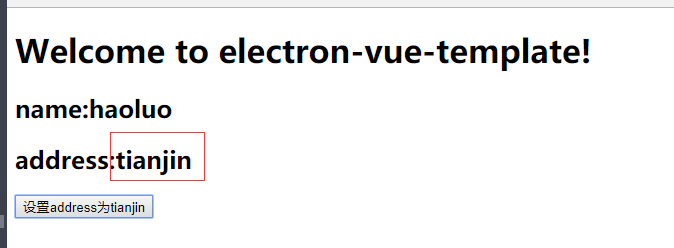
当点击按钮的时候。userInfo中的address被修改了,页面渲染的值也相应的改变了
2、使用vue-router
安装vue-router依赖,在render文件夹下新增router文件夹,并在其中新增index.js
module.exports = [

    {

        path: '/index.html',

        name: 'index',

        meta: {

            title: '首页',

            author: '--',

            parentRouter: '--'

        },

        component: (resolve) => {

            require.ensure([], () => {

                return resolve(require('../views/index.vue'))

            }, "index")

        },

        children: []

    }

];
在入口文件render>index.js中引入并挂载
// render>index.js

import Vue from 'vue';

import VueRouter from 'vue-router';

import store from './store/index.js';

import routers from './router/index.js';

import index from './views/index.vue';

Vue.use(VueRouter);

let router = new VueRouter({

    routes: routers

})

//取消 Vue 所有的日志与警告

Vue.config.silent = true;

new Vue({

    el: '#app',

    router: router,

    store: store,

    render: h => h(index)

});
运行一下,页面可以正常显示,在地址栏输入http://localhost:8099/index.html时,也是没有问题的,现在新增加一个页面,订单页
<template>

    <div class="content">

        <h1>order page!</h1>

    </div>

</template>

<script>

export default {}

</script>

<style></style>
再配置下路由
module.exports = [

    {

        path: '/index.html',

        name: 'index',

        meta: {

            title: '首页',

            author: '--',

            parentRouter: '--'

        },

        component: (resolve) => {

            require.ensure([], () => {

                return resolve(require('../views/index.vue'))

            }, "index")

        },

        children: []

    },

    {

        path: '/order.html',

        name: 'order',

        meta: {

            title: '订单页',

            author: '--',

            parentRouter: '--'

        },

        component: (resolve) => {

            require.ensure([], () => {

                return resolve(require('../views/order.vue'))

            }, "order")

        },

        children: []

    }

];
并在首页index.vue中增加跳转按钮,运行之后,发现跳不过去,尴尬~~~,路由跳转,需要有<router-view></router-view>去接收才行啊
改造一下吧,views下新增home.vue,把index.vue中的内容拷贝过去,index.vue改为下面这样
<!-- render>views>index.vue -->

<template>

    <div>

        <router-view></router-view>

    </div>

</template>

<script>

export default {

    methods: {},

    mounted() {

        this.$router.push({

            name: 'home'

        });

    }

}

</script>

<style></style>
router文件改为下面这样
module.exports = [

    {

        path: '/index.html',

        name: 'index',

        meta: {

            title: '首页',

            author: '--',

            parentRouter: '--'

        },

        component: (resolve) => {

            require.ensure([], () => {

                return resolve(require('../views/index.vue'))

            }, "index")

        },

        children: [

            {

                path: '/home.html',

                name: 'home',

                meta: {

                    title: 'home页',

                    author: '--',

                    parentRouter: '--'

                },

                component: (resolve) => {

                    require.ensure([], () => {

                        return resolve(require('../views/home.vue'))

                    }, "home")

                },

                children: []

            },

            {

                path: '/order.html',

                name: 'order',

                meta: {

                    title: '订单页',

                    author: '--',

                    parentRouter: '--'

                },

                component: (resolve) => {

                    require.ensure([], () => {

                        return resolve(require('../views/order.vue'))

                    }, "order")

                },

                children: []

            }

        ]

    }

];
再次运行,页面已经可以正常跳转了。
3、axios,这里暂时不说,后续electron和vue联调的时候会补上。
几点说明:
1、截止目前,webpack配置以及dev和build脚本仅仅是调通大致的流程,还有很多可优化可考究的地方,后续完善项目的过程中会对打包流程逐渐润色;
2、vue全家桶在实际项目中高级用法很多,细节也很多,这里只是最简单的用法,如若用到实际项目中,还要基于目前情况再做细化;
3、本系列文章旨在记录、回顾整个项目框架搭建流程,把握整体结构,很多地方需要根据实际项目再做处理;
4、如有错误或不当的地方,欢迎指出,共同进步!
【原创】从零开始搭建Electron+Vue+Webpack项目框架,一套代码,同时构建客户端、web端(二)的更多相关文章
- 【原创】从零开始搭建Electron+Vue+Webpack项目框架(五)预加载和Electron自动更新
导航: (一)Electron跑起来(二)从零搭建Vue全家桶+webpack项目框架(三)Electron+Vue+Webpack,联合调试整个项目(四)Electron配置润色(五)预加载及自动更 ...
- 【原创】从零开始搭建Electron+Vue+Webpack项目框架(六)Electron打包,同时构建客户端和web端
导航: (一)Electron跑起来(二)从零搭建Vue全家桶+webpack项目框架(三)Electron+Vue+Webpack,联合调试整个项目(四)Electron配置润色(五)预加载及自动更 ...
- 从零开始搭建Electron+Vue+Webpack项目框架,一套代码,同时构建客户端、web端(一)
摘要:随着前端技术的飞速发展,越来越多的技术领域开始被前端工程师踏足.从NodeJs问世至今,各种前端工具脚手架.服务端框架层出不穷,“全栈工程师”对于前端开发者来说,再也不只是说说而已.在NodeJ ...
- vue-用Vue-cli从零开始搭建一个Vue项目
Vue是近两年来比较火的一个前端框架(渐进式框架吧). Vue两大核心思想:组件化和数据驱动.组件化就是将一个整体合理拆分为一个一个小块(组件),组件可重复使用:数据驱动是前端的未来发展方向,释放了对 ...
- 搭建自己的Webpack项目
五,搭建自己的Webpack项目 https://www.jianshu.com/p/42e11515c10f
- [原]Jenkins(七)---jenkins项目编译测试发布由maven构建的web项目
/** * lihaibo * 文章内容都是根据自己工作情况实践得出. * 版权声明:本博客欢迎转发,但请保留原作者信息! http://www.cnblogs.com/horizonli/p/533 ...
- 从零开始:一个正式的vue+webpack项目的目录结构是怎么形成的
如何从零开始一个vue+webpack前端工程工作流的搭建,首先我们先从项目的目录结构入手.一个持续可发展,不断加入新功能,方便后期维护的目录结构究竟是长什么样子的?接下来闰土大叔带你们一起手摸手学起 ...
- (转)windows环境vue+webpack项目搭建
首先,vue.js是一种前端框架,一般利用vue创建项目是要搭配webpack项目构建工具的,而webpack在执行打包压缩的时候是依赖node.js的环境的,所以,要进行vue项目的开发,我们首先要 ...
- #单元测试#以karma+mocha+chai 为测试框架的Vue webpack项目(一)
目标: 为已有的vue项目搭建 karma+mocha+chai 测试框架 编写组件测试脚本 测试运行通过 抽出共通 一.初始化项目 新建项目文件夹并克隆要测试的已有项目 webAdmin-web 转 ...
随机推荐
- Java中的static(1)【持续更新】——关于Eclipse的No enclosing instance of type ... 错误的理解和改正
No enclosing instance of type SomeClass is accessible. Must qualify the allocation with an enclosing ...
- 3D漫游的分类 3D Navigation Taxonomy
在2001年CHI发表的论文中1,Tan等人提出了一种对3D漫游的分类方法. 当时关于3D漫游(3D Navigation)的研究主要分为两种:一种是发掘有关漫游的认知原则,一种是开发一些具体的漫游技 ...
- 检测MySQL主从是否异常
#!bin/bash user='root' passwd="123" host="192.168.192.156" mycmd="mysql -u$ ...
- FTP协议的主动模式和被动模式的区别
最近准备做一个<FtpCopy系列教程>,主要讲解Ftp协议主动模式和被动模式的区别.以及FTP服务器的安装部署,然后通过几个常用实例演示,详细讲解如何使用FtpCopy进行数据自动备份. ...
- Flutter中TabBarView切换状态保存
TabBarView 类似于Android中的viewPager,但是默认是没有实现切换分页状态保存的.估计是出于节约内存的原因吧. 发现这个问题的时候,搜索了一下全网.大致就两种解决方案,1是修改源 ...
- Redis对象——字符串
文章导航-readme 前言 上一篇文章Redis之对象篇--Redis对象系统简介简单介绍了Redis的对象系统.Redis使用对象来表示数据库中的键和值每个对象都由一个redisObjec ...
- request.getAttribute()和request.getParameter()
request.getParameter()取得是通过容器的实现来取得通过类似post,get等方式传入的数据,request.setAttribute()和getAttribute()只是在web容 ...
- 包名targetPackage和目录名targetProject
generatorConfig.xml中的 <javaModelGenerator targetPackage="edu.cn.pojo" targetProject=&qu ...
- python爬虫之基本类库
简单梳理一下爬虫原理: 1.发送请求 通过HTTP库向目标站点发起请求,即发送一个Request,请求可以包含额外的headers等信息,等待服务器响应. 2.获取响应内容 如果服务器能正常响应(正常 ...
- react16 路由按需加载、路由权限配置
1. 路由按需加载: 不做按需加载,代码全部打包在bundle.js 文件里,首屏渲染很慢,项目文件较多,会出现1分钟加载的可能性. import React, { Component } from ...