
pandas-21 Series和Dataframe的画图方法
pandas-21 Series和Dataframe的画图方法
前言
在pandas中,无论是series还是dataframe都内置了.plot()方法,可以结合plt.show()进行很方便的画图。
Series.plot() 和 Dataframe.plot()参数
data : Series
kind : str
‘line’ : line plot (default)
‘bar’ : vertical bar plot
‘barh’ : horizontal bar plot
‘hist’ : histogram
‘box’ : boxplot
‘kde’ : Kernel Density Estimation plot
‘density’ : same as ‘kde’
‘area’ : area plot
‘pie’ : pie plot
指定画图的类型,是线形图还是柱状图等
label 添加标签
title 添加标题
……(后接一大堆可选参数)
详情请查阅:[官方文档传送门](http://pandas.pydata.org/pandas-docs/stable/reference/api/pandas.Series.plot.html?highlight=series plot#pandas.Series.plot)
Dataframe.plot()参数 也是大同小异:
详情请查阅:官方文档传送门
Series.plot()代码demo
import matplotlib.pyplot as plt

import pandas as pd

import numpy as np

from  pandas import Series

# 创建一个随机种子, 把生成的值固定下来

np.random.seed(666)

s1 = Series(np.random.randn(1000)).cumsum()

s2 = Series(np.random.randn(1000)).cumsum()

# series 中 也包含了 plot 方法

s1.plot(kind = 'line', grid = True, label = 'S1', title = 'xxx')

s2.plot(label = 's2')

plt.legend()

plt.show() # 图1

# 通过 子图的 方式,可视化 series

figure, ax = plt.subplots(2, 1)

ax[0].plot(s1)

ax[1].plot(s2)

plt.legend()

plt.show() # 图2

# 通过 series中的plot方法进行指定是哪一个子图

fig, ax = plt.subplots(2, 1)

s1.plot(ax = ax[1], label = 's1')

s2.plot(ax = ax[0], label = 's2')

plt.legend()

plt.show() # 图3

1234567891011121314151617181920212223242526272829303132333435
图1:

图2:
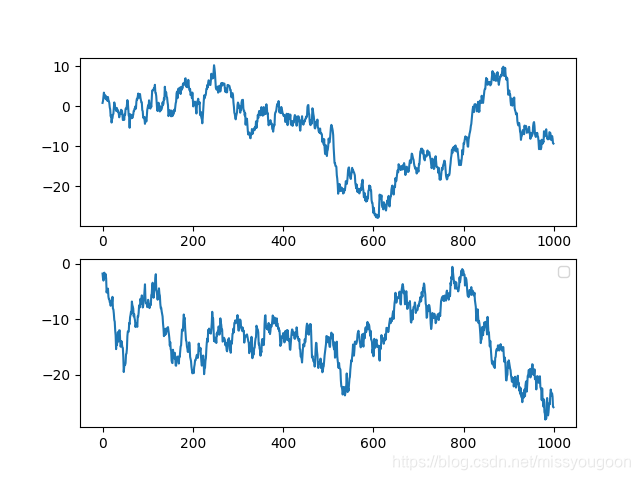
图3:
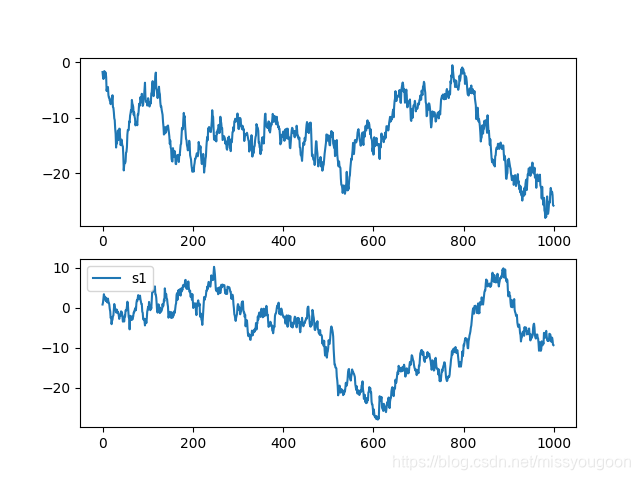
Dataframe.plot()代码demo
import numpy as np

import pandas as pd

import matplotlib.pyplot as plt

from pandas import Series, DataFrame

np.random.seed(666)

df = DataFrame(

    np.random.randint(1, 10, 40).reshape(10, 4),

    columns = ['A', 'B', 'C', 'D']

)

print(df)

'''

   A  B  C  D

0  3  7  5  4

1  2  1  9  8

2  6  3  6  6

3  5  9  5  5

4  1  1  5  1

5  5  6  8  2

6  1  1  7  7

7  1  4  3  3

8  7  1  7  1

9  4  7  4  3

'''

# Dataframe 也有个内置方法 plot

df.plot(kind = 'bar') # kind = 'bar'

plt.show() # 图1

# 横向的柱状图

df.plot(kind = 'barh') # kind = 'barh' 可以是一个横向的柱状图

plt.show() # 图2

# 将每个column的柱状图堆叠起来

df.plot(kind = 'bar', stacked = True)

plt.show() # 图3

# 填充的图

df.plot(kind = 'area')

plt.show() # 图4

# 可以进行选择

b = df.iloc[6] # 这时候的b是一个series

b.plot() # 可以看出x轴就是colume的name

plt.show() # 图5

# 可以将所有的行全部画在一张图里

for i in df.index:

    df.iloc[i].plot(label = str(i))

plt.legend()

plt.show() # 图6

# 对一列进行画图

df['A'].plot()

plt.show() # 图7

# 多列画图,同上

# 注意:默认是按照column来进行画图的,

# 如果需要按照 index 画图,可以将 dataframe 转置一下

df.T.plot()

plt.show() # 图8

1234567891011121314151617181920212223242526272829303132333435363738394041424344454647484950515253545556575859606162
图1:

图2:

图3:

图4:

图5:
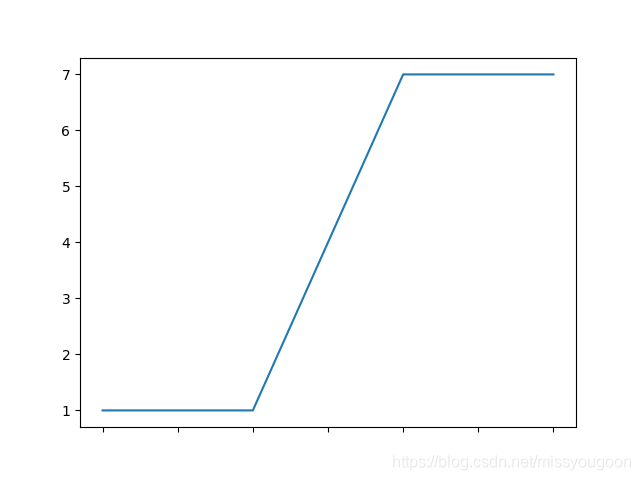
图6:
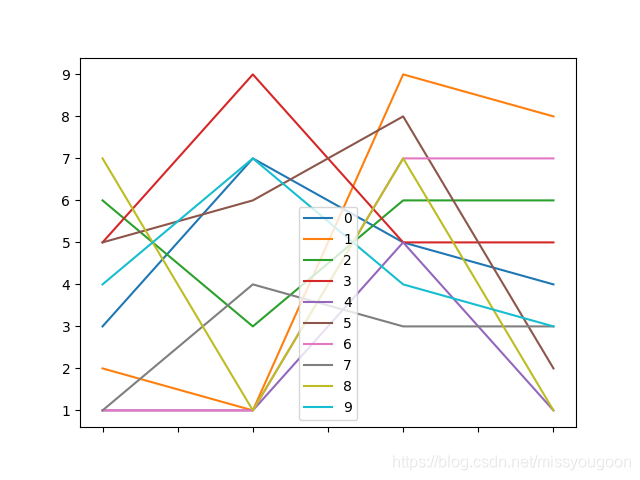
图7:

图8:

pandas-21 Series和Dataframe的画图方法的更多相关文章
- 利用Python进行数据分析(7) pandas基础: Series和DataFrame的简单介绍
一.pandas 是什么 pandas 是基于 NumPy 的一个 Python 数据分析包,主要目的是为了数据分析.它提供了大量高级的数据结构和对数据处理的方法. pandas 有两个主要的数据结构 ...
- Python之Pandas中Series、DataFrame
Python之Pandas中Series.DataFrame实践 1. pandas的数据结构Series 1.1 Series是一种类似于一维数组的对象,它由一组数据(各种NumPy数据类型)以及一 ...
- Python之Pandas中Series、DataFrame实践
Python之Pandas中Series.DataFrame实践 1. pandas的数据结构Series 1.1 Series是一种类似于一维数组的对象,它由一组数据(各种NumPy数据类型)以及一 ...
- 利用Python进行数据分析(8) pandas基础: Series和DataFrame的基本操作
一.reindex() 方法:重新索引 针对 Series 重新索引指的是根据index参数重新进行排序. 如果传入的索引值在数据里不存在,则不会报错,而是添加缺失值的新行. 不想用缺失值,可以用 ...
- pandas基础: Series和DataFrame的简单介绍
一.pandas 是什么 pandas 是基于 NumPy 的一个 Python 数据分析包,主要目的是为了数据分析.它提供了大量高级的数据结构和对数据处理的方法. pandas 有两个主要的数据结构 ...
- pandas学习series和dataframe基础
PANDAS 的使用 一.什么是pandas? 1.python Data Analysis Library 或pandas 是基于numpy的一种工具,该工具是为了解决数据分析人物而创建的. 2.p ...
- Pandas中Series和DataFrame的索引
在对Series对象和DataFrame对象进行索引的时候要明确这么一个概念:是使用下标进行索引,还是使用关键字进行索引.比如list进行索引的时候使用的是下标,而dict索引的时候使用的是关键字. ...
- [Python] Pandas 中 Series 和 DataFrame 的用法笔记
目录 1. Series对象 自定义元素的行标签 使用Series对象定义基于字典创建数据结构 2. DataFrame对象 自定义行标签和列标签 使用DataFrame对象可以基于字典创建数据结构 ...
- Python数据分析-Pandas(Series与DataFrame)
Pandas介绍: pandas是一个强大的Python数据分析的工具包,是基于NumPy构建的. Pandas的主要功能: 1)具备对其功能的数据结构DataFrame.Series 2)集成时间序 ...
随机推荐
- nginx proxy_pass 指令
nginx proxy_pass 指令 文档 Nginx 官方文档 https://nginx.org/en/docs/http/ngx_http_proxy_module.html#proxy_pa ...
- VIJOS-P1066 弱弱的战壕
JDOJ 1247: VIJOS-P1066 弱弱的战壕 题目传送门 Description 永恒和mx正在玩一个即时战略游戏,名字嘛~~~~~~恕本人记性不好,忘了--b. mx在他的基地附近建立了 ...
- 如何解决飞秋FeiQ绑定端口错误
今天启动feiQ居然报错,绑定端口2425错误,如您正使用FeiQ或IPMsg,请先退出. error = 10049... 百度谷歌之后,本人如此解决 1.netstat -an 查看端口 2425 ...
- 【PL/SQL】左侧窗口没了
- 安装sentry的几个命令
docker run -d --name sentry-redis redis docker run -d --name sentry-postgres -e POSTGRES_PASSWORD=se ...
- Layui 表单赋值 编辑页面赋初值
原文:https://blog.csdn.net/yulongxue/article/details/97924591 //编辑 if (id > 0) { $.post("/Hand ...
- 解决github release下载慢/下载失败的问题
在使用github时,有时作者会在release中提供编译好的程序,以https://github.com/AkikoZ/alfred-web-search-suggest为例,是一个alfred3的 ...
- 第02组 Alpha冲刺(2/6)
队名:無駄無駄 组长博客 作业博客 组员情况 张越洋 过去两天完成了哪些任务 任务分配.进度监督 提交记录(全组共用) 接下来的计划 沟通前后端成员,监督.提醒他们尽快完成各自的进度 还剩下哪些任务 ...
- 【计算机视觉】ImageNet介绍
ImageNet介绍 ImageNet 是一个计算机视觉系统识别项目, 是目前世界上图像识别最大的数据库.是美国斯坦福的计算机科学家,模拟人类的识别系统建立的.能够从图片识别物体.ImageNet是一 ...
- 修改Mac新建文件、文件夹的默认权限
Mac 新建文件和文件夹默认 当前用户才有读和写的权限,其他用户只有读的权限 修改Mac新建文件.文件夹的默认权限的步骤如下: 1.打开 “终端” 2.在终端中输入以下命令: 创建文件时,从默认值(对 ...