
android学习1——LinearLayout
用linearLayout,上面放4个按钮,不作任何设置。xml文件内容如下:
<?xml version="1.0" encoding="utf-8"?>

<LinearLayout xmlns:android="http://schemas.android.com/apk/res/android"

              android:layout_width="fill_parent"

              android:layout_height="fill_parent"

        >

    <Button android:id="@+id/bn1"

            android:layout_width="wrap_content"

            android:layout_height="wrap_content"

            android:text="@string/bn1"

            />

    <Button android:id="@+id/bn2"

            android:layout_width="wrap_content"

            android:layout_height="wrap_content"

            android:text="@string/bn2"

            />

    <Button android:id="@+id/bn3"

            android:layout_width="wrap_content"

            android:layout_height="wrap_content"

            android:text="@string/bn3"

            />

    <Button android:id="@+id/bn4"

            android:layout_width="wrap_content"

            android:layout_height="wrap_content"

            android:text="@string/bn4"

            />

    <Button android:id="@+id/bn5"

            android:layout_width="wrap_content"

            android:layout_height="wrap_content"

            android:text="@string/bn5"

            />

</LinearLayout>
显示的效果如下图下所示:
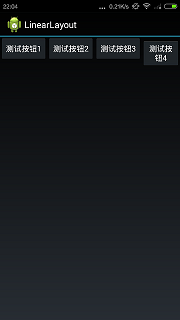
从上图可以看出,xml中一共是5个按钮,但是linearlayout默认是横向排列,所以第5个按钮已经看不到了.下面加一个配制选项:
<LinearLayout xmlns:android="http://schemas.android.com/apk/res/android"

              android:orientation="vertical"

              android:layout_width="fill_parent"

              android:layout_height="fill_parent"

        >
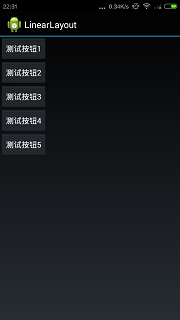
android:orientation指定是横向排列(horizontal)还是纵向(vertical)排列.默认是横向,设置成vertical效果如下:
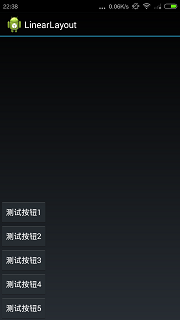
android:gravity控制竖直方向的对齐方式,看下面的例子:
<LinearLayout xmlns:android="http://schemas.android.com/apk/res/android"

              android:orientation="vertical"

              android:layout_width="fill_parent"

              android:layout_height="fill_parent"

              android:gravity="bottom"

        >
指定竖直方向为底部对齐,效果如下图所示
android:gravity的参数还可以组合,比如:
<LinearLayout xmlns:android="http://schemas.android.com/apk/res/android"

              android:orientation="vertical"

              android:layout_width="fill_parent"

              android:layout_height="fill_parent"

              android:gravity="bottom|center"

        >
效果是下方居中对齐,不再帖图片了.
源代码地址:https://github.com/zhouyang209117/AndroidTutorial/tree/master/Crazy/ch2/LinearLayout
看布局管理器嵌套的例子:
<?xml version="1.0" encoding="utf-8"?>

<LinearLayout xmlns:android="http://schemas.android.com/apk/res/android"

              android:orientation="horizontal"

              android:layout_width="fill_parent"

              android:layout_height="fill_parent"

        >

    <Button

            android:layout_width="wrap_content"

            android:layout_height="wrap_content"

            android:text="Button1"/>

    <LinearLayout

            android:orientation="vertical"

            android:layout_width="fill_parent"

            android:layout_height="fill_parent">

        <Button

            android:layout_width="wrap_content"

            android:layout_height="wrap_content"

            android:text="Button3"/>

        <Button

                android:layout_width="wrap_content"

                android:layout_height="wrap_content"

                android:text="Button4"/>

    </LinearLayout>

</LinearLayout>
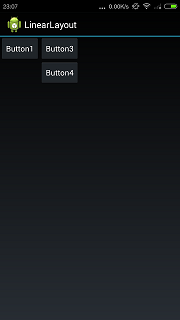
按钮3,4被看成一个整体,在这个整体中Linearlayout的排列规则和上面讲到的相同.排列效果如下:
有一个问题:android:layout_width="fill_parent"表示填充父容器的宽度.但LinearLayout是根布局管理器,那么它填充的是谁的?
android学习1——LinearLayout的更多相关文章
- Android学习笔记——LinearLayout
该工程的功能是实现LinearLayout 以下的代码是MainActivity.java中的代码 package com.example.linearlayout; import android.a ...
- [Android学习笔记]LinearLayout布局,剩余空间的使用
转自:http://segmentfault.com/q/1010000000095725 如果使得一个View占用其父View的剩余空间? 答案是使用:android:layout_weight = ...
- 在LinearLayout中实现列表,列表采用LinearLayout横向布局-android学习
不多讲直接上代码 1.Activity 对应的布局文件如下: <?xml version="1.0" encoding="utf-8"?> < ...
- Android 布局学习之——LinearLayout的layout_weight属性
一直对layout_weight属性感到比较困惑,今天学习一下,来深入了解layout_weight属性和它的用法. 定义 首先,看看Android官方文档是怎么说的,毕竟人家才是权威 ...
- 【转】Pro Android学习笔记(二五):用户界面和控制(13):LinearLayout和TableLayout
目录(?)[-] 布局Layout 线性布局LinearLayout 表格布局TableLayout 布局Layout Layout是容器,用于对所包含的view进行布局.layout是view的子类 ...
- Android学习笔记之LinearLayout
<?xml version="1.0" encoding="utf-8"?> <LinearLayout xmlns:android=&quo ...
- android系列9.LinearLayout 学习2
<?xml version="1.0" encoding="utf-8"?> <LinearLayout xmlns:android=&quo ...
- Android学习——LinearLayout布局实现居中、左对齐、右对齐
android:orientation="vertical"表示该布局下的元素垂直排列: 在整体垂直排列的基础上想要实现内部水平排列,则在整体LinearLayout布局下再创建一 ...
- Android学习——第一个NDK程序
在前面的学习中,我们已经讲解了关于NDK编程的环境搭建流程,简单的使用我们也通过官网本身自带的例子进行说明了.可是相信大家一定还存在这么的一个疑惑:“如果我要自己利用NDK编写一个Android应用, ...
随机推荐
- java实现——006重建二叉树
public class T006 { public static void main(String[] args){ int pre[] = {1,2,4,7,3,5,6,8}; int in[] ...
- C语言-基础
程序是为了让计算机完成某项任务而编写的逐条执行的指令序列. C语言的特点是:结构化,语言简洁,功能强大,移植性好. 因为移植性好,所以大多数单片机如51.stm32,msp430,等众多嵌入式微处理器 ...
- SQL数据库修复/数据库置疑修复
SQL数据库修复的三大核心技术: 1.磁盘阵列分析重组技术: 2.数据库恢复与修复技术: 3.SCSI盘物理故障开盘技术. 至今已经成功恢复数百台服务器的SQL数据库,用户覆盖全国. 导致SQL数据库 ...
- 安卓handler、thread实现异步任务
[转]http://blog.csdn.net/lanpy88/article/details/6659630 一Handler的定义: 主要接受子线程发送的数据, 并用此数据配合主线程更新UI. ...
- Outlook 2013 电子邮件账户设置备份与恢复
与之前版本不同,Outlook 2013需要备份以下注册表内容:HKEY_CURRENT_USER\Software\Microsoft\Office\15.0\Outlook\Profiles恢复时 ...
- CentOS下成功修复了Windows的grub引导
(转载) 以CentOS7和Windows为双系统,且后安装CentOS时,会出现开机没有Windows引导的问题.下图,倒数第二行可以看到Windows引导项: 修复运行终端(terminal),键 ...
- 51NOD 1639 绑鞋带 数学
http://www.51nod.com/onlineJudge/questionCode.html#!problemId=1639 假如一开始有一根绳子. 那么增加一根的时候,可以插在它的尾部,也可 ...
- Hibernate详细教程
一.搭建Hibernate环境 1.在src目录下创建hibernate.cfg.xml配置文件 PS:文件的名字不能改! <?xml version="1.0" encod ...
- jQuery对象插件封装步骤
jQuery是js的一个非常优秀的库,它大大简化了js的很多操作,并且解决了js的大部分兼容性问题.甚至很多css兼容性问题,用jQuery写都能解决. 这里是对象插件的封装.当然,封装插件很多,这里 ...
- 使用jquery时一些小技巧的总结
使用 each 遍历 var nodes = Ztree.getCheckedNodes(true); //获取所有勾选的节点 $.each(nodes,function(i,value){ aler ...