
html+ccs3太阳系行星运转动画
做一个太阳系八大行星的运转动画,不包括行星的卫星,所有行星围绕太阳公转,行星采用纯色,暂时没有自转。
效果静态图:
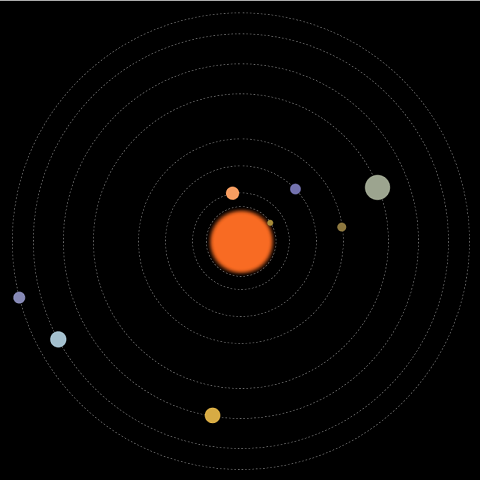
动画中包括:太阳及各行星,运行轨道,行星公转动画。
先画好草图,设计好大小和位置,根据公转周期计算好动画执行的时间。
html的结构:
一个class为solarsys的div,作为太阳系容器元素,该div的position为relative。
行星轨道和行星都用div,position为absolute。
容器用relative和内部元素采用absolute的定位方式,比较简单的能实现效果,缺点就是大小是固定的。
    <div class="solarsys">

        <!--太阳-->

        <div class='sun'></div>

        <!--水星轨道-->

        <div class='mercuryOrbit'></div>

        <!--水星-->

        <div class='mercury'></div>

        <!--金星轨道-->

        <div class='venusOrbit'></div>

        <!--金星-->

        <div class='venus'></div>

        <!--地球轨道-->

        <div class='earthOrbit'></div>

        <!--地球-->

        <div class='earth'></div>

        <!--火星轨道-->

        <div class='marsOrbit'></div>

        <!--火星-->

        <div class='mars'></div>

        <!--木星轨道-->

        <div class='jupiterOrbit'></div>

        <!--木星-->

        <div class='jupiter'></div>

        <!--土星轨道-->

        <div class='saturnOrbit'></div>

        <!--土星-->

        <div class='saturn'></div>

        <!--天王星轨道-->

        <div class='uranusOrbit'></div>

        <!--天王星-->

        <div class='uranus'></div>

        <!--海王星轨道-->

        <div class='neptuneOrbit'></div>

        <!--海王星-->

        <div class='neptune'></div>

    </div>
太阳系容器div的css:
定宽,定高,relative定位,页面内剧中对齐。
        .solarsys{

            width: 800px;

            height: 800px;;

            position: relative;

            margin: 0 auto;

            background-color: #000000;

            padding: 0;

            transform: scale(1);

        }
太阳div的css:
按照设计的大小和位置,设定宽高,left,top。
设定颜色。
通过把boder-radius生成50%,把一个正方形变成圆形。
通过box-shadow的4层颜色设置实现太阳光晕。
        .sun {

            left:357px;

            top:357px;

            height: 90px;

            width: 90px;

            background-color: rgb(248,107,35);

            border-radius: 50%;

            box-shadow: 5px 5px 10px rgb(248,107,35), -5px -5px 10px rgb(248,107,35), 5px -5px 10px rgb(248,107,35), -5px 5px 10px rgb(248,107,35);

            position: absolute;

            margin: 0;

        }
行星轨道div的css:
假设是水星轨道。
按照设计的大小和位置,设定宽高,left,top。
背景色透明。
通过把boder-radius生成50%,把一个正方形变成圆形。
boder的类型设成虚线。
boder的颜色设成灰色。
宽度设1。
        .mercuryOrbit {

            left:342.5px;

            top:342.5px;

            height: 115px;

            width: 115px;

            background-color: transparent;

            border-radius: 50%;

            border-style: dashed;

            border-color: gray;

            position: absolute;

            border-width: 1px;

            margin: 0px;

            padding: 0px;

        }
行星div的css:
假设是水星。
按照设计的大小和位置,设定宽高,left,top。
设置颜色。
通过把boder-radius生成50%,把一个正方形变成圆形。
将transfrom-origin设定成当前div的左上角相对于整个太阳系容器的中心点的横向和纵向的偏移量。加上旋转动画后就是围绕着中心点旋转效果。
做一个animation,引用rotate关键帧动画,线性永久执行,这里的执行时长是根据行星的公转周期计算出来。
        .mercury {

            left:337.5px;

            top:395px;

            height: 10px;

            width: 10px;

            background-color: rgb(166,138,56);

            border-radius: 50%;

            position: absolute;

            transform-origin: 62.5px 5px;

            animation: rotate 1.5s infinite linear;

        }
rotate关键帧动画:
逆时针旋转。
        @keyframes rotate {

            100% {

                transform: rotate(-360deg);

            }

        }
基本结构完成。
仅在chrome中测试过。
全部代码:
<html>

<head>

    <style>

        .solarsys{

            width: 800px;

            height: 800px;;

            position: relative;

            margin: 0 auto;

            background-color: #000000;

            padding: 0;

            transform: scale(1);

        }

        /*太阳*/

        .sun {

            left:357px;

            top:357px;

            height: 90px;

            width: 90px;

            background-color: rgb(248,107,35);

            border-radius: 50%;

            box-shadow: 5px 5px 10px rgb(248,107,35), -5px -5px 10px rgb(248,107,35), 5px -5px 10px rgb(248,107,35), -5px 5px 10px rgb(248,107,35);

            position: absolute;

            margin: 0;

        }

        /*水星*/

        .mercury {

            left:337.5px;

            top:395px;

            height: 10px;

            width: 10px;

            background-color: rgb(166,138,56);

            border-radius: 50%;

            position: absolute;

            transform-origin: 62.5px 5px;

            animation: rotate 1.5s infinite linear;

        }

        /*水星轨道*/

        .mercuryOrbit {

            left:342.5px;

            top:342.5px;

            height: 115px;

            width: 115px;

            background-color: transparent;

            border-radius: 50%;

            border-style: dashed;

            border-color: gray;

            position: absolute;

            border-width: 1px;

            margin: 0px;

            padding: 0px;

        }

        /*金星*/

        .venus {

            left:309px;

            top:389px;

            height: 22px;

            width: 22px;

            background-color: rgb(246,157,97);

            border-radius: 50%;

            position: absolute;

            transform-origin: 91px 11px;

            animation: rotate 3.84s infinite linear;

        }

        /*金星轨道*/

        .venusOrbit {

            left:320px;

            top:320px;

            height: 160px;

            width: 160px;

            background-color: transparent;

            border-radius: 50%;

            border-style: dashed;

            border-color: gray;

            position: absolute;

            border-width: 1px;

            /*margin: 100px;*/

            /*transform-origin: -75px -75px;*/

            /*animation: rotate 4s infinite linear;*/

            margin: 0px;

            padding: 0px;

        }

        /*地球*/

        .earth {

            left:266.5px;

            top:391px;

            height: 18px;

            width: 18px;

            background-color: rgb(115,114,174);

            border-radius: 50%;

            position: absolute;

            transform-origin: 134px 9px;

            animation: rotate 6.25s infinite linear;

        }

        /*地球轨道*/

        .earthOrbit {

            left:275px;

            top:275px;

            height: 250px;

            width: 250px;

            background-color: transparent;

            border-radius: 50%;

            border-style: dashed;

            border-color: gray;

            position: absolute;

            border-width: 1px;

            /*margin: 100px;*/

            /*transform-origin: -75px -75px;*/

            /*animation: rotate 4s infinite linear;*/

            margin: 0px;

            padding: 0px;

        }

        /*火星*/

        .mars {

            left:222.5px;

            top:392.5px;

            height: 15px;

            width: 15px;

            background-color: rgb(140,119,63);

            border-radius: 50%;

            position: absolute;

            transform-origin: 177.5px 7.5px;

            animation: rotate 11.75s infinite linear;

        }

         /*火星轨道*/

        .marsOrbit {

            left:230px;

            top:230px;

            height: 340px;

            width: 340px;

            background-color: transparent;

            border-radius: 50%;

            border-style: dashed;

            border-color: gray;

            position: absolute;

            border-width: 1px;

            /*margin: 100px;*/

            /*transform-origin: -75px -75px;*/

            /*animation: rotate 4s infinite linear;*/

            margin: 0px;

            padding: 0px;

        }

        /*木星*/

        .jupiter {

            left:134px;

            top:379px;

            height: 42px;

            width: 42px;

            background-color: rgb(156,164,143);

            border-radius: 50%;

            position: absolute;

            transform-origin: 266px 21px;

            animation: rotate 74.04s infinite linear;

        }

        /*木星轨道*/

        .jupiterOrbit {

            left:155px;

            top:155px;

            height: 490px;

            width: 490px;

            background-color: transparent;

            border-radius: 50%;

            border-style: dashed;

            border-color: gray;

            position: absolute;

            border-width: 1px;

            /*margin: 100px;*/

            /*transform-origin: -75px -75px;*/

            /*animation: rotate 4s infinite linear;*/

            margin: 0px;

            padding: 0px;

        }

        /*土星*/

        .saturn {

            left:92px;

            top:387px;

            height: 26px;

            width: 26px;

            background-color: rgb(215,171,68);

            border-radius: 50%;

            position: absolute;

            transform-origin: 308px 13px;

            animation: rotate 183.92s infinite linear;

        }

        /*土星轨道*/

        .saturnOrbit {

            left:105px;

            top:105px;

            height: 590px;

            width: 590px;

            background-color: transparent;

            border-radius: 50%;

            border-style: dashed;

            border-color: gray;

            position: absolute;

            border-width: 1px;

            /*margin: 100px;*/

            /*transform-origin: -75px -75px;*/

            /*animation: rotate 4s infinite linear;*/

            margin: 0px;

            padding: 0px;

        }

        /*天王星*/

        .uranus {

            left:41.5px;

            top:386.5px;

            height: 27px;

            width: 27px;

            background-color: rgb(164,192,206);

            border-radius: 50%;

            position: absolute;

            transform-origin: 358.5px 13.5px;

            animation: rotate 524.46s infinite linear;

        }

        /*天王星轨道*/

        .uranusOrbit {

            left:55px;

            top:55px;

            height: 690px;

            width: 690px;

            background-color: transparent;

            border-radius: 50%;

            border-style: dashed;

            border-color: gray;

            position: absolute;

            border-width: 1px;

            /*margin: 100px;*/

            /*transform-origin: -75px -75px;*/

            /*animation: rotate 4s infinite linear;*/

            margin: 0px;

            padding: 0px;

        }

        /*海王星*/

        .neptune {

            left:10px;

            top:390px;

            height: 20px;

            width: 20px;

            background-color: rgb(133,136,180);

            border-radius: 50%;

            position: absolute;

            transform-origin: 390px 10px;

            animation: rotate 1028.76s infinite linear;

        }

        /*海王星轨道*/

        .neptuneOrbit {

            left:20px;

            top:20px;

            height: 760px;

            width: 760px;

            background-color: transparent;

            border-radius: 50%;

            border-style: dashed;

            border-color: gray;

            position: absolute;

            border-width: 1px;

            /*margin: 100px;*/

            /*transform-origin: -75px -75px;*/

            /*animation: rotate 4s infinite linear;*/

            margin: 0px;

            padding: 0px;

        }

        @keyframes rotate {

            100% {

                transform: rotate(-360deg);

            }

        }

    </style>

</head>

<body>

    <div class="solarsys">

        <!--太阳-->

        <div class='sun'></div>

        <!--水星轨道-->

        <div class='mercuryOrbit'></div>

        <!--水星-->

        <div class='mercury'></div>

        <!--金星轨道-->

        <div class='venusOrbit'></div>

        <!--金星-->

        <div class='venus'></div>

        <!--地球轨道-->

        <div class='earthOrbit'></div>

        <!--地球-->

        <div class='earth'></div>

        <!--火星轨道-->

        <div class='marsOrbit'></div>

        <!--火星-->

        <div class='mars'></div>

        <!--木星轨道-->

        <div class='jupiterOrbit'></div>

        <!--木星-->

        <div class='jupiter'></div>

        <!--土星轨道-->

        <div class='saturnOrbit'></div>

        <!--土星-->

        <div class='saturn'></div>

        <!--天王星轨道-->

        <div class='uranusOrbit'></div>

        <!--天王星-->

        <div class='uranus'></div>

        <!--海王星轨道-->

        <div class='neptuneOrbit'></div>

        <!--海王星-->

        <div class='neptune'></div>

    </div>

</body>

</html>
html+ccs3太阳系行星运转动画的更多相关文章
- html+ccs3太阳系行星运转动画之土星有个环,地球有颗小卫星
在上一篇<html+ccs3太阳系行星运转动画>中实现了太阳系八大行星的基本运转动画. 太阳系又何止这些内容,为丰富一下动画,接下来增加“土星环”和“月球”来充盈太阳系动画. 下面是充盈后 ...
- 【Web动画】CSS3 3D 行星运转 && 浏览器渲染原理
承接上一篇:[CSS3进阶]酷炫的3D旋转透视 . 最近入坑 Web 动画,所以把自己的学习过程记录一下分享给大家. CSS3 3D 行星运转 demo 页面请戳:Demo.(建议使用Chrome打开 ...
- 使用css3的动画模拟太阳系行星公转
本文介绍使用css3的animation画一个太阳系行星公转的动画,再加以改进,讨论如何画椭圆的运行轨迹.然后分析京东和人人网使用animation的实际案例,最后结合css3的clip-path做一 ...
- three.js模拟实现太阳系行星体系
概况如下: 1.SphereGeometry实现自转的太阳: 2.RingGeometry实现太阳系星系的公转轨道: 3.ImageUtils加载球体和各行星贴图: 4.canvas中createRa ...
- css3加js做一个简单的3D行星运转效果
前几天在园子里看到一篇关于CSS3D行星运转的文章,原文在这里,感觉这个效果也太酷炫了,于是自己也就心血来潮的来尝试的做了一下.因为懒得去用什么插件了,于是就原生的JS写,效果有点粗超,还有一些地方处 ...
- OpenGL 太阳系行星拾取例子(GL_SELECT) VS2008 + glut实现
太阳系:Solar System 以太阳(Sun)为中心,由内到外分别是: 水星(Mercury) 金星(Venus) 地球(Earth) 火星(Mars) 木星(Jupiter) 土星(Saturn ...
- 认识我们的太阳系(Solar System)
一.初识太阳系 如果太阳是一颗篮球,那么我们的地球是什么?? 如果太阳系里最大的行星:木星是一颗足球,那么我们的地球是什么?? 如果我们的地球是一颗排球,那么其他行星是什么?? 由此,我们可以看到,我 ...
- 一个流行的网页动画JS库
animejs https://animejs.com/ Anime.js (/ˈæn.ə.meɪ/) is a lightweight JavaScript animation library wi ...
- 简单的转盘抽奖——CSS动画优化
前言 前两天去一家公司面试,被问到一些小游戏的东西.面试官提到了刷红包还有抽奖这些怎么实现,当时简单说了下思路,回来之后想想还是说的太轻描淡写了,干说不做就是耍流氓,所以就做了一个(Demo & ...
随机推荐
- WebAPi之SelfHost自创建证书启动Https疑难解惑及无法正确返回结果
前言 话说又来需求了,之前对于在SelfHost中需要嵌套页面并操作为非正常需求,这回来正常需求了,客户端现在加了https,老大过来说WebAPi访问不了了,这是什么情况,我去试了试,还真是这个情况 ...
- LeetCode[3] Longest Substring Without Repeating Characters
题目描述 Given a string, find the length of the longest substring without repeating characters. For exam ...
- AI人工智能系列随笔
初探 AI人工智能系列随笔:syntaxnet 初探(1)
- 微信网页开发之获取用户unionID的两种方法--基于微信的多点登录用户识别
假设网站A有以下功能需求:1,pc端微信扫码登录:2,微信浏览器中的静默登录功能需求,这两种需求就需要用到用户的unionID,这样才能在多个登录点(终端)识别用户.那么这两种需求下用户的unionI ...
- 《LoadRunner12七天速成宝典》来了
看到自己的新书又要发行了,算算从09年第一本书开始,不知不觉已经是第四本书了(帮朋友合写的书不算),每次写完之后都会说太累了,不想再写了,但是却又次次反悔,吞下食言的苦果.如果非要说第四本书的感受,那 ...
- 代码的坏味道(18)——依恋情结(Feature Envy)
坏味道--依恋情结(Feature Envy) 特征 一个函数访问其它对象的数据比访问自己的数据更多. 问题原因 这种气味可能发生在字段移动到数据类之后.如果是这种情况,你可能想将数据类的操作移动到这 ...
- unity 3d 解析 json
官网案例传送门 我这里不过是借花献佛,案例官网就有. using UnityEngine; using System.Collections; public class json : MonoBeha ...
- SharePoint 2016 入门视频教程
之前一直有朋友让自己录一些SharePoint的入门视频,之前没有太多时间,一个巧合的机会收到CSDN学院的邮件,可以在CSDN上发布视频教程,自己就录了一些.说起录视频也是蛮辛苦的,每天下班吃完饭要 ...
- appium+robotframework环境搭建
appium+robotframework环境搭建步骤(Windows系统的appium自动化测试,只适用于测试安卓机:ios机需要在mac搭建appium环境后测试) 搭建步骤,共分为3部分: 一. ...
- 在Redhat上为.Net 项目构建基于Jenkins + Github + Mono 的持续集成环境
在Redhat enterprise 6.5 的服务器上,为在gutub 上的 .net 项目构建一个持续集成环境,用到了Jenkins和mono.因公司的服务器在内网,访问外网时要通过代理,所以在很 ...