
Flask请求扩展和数据库连接池
1.1.Flask之请求扩展
#!/usr/bin/env python

# -*- coding:utf-8 -*-

from flask import Flask, Request, render_template

app = Flask(__name__, template_folder='templates')

app.debug = True

@app.before_first_request

def before_first_request1():

    print('before_first_request1')

@app.before_first_request

def before_first_request2():

    print('before_first_request2')

@app.before_request

def before_request1():

    Request.nnn = 123

    print('before_request1')

@app.before_request

def before_request2():

    print('before_request2')

@app.after_request

def after_request1(response):

    print('before_request1', response)

    return response

@app.after_request

def after_request2(response):

    print('before_request2', response)

    return response

@app.errorhandler(404)

def page_not_found(error):

    return 'This page does not exist', 404

@app.template_global()

def sb(a1, a2):

    return a1 + a2

@app.template_filter()

def db(a1, a2, a3):

    return a1 + a2 + a3

@app.route('/')

def hello_world():

    return render_template('hello.html')

if __name__ == '__main__':

    app.run()
所有请求扩展
(1)基于before_request 做用户登录认证
@app.before_request

def process_request(*args,**kwargs):

    #登录页面不需要验证

    if request.path == '/login':

        return None

    user = session.get('user_info')

    if user:

        return None

    return redirect('/login')
(2)before_request和after_request执行顺序
from flask import Flask,render_template,request,redirect,session,url_for

app = Flask(__name__)

app.debug = True

app.secret_key = 'abcdef'

@app.before_request

def process_request1(*args,**kwargs):

    print('request1进来')

@app.before_request

def process_request2(*args,**kwargs):

    print('request2进来')

@app.after_request

def process_response1(response):

    print('response1走了')

    return response

@app.after_request

def process_response2(response):

    print('response2走了')

    return response

@app.route('/index',methods=['GET'])

def index():

    print('index函数')

    return 'hello'

if __name__ == '__main__':

    app.run()
运行结果:
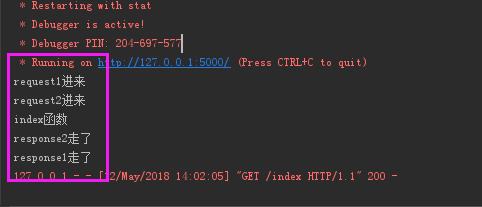
可以看出:
- before_request是从上往下的执行顺序(先1后2)
- after_response是从下往上的执行顺序(先2后1)
(3)请求拦截后,response所有都执行
在process_request 添加一个return
@app.before_request

def process_request1(*args,**kwargs):

    print('request1进来')

    return "拦截"
再运行结果如下:

(4)定制错误信息
当访问不存在的url,可以自己定制错误信息页面
@app.errorhandler(404)

def error_404(arg):

    return '404错误'
1.2.数据库连接池
DBUtils是Python的一个用于实现数据库连接池的模块。
安装
进官网下载https://pypi.org/project/DBUtils/1.2/,然后安装:
连接池有两种方式
(1)模式一
为每个线程创建连接,线程即使调用了close方法,也不会关闭,只是把连接重新放到连接池,供自己线程再次使用。当线程终止时,连接自动关闭。
POOL = PersistentDB(

    creator=pymysql,  # 使用链接数据库的模块

    maxusage=None,  # 一个链接最多被重复使用的次数,None表示无限制

    setsession=[],  # 开始会话前执行的命令列表。如:["set datestyle to ...", "set time zone ..."]

    ping=0,

    # ping MySQL服务端,检查是否服务可用。# 如:0 = None = never, 1 = default = whenever it is requested, 2 = when a cursor is created, 4 = when a query is executed, 7 = always

    closeable=False,

    # 如果为False时, conn.close() 实际上被忽略,供下次使用,再线程关闭时,才会自动关闭链接。如果为True时, conn.close()则关闭链接,那么再次调用pool.connection时就会报错,因为已经真的关闭了连接(pool.steady_connection()可以获取一个新的链接)

    threadlocal=None,  # 本线程独享值得对象,用于保存链接对象,如果链接对象被重置

    host='127.0.0.1',

    port=3306,

    user='root',

    password='',

    database='pooldb',

    charset='utf8'

)

def func():

    conn = POOL.connection(shareable=False)

    cursor = conn.cursor()

    cursor.execute('select * from tb1')

    result = cursor.fetchall()

    cursor.close()

    conn.close()

func()
(2)模式二,推荐使用的方式
创建多个连接,多线程来时,去获取,
import time

import pymysql

import threading

from DBUtils.PooledDB import PooledDB, SharedDBConnection

POOL = PooledDB(

    creator=pymysql,  # 使用链接数据库的模块

    maxconnections=6,  # 连接池允许的最大连接数,0和None表示不限制连接数

    mincached=2,  # 初始化时,链接池中至少创建的空闲的链接,0表示不创建

    maxcached=5,  # 链接池中最多闲置的链接,0和None不限制

    maxshared=3,  # 链接池中最多共享的链接数量,0和None表示全部共享。PS: 无用,因为pymysql和MySQLdb等模块的 threadsafety都为1,所有值无论设置为多少,_maxcached永远为0,所以永远是所有链接都共享。

    blocking=True,  # 连接池中如果没有可用连接后,是否阻塞等待。True,等待;False,不等待然后报错

    maxusage=None,  # 一个链接最多被重复使用的次数,None表示无限制

    setsession=[],  # 开始会话前执行的命令列表。如:["set datestyle to ...", "set time zone ..."]

    ping=0,

    # ping MySQL服务端,检查是否服务可用。# 如:0 = None = never, 1 = default = whenever it is requested, 2 = when a cursor is created, 4 = when a query is executed, 7 = always

    host='127.0.0.1',

    port=3306,

    user='root',

    password='',

    database='pooldb',

    charset='utf8'

)

def func():

    # 检测当前正在运行连接数的是否小于最大链接数,如果不小于则:等待或报raise TooManyConnections异常

    # 否则

    # 则优先去初始化时创建的链接中获取链接 SteadyDBConnection。

    # 然后将SteadyDBConnection对象封装到PooledDedicatedDBConnection中并返回。

    # 如果最开始创建的链接没有链接,则去创建一个SteadyDBConnection对象,再封装到PooledDedicatedDBConnection中并返回。

    # 一旦关闭链接后,连接就返回到连接池让后续线程继续使用。

    conn = POOL.connection()

    # print(th, '链接被拿走了', conn1._con)

    # print(th, '池子里目前有', pool._idle_cache, '\r\n')

    cursor = conn.cursor()

    cursor.execute('select * from tb1')

    result = cursor.fetchall()

    conn.close()

func()
如果没有连接池,使用pymysql来连接数据库时,单线程应用完全没有问题,但如果涉及到多线程应用那么就需要加锁,一旦加锁那么连接势必就会排队等待,当请求比较多时,性能就会降低了。
import pymysql

import threading

from threading import RLock

LOCK = RLock()

CONN = pymysql.connect(host='127.0.0.1',

                       port=3306,

                       user='root',

                       password='',

                       database='pooldb',

                       charset='utf8')

def task(arg):

    with LOCK:

        cursor = CONN.cursor()

        cursor.execute('select * from tb1')

        result = cursor.fetchall()

        cursor.close()

        print(result)

for i in range(10):

    t = threading.Thread(target=task, args=(i,))

    t.start()
Flask请求扩展和数据库连接池的更多相关文章
- Flask - 请求扩展,钩子函数(Django的中间件) --> 请求前,中,后,
例子1. 处理请求之前 @app.before_request 在请求之前,这个被装饰的函数会被执行 用户登录验证代码可以在这里写 @app.before_request def process_re ...
- Flask中使用数据库连接池 DBUtils ——(4)
DBUtils是Python的一个用于实现数据库连接池的模块. 此连接池有两种连接模式: 模式一:为每个线程创建一个连接,线程即使调用了close方法,也不会关闭,只是把连接重新放到连接池,供自己线程 ...
- 第二篇 Flask基础篇之(闪现,蓝图,请求扩展,中间件)
本篇主要内容: 闪现 请求扩展 中间件 蓝图 写装饰器,常用 functools模块,帮助设置函数的元信息 import functools def wrapper(func): @functools ...
- 数据库连接池php-cp介绍
php-cp(php-connect-pool)是用php扩展写的一个数据库连接池. 我们知道php开发速度快,适合创业快速迭代,但当流量大了之后,php大量的短连接给db层造成多余的消耗,而php处 ...
- 3、flask之基于DBUtils实现数据库连接池、本地线程、上下文
本篇导航: 数据库连接池 本地线程 上下文管理 面向对象部分知识点解析 1.子类继承父类__init__的三种方式 class Dog(Animal): #子类 派生类 def __init__(se ...
- flask之基于DBUtils实现数据库连接池、本地线程、上下文
本篇导航: 数据库连接池 本地线程 上下文管理 面向对象部分知识点解析 1.子类继承父类__init__的三种方式 class Dog(Animal): #子类 派生类 def __init__(se ...
- flask框架----数据库连接池
数据库连接池 flask中是没有ORM的,如果在flask里面连接数据库有两种方式 一:pymysql 二:SQLAlchemy 是python 操作数据库的一个库.能够进行 orm 映射官方文档 s ...
- Flask学习【第3篇】:蓝图、基于DBUtils实现数据库连接池、上下文管理等
小知识 子类继承父类的三种方式 class Dog(Animal): #子类 派生类 def __init__(self,name,breed, life_value,aggr): # Animal. ...
- Flask的数据库连接池 DBUtils
Flask是没有ORM的操作的,如果在flask中连接数据库有两种方式 一.pymysql 二.SQLAlchemy 是python操作数据库的以一个库,能够进行orm映射官网文档 sqlchemy ...
随机推荐
- matlab下K-means Cluster 算法实现
一.概念介绍 K-means算法是硬聚类算法,是典型的局域原型的目标函数聚类方法的代表,它是数据点到原型的某种距离作为优化的目标函数,利用函数求极值的方法得到迭代运算的调整规则.K-means算法以欧 ...
- MySQL学习笔记_3_MySQL创建数据表(中)
MySQL创建数据表(中) 三.数据字段属性 1.unsigned[无符号] 可以让空间增加一倍 比如可以让-128-127增加到0-255 注意:只能用在数值型字段 2.zerofill[前导零] ...
- 【Android 应用开发】 Ubuntu 安装 Android Studio (旧版本|仅作参考)
. 果断换Ubuntu了, Ubuntu的截图效果不好, 不能设置阴影 ... 作者 : 万境绝尘 转载请注明出处 : http://blog.csdn.net/shulianghan/article ...
- 《java入门第一季》之面向对象面试题(面向对象都做了哪些事情)
创建对象内存图解.
- JS跨域请求
前提:两个项目,第一个项目想请求第二个项目不通过服务器代码只通过页面请求. 1. 第一个项目html(需要第二个项目配合实现) 1 2 3 4 5 6 7 <script> functio ...
- RHEL6非交互式工具sshpass和expect安装
RHEL6非交互式工具sshpass和expect安装 1 sshpass 在rhel6.4上,没有sshpass的软件包,无法采用yum方式安装.从源码编译安装非常简单. 1) 下载sshpass源 ...
- hibernate链接数据库链接池c3p0配置
[html] view plain copy <bean id="dataSourceLocal" name="dataSource" class=&qu ...
- 初探linux子系统集之led子系统(二)
巴西世界杯,德国7比1东道主,那个惨不忍睹啊,早上起来看新闻,第一眼看到7:1还以为点球也能踢成这样,后来想想,点球对多嘛6比1啊,接着就是各种新闻铺天盖地的来了.其实失败并没有什么,人生若是能够成功 ...
- Understanding the Objective-C Runtime
Wednesday, January 20, 2010 Understanding the Objective-C Runtime The Objective-C Runtime is one of ...
- WebService学习--(一)webservice相关概念
一.序言 大家或多或少都听过 WebService(Web服务),有一段时间很多计算机期刊.书籍和网站都大肆的提及和宣传WebService技术,其中不乏很多吹嘘和做广告的成 分.但是不得不承认的是W ...