
xheditor在线编辑器在.netMVC4中的使用
在线编辑器xheditor,测试感觉不错,特把使用方法记录如下 :
先看看基本使用方法,然后用实例来操作
1、xheditor 地址
2、下载最新编辑器源码

3、将下载的压缩文件解压缩,上传其中的xheditor.min.js以及xheditor_lang、xheditor_emot、xheditor_plugins和xheditor_skin四个文件夹到网站相应文件夹xheditor中。
注:如果您网站中没有使用jQuery框架,也请一并上传jquery文件夹中的jquery-1.4.4.min.js
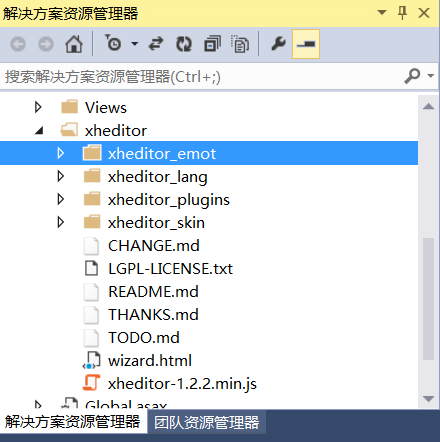
4、在需要调用xhEditor编辑器的网页head标签结束之前添加以下代码:
<script src="~/Scripts/jquery-3.1.1.min.js"></script>
<script src="~/xheditor/xheditor-1.2.2.min.js"></script>
<script src="~/xheditor/xheditor_lang/zh-cn.js"></script>
5、在需要实现可视化的文本框textarea属性中添加:
class="xheditor"

例如:<textarea name="content" id="content" class="xheditor">test</textarea>
上面是用class完成的,也可以用js:
$('#content').xheditor();
6、参数调整,比如编辑大小,菜单项,上传图片执行文件等
http://xheditor.com/wizard.html
打开上面地址,在线可视化生成参数。
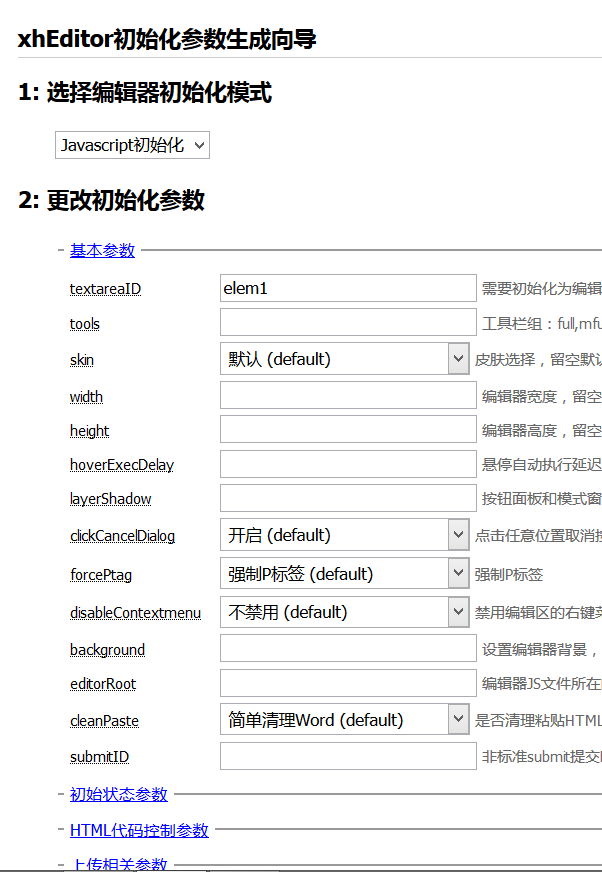
把生成的代码放回自己程序中就可以了,比如 class="xheditor-simple {width:'650',height:'300'}"
下面使用.net mvc4操作实现一个简单的增删改查功能的例子
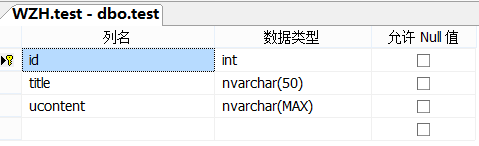
1、首选Demo的数据库结构,如下,数据库中有一个表test,就是本实例的数据表
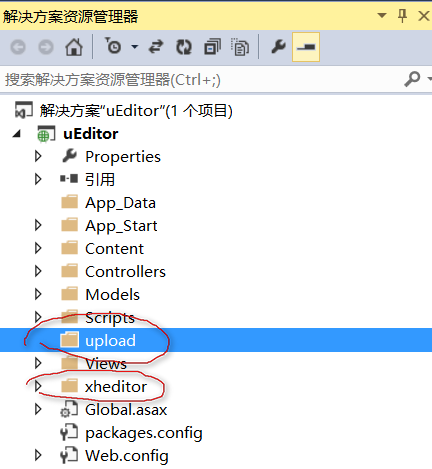
2、VS创建实例,并创建 xheditor 和upload文件夹,upload文件夹后面会用到,就是上传图片到此文件夹下。
3、下载xheditor,并解压缩,上传其中的xheditor.min.js以及xheditor_lang、xheditor_emot、xheditor_plugins和xheditor_skin四个文件夹到网站相应文件夹xheditor中
4、下面开始编程,实现功能,首先在控制器中创建Home控制器,并创建增册改查功能,这里不详细说明了,我把源码提供一下,自己研究吧,数据库的连接我用的是EF,不知道的可以看我以前的博文。
    public class HomeController : Controller

    {

        testEntities db = new testEntities();

        public ActionResult Index()

        {

            return View(db.tests.OrderByDescending(x => x.id));

        }

        //创建

        public ActionResult create()

        {

            return View();

        }

        //添加

        [HttpPost]

        [ValidateInput(false)]

        public ActionResult add(test t)

        {

            if (string.IsNullOrEmpty(t.title))

                return Content("名称不能为空");

            if (string.IsNullOrEmpty(t.ucontent))

                return Content("内容不能为空");

            try

            {

                db.tests.Add(t);

                db.SaveChanges();

            }

            catch (Exception ex)

            {

                return Content(ex.Message);

            }

            return Content("ok");

        }

        //浏览新闻

        public ActionResult news(int id)

        {

            return View(db.tests.Find(id));

        }

        //编辑

        public ActionResult edit(int id)

        {

            return View(db.tests.Find(id));

        }

        //编辑保存

        [HttpPost]

        [ValidateInput(false)]

        public ActionResult edit(test t)

        {

            db.Entry(t).State = System.Data.EntityState.Modified;

            db.SaveChanges();

            return Content("ok");

        }

        //删除

        public ActionResult del(int id)

        {

            var item = db.tests.Find(id);

            db.tests.Remove(item);

            return Content("ok");

        }

    }
5、网页模板
<!DOCTYPE html>

<html>

<head>

    <meta charset="utf-8" />

    <meta name="viewport" content="width=device-width" />

    <title>@ViewBag.Title</title>

    <script src="~/Scripts/jquery-3.1.1.min.js"></script>

    <script src="~/xheditor/xheditor-1.2.2.min.js"></script>

    <script src="~/xheditor/xheditor_lang/zh-cn.js"></script>

</head>

<body>

    @RenderBody()

    @RenderSection("scripts", required: false)

</body>

</html>
6、列表页
<h2>列表</h2>

<a href="/home/create">创建</a>

<ul>

@foreach (var item in Model)

{

    <li><a href="/home/edit/@item.id">编辑</a> <a href="/home/del/@item.id">删除</a> <a href="/home/news/@item.id"> @item.title </a></li>

}

</ul>
7、创建页
@{

    ViewBag.Title = "create";

}

<h2>create</h2>

<a href="/home">返回</a>

<form id="myform">

    <div>

        <input placeholder="标题" id="title" name="title" />

    </div>

    <textarea name="ucontent" id="ucontent">test</textarea>

</form>

<button class="btnOk">提交</button>

<br />

<script>

    $('#ucontent').xheditor({ tools: 'mfull', width: '', height: '', upImgUrl: "/images/XhUpload", upImgExt: "jpg,jpeg,gif,png" });

    $(".btnOk").click(function () {

        $.post("/home/add", $("#myform").serialize(), function (data) { alert(data); });

    });

</script>
8、编辑页
@model uEditor.Models.test

@{

    ViewBag.Title = "edit";

}

<h2>edit</h2>

<a href="/home">返回</a>

<form id="myform">

    <div>

        <input type="hidden" name="id" value="@Model.id" />

        <input placeholder="标题" id="title" name="title" value="@Model.title" />

    </div>

    <textarea name="ucontent" id="ucontent">@Model.ucontent</textarea>

</form>

<button class="btnOk">提交</button>

<script>

    $('#ucontent').xheditor({ tools: 'mfull', width: '', height: '', upImgUrl: "/images/XhUpload", upImgExt: "jpg,jpeg,gif,png" });

    $(".btnOk").click(function () {

        $.post("/home/edit", $("#myform").serialize(), function (data) {

            alert(data);

        })

    });

</script>
9、浏览页
<h2>news</h2>

<h4>@Model.title</h4>

<div>

    @Html.Raw(Model.ucontent)

</div>
10、上传图片功能需要自己写代码,如果不实现,则无法在编辑器中上传图片,实现上传功能后会在编辑上传图片右侧多出上传按钮,如下
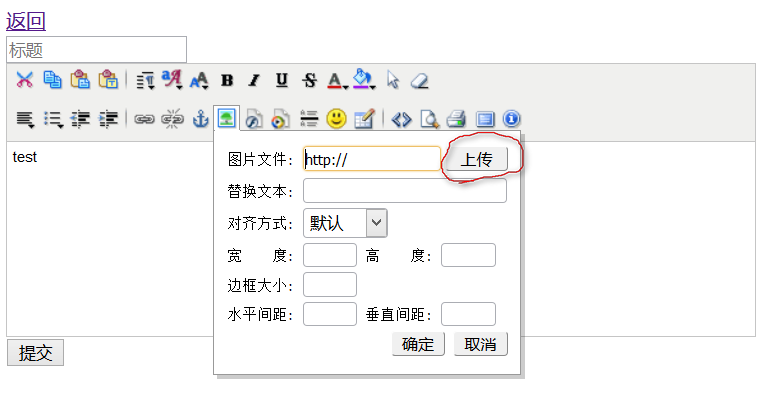
首先在编辑器页面中添加参数:upImgUrl: "/images/XhUpload", upImgExt: "jpg,jpeg,gif,png" }
/images/XhUpload 就是上传功能的文件,在控制器中创建images控制器,然后创建XhUpload,代码如下:
 public class ImagesController : Controller

    {

        #region XhEditor网页编辑器图片上传【HTML5+】

        /// <summary>

        /// XhEditor网页编辑器图片上传【HTML5+】

        /// </summary>

        /// <param name="fileData"></param>

        /// <returns></returns>

        [HttpPost]

        public ActionResult XhUpload(HttpPostedFileBase fileData)

        {

            Response.Charset = "UTF-8";

            // 初始化一大堆变量

            //string inputname = "filedata";//表单文件域name

            string xheditorUpload = "upload";     //配置文件: 上传文件保存路径,结尾不要带/

            string imagesDomain = "";         //配置文件:网站域名

            int dirtype = ;                 // 1:按天存入目录 2:按月存入目录 3:按扩展名存目录  建议使用按天存

            int maxattachsize = ;     // 最大上传大小,默认是2M

            string upext = "txt,rar,zip,jpg,jpeg,gif,png,swf,wmv,avi,wma,mp3,mid";    // 上传扩展名

            int msgtype = ;                 //返回上传参数的格式:1,只返回url,2,返回参数数组

            string immediate = Request.QueryString["immediate"];//立即上传模式,仅为演示用

            byte[] file;                     // 统一转换为byte数组处理

            string localname = "";

            string disposition = Request.ServerVariables["HTTP_CONTENT_DISPOSITION"];

            string err = "";

            string msg = "''";

            if (disposition != null)

            {

                // HTML5上传

                file = Request.BinaryRead(Request.TotalBytes);

                localname = Server.UrlDecode(Regex.Match(disposition, "filename=\"(.+?)\"").Groups[].Value);// 读取原始文件名

            }

            else

            {

                //HttpFileCollectionBase filecollection = Request.Files;

                //HttpPostedFileBase fileData = filecollection.Get(inputname);

                // 读取原始文件名

                localname = fileData.FileName;

                // 初始化byte长度.

                file = new Byte[fileData.ContentLength];

                // 转换为byte类型

                System.IO.Stream stream = fileData.InputStream;

                stream.Read(file, , fileData.ContentLength);

                stream.Close();

                //filecollection = null;

            }

            if (file.Length == ) err = "无数据提交";

            else

            {

                if (file.Length > maxattachsize) err = "文件大小超过" + maxattachsize + "字节";

                else

                {

                    string attach_dir, attach_subdir, filename, extension, target;

                    // 取上载文件后缀名

                    extension = GetFileExt(localname);

                    if (("," + upext + ",").IndexOf("," + extension + ",") < ) err = "上传文件扩展名必需为:" + upext;

                    else

                    {

                        switch (dirtype)

                        {

                            case :

                                attach_subdir = "month_" + DateTime.Now.ToString("yyMM");

                                break;

                            case :

                                attach_subdir = "ext_" + extension;

                                break;

                            default:

                                attach_subdir = "day_" + DateTime.Now.ToString("yyMMdd");

                                break;

                        }

                        attach_dir = xheditorUpload.Replace("~/", "") + "/" + attach_subdir + "/";

                        // 生成随机文件名

                        Random random = new Random(DateTime.Now.Millisecond);

                        filename = DateTime.Now.ToString("yyyyMMddhhmmss") + random.Next() + "." + extension;

                        target = attach_dir + filename;

                        try

                        {

                            CreateFolder(Server.MapPath("~/" + attach_dir));

                            System.IO.FileStream fs = new System.IO.FileStream(Server.MapPath("~/" + target), System.IO.FileMode.Create, System.IO.FileAccess.Write);

                            fs.Write(file, , file.Length);

                            fs.Flush();

                            fs.Close();

                        }

                        catch (Exception ex)

                        {

                            err = ex.Message.ToString();

                        }

                        // 立即模式判断

                        if (immediate == "") target = "!" + target;

                        target = jsonString(target);

                        if (msgtype == )

                        {

                            msg = "'" + imagesDomain + "/" + target + "'";

                        }

                        else

                        {

                            //url必须为绝对路径

                            msg = "{'url':'" + imagesDomain + "/" + target + "','localname':'" + jsonString(localname) + "','id':'1'}";

                        }

                    }

                }

            }

            file = null;

            //Response.Write("{'err':'" + jsonString(err) + "','msg':" + msg + "}");

            return this.Content("{'err':'" + jsonString(err) + "','msg':" + msg + "}");

        }

        string jsonString(string str)

        {

            str = str.Replace("\\", "\\\\");

            str = str.Replace("/", "\\/");

            str = str.Replace("'", "\\'");

            return str;

        }

        string GetFileExt(string FullPath)

        {

            if (FullPath != "") return FullPath.Substring(FullPath.LastIndexOf('.') + ).ToLower();

            else return "";

        }

        void CreateFolder(string FolderPath)

        {

            if (!System.IO.Directory.Exists(FolderPath)) System.IO.Directory.CreateDirectory(FolderPath);

        }

        #endregion

    }
上面的上传文件夹upload就在这里对应,也可以换成其它上传路径。
这样,一个简单的带有图片上传功能的新闻发布系统就完成了。
xheditor在线编辑器在.netMVC4中的使用的更多相关文章
- xhEditor在线编辑器使用实例
使用xhEditor的最大好处就是不用去处理烦人的HTML标签问题,研究了一天,记录备用 前台HTML: <%@ Page Language="C#" AutoEventWi ...
- xheditor在线编辑器的使用
在你所需要在线编辑器的工程目录下,导入xheditor_emot.xheditor_plugins和xheditor_skin.jquery四个文件夹,然后在textarea标签中加入: class= ...
- 百度在线编辑器 - PHP获取提交的数据
原文:http://www.upwqy.com/details/14.html 1 我们知道在在百度在线编辑器的demo中. 我们只要在body 里面 加载 script 标签 id="ed ...
- Html在线编辑器--基于Jquery的xhEditor轻量级编辑器
xhEditor V1.2.2 下载地址 开源中国社区: http://www.oschina.net/p/xheditor xhEditor是一个基于jQuery开发的简单迷你并且高效的可视化XHT ...
- 在ASP.NET Core中使用百度在线编辑器UEditor
在ASP.NET Core中使用百度在线编辑器UEditor 0x00 起因 最近需要一个在线编辑器,之前听人说过百度的UEditor不错,去官网下了一个.不过服务端只有ASP.NET版的,如果是为了 ...
- 05传智_jbpm与OA项目_部门模块中增加部门的jsp页面增加一个在线编辑器功能
这篇文章讲的是在线编辑器功能,之前的部门模块中,增加部门的功能jsp页面起先是这么做的.
- [转]在ASP.NET Core中使用百度在线编辑器UEditor
原文地址:https://www.cnblogs.com/durow/p/6116393.html 0x00 起因 最近需要一个在线编辑器,之前听人说过百度的UEditor不错,去官网下了一个.不过服 ...
- 在ASP.NET Core2.0中使用百度在线编辑器UEditor(转)
一.起因 UEditor是百度旗下的富文本编辑器,对于后端上传处理仅提供了Asp.Net 版的支持. 如果想在.Net Core项目中使用,那么后台上传接口需要重构. UEditorNetCore:百 ...
- Angularjs在线编辑器
1.TextAngular: https://github.com/fraywing/textAngular textAngular是一个强大的Text-Editor/Wysiwyg 编辑器,用于An ...
随机推荐
- 20155231 2016-2017-2《Java程序设计》课程总结
20155231 2016-2017-2<Java程序设计>课程总结 每周作业链接汇总 预备作业1:师生关系 预备作业2:优秀技能经验 预备作业3:虚拟机linux初接触 第一周作业:认识 ...
- 20155231 2016-2017-2 《Java程序设计》第2周学习总结
20155231 2016-2017-2 <Java程序设计>第2周学习总结 教材学习内容总结 学习目标: 了解java编程风格 认识java的类型与变量 掌握java流程控制 第三章基础 ...
- 再装虚拟机及git
再装虚拟机及git 问题1:在假期的学习中并没有上传代码的习惯,到了开学要用到的时候发现新建的目录无法git到码云上,当时也没有在意,直到老师问我要代码链接才意识到这个问题. 问题2:在按照老师的博客 ...
- 三边定位 c#
MATLAB是美国MathWorks公司出品的商业数学软件,用于算法开发.数据可视化.数据分析以及数值计算的高级技术计算语言和交互式环境,主要包括MATLAB和Simulink两大部分. 项目中用到三 ...
- Windows网络通信(一):socket同步编程
网络通信常用API 1. WSAStartup用于初始化WinSock环境 int WSAStartup( WORD wVersionRequested, LPWSADATA lpWSAData ); ...
- VS2013只显示会附加到进程,无法启动调试
今天在使用VS2013的时候,打开突然发现,只显示附加到进程,无法进行调试,调试位置显示灰色,到网上各处寻求答案,本以为是个大问题,没想到只是个小问题.主要原因只是后台开太多东西了,导致VS2013运 ...
- 十几行代码带你用Python批量实现txt转xls,方便快捷
前天看到后台有一兄弟发消息说目前自己有很多txt 文件,领导要转成xls文件,问用python怎么实现,我在后台简单回复了下,其实完成这个需求方法有很多,因为具体的txt格式不清楚,当然如果是有明确分 ...
- Elasticsearch.Net 异常:[match] query doesn't support multiple fields, found [field] and [query]
用Elasticsearch.Net检索数据,报异常: )); ElasticLowLevelClient client = new ElasticLowLevelClient(settings); ...
- 使用calendar日历插件实现动态展示会议信息
效果图如下,标红色为有会议安排,并跳转详细会议信息页面. html页面 <%@ page contentType="text/html;charset=UTF-8"%> ...
- [线性DP][codeforces-1110D.Jongmah]一道花里胡哨的DP题
题目来源: Codeforces - 1110D 题意:你有n张牌(1,2,3,...,m)你要尽可能多的打出[x,x+1,x+2] 或者[x,x,x]的牌型,问最多能打出多少种牌 思路: 1.三组[ ...