
MySQL data sync to Oracle with OGG(Remote Delivery)
MySQL to Oracle with OGG
1. Install MySQL:
yum install mysql-community-server
[root@localhost ~]# yum install mysql-community-server
Loaded plugins: refresh-packagekit, security, ulninfo
Setting up Install Process
mysql-connectors-community | 2.5 kB 00:00
mysql-connectors-community/primary_db | 17 kB 00:00
mysql-tools-community | 2.5 kB 00:00
mysql-tools-community/primary_db | 38 kB 00:00
mysql57-community | 2.5 kB 00:00
mysql57-community/primary_db | 130 kB 00:00
Resolving Dependencies
--> Running transaction check
---> Package mysql-community-server.x86_64 0:5.7.20-1.el6 will be obsoletin
--> Processing Dependency: mysql-community-common(x86-64) = 5.7.20-1.el6 fokage: mysql-community-server-5.7.20-1.el6.x86_64
--> Processing Dependency: mysql-community-client(x86-64) >= 5.7.9 for packmysql-community-server-5.7.20-1.el6.x86_64
---> Package mysql-server.x86_64 0:5.1.73-8.0.1.el6_8 will be obsoleted
--> Running transaction check
---> Package mysql.x86_64 0:5.1.73-8.0.1.el6_8 will be obsoleted
---> Package mysql-community-client.x86_64 0:5.7.20-1.el6 will be obsoletin
--> Processing Dependency: mysql-community-libs(x86-64) >= 5.7.9 for packagsql-community-client-5.7.20-1.el6.x86_64
---> Package mysql-community-common.x86_64 0:5.7.20-1.el6 will be installed
--> Running transaction check
---> Package mysql-community-libs.x86_64 0:5.7.20-1.el6 will be obsoleting
---> Package mysql-libs.x86_64 0:5.1.73-8.0.1.el6_8 will be obsoleted
--> Processing Dependency: libmysqlclient.so.16()(64bit) for package: 2:pos2.6.6-6.el6_5.x86_64
--> Processing Dependency: libmysqlclient.so.16()(64bit) for package: perl-ySQL-4.013-3.el6.x86_64
--> Processing Dependency: libmysqlclient.so.16(libmysqlclient_16)(64bit) fckage: 2:postfix-2.6.6-6.el6_5.x86_64
--> Processing Dependency: libmysqlclient.so.16(libmysqlclient_16)(64bit) fckage: perl-DBD-MySQL-4.013-3.el6.x86_64
--> Running transaction check
---> Package mysql-community-libs-compat.x86_64 0:5.7.20-1.el6 will be obsog
---> Package postfix.x86_64 2:2.6.6-6.el6_5 will be updated
---> Package postfix.x86_64 2:2.6.6-8.el6 will be an update
--> Finished Dependency Resolution
Dependencies Resolved
===========================================================================
Package Arch Version Repository
===========================================================================
Installing:
mysql-community-client x86_64 5.7.20-1.el6 mysql57-community
replacing mysql.x86_64 5.1.73-8.0.1.el6_8
mysql-community-libs x86_64 5.7.20-1.el6 mysql57-community 2
replacing mysql-libs.x86_64 5.1.73-8.0.1.el6_8
mysql-community-libs-compat x86_64 5.7.20-1.el6 mysql57-community 1
replacing mysql-libs.x86_64 5.1.73-8.0.1.el6_8
mysql-community-server x86_64 5.7.20-1.el6 mysql57-community 1
replacing mysql-server.x86_64 5.1.73-8.0.1.el6_8
Installing for dependencies:
mysql-community-common x86_64 5.7.20-1.el6 mysql57-community 3
Updating for dependencies:
postfix x86_64 2:2.6.6-8.el6 public_ol6_latest 2
Transaction Summary
===========================================================================
Install 5 Package(s)
Upgrade 1 Package(s)
Total download size: 181 M
Is this ok [y/N]: y
Downloading Packages:
(1/6): mysql-community-client-5.7.20-1.el6.x86_64.rpm | 23 MB 00:25
(2/6): mysql-community-common-5.7.20-1.el6.x86_64.rpm | 329 kB 00:01
(3/6): mysql-community-libs-5.7.20-1.el6.x86_64.rpm | 2.1 MB 00:16
(4/6): mysql-community-libs-compat-5.7.20-1.el6.x86_64.r | 1.6 MB 00:11
(5/6): mysql-community-server-5.7.20-1.el6.x86_64.rpm | 152 MB 03:10
(6/6): postfix-2.6.6-8.el6.x86_64.rpm | 2.0 MB 00:03
---------------------------------------------------------------------------
Total 724 kB/s | 181 MB 04:16
warning: rpmts_HdrFromFdno: Header V3 DSA/SHA1 Signature, key ID 5072e1f5:
Retrieving key from file:///etc/pki/rpm-gpg/RPM-GPG-KEY-mysql
Importing GPG key 0x5072E1F5:
Userid : MySQL Release Engineering <mysql-build@oss.oracle.com>
Package: mysql57-community-release-el6-8.noarch (installed)
From : /etc/pki/rpm-gpg/RPM-GPG-KEY-mysql
Is this ok [y/N]: y
Running rpm_check_debug
Running Transaction Test
Transaction Test Succeeded
Running Transaction
Warning: RPMDB altered outside of yum.
Installing : mysql-community-common-5.7.20-1.el6.x86_64
Installing : mysql-community-libs-5.7.20-1.el6.x86_64
Installing : mysql-community-libs-compat-5.7.20-1.el6.x86_64
Installing : mysql-community-client-5.7.20-1.el6.x86_64
Installing : mysql-community-server-5.7.20-1.el6.x86_64
Updating : 2:postfix-2.6.6-8.el6.x86_64
Erasing : mysql-server-5.1.73-8.0.1.el6_8.x86_64
Erasing : mysql-5.1.73-8.0.1.el6_8.x86_64
Cleanup : 2:postfix-2.6.6-6.el6_5.x86_64
Erasing : mysql-libs-5.1.73-8.0.1.el6_8.x86_64 1
Verifying : mysql-community-common-5.7.20-1.el6.x86_64
Verifying : mysql-community-libs-compat-5.7.20-1.el6.x86_64
Verifying : 2:postfix-2.6.6-8.el6.x86_64
Verifying : mysql-community-libs-5.7.20-1.el6.x86_64
Verifying : mysql-community-client-5.7.20-1.el6.x86_64
Verifying : mysql-community-server-5.7.20-1.el6.x86_64
Verifying : mysql-server-5.1.73-8.0.1.el6_8.x86_64
Verifying : mysql-libs-5.1.73-8.0.1.el6_8.x86_64
Verifying : 2:postfix-2.6.6-6.el6_5.x86_64
Verifying : mysql-5.1.73-8.0.1.el6_8.x86_64 1
Installed:
mysql-community-client.x86_64 0:5.7.20-1.el6
mysql-community-libs.x86_64 0:5.7.20-1.el6
mysql-community-libs-compat.x86_64 0:5.7.20-1.el6
mysql-community-server.x86_64 0:5.7.20-1.el6
Dependency Installed:
mysql-community-common.x86_64 0:5.7.20-1.el6
Dependency Updated:
postfix.x86_64 2:2.6.6-8.el6
Replaced:
mysql.x86_64 0:5.1.73-8.0.1.el6_8
mysql-libs.x86_64 0:5.1.73-8.0.1.el6_8
mysql-server.x86_64 0:5.1.73-8.0.1.el6_8
Complete!
2. Start service
[root@localhost log]# service mysqld start
Starting mysqld: [ OK ]
[root@localhost log]# grep 'temporary password' /var/log/mysqld.log
2018-01-08T13:17:47.001764Z 1 [Note] A temporary password is generated for localhost: Ba(*ZrtNa7l6
3. Change the temporary password
[root@localhost log]# mysql -u root -p
Enter password:
Welcome to the MySQL monitor. Commands end with ; or \g.
Your MySQL connection id is 10
Server version: 5.7.20
Copyright (c) 2000, 2017, Oracle and/or its affiliates. All rights reserved
Oracle is a registered trademark of Oracle Corporation and/or its
affiliates. Other names may be trademarks of their respective
owners.
Type 'help;' or '\h' for help. Type '\c' to clear the current input stateme
mysql> set password =password('Welcome_1');
Query OK, 0 rows affected, 1 warning (0.00 sec)
mysql> alter user 'root'@'localhost' password expire never;
Query OK, 0 rows affected (0.00 sec)
mysql> flush privileges;
Query OK, 0 rows affected (0.00 sec)
mysql> exit
Bye
[root@localhost log]# mysql -u root -p
Enter password:
Welcome to the MySQL monitor. Commands end with ; or \g.
Your MySQL connection id is 11
Server version: 5.7.20 MySQL Community Server (GPL)
4. Create database:
mysql> create database mydb;
Query OK, 1 row affected (0.00 sec)
mysql> use mydb;
Database changed
mysql> show tables;
Empty set (0.00 sec)
5. Install the OGG for MySQL
Unzip the package to the folder
6. Install the Oracle Client
Choose one with networking services

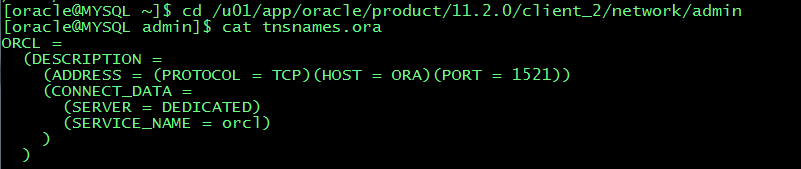
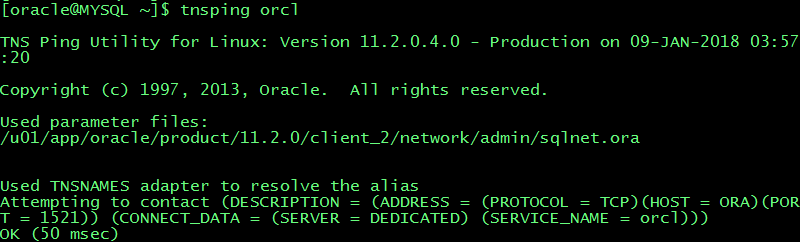
Update the tnsnames.ora of the target and add the target host into /etc/hosts

tnsping
7. Change the folder privilege
Chmod 777 for mysql-bin.index and oracle
[oracle@MYSQL mysql]$ ll
total 122928
-rw-r-----. 1 oracle oracle 56 Jan 9 06:44 auto.cnf
-rwxrwxrwx. 1 oracle oracle 351 Jan 9 05:29 ib_buffer_pool
-rwxrwxrwx. 1 oracle oracle 12582912 Jan 9 06:44 ibdata1
-rwxrwxrwx. 1 oracle oracle 50331648 Jan 9 06:44 ib_logfile0
-rwxrwxrwx. 1 oracle oracle 50331648 Jan 8 08:17 ib_logfile1
-rw-r-----. 1 oracle oracle 12582912 Jan 9 06:44 ibtmp1
drwxrwxrwx. 2 oracle oracle 4096 Jan 9 05:17 mydb
drwxrwxrwx. 2 oracle oracle 4096 Jan 8 08:17 mysql
-rwxrwxrwx. 1 oracle oracle 177 Jan 9 06:42 mysql-bin.000001
-rw-r-----. 1 oracle oracle 154 Jan 9 06:44 mysql-bin.000002
-rwxrwxrwx. 1 oracle oracle 64 Jan 9 06:44 mysql-bin.index
srwxrwxrwx. 1 oracle oracle 0 Jan 9 06:44 mysql.sock
-rw-------. 1 oracle oracle 6 Jan 9 06:44 mysql.sock.lock
drwxrwxrwx. 2 oracle oracle 4096 Jan 8 08:17 performance_schema
drwxrwxrwx. 2 oracle oracle 12288 Jan 8 08:17 sys
8. my.cnf file
[oracle@MYSQL mysql]$ cat /etc/my.cnf
# For advice on how to change settings please see
# http://dev.mysql.com/doc/refman/5.7/en/server-configuration-defaults.html
[mysqld]
#
# Remove leading # and set to the amount of RAM for the most important data
# cache in MySQL. Start at 70% of total RAM for dedicated server, else 10%.
# innodb_buffer_pool_size = 128M
#
# Remove leading # to turn on a very important data integrity option: logging
# changes to the binary log between backups.
# log_bin
#
# Remove leading # to set options mainly useful for reporting servers.
# The server defaults are faster for transactions and fast SELECTs.
# Adjust sizes as needed, experiment to find the optimal values.
# join_buffer_size = 128M
# sort_buffer_size = 2M
# read_rnd_buffer_size = 2M
datadir=/var/lib/mysql
socket=/var/lib/mysql/mysql.sock
# Disabling symbolic-links is recommended to prevent assorted security risks
symbolic-links=0
log-error=/var/log/mysqld.log
pid-file=/var/run/mysqld/mysqld.pid
#Update for OGG
server-id=11223344
log-bin=/var/lib/mysql/mysql-bin
#log-bin-index=/var/lib/mysql/mysql-bin.index
binlog_format=row
9. OGG setup
Extract:
Extract extmysql
ExtTrail ./dirdat/aa
SourceDB mydb, UserID root, Password Welcome_1
TranLogOptions AltLogDest /var/lib/mysql/mysql-bin.index
Table mydb.TCUSTMER;
Pump:
Extract pummysql
RmtHost MYSQL, MgrPort 7909
RmtTrail ./dirdat/ac
Passthru
Table mydb.TCUSTMER;
Replicat:
Replicat repmysql
UserID ogg@orcl, password ogg
DiscardFile ./dirrpt/repmysql.dsc, purge
map mydb.TCUSTMER,target ogg.TCUSTMER;
Add groups:
--adding extract group by
add extract extmysql,tranlog,begin now
add exttrail ./dirdat/aa,extract extmysql
--adding pump group by
add extract pummysql,exttrailsource ./dirdat/aa
add rmttrail ./dirdat/ac,extract pummysql
--adding replicat group by
add replicat repmysql,exttrail ./dirdat/ac
10. Test DML
Create table:
--source MySQL
CREATE TABLE TCUSTMER
(
CUST_CODE VARCHAR(4) NOT NULL,
NAME VARCHAR(30),
CITY VARCHAR(20),
STATE CHAR(2),
PRIMARY KEY (CUST_CODE)
);
--target Oracle
CREATE TABLE tcustmer
(
cust_code VARCHAR2(4),
name VARCHAR2(30),
city VARCHAR2(20),
state CHAR(2),
PRIMARY KEY (cust_code)
USING INDEX
);
Test SQL:
INSERT INTO TCUSTMER
VALUES
(
'Alex',
'Alex&Lina INC.',
'LA',
'CA'
);
INSERT INTO TCUSTMER
VALUES
(
'JANE',
'ROCKY FLYER INC.',
'DENVER',
'CO'
);
INSERT INTO TCUSTMER
VALUES
(
'WILL',
'BG SOFTWARE CO.',
'SEATTLE',
'WA'
);
delete from TCUSTMER where CUST_CODE='WILL';
update TCUSTMER set city='LA' where CUST_CODE='JANE';
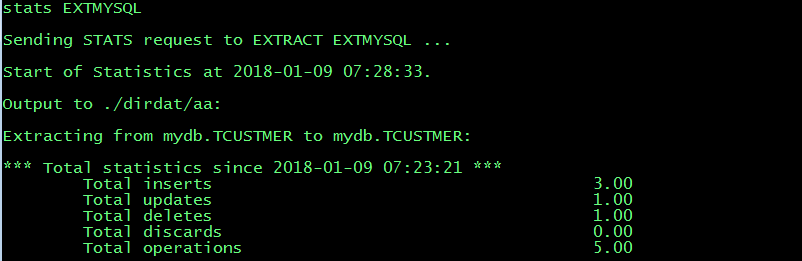
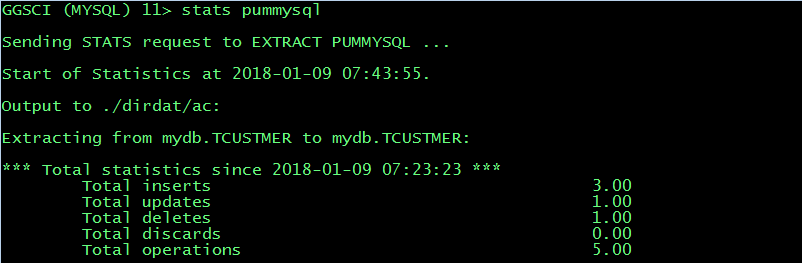
11. Test result
Extract:
Pump:
Replicate:
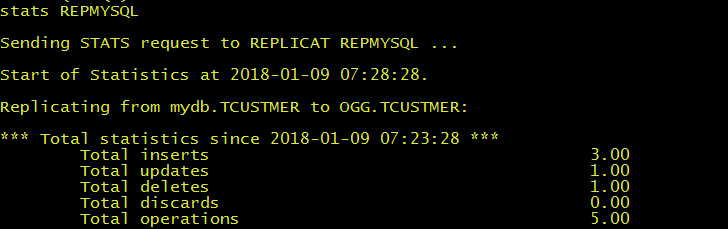
MySQL source table:

Oracle target table:

MySQL data sync to Oracle with OGG(Remote Delivery)的更多相关文章
- PCB .NET连接MySQL与Oracle DLL文分享件 MySql.Data,Oracle.ManagedDataAccess
虽然我们C#对SQL SERVER天然的支持,但对于C#要连接MYSQL或Oracle就不同了, 需要用到第3方组件才行,本文将2个组件连接数据库代码与DLL下载地址贴出. 一.C#连接MYSQL ...
- Oracle GoldenGate OGG管理员手册(较早资料)
第一章 系统实现简述 前言 编写本手册的目的是为系统管理员以及相关操作人员提供 Oracle Goldengat 软 件的日常维护和使用的技术参考: 3 ORACLE 第二章 OGG 日常维护操作 ...
- 【Oracle】OGG(Oracle GoldenGate)简介及搭建过程
GoldenGate公司简介 GoldenGate公司专注于数据同步领域,是实现数据同步技术的领导者.至2007年,在全球35个国家售出超过2000个许可证,客户分布在政府.银行.电信.证券.传媒.医 ...
- Oracle GoldenGate OGG管理员手册
第一章 系统实现简述 前言 编写本手册的目的是为系统管理员以及相关操作人员提供 Oracle Goldengat 软 件的日常维护和使用的技术参考: 3 ORACLE 第二章 OGG 日常维护操作 ...
- mysql导入数据到oracle中
mysql导入数据到oracle中. 建立Oracle表: CREATE TABLE "GG_USER" ( "USERID" BYTE) NOT NULL, ...
- 600万用户数据导入MYSQL、MSSQL、Oracle数据库方法【转】
1.导入MySql数据库 参考文献:http://zhuaxia.org/blog/post/145 1.1.LOAD DATA INFILE语法 因为获得的数据库文件是一个文本文件www.csd ...
- Oracle数据库学习(二):Oracle Linux下oracle、ogg的挂载与参数配置
准备工作:打开虚拟机端的Oracle Linux Server 6.9的系统,然后使用root用户登录.打开终端界面,输入ifconfig -a查看IP地址. 然后在本地打开XShell软件使用以下命 ...
- 一次Mysql连接池卡死导致服务无响应问题分析(.Net Mysql.Data 6.9.9)
问题: 进程启动后,线程数迅速上升至最小线程数后,缓慢上升(线程池限制)到数千,然后由于线程过多,CPU飙升到90%. 对外表现为Api无响应或连接超时. 背景 有些数据存在于另一个机房,通过内网专线 ...
- 【Oracle】OGG单向复制配置
实验环境: 源端: Ip:192.168.40.10 DataBase:Oracle 11.2.0.1.0 ORCL OS:OEL5.6 OGG:fbo_ggs_Linux_x86_ora11g_32 ...
随机推荐
- 阿里云盾SSL证书即将到期怎么办?
如果你也像我一样用了一个有效期限1年的DV证书,颁发厂商:Symantec.那当这个证书快到期的时候要怎么更换证书呢?1.证书安装环境是IIS82.下载重新购买的免费证书,对新证书进行重新先发.3.证 ...
- IT项目管理十大要素
1.项目需求PgMp.mypm.net 当项目混乱和不可控的时候,往往是源头出了问题,解决源头才能治本.项目管理者联盟文章 软件项目中的范围管理重点就是项目需求,需求包括原始需求,用户需求,产品需求和 ...
- # 常用linux 命令和相关问题解决
最近试着自己部署了服务器,在unbantu的环境下 学习了很多新知识 也遇到了很多问题,现在腾出手了,总结一下 常用Linux命令 目录操作 pwd: 查看当前路径 cd: 移动 cd .. : 返回 ...
- 软件理论基础—— 第一章命题逻辑系统L
逻辑 语法 语义 推理系统 公理 推理规则 MP A,A->B =>B HS A->B,B->C => A->C 命题逻辑公式 ::= BNF backus ...
- MySQL 存储过程的变量
MySQL 存储过程的变量 变量是一个命名数据对象,变量的值可以在存储过程执行期间更改.我们通常使用存储过程中的变量来保存直接/间接结果. 这些变量是存储过程的本地变量. 注意:变量必须先声明后,才 ...
- SQLServer2008 查询分析器内容未保存,查找分析器内容
位置:C:\Users\Administrator\Documents\SQL Server Management Studio\Backup Files\Solution1
- IP通信实验感想
经过几周的学习之后,我终于开始了IP通信的实验课. 我们利用H3C进行对ip地址进行设置,在对不同交换机下的pc进行连接测试 首先,我们对交换机和pc机器进行配置设置,ip地址分配分别从192.168 ...
- python-css基础知识
CSS 是指层叠样式表 (Cascading Style Sheets),样式定义如何显示html,用于对页面进行美化. css样式的存放位置有三种: 第一种,直接写在html标签里: <div ...
- HATEOAS约束
HATEOAS(Hypermedia as the engine of application state)是 REST 架构风格中最复杂的约束,也是构建成熟 REST 服务的核心.它的重要性在于打破 ...
- shell脚本 快照还原Hbase数据库
#!/bin/bash for i in $(cat ./hbaseTable);do echo "disable '$i'" | hbase shellecho "re ...