
android 进程/线程管理(一)----消息机制的框架
一:android 进程和线程
进程是程序运行的一个实例。android通过4大主件,弱化了进程的概念,尤其是在app层面,基本不需要关系进程间的通信等问题。
但是程序的本质没有变,尤其是多任务系统,以事件为驱动的软件系统基本模式都是如下:
程序的入口一般是main:
1.初始化:
比如创建窗口,申请资源等。
2.进入while(true)
在循环中处理各种事件,直到进程退出。
四大组件是进程的部分载体,配置进程在androidmanifest.xml里面,android:process 属性。
当然默认所有的都在同一个进程里面,由application里面配置,默认进程为apk的包名。
线程是进程的有机组成部分,是CPU调度的基础。
一般情况下,都有主线程和其他线程之分,只有主线程才可以刷新UI。
应用程序启动后,将创建ActivityThread 主线程。
不同包名的组件可以一定的方式运行在同一个进程中。
一个Activity启动后,至少会有3个线程。一个主线程和2个binder线程。
二:android 进程内的消息驱动机制---Handler,MessageQueue,Runnable,Looper
1.Runnable & MessageQueue:
Runnable 和Message 是消息的2种载体。
消息的行为本质上就是 一段操作Runnable,或者是一段数据Message,包含这操作内容,由handlemessage来判断处理。
他们的操作方式就是:
 public final boolean post(Runnable r)

    {

         return  sendMessageDelayed(getPostMessage(r), 0);

    }

public final boolean postAtTime(Runnable r, long uptimeMillis)

public final boolean postAtTime(Runnable r, Object token, long uptimeMillis)
上面就是Runnable的方法,可以看到Runnable会被分装成Message的形式发送。
    private static Message getPostMessage(Runnable r) {

        Message m = Message.obtain();

        m.callback = r;

        return m;

    }
所以本质上,都是以Message的封装方式处理。
最终所有的消息都会放入MessageQueue里面。
MessageQueue并不是一个真正的队列,而是链表。
Looper就是循环在某件事情,类似于while(true)干的事情。
Handler就是真正做事情的。
Looper不断的从MessageQueue从取出数据,然后交给handler来处理。
2.Handler:
framework/base/core/android/os/Handler.java
其实handler的作用,它的注释已经解释的非常清楚。
/**

 * A Handler allows you to send and process {@link Message} and Runnable

 * objects associated with a thread's {@link MessageQueue}.  Each Handler

 * instance is associated with a single thread and that thread's message

 * queue.  When you create a new Handler, it is bound to the thread /

 * message queue of the thread that is creating it -- from that point on,

 * it will deliver messages and runnables to that message queue and execute

 * them as they come out of the message queue.

*

 * <p>There are two main uses for a Handler: (1) to schedule messages and

 * runnables to be executed as some point in the future; and (2) to enqueue

 * an action to be performed on a different thread than your own.

*

 * <p>When posting or sending to a Handler, you can either

 * allow the item to be processed as soon as the message queue is ready

 * to do so, or specify a delay before it gets processed or absolute time for

 * it to be processed.  The latter two allow you to implement timeouts,

 * ticks, and other timing-based behavior.

*/
这个一共三段内容,大意是:
1)handler使用runnable或者message的方式传递,存储在一个thread的messagequeue里面。
当你创建一个新的handler的时候,他会与这个创建它的线程绑定。
对于一个Thread 来说MessageQueue,和Looper只有一个。
2)使用handler一般有2种场景。
希望do runnable或者某种Message 在in the future.
或者把一个action(Runnable or Message)传递到其他线程进行操作。
常见的操作就是在工作线程中使用主线程handler来操作UI。
3)你可以让handler直接操作message内容,或者等待一段时间,这个时间是可以配置的。
handle的2大功能
处理message:
public void dispatchMessage(Message msg) 分发消息

public void handleMessage(Message msg)   处理消息,该方法通常情况下,须由子类继承。
Looper.loop()方法会调用dispatchMessage来处理消息。
    public void dispatchMessage(Message msg) {

        if (msg.callback != null) {

            handleCallback(msg);

        } else {

            if (mCallback != null) {

                if (mCallback.handleMessage(msg)) {

                    return;

                }

            }

            handleMessage(msg);

        }

    }
handler的子类通过重载该方法,可以修改handler的消息派发方式。
handler的第二个作用是把message & Runnable分装到MessageQueue里面。
handler,messagequeue,looper目的是什么,目的就是启动消息机制。
MessageQueue:
MessageQueue从哪里得到,从Handler源码看到,是从Looper里面来的。
    public Handler(Looper looper, Callback callback, boolean async) {

        mLooper = looper;

        mQueue = looper.mQueue;

        mCallback = callback;

        mAsynchronous = async;

    }
Looper:
    private Looper(boolean quitAllowed) {

        mQueue = new MessageQueue(quitAllowed);

        mThread = Thread.currentThread();

    }
Looper 构造函数就干了2件事。
创建Messagequeue,所以 每个Looper都有唯一的一个MessageQueue与之对应。
得到运行thread。
    // sThreadLocal.get() will return null unless you've called prepare().

    static final ThreadLocal<Looper> sThreadLocal = new ThreadLocal<Looper>();
Looper有个特殊的变量,ThreadLocal, 这个对象只对自己所在的线程全局,其他的线程无法看到它。
Looper提供了很多static的方法,所以肯定还有一些能都识别“身份“的方法。
这些方法在我们使用looper 的时候,最重要的是如下2个:
    private static void prepare(boolean quitAllowed) {

        if (sThreadLocal.get() != null) {

            throw new RuntimeException("Only one Looper may be created per thread");

        }

        sThreadLocal.set(new Looper(quitAllowed));

    }
/**

     * Run the message queue in this thread. Be sure to call

     * {@link #quit()} to end the loop.

     */

    public static void loop() {

        final Looper me = myLooper();

        if (me == null) {

            throw new RuntimeException("No Looper; Looper.prepare() wasn't called on this thread.");

        }

        final MessageQueue queue = me.mQueue;

        // Make sure the identity of this thread is that of the local process,

        // and keep track of what that identity token actually is.

        Binder.clearCallingIdentity();

        final long ident = Binder.clearCallingIdentity();

        for (;;) {

            Message msg = queue.next(); // might block

            if (msg == null) {

                // No message indicates that the message queue is quitting.

                return;

            }

            // This must be in a local variable, in case a UI event sets the logger

            Printer logging = me.mLogging;

            if (logging != null) {

                logging.println(">>>>> Dispatching to " + msg.target + " " +

                        msg.callback + ": " + msg.what);

            }

            msg.target.dispatchMessage(msg);

            if (logging != null) {

                logging.println("<<<<< Finished to " + msg.target + " " + msg.callback);

            }

            // Make sure that during the course of dispatching the

            // identity of the thread wasn't corrupted.

            final long newIdent = Binder.clearCallingIdentity();

            if (ident != newIdent) {

                Log.wtf(TAG, "Thread identity changed from 0x"

                        + Long.toHexString(ident) + " to 0x"

                        + Long.toHexString(newIdent) + " while dispatching to "

                        + msg.target.getClass().getName() + " "

                        + msg.callback + " what=" + msg.what);

            }

            msg.recycle();

        }

    }
prepare才是looper创建以及和thread绑定的地方。
looper.loop()方法是整个looper机制启动的地方。
从此thread就会接受消息和处理消息了。
这里有个小问题:
            Message msg = queue.next(); // might block

            if (msg == null) {

                // No message indicates that the message queue is quitting.

                return;

            }
一开始的时候,MessageQueue handler没有传递消息进队列,按理说取到的消息是null,这样looper就直接退出了。
这个问题等到分析源码的时候,在解决。
这样handler,messaqequeue,looper, 和thread都关联起来了。
下面还有一个mainlooper的问题。
public static void main(String[] args) {

    ...

    Looper.prepareMainLooper();

    if (sMainThreadHandler == null) {

            sMainThreadHandler = thread.getHandler();

        }

    Looper.loop();

}
以上是ActivityThread的部分入口函数main的源码:
可见prepareMainLooper()的方法,是给主线程使用的。
而looper那边的
private static Looper sMainLooper; // guarded by Looper.class
是为了给其他线程应用使用。
这样其他线程可以给主线程发消息。
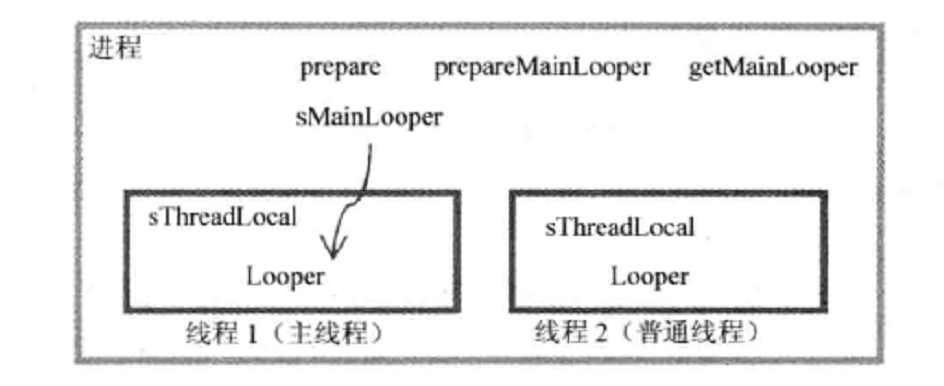
如图所示:主线程的looper将由sMainLooper作为应用,保存在static空间中,其他工作线程可以访问它
至此,整个消息机制的框架已经驱动起来。
本文参考:
1.《深入理解android内核设计思想》林学森
2.《Android内核剖析》
相关文章:
android 进程/线程管理(三)----Thread,Looper / HandlerThread / IntentService
android 进程/线程管理(一)----消息机制的框架的更多相关文章
- android 进程/线程管理(四)续----消息机制的思考(自定义消息机制)
继续分析handler 和looper 先看看handler的 public void dispatchMessage(Message msg) { if (msg.callback != null) ...
- android 进程/线程管理(四)----消息机制的思考(自定义消息机制)
关于android消息机制 已经写了3篇文章了,想要结束这个系列,总觉得少了点什么? 于是我就在想,android为什么要这个设计消息机制,使用消息机制是现在操作系统基本都会有的特点. 可是andro ...
- android 进程/线程管理(二)----关于线程的迷思
一:进程和线程的由来 进程是计算机科技发展的过程的产物. 最早计算机发明出来,是为了解决数学计算而发明的.每解决一个问题,就要打纸带,也就是打点. 后来人们发现可以批量的设置命令,由计算机读取这些命令 ...
- android 进程/线程管理(三)----Thread,Looper / HandlerThread / IntentService
Thread,Looper的组合是非常常见的组合方式. Looper可以是和线程绑定的,或者是main looper的一个引用. 下面看看具体app层的使用. 首先定义thread: package ...
- android学习-进程/线程管理-完整
我们知道,应用程序的主入口都是main函数--"它是一切事物的起源" main函数工作也是千篇一律的, 初始化 比如ui的初始化,向系统申请资源等. 进入死循环 再循环中处理各种事 ...
- Android 面试收集录5 消息机制
1.消息机制概述 1.1.消息机制的简介 在Android中使用消息机制,我们首先想到的就是Handler. 没错,Handler是Android消息机制的上层接口. Handler的使用过程很简单, ...
- 【转载】每个 Android 开发者必须知道的消息机制问题总结
Android的消息机制几乎是面试必问的话题,当然也并不是因为面试,而去学习,更重要的是它在Android的开发中是必不可少的,占着举足轻重的地位,所以弄懂它是很有必要的.下面就来说说最基本的东西. ...
- Android消息机制:Looper,MessageQueue,Message与handler
Android消息机制好多人都讲过,但是自己去翻源码的时候才能明白. 今天试着讲一下,因为目标是讲清楚整体逻辑,所以不追究细节. Message是消息机制的核心,所以从Message讲起. 1.Mes ...
- Android线程管理之ThreadLocal理解及应用场景
前言: 最近在学习总结Android的动画效果,当学到Android属性动画的时候大致看了下源代码,里面的AnimationHandler存取使用了ThreadLocal,激起了我很大的好奇心以及兴趣 ...
随机推荐
- C# 异常捕获机制(Try Catch Finally)
一.C#的异常处理所用到关键字 try 用于检查发生的异常,并帮助发送任何可能的异常. catch 以控制权更大的方式处理错误,可以有多个catch子句. finally 无论是否引发了异常,fina ...
- C语言学习006:歌曲搜索
#include <stdio.h> #include <string.h> //字符串处理库 ]={ "I left my heart in Harvard Med ...
- 基于C#的MongoDB数据库开发应用(3)--MongoDB数据库的C#开发之异步接口
在前面的系列博客中,我曾经介绍过,MongoDB数据库的C#驱动已经全面支持异步的处理接口,并且接口的定义几乎是重写了.本篇主要介绍MongoDB数据库的C#驱动的最新接口使用,介绍基于新接口如何实现 ...
- How to throw an error in MySql procedure?
http://stackoverflow.com/questions/4862911/how-to-throw-an-error-in-mysql-procedure 9down votefavori ...
- 最小生成二叉树-prim算法
1.prim算法:一种计算生成最小生成树的方法,它的每一步都会为一棵生长中的树添加一条边. 2.时间复杂度:
- java servlet手机app访问接口(一)数据加密传输验证
前面几篇关于servlet的随笔,算是拉通了 servlet的简单使用流程,接下去的文章将主要围绕手机APP访问接口这块出发续写,md5加密传输--->短信验证--->手机推送---> ...
- Ajax中传递Json格式的参数
$.ajax({ type: "post", url: baseUrl+"sys/login", dataType: "json", con ...
- 自学H5第二天
笔记: 1.css之外联样式 2.css之行间样式: 3.css之内联样式 二.边框的知识: 1.边框的复合样式: 2.边框的单一样式: /*单一样式*/ border-width: 1px 2px ...
- js 关于日期
new Date() 获取当前的完整日期 : 如 2016-12-30 new Date().getFullYear() 获取当前的年份 new Date().getMonth() 获取当前的月份( ...
- 一个java实习生两周八次的面试经历
以前从来没有因为求职出去面试过,一直觉得面试很可怕,没想到最近两周我也成为了面霸,两周面试八次,我的找工作之路就这样开始了!大概两个星期之前,我看着自己在招聘网站上写好的简历连投出去的勇气都没有,战战 ...