
状态开关按钮(ToggleButton)和开关(Switch)
ToggleButton支持的XML属性及相关方法
1.android:checked----->setChecked(boolean)
----->设置该按钮是否被选中
2.android:textOff----->设置当该按钮的状态关闭时显示的文本
3.android:textON----->设置当该按钮的状态打开时显示的文本
Switch支持的XML属性及相关方法
1.android:checked----->setChecked(boolean)
----->设置该按钮是否被选中
2.android:textOff----->设置当该按钮的状态关闭时显示的文本
3.android:textON----->设置当该按钮的状态打开时显示的文本
4.android:switchMinWidth----->setSwitchMinWidth(int)
----->设置该开关的最小宽度
5.android:switchPadding----->setSwitchMinWidth(int)
----->设置该开关与标题文本之间的空白
6.android:switchTextAppearance----->setSwitchTextAppearance(Context,int)
----->设置开关图标上的文本样式
7.android:textStyle----->setSwitchTypeface(TYpeface)
----->设置开关的文本风格
8.android:thumb----->setThumbResource(int)
----->指定使用自定义Drawable绘制该开关的开关按钮
9.android:track----->setTrackResource(int)
----->指定使用自定义Drawable绘制该开关的轨道
10.android:typeface----->setSwitchTypeface(TYpeface)
-----设置该开关的文本的字体风格
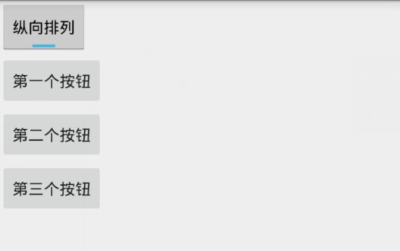
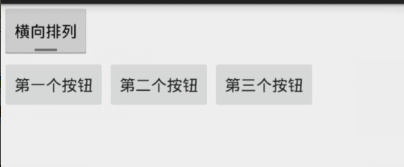
Demo2\togglebutton_demo\src\main\res\layout\activity_main.xml
 <LinearLayout xmlns:android="http://schemas.android.com/apk/res/android"

     xmlns:tools="http://schemas.android.com/tools"

     android:layout_width="match_parent"

     android:layout_height="match_parent"

     android:orientation="vertical"

     tools:context=".MainActivity">

     <!--定义一个ToggleButton按钮-->

     <ToggleButton

         android:id="@+id/toggle"

         android:layout_width="wrap_content"

         android:layout_height="wrap_content"

         android:checked="true"

         android:textOff="横向排列"

         android:textOn="纵向排列" />

     <!--定义一个可以动态改变方向的线性布局-->

     <LinearLayout

         android:id="@+id/test"

         android:layout_width="match_parent"

         android:layout_height="match_parent"

         android:orientation="vertical">

         <Button

             android:layout_width="wrap_content"

             android:layout_height="wrap_content"

             android:text="第一个按钮"/>

         <Button

             android:layout_width="wrap_content"

             android:layout_height="wrap_content"

             android:text="第二个按钮"/>

         <Button

             android:layout_width="wrap_content"

             android:layout_height="wrap_content"

             android:text="第三个按钮"/>

     </LinearLayout>

 </LinearLayout>
Demo2\togglebutton_demo\src\main\java\com\ly\togglebutton_demo\MainActivity.java
 import android.app.Activity;

 import android.os.Bundle;

 import android.widget.CompoundButton;

 import android.widget.LinearLayout;

 import android.widget.ToggleButton;

 public class MainActivity extends Activity {

     private ToggleButton toggle ;

     private LinearLayout linear ;

     @Override

     protected void onCreate(Bundle savedInstanceState) {

         super.onCreate(savedInstanceState);

         setContentView(R.layout.activity_main);

         toggle = (ToggleButton) findViewById(R.id.toggle);

         linear = (LinearLayout) findViewById(R.id.test);

         toggle.setOnCheckedChangeListener(new CompoundButton.OnCheckedChangeListener() {

             @Override

             public void onCheckedChanged(CompoundButton buttonView, boolean isChecked) {

                 if (isChecked){

                     //如果选中了,就设置垂直布局

                     linear.setOrientation(LinearLayout.VERTICAL);

                 }else {

                     //否则就水平

                     linear.setOrientation(LinearLayout.HORIZONTAL);

                 }

             }

         });

     }

 }
状态开关按钮(ToggleButton)和开关(Switch)的更多相关文章
- Android学习笔记-开关按钮ToggleButton和开关Switch
本节给大家介绍的Android基本UI控件是:开关按钮ToggleButton和开关Switch,这两个其实都是开关组件,只是后者需要在Android 4.0以后才能使用 所以AndroidManif ...
- Android——滚动视图(ScrollView)图片视图(ImageView)、状态开关按钮(ToggleButton)、时钟
xml <?xml version="1.0" encoding="utf-8"?> <!--滚动视图--> <ScrollVie ...
- Android——图片视图(ImageView)、状态开关按钮(ToggleButton)、时钟、图片透明度、滚动和时间选择器
activity_ui1.xml dth="wrap_content" android:layout_height="wrap_content" android ...
- 状态开关按钮(ToggleButton)与开关(Switch)的功能与用法
状态开关按钮(ToggleButton)与开关(Switch)也是由Button派生出来的,因此它们的本质也是按钮,Button支持的各种属性.方法也适用于ToggleButton和Switch.从功 ...
- 状态开关按钮(ToggleButton)及按钮(Swich)的使用
状态开关按钮(ToggleButton)和开关(Switch)也是由Button派生出来的,因此它们本质上都是按钮,Button支持的各种属性.方法也适用于ToggleButton和Switch.从功 ...
- Android ToggleButton(开关函数)与switch (开关按钮)
1.ToggleButton (1)介绍 (2)组件形状 (3)xml文件设置 <?xml version="1.0" encoding="utf-8"? ...
- Android 多状态按钮ToggleButton
1.什么是ToggleButtonToggleButton有两种状态:选中和未选中状态并且需要为不同的状态设置不同的显示文本2.ToggleButton属性android:checked=" ...
- vue.js开发之开关(switch)组件
最近开发组件的时候,自定义开发了开关(switch)组件,现将代码整理如下,方便日后复用. toggle-switch.vue <template> <label role=&quo ...
- 可滑动的ToggleButton(开关)
2013-12-28 17:25:01 网上看到一篇关于可滑动的ToogleButton的文章,有代码,觉得挺好,但是不符合我的要求,因此在他的代码基础上改了一些.(作者看到了勿喷啊,实在找不到原文了 ...
随机推荐
- Light OJ 1032 - Fast Bit Calculations(数学)
题目链接:http://www.lightoj.com/volume_showproblem.php?problem=1032 题目大意:一个十进制数变化为二进制,那么对于这个数,如果连着两个二进制位 ...
- NPOI简单应用
打开或创建文件 fs = new FileStream(fileName, FileMode.OpenOrCreate, FileAccess.ReadWrite); 不同版本的workbook if ...
- 项目里面Swift和OC 交叉使用
在OC的项目中使用Swift 语言开发 创建swift文件,同时创建桥接文件.(桥接文件里面不用导入头文件) 在swift文件中完成代码的编写. 在某OC类的.m文件中,使用swift文件.方法;#i ...
- jQuery Mobile 列表视图(带有自动检索)
输入a: 输入b: jQuery Mobile 列表视图 jQuery Mobile 中的列表视图是标准的 HTML 列表:有序列表 (<ol>) 和无序列表 (<ul>). ...
- Unity(四)IocContainer 封装类库
首先要在项目中安装Unity,通过NuGet搜索Unity. 1.定义接口 IDependencyResolver using System; using System.Collections.Gen ...
- TCP协议学习记录 (三) Ping程序 RR选项 记录路由hop
一开始想直接在上个程序改,自己构造IP包头,但后来发现不行,微软不让干了,所以后来选用libcap库来收发包 代码写的很乱.. #pragma pack(4) #define ECHO_REQUEST ...
- 微软2016校园招聘4月在线笔试 A FontSize
题目链接:http://hihocoder.com/problemset/problem/1288 分析:题目中所求的是最大的FontSize(记为S),其应该满足P*[W/S]*[H/S] > ...
- 记录视频“ Why I build Docker"
Why we built Docker ? IT界中云计算革命正在如火如荼的进行着,docker 正在引领着这个潮流. 那么docker 是怎么引进来的呢? Docker的CTO在下面视频里如此清晰的 ...
- android 获取系统联系人 完全解析
一.代码 1.ContactsEngine.java import java.util.ArrayList; import java.util.HashMap; import java.util.Li ...
- C# 解析 Json
C# 解析 json JSON(全称为JavaScript Object Notation) 是一种轻量级的数据交换格式.它是基于JavaScript语法标准的一个子集. JSON采用完全独立于语言的 ...