
本地idea开发mapreduce程序提交到远程hadoop集群执行
https://www.codetd.com/article/664330

https://blog.csdn.net/dream_an/article/details/84342770
通过idea开发mapreduce程序并直接run,提交到远程hadoop集群执行mapreduce。
简要流程:本地开发mapreduce程序–>设置yarn 模式 --> 直接本地run–>远程集群执行mapreduce程序;
完整的流程:本地开发mapreduce程序——> 设置yarn模式——>初次编译产生jar文件——>增加 job.setJar("mapreduce/build/libs/mapreduce-0.1.jar");——>直接在Idea中run——>远程集群执行mapreduce程序;
一图说明问题: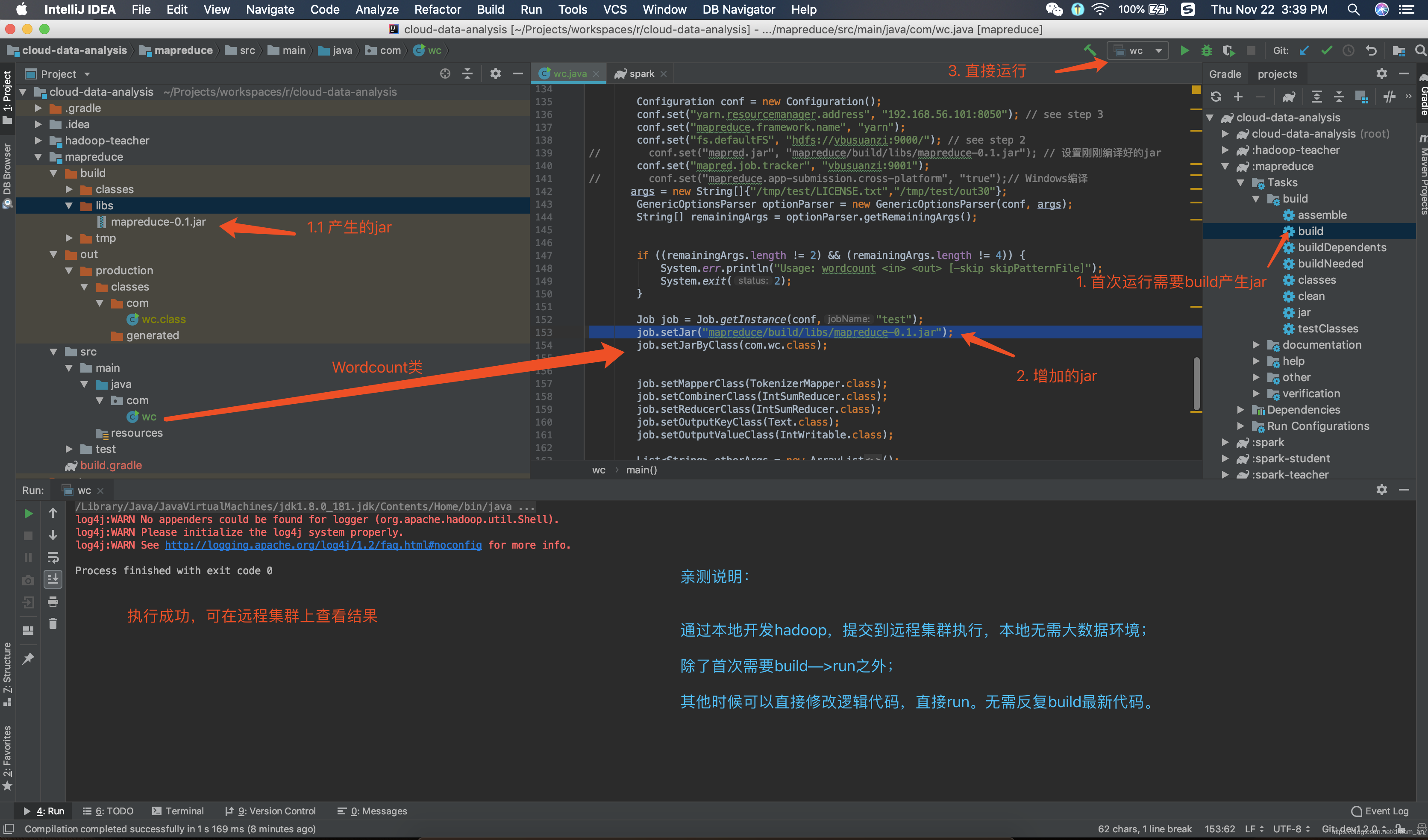
源码
build.gradle
plugins {

    id 'java'

}

group 'com.ruizhiedu'

version '0.1'

sourceCompatibility = 1.8

repositories {

    mavenCentral()

}

dependencies {

    compile group: 'org.apache.hadoop', name: 'hadoop-common', version: '3.1.0'

    compile group: 'org.apache.hadoop', name: 'hadoop-mapreduce-client-core', version: '3.1.0'

    compile group: 'org.apache.hadoop', name: 'hadoop-mapreduce-client-jobclient', version: '3.1.0'

    testCompile group: 'junit', name: 'junit', version: '4.12'

}
java文件
输入、输出已经让我写死了,可以直接run。不需要再运行时候设置idea运行参数
wc.java
package com;

import org.apache.hadoop.conf.Configuration;

import org.apache.hadoop.fs.Path;

import org.apache.hadoop.io.IntWritable;

import org.apache.hadoop.io.Text;

import org.apache.hadoop.mapreduce.Counter;

import org.apache.hadoop.mapreduce.Job;

import org.apache.hadoop.mapreduce.Mapper;

import org.apache.hadoop.mapreduce.Reducer;

import org.apache.hadoop.mapreduce.lib.input.FileInputFormat;

import org.apache.hadoop.mapreduce.lib.output.FileOutputFormat;

import org.apache.hadoop.util.GenericOptionsParser;

import org.apache.hadoop.util.StringUtils;

import java.io.BufferedReader;

import java.io.FileReader;

import java.io.IOException;

import java.net.URI;

import java.util.*;

/**

 * @author wangxiaolei(王小雷)

 * @since 2018/11/22

 */

public class wc {

    public static class TokenizerMapper

            extends Mapper<Object, Text, Text, IntWritable> {

        static enum CountersEnum { INPUT_WORDS }

        private final static IntWritable one = new IntWritable();

        private Text word = new Text();

        private boolean caseSensitive;

        private Set<String> patternsToSkip = new HashSet<String>();

        private Configuration conf;

        private BufferedReader fis;

        @Override

        public void setup(Context context) throws IOException,

                InterruptedException {

            conf = context.getConfiguration();

            caseSensitive = conf.getBoolean("wordcount.case.sensitive", true);

            if (conf.getBoolean("wordcount.skip.patterns", false)) {

                URI[] patternsURIs = Job.getInstance(conf).getCacheFiles();

                for (URI patternsURI : patternsURIs) {

                    Path patternsPath = new Path(patternsURI.getPath());

                    String patternsFileName = patternsPath.getName().toString();

                    parseSkipFile(patternsFileName);

                }

            }

        }

        private void parseSkipFile(String fileName) {

            try {

                fis = new BufferedReader(new FileReader(fileName));

                String pattern = null;

                while ((pattern = fis.readLine()) != null) {

                    patternsToSkip.add(pattern);

                }

            } catch (IOException ioe) {

                System.err.println("Caught exception while parsing the cached file '"

                        + StringUtils.stringifyException(ioe));

            }

        }

        @Override

        public void map(Object key, Text value, Context context

        ) throws IOException, InterruptedException {

            String line = (caseSensitive) ?

                    value.toString() : value.toString().toLowerCase();

            for (String pattern : patternsToSkip) {

                line = line.replaceAll(pattern, "");

            }

            StringTokenizer itr = new StringTokenizer(line);

            while (itr.hasMoreTokens()) {

                word.set(itr.nextToken());

                context.write(word, one);

                Counter counter = context.getCounter(CountersEnum.class.getName(),

                        CountersEnum.INPUT_WORDS.toString());

                counter.increment();

            }

        }

    }

    public static class IntSumReducer

            extends Reducer<Text,IntWritable,Text,IntWritable> {

        private IntWritable result = new IntWritable();

        public void reduce(Text key, Iterable<IntWritable> values,

                           Context context

        ) throws IOException, InterruptedException {

            int sum = ;

            for (IntWritable val : values) {

                sum += val.get();

            }

            result.set(sum);

            context.write(key, result);

        }

    }

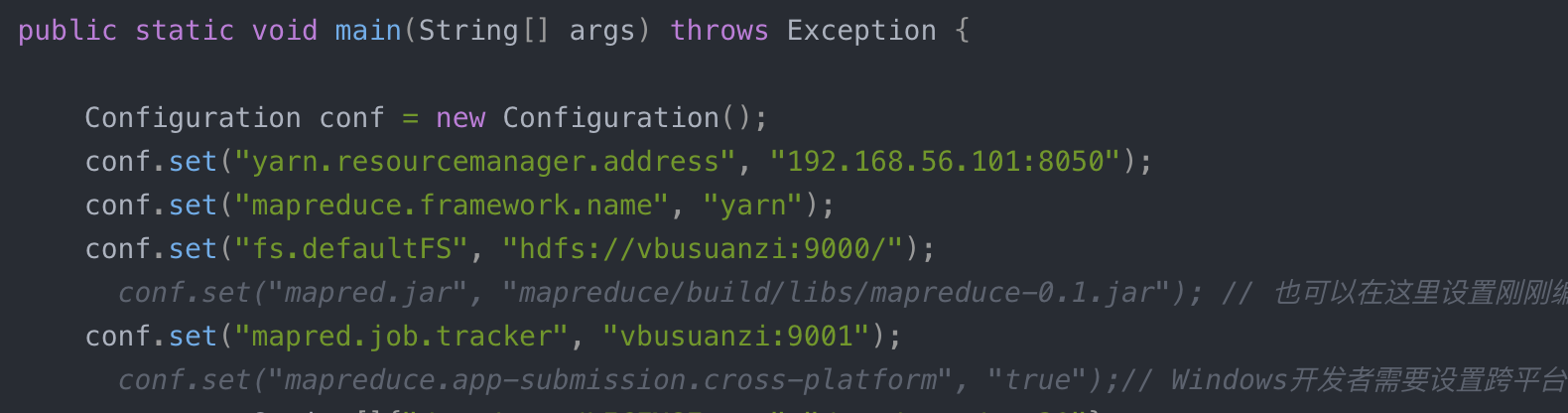
    public static void main(String[] args) throws Exception {

        Configuration conf = new Configuration();

        conf.set("yarn.resourcemanager.address", "192.168.56.101:8050");

        conf.set("mapreduce.framework.name", "yarn");

        conf.set("fs.defaultFS", "hdfs://vbusuanzi:9000/");

//        conf.set("mapred.jar", "mapreduce/build/libs/mapreduce-0.1.jar"); // 也可以在这里设置刚刚编译好的jar

        conf.set("mapred.job.tracker", "vbusuanzi:9001");

//        conf.set("mapreduce.app-submission.cross-platform", "true");// Windows开发者需要设置跨平台

       args = new String[]{"/tmp/test/LICENSE.txt","/tmp/test/out30"};

        GenericOptionsParser optionParser = new GenericOptionsParser(conf, args);

        String[] remainingArgs = optionParser.getRemainingArgs();

        if ((remainingArgs.length != ) && (remainingArgs.length != )) {

            System.err.println("Usage: wordcount <in> <out> [-skip skipPatternFile]");

            System.exit();

        }

        Job job = Job.getInstance(conf,"test");

        job.setJar("mapreduce/build/libs/mapreduce-0.1.jar");

        job.setJarByClass(com.wc.class);

        job.setMapperClass(TokenizerMapper.class);

        job.setCombinerClass(IntSumReducer.class);

        job.setReducerClass(IntSumReducer.class);

        job.setOutputKeyClass(Text.class);

        job.setOutputValueClass(IntWritable.class);

        List<String> otherArgs = new ArrayList<String>();

        for (int i=; i < remainingArgs.length; ++i) {

            if ("-skip".equals(remainingArgs[i])) {

                job.addCacheFile(new Path(remainingArgs[++i]).toUri());

                job.getConfiguration().setBoolean("wordcount.skip.patterns", true);

            } else {

                otherArgs.add(remainingArgs[i]);

            }

        }

        FileInputFormat.addInputPath(job, new Path(otherArgs.get()));

        FileOutputFormat.setOutputPath(job, new Path(otherArgs.get()));

        job.waitForCompletion(true);

        System.exit(job.waitForCompletion(true) ?  : );

    }

}
本地idea开发mapreduce程序提交到远程hadoop集群执行的更多相关文章
- eclipse连接远程hadoop集群开发时权限不足问题解决方案
转自:http://blog.csdn.net/shan9liang/article/details/9734693 eclipse连接远程hadoop集群开发时报错 Exception in t ...
- eclipse连接远程hadoop集群开发时0700问题解决方案
eclipse连接远程hadoop集群开发时报错 错误信息: Exception in thread "main" java.io.IOException:Failed to se ...
- 在windows远程提交任务给Hadoop集群(Hadoop 2.6)
我使用3台Centos虚拟机搭建了一个Hadoop2.6的集群.希望在windows7上面使用IDEA开发mapreduce程序,然后提交的远程的Hadoop集群上执行.经过不懈的google终于搞定 ...
- 本地Pycharm将spark程序发送到远端spark集群进行处理
前言 最近在搞hadoop+spark+python,所以就搭建了一个本地的hadoop环境,基础环境搭建地址hadoop2.7.7 分布式集群安装与配置,spark集群安装并集成到hadoop集群, ...
- Eclipse提交任务至Hadoop集群遇到的问题
环境:Windows8.1,Eclipse 用Hadoop自带的wordcount示例 hadoop2.7.0 hadoop-eclipse-plugin-2.7.0.jar //Eclipse的插件 ...
- idea打jar包-MapReduce作业提交到hadoop集群执行
https://blog.csdn.net/jiaotangX/article/details/78661862 https://liushilang.iteye.com/blog/2093173
- Eclipse远程提交hadoop集群任务
文章概览: 1.前言 2.Eclipse查看远程hadoop集群文件 3.Eclipse提交远程hadoop集群任务 4.小结 1 前言 Hadoop高可用品台搭建完备后,参见<Hadoop ...
- IntelliJ IDEA编写的spark程序在远程spark集群上运行
准备工作 需要有三台主机,其中一台主机充当master,另外两台主机分别为slave01,slave02,并且要求三台主机处于同一个局域网下 通过命令:ifconfig 可以查看主机的IP地址,如下图 ...
- Hadoop集群(第7期)_Eclipse开发环境设置
1.Hadoop开发环境简介 1.1 Hadoop集群简介 Java版本:jdk-6u31-linux-i586.bin Linux系统:CentOS6.0 Hadoop版本:hadoop-1.0.0 ...
随机推荐
- VBS 移除excel数据公式,只保留值
如果将excel数据公式移除,只保留计算之后的值,将大大减少excel文件. 因为有上篇移除excel外部数据链接的经验,进行excel数据公式移除将快的多,方法如下. 首先我们得明白怎么手动移除ex ...
- string类(二、常用string函数)
常用string相关,参至System.String类: 1/ string.Length a.Length字符串长度 string a="a5"; //a.Length==2 s ...
- asp.net页面生命周期总结
//页面请求-判断是否开始声明生命还是通过cache响应用户 //开始-开始声明周期的话,那么就去判断是新的请求还是回发请求,并修改IspostBack属性 ...
- Android 安卓真机调试 出现Installation error: INSTALL_FAILED_UPDATE_INCOMPATIBLE....
[2017-03-24 13:30:04 - DataVDemo06] Installing DataVDemo06.apk...[2017-03-24 13:30:08 - DataVDemo06] ...
- Fel初认识
Fel在源自于企业项目,设计目标是为了满足不断变化的功能需求和性能需求. Fel是开放的,引擎执行中的多个模块都可以扩展或替换.Fel的执行主要是通过函数实现,运算符(+.-等都是Fel函数),所有这 ...
- IOS模拟器
IOS模拟器 目录 概述 实用操作 概述 实用操作 快速删除大量程序的方式 菜单栏 -> Reset Contain And Settings 或者:直接删除模拟器应用里面的想要去除的应用程序的 ...
- Objective-C代码学习大纲(1)
2011-05-11 14:06 佚名 otierney 字号:T | T 本文为台湾出版的<Objective-C学习大纲>的翻译文档,系统介绍了Objective-C代码,很多名词为台 ...
- Rsync文件同步机备份工具使用
一,Rsync简介 Rsync是一款开源的,快速的,多功能的,可实现全量及增量的本地或远程数据同步的优秀工具.适用于多种操作平台. 全称是Remote synchronization 具有可使本地和远 ...
- ZOJ 3605 Find the Marble(dp)
Find the Marble Time Limit: 2 Seconds Memory Limit: 65536 KB Alice and Bob are playing a game. ...
- ubuntu重启不清除 /tmp 设置
gedit /etc/default/rcS, 把TMPTIME=0 修改成 TMPTIME=-1,保存退出即可.