
js的bind方法
转载:http://www.jb51.net/article/94451.htm
http://www.cnblogs.com/TiestoRay/p/3360378.html
https://segmentfault.com/a/1190000002662251
对于函数绑定(Function binding)很有可能是大家在使用JavaScript时最少关注的一点,但是当你意识到你需要一个解决方案来解决如何在另一个函数中保持this上下文的时候,你真正需要的其实就是 Function.prototype.bind() ,只是你有可能仍然没有意识到这点。
第一次遇到这个问题的时候,你可能倾向于将this设置到一个变量上,这样你可以在改变了上下文之后继续引用到它。
一. bind的语法
bind() 方法的主要作用就是将函数绑定至某个对象,bind() 方法会创建一个函数,函数体内this对象的值会被绑定到传入bind() 函数的值。
1.1 定义
bind()的定义如下:
The bind() method creates a new function that, when called, has its this keyword set to the provided value, with a given sequence of arguments preceding any provided when the new function is called.
bind() 函数会创建一个新函数(称为绑定函数),新函数与被调函数(绑定函数的目标函数)具有相同的函数体。当目标函数被调用时 this 值绑定到 bind() 的第一个参数,该参数不能被重写。
1.2 原理
可以用如下代码模拟bind()的原理:
|
1
2
3
4
5
6
|
Function.prototype.bind = function(context) { var self = this; // 保存原函数 return function() { // 返回一个新函数 return self.apply(context, arguments); // 执行新函数时,将传入的上下文context作为新函数的this }} |
1.3 语法
|
1
|
Function.prototype.bind(thisArg[, arg1[, arg2[, ...]]]) |
二. bind的应用场景
2.1 实现对象继承
|
1
2
3
4
5
6
7
8
9
10
11
12
13
14
|
var A = function(name) { this.name = name;}var B = function() { A.bind(this, arguments);}B.prototype.getName = function() { return this.name;}var b = new B("hello");console.log(b.getName()); // "hello" |
2.2 事件处理
|
1
2
3
4
5
6
7
8
9
10
11
12
13
14
15
16
|
var paint = { color: "red", count: 0, updateCount: function() { this.count++; console.log(this.count); }};// 事件处理函数绑定的错误方法:document.querySelector('button') .addEventListener('click', paint.updateCount); // paint.updateCount函数的this指向变成了该DOM对象// 事件处理函数绑定的正确方法:document.querySelector('button') .addEventListener('click', paint.updateCount.bind(paint)); // paint.updateCount函数的this指向变成了paint |
2.3 时间间隔函数
|
1
2
3
4
5
6
7
8
9
10
11
12
13
14
15
16
|
var notify = { text: "Hello World!", beforeRender: function() { alert(this.text); }, render: function() { // 错误方法: setTimeout(this.beforeRender, 0); // undefined // 正确方法: setTimeout(this.beforeRender.bind(this), 0); // "Hello World!" }};notify.render(); |
2.4 借用Array的原生方法
|
1
2
3
4
|
var a = {};Array.prototype.push.bind(a, "hello", "world")();console.log(a); // "hello", "world" |
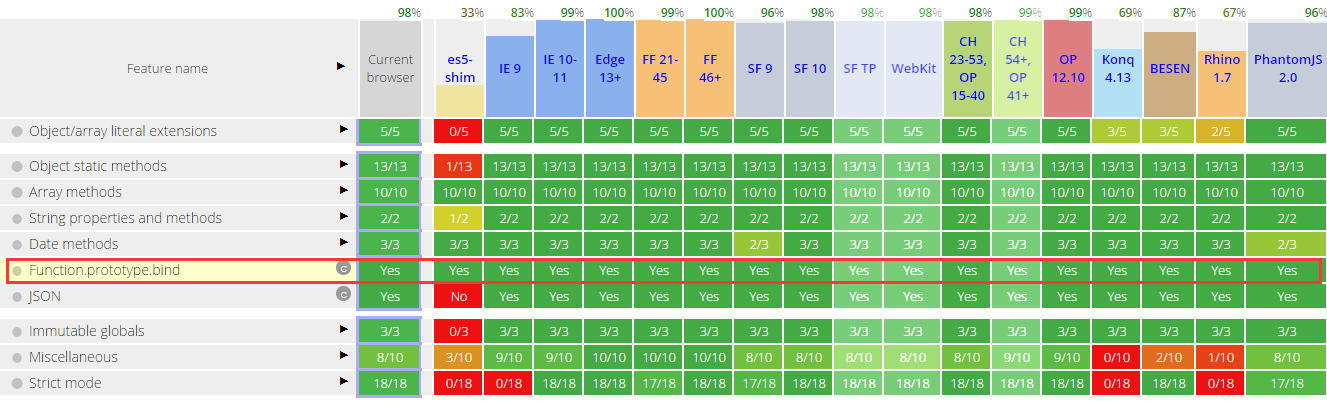
三. bind()方法的浏览器兼容性
四. bind()的兼容性写法
|
1
2
3
4
5
6
7
8
9
10
11
12
|
if (!Function.prototype.bind) { Function.prototype.bind = function() { var self = this, // 保存原函数 context = [].shift.call(arguments), // 需要绑定的this上下文 args = [].slice.call(arguments); // 剩余的参数转成数组 return function() { // 返回一个新函数 // 执行新函数时,将传入的上下文context作为新函数的this // 并且组合两次分别传入的参数,作为新函数的参数 return self.apply(context, [].concat.call(args, [].slice.call(arguments))); } };} |
五. bind与 call/apply方法的区别
共同点:
都可以改变函数执行的上下文环境;
不同点:
bind: 不立即执行函数,一般用在异步调用和事件; call/apply: 立即执行函数。
总结
好了,以上就是这篇文章的全部内容了,希望本文的内容对大家学习或者使用Javascript能有一定的帮助,如果有疑问大家可以留言交流。
js的bind方法的更多相关文章
- 【转载】JS中bind方法与函数柯里化
原生bind方法 不同于jQuery中的bind方法只是简单的绑定事件函数,原生js中bind()方法略复杂,该方法上在ES5中被引入,大概就是IE9+等现代浏览器都支持了(有关ES5各项特性的支持情 ...
- 理解js中bind方法的使用
提到bind方法,估计大家还会想到call方法.apply方法:它们都是Function对象内建的方法,它们的第一个参数都是用来更改调用方法中this的指向.需要注意的是bind 是返回新的函数,以便 ...
- JS高级---bind方法的使用
bind方法的使用 //通过对象,调用方法,产生随机数 function ShowRandom() { //1-10的随机数 this.number = parseInt(Math.random() ...
- JS高级---bind方法
bind方法 复制了一份的时候, 把参数传入到了f1函数中, x===>10, y===>20, null就是this, 默认就是window bind方法是复制的意思, 参数可以在复制的 ...
- js实现bind方法
//目标函数 function fun(...args) { console.log(this); console.log(args); } //目标函数原型对象上的一个方法cher func.pro ...
- JS bind()方法、JS原生实现bind()
一.arguments的含义 // arguments 是一个对应于传递给函数的参数的类数组对象 function a(){ console.log(arguments); } a(); // Arg ...
- js中bind解析
一.arguments的含义 // arguments 是一个对应于传递给函数的参数的类数组对象 function a(){ console.log(arguments); } a(); // Arg ...
- js中bind,call,apply方法的应用
最近用js的类写东西,发现一个无比蛋疼的事,那就是封装的类方法中的this指针经常会改变指向,失去上下文,导致程序错误或崩溃. 比如: function Obj(){ this.type = &quo ...
- js学习进阶中-bind()方法
有次面试遇到的,也是没说清楚具体的作用,感觉自己现在还是没有深刻的理解! bind():绑定事件类型和处理函数到DOM element(父元素上) live():绑定事件到根节点上,(document ...
随机推荐
- Fiddler基本原理与抓取Andriod与IOS的App数据包
Fiddler基本原理 Fiddler数据包的原理是Fiddler将自己设置为一个代理服务器,默认监听127.0.0.1:8888端口同时将浏览器的HTTP.HTTPS协议设置为使用代理服务器也就是使 ...
- MicroCube 风力发电装置
这个叫做 MicroCube 的发电装置其实是一套「小型风扇+发电机」的组合,能够输出三相交流电,之后转换成直流电给电池组充电. 一个 MicroCube 长宽高均为 23 厘米左右,重约 1.4 公 ...
- Struts2文件上传,以及各种注意事项
首先肯定是要配置好struts2环境,这个在另一篇<struts2环境搭建,以及一个简单实例>里已经讲过了 首先是网页部分,upload_file.jsp <%@ page lang ...
- 免费股票数据API接口
免费股票数据API接口提供沪深.香港.美国股市信息. 1.沪深股市 2.香港股市 3.美国股市 4.香港股市列表 5.美国股市列表 6.深圳股市列表 7.沪股列表 API文档:https://www. ...
- 学习OpenStack之(5):在Mac上部署Juno版本OpenStack 四节点环境
0. 前沿 经过一段时间的折腾,终于在自己的Mac上装好了Juno版本的四节点环境.这过程中,花了大量的时间,碰到了许多问题,学到不少知识,折腾过不少其实不需要折腾的东西,本文试着来对这过程做个总结. ...
- simple-spring-memcached缓存搭建
项目中使用的缓存经常是知道使用,没有试过搭建起它.刚好这次自己的毕业可以用来搭建缓存.其他不多说了,直接看操作吧.首先在pom.xml中依赖simple-spring-memcached的架包. &l ...
- HDU2639Bone Collector II[01背包第k优值]
Bone Collector II Time Limit: 5000/2000 MS (Java/Others) Memory Limit: 32768/32768 K (Java/Others ...
- AC日记——组合数问题 落谷 P2822 noip2016day2T1
题目描述 组合数表示的是从n个物品中选出m个物品的方案数.举个例子,从(1,2,3) 三个物品中选择两个物品可以有(1,2),(1,3),(2,3)这三种选择方法.根据组合数的定 义,我们可以给出计算 ...
- 改变图片的颜色,UIImage改变颜色
定义 #import <UIKit/UIKit.h> @interface UIImage (ChangeImageColor) /** * 改变图片的颜色 * * @param tint ...
- 基于jquery的tips悬浮消息提示插件tipso
<a href="javascript:;" class="disabled" data-tipso="Tips" id=" ...