
(原)ubuntu16中编译boost1.61.0库
转载请注明出处:
http://www.cnblogs.com/darkknightzh/p/5797940.html
参考网址:
http://www.boost.org/doc/libs/1_61_0/more/getting_started/unix-variants.html
http://blog.csdn.net/tedious/article/details/6793544
说明:boost库包含两部分:无需编译的头文件,及单独编译的库。单独编译的库如下:
Boost.Chrono
Boost.Context
Boost.Filesystem
Boost.GraphParallel
Boost.IOStreams
Boost.Locale
Boost.MPI
Boost.ProgramOptions
Boost.Python (see the Boost.Python build documentation before building and installing it)
Boost.Regex
Boost.Serialization
Boost.Signals
Boost.System
Boost.Thread
Boost.Timer
Boost.Wave
A few libraries have optional separately-compiled binaries:
Boost.DateTime has a binary component that is only needed if you're using its to_string/from_string or serialization features, or if you're targeting Visual C++ 6.x or Borland.
Boost.Graph also has a binary component that is only needed if you intend to parse GraphViz files.
Boost.Math has binary components for the TR1 and C99 cmath functions.
Boost.Random has a binary component which is only needed if you're using random_device.
Boost.Test can be used in “header-only” or “separately compiled” mode, although separate compilation is recommended for serious use.
Boost.Exception provides non-intrusive implementation of exception_ptr for 32-bit _MSC_VER==1310 and _MSC_VER==1400 which requires a separately-compiled binary. This is enabled by #define BOOST_ENABLE_NON_INTRUSIVE_EXCEPTION_PTR.
安装步骤(首先下载并解压缩文件,并cd到该文件夹内):
1. 运行bootstrap.sh:后面加上需要编译的库(如果不加的话,貌似只会编译最小的库,即包含基本功能的库)需要编译的自己选(可以见参考网址2里面完全编译)。
./bootstrap.sh --with-libraries= system,filesystem, thread,python
经过上命令后,可以看到,会编译哪些库:
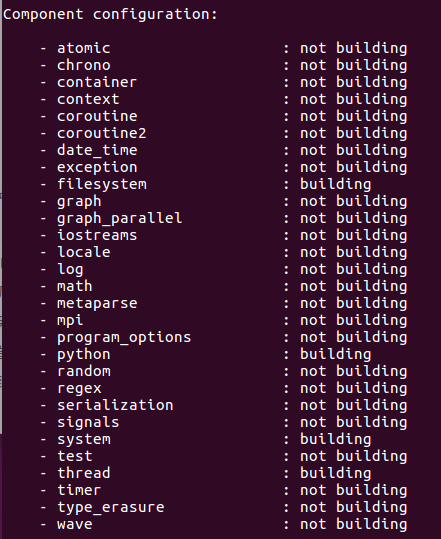
2. 运行./b2。直接这样用,提示权限不够,所以使用如下命令就可以成功:
sudo ./b2
成功编译了这些文件(和上图对应的库):

3. 将编译好的文件使用cp命令拷贝到系统的目录:
sudo cp -a stage/lib /usr/local

sudo cp -a boost /usr/local/include/boost
ps. 貌似这些目录不是ubuntu默认的库目录。ubuntu默认库目录是/usr/lib。所以上面拷贝时,可以使用:
sudo cp -a stage/lib /usr

sudo cp -a boost /usr/include
说明:
1. 使用--show-libraries查看哪些需要单独编译:
./bootstrap.sh --show-libraries

2. 全编译(没试过):
./bootstrap.sh --with-libraries= atomic,chrono,container,context,coroutine,coroutine2,date_time,exception,filesystem,graph,graph_parallel,iostreams,locale,with-log,math,metaparse,mpi,program_options,python,random,regex,serialization,signals,system,test,thread,timer,type_erasure,wave
在另一台电脑上,使用./bootstrap.sh --with-libraries= system,filesystem, thread,python,结果全编译出来了。。。
(原)ubuntu16中编译boost1.61.0库的更多相关文章
- vs2013编译boost1.55.0 32/64位
在使用vs2013编译boost-1.55.0之前,先要给boost做下修改: boost_1_55_0\boost\intrusive\detail\has_member_function_call ...
- 在vs2010中编译log4cxx-0.10.0详细方法(从下载、编译、解决错误详细介绍)
在vs2010中编译log4cxx-0.10.0详细方法(从下载.编译.解决错误详细介绍) http://blog.sina.com.cn/s/blog_a459dcf501013tbn.html
- 使用MSYS2环境中编译Qt5.5.0的补丁
Qt的configure脚本对MinGW静态编译支持不太完善,总有这样那样的问题.如果你不嫌麻烦,而且可以接受高版本的Qt的话,可以考虑使用我做的补丁在MSYS2环境中编译.Qt5.4.2的补丁 Qt ...
- 在VS中编译Opencascade6.6.0
话说,OpenCASCADE团队真的很给力,版本更新速度也是嗖嗖地.依稀记得上次编译OCC,那时候的第三方库.OCC本身几何引擎库,全都得自己编译. 于是,编译过程之艰苦也就可想而知了.最近重换系统, ...
- 在vs2010中编译log4cxx-0.10.0详细方法
本文一共包含了17个步骤,按照下面的步骤就可以完成vs2010中编译log4cxx的工作了. 1. 下载 log4cxx 以及 apr 和 apr-util 源码: a) http://www.apa ...
- (原)Ubuntu16中编译caffe
转载请注明出处: http://www.cnblogs.com/darkknightzh/p/5797526.html 参考网址: http://caffe.berkeleyvision.org/in ...
- (原)vs2013编译boost1.60库
转载请注明出处: http://www.cnblogs.com/darkknightzh/p/5394236.html 参考网址: http://www.cnblogs.com/chuncn/arch ...
- CentOS7中编译安装redis5.0
1. 环境介绍 CentOS7 (未安装Development Tools) 2. 下载Redis5.0-rc3 wget -O redis-5.0-rc3.tar.gz https://github ...
- 在vs2010中编译log4cxx-0.10.0具体方法(从下载、编译、解决错误具体介绍)
一. 简单介绍 log4cxx是Java社区著名的log4j的c++移植版.用于为C++程序提供日志功能,以便开发人员对目标程序进行调试和审计,log4cxx是apache软件基金会的开源项目,基于A ...
随机推荐
- web qq 获取好友列表hash算法
web qq 获取好友列表hash算法 在使用web qq的接口进行好友列表获取的时候,需要post一个参数:hash 在对其js文件进行分析之后,发现计算hash的函数位于: http://0.we ...
- .Net 插入数据MySql数据库,中文乱码解决问题
1, 修改mysql根目录下配置文件my.ini,在[client]节点下添加default-character-set=utf8 ,在[mysqld]节点下添加character_set_serve ...
- 字典:当索引不好用时 - 零基础入门学习Python025
字典:当索引不好用时 让编程改变世界 Change the world by program 有天你想翻开牛津字典,查找"sadomasochism[ˌseɪdoʊ'mæsəkɪzəm]&q ...
- mysql 5.7 内存使用监控
5.7 中的performance_schema 已经有能力监控mysql 的内存使用情况了,对于这一点也是要通过instrument 来实现的,由于内存这一块没有对应的consumer 所以只要 配 ...
- Java compiler level does not match the version of the installed Java project facet.解决办法
问题原因: 出现这个问题的原因是因为,eclipse/myeclipse的jdk编译版本与出现问题的项目JDK编译版本不一致所导致! 解决办法: 工程名---->右键properties-- ...
- Redis使用(1)---安装
简介 Redis具体简介可以百度.它可以在Linux和Windows下运行,但官方只提供针对Linux的包,Windows对其也有自己的开发团队. redis官网:http://www.redis.i ...
- block(四)揭开神秘面纱(下)
看此篇时,请大家同时打开两个网址(或者下载它们到本地然后打开): http://llvm.org/svn/llvm-project/compiler-rt/trunk/lib/BlocksRuntim ...
- [android]-如何在向服务器发送request时附加已保存的cookie数据
[android]-如何在向服务器发送request时附加已保存的cookie数据 应用场景:在开发android基于手机端+服务器端的应用时,登陆->获取用户信息->获取授权用户相关业务 ...
- keil or c51 汇编调用c语言函数 容易忽视的问题
最近,在用keil 写一个小程序时,想实践一下从汇编调用 C语言函数,我们都知道C语言调用汇编函数讨论得较多,但反过来,从汇编中调用C语言的函数未见深入分析:在开始的时候,还是忽视了一个问题,就是对现 ...
- AOP技术基础
1.引言 2.AOP技术基础 3.Java平台AOP技术研究 4..Net平台AOP技术研究 2.1 AOP技术起源 AOP技术的诞生并不算晚,早在1990年开始,来自Xerox Palo Alto ...