
Hadoop: Setup Maven project for MapReduce in 5mn
Hadoop: Setup Maven project for MapReduce in 5mn
I am sure I am not the only one who ever struggled with Hadoop eclipse plugin installation. This plugin strongly depends on your environment (eclipse, ant, jdk) and hadoop distribution and version. Moreover, it only provides the Old API for MapReduce.
It is so simple to create a maven project for Hadoop that wasting time trying to build this plugin becomes totally useless. I am describing on this article how to setup a first maven hadoop project for Cloudera CDH4 on eclipse.
Prerequisite
maven 3

jdk 1.6

eclipse with m2eclipse plugin installed
Add Cloudera repository
Cloudera jar files are not available on default Maven central repository. You need to explicitly add cloudera repo in your settings.xml (under ${HOME}/.m2/settings.xml).
|
1
2
3
4
5
6
7
8
9
10
11
12
13
14
15
16
17
18
19
20
21
22
23
24
25
26
27
28
29
30
31
32
33
34
35
|
<?xml version="1.0" encoding="UTF-8"?><settings> <profiles> <profile> <id>standard-extra-repos</id> <activation> <activeByDefault>true</activeByDefault> </activation> <repositories> <repository> <!-- Central Repository --> <id>central</id> <releases> <enabled>true</enabled> </releases> <snapshots> <enabled>true</enabled> </snapshots> </repository> <repository> <!-- Cloudera Repository --> <id>cloudera</id> <releases> <enabled>true</enabled> </releases> <snapshots> <enabled>true</enabled> </snapshots> </repository> </repositories> </profile> </profiles></settings> |
Create Maven project
On eclipse, create a new Maven project as follow

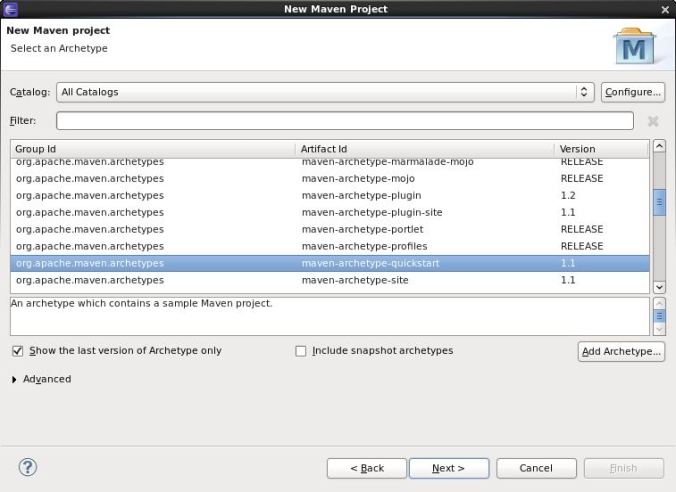
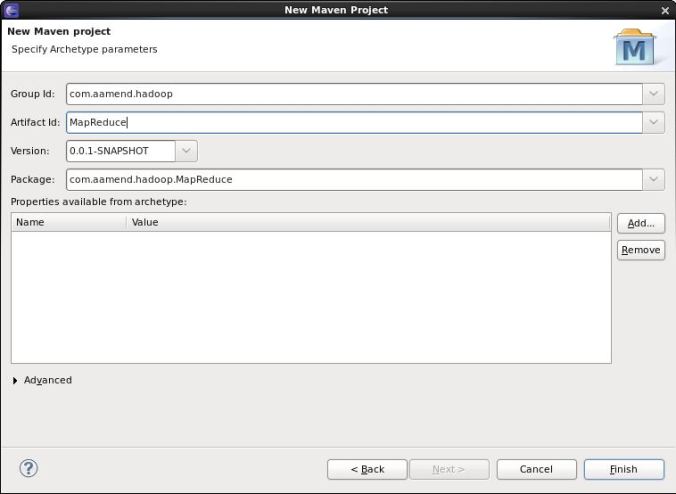
Add Hadoop Nature
For Cloudera distribution CDH4, open pom.xml file and add the following dependencies
|
1
2
3
4
5
6
7
8
9
10
11
12
13
14
15
16
17
18
19
20
21
22
23
24
25
26
27
28
29
30
31
32
33
34
35
36
37
38
39
40
41
42
43
44
45
46
47
48
49
50
51
52
53
54
55
56
57
58
59
60
61
62
63
64
65
66
67
68
69
70
71
|
<dependencyManagement> <dependencies> <dependency> <groupId>jdk.tools</groupId> <artifactId>jdk.tools</artifactId> <version>1.6</version> </dependency> <dependency> <groupId>org.apache.hadoop</groupId> <artifactId>hadoop-hdfs</artifactId> <version>2.0.0-cdh4.0.0</version> </dependency> <dependency> <groupId>org.apache.hadoop</groupId> <artifactId>hadoop-auth</artifactId> <version>2.0.0-cdh4.0.0</version> </dependency> <dependency> <groupId>org.apache.hadoop</groupId> <artifactId>hadoop-common</artifactId> <version>2.0.0-cdh4.0.0</version> </dependency> <dependency> <groupId>org.apache.hadoop</groupId> <artifactId>hadoop-core</artifactId> <version>2.0.0-mr1-cdh4.0.1</version> </dependency> <dependency> <groupId>junit</groupId> <artifactId>junit-dep</artifactId> <version>4.8.2</version> </dependency> </dependencies></dependencyManagement><dependencies> <dependency> <groupId>org.apache.hadoop</groupId> <artifactId>hadoop-hdfs</artifactId> </dependency> <dependency> <groupId>org.apache.hadoop</groupId> <artifactId>hadoop-auth</artifactId> </dependency> <dependency> <groupId>org.apache.hadoop</groupId> <artifactId>hadoop-common</artifactId> </dependency> <dependency> <groupId>org.apache.hadoop</groupId> <artifactId>hadoop-core</artifactId> </dependency> <dependency> <groupId>junit</groupId> <artifactId>junit</artifactId> <version>4.10</version> <scope>test</scope> </dependency></dependencies><build> <plugins> <plugin> <groupId>org.apache.maven.plugins</groupId> <artifactId>maven-compiler-plugin</artifactId> <version>2.1</version> <configuration> <source>1.6</source> <target>1.6</target> </configuration> </plugin> </plugins></build> |
Download dependencies
Now that you have added your Cloudera repository and created your project, download dependencies. This can be easily done by right-clicking on your eclipse project, “update Maven dependencies”.
All these dependencies must have been added on your .m2 repository.
[developer@localhost ~]$ find .m2/repository/org/apache/hadoop -name "*.jar"

.m2/repository/org/apache/hadoop/hadoop-tools/1.0.4/hadoop-tools-1.0.4.jar

.m2/repository/org/apache/hadoop/hadoop-common/2.0.0-cdh4.0.0/hadoop-common-2.0.0-cdh4.0.0-sources.jar

.m2/repository/org/apache/hadoop/hadoop-common/2.0.0-cdh4.0.0/hadoop-common-2.0.0-cdh4.0.0.jar

.m2/repository/org/apache/hadoop/hadoop-core/2.0.0-mr1-cdh4.0.1/hadoop-core-2.0.0-mr1-cdh4.0.1-sources.jar

.m2/repository/org/apache/hadoop/hadoop-core/2.0.0-mr1-cdh4.0.1/hadoop-core-2.0.0-mr1-cdh4.0.1.jar

.m2/repository/org/apache/hadoop/hadoop-hdfs/2.0.0-cdh4.0.0/hadoop-hdfs-2.0.0-cdh4.0.0.jar

.m2/repository/org/apache/hadoop/hadoop-streaming/1.0.4/hadoop-streaming-1.0.4.jar

.m2/repository/org/apache/hadoop/hadoop-auth/2.0.0-cdh4.0.0/hadoop-auth-2.0.0-cdh4.0.0.jar

[developer@localhost ~]$
Create WordCount example
Create your driver code
|
1
2
3
4
5
6
7
8
9
10
11
12
13
14
15
16
17
18
19
20
21
22
23
24
25
26
27
28
29
30
31
32
33
34
35
36
37
38
39
40
41
42
43
44
45
46
47
48
49
50
51
52
53
54
55
56
57
58
59
|
package com.aamend.hadoop.MapReduce;import java.io.IOException;import org.apache.hadoop.conf.Configuration;import org.apache.hadoop.fs.FileSystem;import org.apache.hadoop.fs.Path;import org.apache.hadoop.io.IntWritable;import org.apache.hadoop.io.Text;import org.apache.hadoop.mapreduce.Job;import org.apache.hadoop.mapreduce.lib.input.FileInputFormat;import org.apache.hadoop.mapreduce.lib.input.TextInputFormat;import org.apache.hadoop.mapreduce.lib.output.FileOutputFormat;import org.apache.hadoop.mapreduce.lib.output.TextOutputFormat;public class WordCount { public static void main(String[] args) throws IOException, InterruptedException, ClassNotFoundException { Path inputPath = new Path(args[0]); Path outputDir = new Path(args[1]); // Create configuration Configuration conf = new Configuration(true); // Create job Job job = new Job(conf, "WordCount"); job.setJarByClass(WordCountMapper.class); // Setup MapReduce job.setMapperClass(WordCountMapper.class); job.setReducerClass(WordCountReducer.class); job.setNumReduceTasks(1); // Specify key / value job.setOutputKeyClass(Text.class); job.setOutputValueClass(IntWritable.class); // Input FileInputFormat.addInputPath(job, inputPath); job.setInputFormatClass(TextInputFormat.class); // Output FileOutputFormat.setOutputPath(job, outputDir); job.setOutputFormatClass(TextOutputFormat.class); // Delete output if exists FileSystem hdfs = FileSystem.get(conf); if (hdfs.exists(outputDir)) hdfs.delete(outputDir, true); // Execute job int code = job.waitForCompletion(true) ? 0 : 1; System.exit(code); }} |
Create Mapper class
|
1
2
3
4
5
6
7
8
9
10
11
12
13
14
15
16
17
18
19
20
21
22
23
24
|
package com.aamend.hadoop.MapReduce;import java.io.IOException;import org.apache.hadoop.io.IntWritable;import org.apache.hadoop.io.Text;import org.apache.hadoop.mapreduce.Mapper;public class WordCountMapper extends Mapper<Object, Text, Text, IntWritable> { private final IntWritable ONE = new IntWritable(1); private Text word = new Text(); public void map(Object key, Text value, Context context) throws IOException, InterruptedException { String[] csv = value.toString().split(","); for (String str : csv) { word.set(str); context.write(word, ONE); } }} |
Create your Reducer class
|
1
2
3
4
5
6
7
8
9
10
11
12
13
14
15
16
17
18
19
20
|
package com.aamend.hadoop.MapReduce;import java.io.IOException;import org.apache.hadoop.io.IntWritable;import org.apache.hadoop.io.Text;import org.apache.hadoop.mapreduce.Reducer;public class WordCountReducer extends Reducer<Text, IntWritable, Text, IntWritable> { public void reduce(Text text, Iterable<IntWritable> values, Context context) throws IOException, InterruptedException { int sum = 0; for (IntWritable value : values) { sum += value.get(); } context.write(text, new IntWritable(sum)); }} |
Build project
Exporting jar file is actually out of the box using maven. Execute the following command
mvn clean install
You should see same output as below
.../...

[INFO]

[INFO] --- maven-jar-plugin:2.3.2:jar (default-jar) @ MapReduce ---

[INFO] Building jar: /home/developer/Workspace/hadoop/MapReduce/target/MapReduce-0.0.1-SNAPSHOT.jar

[INFO]

[INFO] --- maven-install-plugin:2.3.1:install (default-install) @ MapReduce ---

[INFO] Installing /home/developer/Workspace/hadoop/MapReduce/target/MapReduce-0.0.1-SNAPSHOT.jar to /home/developer/.m2/repository/com/aamend/hadoop/MapReduce/0.0.1-SNAPSHOT/MapReduce-0.0.1-SNAPSHOT.jar

[INFO] Installing /home/developer/Workspace/hadoop/MapReduce/pom.xml to /home/developer/.m2/repository/com/aamend/hadoop/MapReduce/0.0.1-SNAPSHOT/MapReduce-0.0.1-SNAPSHOT.pom

[INFO] ------------------------------------------------------------------------

[INFO] BUILD SUCCESS

[INFO] ------------------------------------------------------------------------

[INFO] Total time: 9.159s

[INFO] Finished at: Sat May 25 00:35:56 GMT+02:00 2013

[INFO] Final Memory: 16M/212M

[INFO] ------------------------------------------------------------------------
And your jar file must be available on project’s target directory (additionally in your ${HOME}/.m2 local repository).
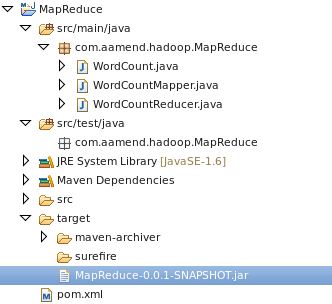
This jar is ready to be executed on your Hadoop environment.
hadoop jar MapReduce-0.0.1-SNAPSHOT.jar com.aamend.hadoop.MapReduce.WordCount input output
Each time I need to create a new Hadoop project, I simply copy pom.xml template described above, and that’s it..
Hadoop: Setup Maven project for MapReduce in 5mn的更多相关文章
- Hadoop: Add third-party libraries to MapReduce job
来自:http://hadoopi.wordpress.com/2014/06/05/hadoop-add-third-party-libraries-to-mapreduce-job/ Anybod ...
- hadoop集群配置方法---mapreduce应用:xml解析+wordcount详解---yarn配置项解析
注:以下链接均为近期hadoop集群搭建及mapreduce应用开发查找到的资料.使用hadoop2.6.0,其中hadoop集群配置过程下面的文章都有部分参考. hadoop集群配置方法: ---- ...
- 安装配置JDK+Eclipse+Maven、Eclipse里新建Maven Project以及HDFS命令和Java API-课堂内容
步骤:1.安装JDK→2.安装Eclipse→3.安装Maven→4. Eclipse里配置Maven (下载Windows版本,在Windows里安装使用.) 1.安装配置JDK ①官网下载Java ...
- 导入spark程序的maven依赖包时,无法导入,报错Unable to import maven project: See logs for details
问题:导入spark程序的maven依赖包时,无法导入,且报错:0:23 Unable to import maven project: See logs for details 2019-08-23 ...
- maven project中,在main方法上右键Run as Java Application时,提示错误:找不到或无法加载主类XXX.XXXX.XXX
新建了一个maven project项目,经过一大堆的修改操作之后,突然发现在main方法上右键运行时,竟然提示:错误:找不到或无法加载主类xxx.xxx.xxx可能原因1.eclipse出问题了,在 ...
- SSM框架整合首只拦路虎——Eclipse新建Maven Project界面select an archetype 空白
首先给大家说,本篇博客没有技术价值,纯属个人学习总结,权当给大家添加一乐.事件如有雷同,纯属巧合,莫怪! 前一段时间一直在看<淘淘商城>这个教程,里面讲的是SSM框架的一个电商项目.这不是 ...
- 【转载】Selenim入门环境的搭建--Java环境下的Java Maven Project
一.开发环境 操作系统: xp win7 win8 win10都可以 JDK: 1.6或者1.7 下载地址 JDK1.7下载 Eclipse: 官网下载比较新的版本,建议下载EE的版本 eclips ...
- Myeclipse 找不到Convert to maven project选项
https://my.oschina.net/u/2419190/blog/504417 Window > Preferences > General > Capabilities ...
- Eclipse无法启动报An internal error occurred during: "reload maven project". java.lang.NullPointerException
由于没有正常关机导致eclipse无法将数据正常写入配置文件导致无法启动.报这样一个异常 An internal error occurred during: "reload maven p ...
随机推荐
- java list按照元素对象的指定多个字段属性进行排序
ListUtils.java---功能类 package com.enable.common.utils; import java.lang.reflect.Field;import java.tex ...
- Opera Unit如何自定义My Opera的网页界面
1 双击Opera Unite Home进入你的个人主页 2 点击你的头像进入你的个人信息设置页面,然后点击右上角的设置图标 3 在下拉菜单中选择"Customize design" ...
- ZH奶酪:PHP判断图片格式的7种方法
以图片 $imgurl = "http://www.php10086.com/wp-content/themes/inove/img/readers.gif"; 为例: 思路1. ...
- data directory "/var/lib/postgres/data" has group or world access
直接拷贝完好的data至pg目录底下,可能引起下面的错误:说data目录权限不是700.FATAL: data directory "/var/lib/postgres/data" ...
- 【#254_DIV2】-A B C
题目链接:http://codeforces.com/contest/445 解题报告: 俄国人今天不知道为什么九点钟就比赛了.仅仅过了两道题,第三题全然没思路,有时间单独去刷第三题吧,看起来非常难 ...
- webservice系统学习笔记10-使用jax-ws创建基于tomcat类型的容器的ws服务
1.在web-info目录下新建目录wsdl 2.在1步的目录下 新建文件user.wsdl <?xml version="1.0" encoding="UTF-8 ...
- 保护HTTP的安全
#如果没有严格的限制访问的权限,公司放在服务器上的重要文档就存在隐患,web需要有一些安全的http形式: #安全方法: #基本认证.摘要认证.报文完整性检查都是一些轻量级的方法,但还不够强大,下面介 ...
- Rational Rose 2003 逆向工程转换C++源代码成UML类图
主要介绍用户如何使用Rose的逆向工程生成UML模型,并用来进行C++代码的结构分析. Rational Rose可以支持标准C++和Visual C++的模型到代码的转换以及逆向工程.下面将详细地说 ...
- What is the difference between J2EE and Spring
来自于:https://www.quora.com/What-is-the-difference-between-J2EE-and-Spring Lot of people specially tho ...
- 利用ASP.NET一般处理程序动态生成Web图像(转)
摘自:http://www.cnblogs.com/zhouhb/archive/2011/02/15/1955262.html 一般处理程序的扩展名为ashx,它实现了IHttpHandler接口, ...