
使用swipemenulistview实现列表的左右滑动
今天从网上找到一个第三方控件swipemenulistview,封装好的一个控件,可以实现列表的左右滑动,模仿qq的列表效果

下载地址为:https://github.com/baoyongzhang/SwipeMenuListView
我们下载好之后,将这个项目导入到我们的工程当中去,
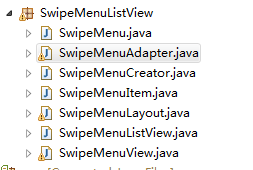
我个人感觉比较重要的是SwipeMenuLayout这个类,在这个类当中重写了好多方法,才能实现我们列表选项的左右滑动。
    @Override

    public void computeScroll() {

        if (state == STATE_OPEN) {

            if (mOpenScroller.computeScrollOffset()) {// 要是没有滚动完 就启动滚动的动画

                swipe(mOpenScroller.getCurrX());

                postInvalidate();// //必须调用该方法,否则不一定能看到滚动效果

            }

        } else {

            if (mCloseScroller.computeScrollOffset()) {

                swipe(mBaseX - mCloseScroller.getCurrX());

                postInvalidate();

            }

        }

    }

    public void smoothCloseMenu() {

        state = STATE_CLOSE;//

        mBaseX = -mContentView.getLeft();//

        mCloseScroller.startScroll(0, 0, mBaseX, 0, 350);// 滚动的final位置

        postInvalidate();

    }

    // ////////////////////////////////////////////

    // 创建open动画

    public void smoothOpenMenu() {

        state = STATE_OPEN;

        mOpenScroller.startScroll(-mContentView.getLeft(), 0,

                mMenuView.getWidth(), 0, 350);

        postInvalidate();

    }

    // 创建close动画

    public void closeMenu() {

        if (mCloseScroller.computeScrollOffset()) {

            mCloseScroller.abortAnimation();

        }

        if (state == STATE_OPEN) {

            state = STATE_CLOSE;

            swipe(0);

        }

    }

    public void openMenu() {

        if (state == STATE_CLOSE) {

            state = STATE_OPEN;

            swipe(mMenuView.getWidth());

        }

    }
这只是部分比较重要的代码,在我们工程中,我们如何去调用它
private void InitcehuaListView(View view) {// 初始化

        listView = (SwipeMenuListView) view.findViewById(R.id.listView);

        // ///////////////////////////////////////////////////////////////////

        // 这个是创建了一个滑动菜单的的listview

        SwipeMenuCreator creator = new SwipeMenuCreator() {

            @Override

            public void create(SwipeMenu menu) {

                ListViewMenuCreate(menu);

            }

        };

        // set creator

        listView.setMenuCreator(creator);// listview要添加menu

}
我们在创建的时候跳转到我们的ListViewMenuCreate这个方法
    // 值得注意的是 每一个listview的item创建的时候 SwipeMenu就创建了一次

    private void ListViewMenuCreate(SwipeMenu menu) {

                    SwipeMenuItem kankanItem = new SwipeMenuItem(getActivity()

                            .getApplicationContext());

                    // set item background

                    kankanItem.setBackground(new ColorDrawable(Color.rgb(0x33,

                            0x66, 0xcc)));// 设置背景颜色

                    // set item width

                    // kankanItem.setWidth(dp2px(60));// 设置宽度

                    kankanItem.setWidth(SyllabusMethod

                            .dp2px(60, getResources()));

                    // set item title

                    kankanItem.setTitle("添加");// 设置第一个标题

                    // set item title fontsize

                    kankanItem.setTitleSize(18);// 设置标题文字的大小

                    // set item title font color

                    kankanItem.setTitleColor(Color.WHITE);// 设置标题颜色

                    // add to menu

                    menu.addMenuItem(kankanItem);// 添加标题到menu类中

                    SwipeMenuItem showItem = new SwipeMenuItem(getActivity()

                            .getApplicationContext());

                    // set item background

                    showItem.setBackground(new ColorDrawable(Color.rgb(0xC9,

                            0xC9, 0xCE)));// 设置背景颜色

                    // set item width

                    // showItem.setWidth(dp2px(60));// 设置宽度

                    showItem.setWidth(SyllabusMethod.dp2px(60, getResources()));

                    // set item title

                    showItem.setTitle("删除");// 设置第一个标题

                    // set item title fontsize

                    showItem.setTitleSize(18);// 设置标题文字的大小

                    // set item title font color

                    showItem.setTitleColor(Color.WHITE);// 设置标题颜色

                    // add to menu

                    menu.addMenuItem(showItem);// 添加标题到menu类中

    }
我们将item加入到我们的menu中来,然后我们再去设置我们item的点击事件
listView.setOnMenuItemClickListener(new OnMenuItemClickListener() {

            public void onMenuItemClick(int position, SwipeMenu menu, int index) {

                ListmenuTimes = -1;

                String value = menu.getMenuItem(index).getTitle().toString();

                if (value.equals("添加")) {

                    appliction.setCurrentchickpos(position + 1);

                    Intent addkchengintent = new Intent(getActivity(),

                            AddsyllabusActivity.class);

                    startActivityForResult(addkchengintent,

                            CommonCS.INTENT_GOTO_ADDSYLLABUS_CODE);

                } else if (value.equals("删除")) {

                    boolean flag = SomeSqliteMethod.deleteCurrentItem(

                            getActivity(), appliction.getCurrentdate(),

                            (position + 1));

                    if (flag) {

                        Toast.makeText(getActivity().getApplicationContext(),

                                "删除成功", Toast.LENGTH_SHORT).show();

                        if (!Todaysyllabuslist.isEmpty()) {

                            Todaysyllabuslist.clear();

                        }

                        int currentdate = appliction.getCurrentdate();

                        InitMYTodayListData(currentdate);

                        showlist();

                    }

                }
我们在相应的value中添加我们需要跳转的方法即可。然后我们就实现了列表的左右滑动

出处:http://www.cnblogs.com/jerehedu/
本文版权归烟台杰瑞教育科技有限公司和博客园共有,欢迎转载,但未经作者同意必须保留此段声明,且在文章页面明显位置给出原文连接,否则保留追究法律责任的权利。
使用swipemenulistview实现列表的左右滑动的更多相关文章
- WP8_GestureListener实现列表向下滑动加载新数据
利用GestureListener的OnDragCompleted事件,实现列表向下滑动时,加载新的数据: (不建议使用 Touch.FrameReported+=Touch_FrameReporte ...
- [UI列表]LoopScrollRect无限滑动不卡顿
应用场景 对于背包界面,排行榜列表,聊天消息,等有大量的UI列表的界面,常规做法是为每一条数据生成一个格子,在数据量越大的情况下,会生成越来越多的Gameobject,引起卡顿. 这篇文章讲述的就是解 ...
- Android SwipeActionAdapter结合Pinnedheaderlistview实现复杂列表的左右滑动操作
在上一篇博客<Android 使用SwipeActionAdapter开源库实现简单列表的左右滑动操作>里,已经介绍了利用SwipeActionAdapter来左右滑动操作列表: 然,有时 ...
- QQ好友列表向左滑动出现置顶、删除--第三方开源--SwipeMenuListView
SwipeMenuListView是在github上的第三方开源项目,该项目在github上的链接地址是:https://github.com/baoyongzhang/SwipeMenuListVi ...
- SwipeMenuListView在ScrollView里上下滑动导致菜单不能显示完全的bug解决方法
这是因为上下滑动的时候,事件被ScrollView截获了,这时候应该禁止ScrollView截获上下滑动事件,解决方法如下 public class NoRollSwipeMenuListView e ...
- 监听列表ListVIew的滑动状态
/*监听列表的滑动状态:暂时用不到 * SCROLL_STATE_FLING 时让图片不显示,提高滚动性能让滚动小姑更平滑 * SCROLL_STATE_IDLE 时显示当前屏幕可见的图片*/ mLi ...
- Android 使用SwipeActionAdapter开源库实现简单列表的左右滑动操作
我们做listview左右滑动操作时,一般中情况下,都是像QQ那样,左滑弹出操作菜单(删除.编辑),然后选择菜单操作: 这样的效果不可谓不好,算是非常经典. 另外,有少数的APP,尤其是任务管理类的A ...
- Android 滑动菜单框架--SwipeMenuListView框架完全解析
SwipeMenuListView(滑动菜单) A swipe menu for ListView.--一个非常好的滑动菜单开源项目. Demo 一.简介 看了挺长时间的自定义View和事件分发,想找 ...
- WP8_区分滑动和点击(在图片列表中)
在windows phone中,对于一个页面中 有图片列表的,滑动的时候,很容易被误认为是点击了图片,而打开图片详细信息等,原意是滑动列表,由此对图片添加2个事件,来控制其点击行为(滑动的时候,基本不 ...
随机推荐
- python创建有序字典OrderedDict()
python 有序字典OrderedDict # -*- coding:utf-8 -*- """ python有序字典 需导入模块collections "& ...
- python使用web.py开发httpserver,解决post请求跨域问题
使用web.py做http server开发时,遇到postman能够正常请求到数据,但是浏览器无法请求到数据,查原因之后发现是跨域请求的问题. 跨域请求,就是在浏览器窗口中,和某个服务端通过某个 “ ...
- 深入理解mysql的自连接和join关联
一.mysql自连接 mysql有时在信息查询时需要进行对自身连接(自连接),所以我们需要为表定义别名.我们举例说明,下面是商品采购表,我们需要找到采购价格比惠惠高的所有信息. 一般情况我们看到这张表 ...
- 【CF 585E】 E. Present for Vitalik the Philatelist
E. Present for Vitalik the Philatelist time limit per test 5 seconds memory limit per test 256 megab ...
- [UOJ422]小Z的礼物
设要取的物品集合为$S$,$E=n(m-1)+(n-1)m$,$x_T$为覆盖了$T$中至少一个元素的$1\times2$数量 $$\begin{aligned}\sum\limits_{i=1}^\ ...
- [CC-XYHUMOQ]A humongous Query
[CC-XYHUMOQ]A humongous Query 题目大意: 有一个长度为\(n(n\le32)\)的以\(1\)开头,\(0\)结尾的\(01\)序列\(S\).令\(f(S)\)表示序列 ...
- Codeforces Round #361 (Div. 2) D. Friends and Subsequences 二分
D. Friends and Subsequences 题目连接: http://www.codeforces.com/contest/689/problem/D Description Mike a ...
- hdoj 5199 Gunner map
Gunner Time Limit: 1 Sec Memory Limit: 256 MB 题目连接 http://acm.hdu.edu.cn/showproblem.php?pid=5199 D ...
- Codeforces Round #297 (Div. 2)D. Arthur and Walls 暴力搜索
Codeforces Round #297 (Div. 2)D. Arthur and Walls Time Limit: 2 Sec Memory Limit: 512 MBSubmit: xxx ...
- SPOJ 375. Query on a tree (动态树)
375. Query on a tree Problem code: QTREE You are given a tree (an acyclic undirected connected graph ...