
JavaScript Event Delegation, and event.target vs. event.currentTarget
In this case, at the time you call console.log(e), there's a DOM element in the currentTarget property. But sometime later, that property is reset to null for some reason. When you expand the event object, that's what you see.
你的情况是,当调用console.log(e)时,currentTarget属性是有值的,但是过后这个值就被重置为null了。所以当你展开事件对象,看到的就是null。
<!DOCTYPE html>

<html lang="en">

<head>

    <meta charset="UTF-8">

    <title>Document</title>

    <style type="text/css">

        #wrapDiv,

        #innerP,

        #textSpan {

            margin: 5px;

            padding: 5px;

            box-sizing: border-box;

            cursor: default;

        }

        #wrapDiv {

            width: 300px;

            height: 300px;

            border: indianred 3px solid;

        }

        #innerP {

            width: 200px;

            height: 200px;

            border: hotpink 3px solid;

        }

        #textSpan {

            display: block;

            width: 100px;

            height: 100px;

            border: orange 3px solid;

        }

    </style>

</head>

<body>

    <div id="wrapDiv">wrapDiv

        <p id="innerP">innerP

            <span id="textSpan">textSpan</span>

        </p>

    </div>

    <script>

        var div = document.getElementById('wrapDiv');

        var p = document.getElementById('innerP');

        var span = document.getElementById('textSpan');

        div.onclick = function(ev){

            console.log(ev); //

            console.log("target:", ev.target);

            console.log("currentTarget:", ev.currentTarget);

        }

    </script>

</body>

</html>
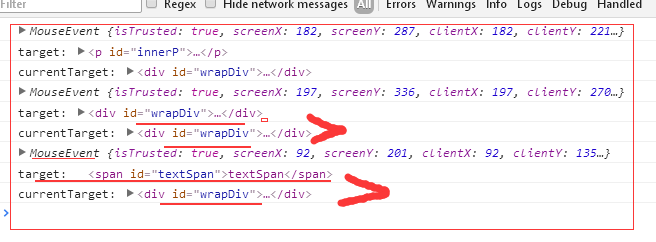
-----------------------------------------------
Event delegation is a popular methodology in JavaScript. It allows us to add an event listener to one parent, and avoid to add many event listeners to specific nodes. We can demonstrate this technique with simple example.
Let’s say we have a list with thousands of items:
<body>
  <div id="container">
   <ul id="list">
     <li><a href="#">Item 1</a></li>
     <li><a href="#">Item 2</a></li>
     <li><a href="#">Item 3</a></li>
     <li><a href="#">Item 4</a></li>
     ..................................
     <li><a href="#">Item 1000</a></li>
   </ul>
  </div>
</body>
With such number of items, it would be a nightmare to loop through every <a> element on the page, adding an event listener one after one. Moreover, it may “freeze” the page when JavaScript is trying to create them all.
So here comes the event delegation: When the event bubbles up to the body element, we can check the element that triggered the event, using the event object’s target property.
document.addEventListener("click", function(e) {
  if(e.target && e.target.nodeName == "A") {
  console.log("List item ", e.target.textContent, " was clicked!");
  }
});
// When we click the 2nd item, the page prints out:
"List item Item 2 was clicked!"
target vs. currentTarget
Since we already talked about the event.target property, there is another property called event.currentTarget in JavaScript event. It can be very confused by just reading about them on JavaScript documentation.
As we’ve seen from the last example, when we clicked the a element, clickevent bubbles up to <body> node of the document like below:
<a> → <li> → <ul> → <div> → <body>
Let’s add one more line of code and prints out what the e.currentTarget is from the example we used above:
document.addEventListener(“click”, function(e) {
  if(e.target && e.target.nodeName == “A”) {
    console.log(“List item “, e.target.textContent, “ was clicked!”);  // "List item Item 2 was clicked!"
  }
  console.log(e.currentTarget);  // #document
});
It prints out “document” since we attached current event listener to the document while e.target refers to <a> which we clicked.
We can also look at one more example to see the differences between target and currentTarget. This time, we add the event listener to the <ul>:
document.getElementById(“list”).addEventListener(“click”, function(e) {
  console.log(e.currentTarget);  //<ul><li>...</li><ul>
  console.log(e.target);         //<a href="#">Item 2</a>
);
Again, the currentTarget refers to the element that the event listener directly attached to while the target still refers to the specific <a> we clicked.
With these two properties target and currentTarget, we can easily manipulate the node when the event gets triggered, as well as the node the event is attached to.
JavaScript Event Delegation, and event.target vs. event.currentTarget的更多相关文章
- Event对象中的target属性和currentTarget属性的区别
先上结论: Event.target:触发事件的元素: Event.currentTarget:事件绑定的元素: 通过下面的例子来理解这两个属性的区别: 使用Event.target属性的例子:(我在 ...
- JavaScript Interview Questions: Event Delegation and This
David Posin helps you land that next programming position by understanding important JavaScript fund ...
- javascript 事件委托 event delegation
事件委托 event delegation 一.概念: 假设我们有很多个子元素,每个元素被点击时都会触发相应事件,普通的做法是给每个子元素添加一个事件监听. 而,事件委托则是给它们的父元素添加一个事件 ...
- javascript事件代理(Event Delegation)
看了几篇文章,放上来供参考 司徒正美的文章,Event Delegation Made Easy --------------------------------------------------- ...
- JavaScript------事件委托(event delegation)
简单的说,事件委托(event delegation)是在DOM上层(也就是在触发事件的元素的父元素上)定义事件的处理程序,而不是定义在触发事件的元素本身上. 首先我们来举这样一个例子:我有N个li元 ...
- window.event.srcElement与window.event.target 触发事件的元素 触发事件对象的获取,window.event与时间函数参数的event是同一个 事件对象
判断事件触发的元素: var tag = window.event.target || window.event.srcElement; if (tag.tagName.toLowerC ...
- JS:event对象下的target属性和取消冒泡事件
1.target 通过获取DOM元素 var box = document.getElementById("box"); document.box.onclick = functi ...
- 【前端】event.target 和 event.currentTarget 的区别
event.target 和 event.currentTarget 的区别 举例说明: <!DOCTYPE html> <html> <head> <tit ...
- javascript运行模式:并发模型 与Event Loop
看了阮一峰老师的JavaScript 运行机制详解:再谈Event Loop和[朴灵评注]的文章,查阅网上相关资料,把自己对javascript运行模式和EVENT loop的理解整理下,不一定对,日 ...
随机推荐
- 使用multiprocessing中的常见问题
在python的解释器中,CPython是应用范围最广的一种,其具有丰富的扩展包,方便了开发者的使用.当然CPython也不是完美的,由于全局解释锁(GIL)的存在,python的多线程可以近似看作单 ...
- [Luogu5105]不强制在线的动态快速排序
首先集合去重不影响答案,然后打表易得连续自然数平方差异或前缀和的规律,于是问题就变为在线维护区间求并同时更新答案,set记录所有区间,每次暴力插入删除即可.由于每个区间至多只会插入删除一次,故均摊复杂 ...
- [LOJ2541][PKUWC2018]猎人杀(容斥+分治+FFT)
https://blog.csdn.net/Maxwei_wzj/article/details/80714129 n个二项式相乘可以用分治+FFT的方法,使用空间回收可以只开log个数组. #inc ...
- BZOJ 3483 SGU505 Prefixes and suffixes(字典树+可持久化线段树)
[题目链接] http://www.lydsy.com/JudgeOnline/problem.php?id=3483 [题目大意] 给出一些串,同时给出m对前缀后缀,询问有多少串满足给出的前缀后缀模 ...
- 在Kali Linux上编译Windows EXP
使用vc6.0去编译的时候,难免会出现点问题 这里找到MS11-046的exp来编译 poc地址:https://www.exploit-db.com/exploits/40564/ 首先需要安装mi ...
- 破解神器Hashcat使用简介
0x00 背景 目前GPU的速度越来越快,使用GPU超强的运算速度进行暴力密码破解也大大提高了成功率,曾经看到老外用26块显卡组成的分布式破解神器让我羡慕不已.要说目前最好的GPU破解HASH的软件, ...
- wx小程序碎碎念
对button组件的例子中,js代码的一点理解 for (var i = 0; i < types.length; ++i) { (function(type) { // 循环构建目标函数 pa ...
- Codeforces Round #279 (Div. 2) C. Hacking Cypher 机智的前缀和处理
#include <cstdio> #include <cmath> #include <cstring> #include <ctime> #incl ...
- MVC之Global.asax解析
大家看到上面的代码了,Application_Start大家都知道这是应用程序启动入口. AreaRegistration.RegisterAllAreas是什么呢? 我们先看看微软官方的注解: 我们 ...
- MVC的Action上下文:ActionExecutingContext
就上图来看,大家注意了吗,ActionExecutingContext对象一共有3处引用.下面我来一一解析: 调用base.OnActionExecuting(filterContext)这个后,才会 ...