
python selenium wait方法
遇到一个网站运行很慢,所以要等待某个元素显示出来之后再进行操作,自己手上的书上没有例子可以直接用
发现一篇文章:http://www.cnblogs.com/yoyoketang/p/6517477.html 原文如下
前言:
在脚本中加入太多的sleep后会影响脚本的执行速度,虽然implicitly_wait()这种方法隐式等待方法一定程度上节省了很多时间。
但是一旦页面上某些js无法加载出来(其实界面元素经出来了),左上角那个图标一直转圈,这时候会一直等待的。
一、参数解释
1.这里主要有三个参数:
class WebDriverWait(object):driver, timeout, poll_frequency
2.driver:返回浏览器的一个实例,这个不用多说
3.timeout:超时的总时长
4.poll_frequency:循环去查询的间隙时间,默认0.5秒
以下是源码的解释文档(案例一个是元素出现,一个是元素消失)
def __init__(self, driver, timeout, poll_frequency=POLL_FREQUENCY, ignored_exceptions=None):
"""Constructor, takes a WebDriver instance and timeout in seconds.
:Args:
- driver - Instance of WebDriver (Ie, Firefox, Chrome or Remote)
- timeout - Number of seconds before timing out
- poll_frequency - sleep interval between calls
By default, it is 0.5 second.
- ignored_exceptions - iterable structure of exception classes ignored during calls.
By default, it contains NoSuchElementException only.
Example:
from selenium.webdriver.support.ui import WebDriverWait \n
element = WebDriverWait(driver, 10).until(lambda x: x.find_element_by_id("someId")) \n
is_disappeared = WebDriverWait(driver, 30, 1, (ElementNotVisibleException)).\ \n
until_not(lambda x: x.find_element_by_id("someId").is_displayed())
"""
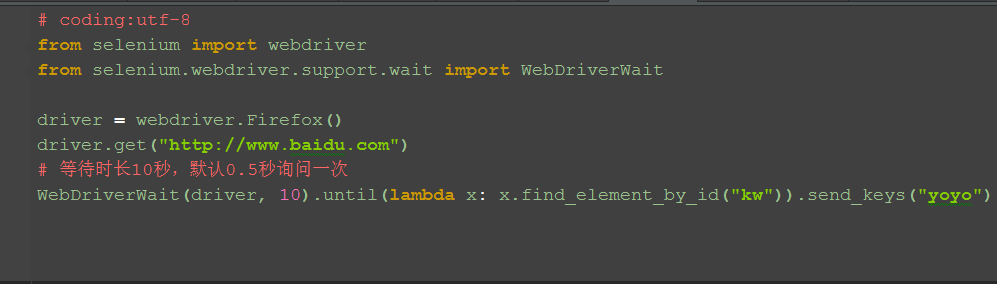
二、元素出现:until()
1.until里面有个lambda函数,这个语法看python文档吧
2.以百度输入框为例
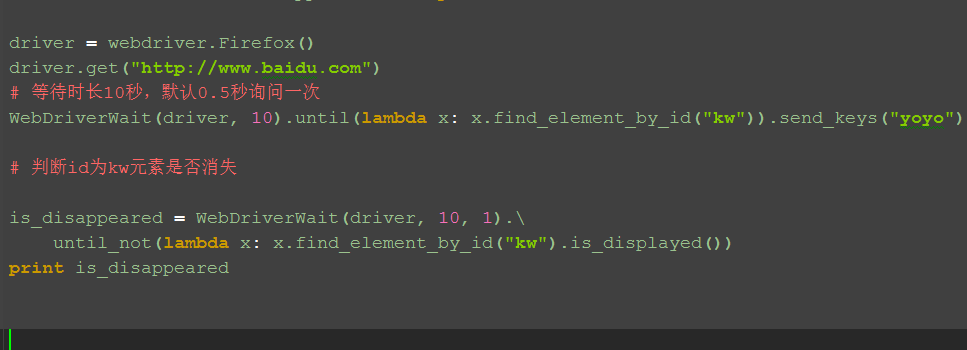
三、元素消失:until_not()
1.判断元素是否消失,是返回Ture,否返回False
备注:此方法未调好,暂时放这
四、参考代码:
# coding:utf-8
from selenium import webdriver
from selenium.webdriver.support.wait import WebDriverWait
driver = webdriver.Firefox()
driver.get("http://www.baidu.com")
# 等待时长10秒,默认0.5秒询问一次
WebDriverWait(driver, 10).until(lambda x: x.find_element_by_id("kw")).send_keys("yoyo")
# 判断id为kw元素是否消失
is_disappeared = WebDriverWait(driver, 10, 1).\
until_not(lambda x: x.find_element_by_id("kw").is_displayed())
print is_disappeared
五、WebDriverWait源码
1.WebDriverWait主要提供了两个方法,一个是until(),另外一个是until_not()
以下是源码的注释,有兴趣的小伙伴可以看下
# Licensed to the Software Freedom Conservancy (SFC) under one
# or more contributor license agreements. See the NOTICE file
# distributed with this work for additional information
# regarding copyright ownership. The SFC licenses this file
# to you under the Apache License, Version 2.0 (the
# "License"); you may not use this file except in compliance
# with the License. You may obtain a copy of the License at
#
# http://www.apache.org/licenses/LICENSE-2.0
#
# Unless required by applicable law or agreed to in writing,
# software distributed under the License is distributed on an
# "AS IS" BASIS, WITHOUT WARRANTIES OR CONDITIONS OF ANY
# KIND, either express or implied. See the License for the
# specific language governing permissions and limitations
# under the License.
import time
from selenium.common.exceptions import NoSuchElementException
from selenium.common.exceptions import TimeoutException
POLL_FREQUENCY = 0.5 # How long to sleep inbetween calls to the method
IGNORED_EXCEPTIONS = (NoSuchElementException,) # exceptions ignored during calls to the method
class WebDriverWait(object):
def __init__(self, driver, timeout, poll_frequency=POLL_FREQUENCY, ignored_exceptions=None):
"""Constructor, takes a WebDriver instance and timeout in seconds.
:Args:
- driver - Instance of WebDriver (Ie, Firefox, Chrome or Remote)
- timeout - Number of seconds before timing out
- poll_frequency - sleep interval between calls
By default, it is 0.5 second.
- ignored_exceptions - iterable structure of exception classes ignored during calls.
By default, it contains NoSuchElementException only.
Example:
from selenium.webdriver.support.ui import WebDriverWait \n
element = WebDriverWait(driver, 10).until(lambda x: x.find_element_by_id("someId")) \n
is_disappeared = WebDriverWait(driver, 30, 1, (ElementNotVisibleException)).\ \n
until_not(lambda x: x.find_element_by_id("someId").is_displayed())
"""
self._driver = driver
self._timeout = timeout
self._poll = poll_frequency
# avoid the divide by zero
if self._poll == 0:
self._poll = POLL_FREQUENCY
exceptions = list(IGNORED_EXCEPTIONS)
if ignored_exceptions is not None:
try:
exceptions.extend(iter(ignored_exceptions))
except TypeError: # ignored_exceptions is not iterable
exceptions.append(ignored_exceptions)
self._ignored_exceptions = tuple(exceptions)
def __repr__(self):
return '<{0.__module__}.{0.__name__} (session="{1}")>'.format(
type(self), self._driver.session_id)
def until(self, method, message=''):
"""Calls the method provided with the driver as an argument until the \
return value is not False."""
screen = None
stacktrace = None
end_time = time.time() + self._timeout
while True:
try:
value = method(self._driver)
if value:
return value
except self._ignored_exceptions as exc:
screen = getattr(exc, 'screen', None)
stacktrace = getattr(exc, 'stacktrace', None)
time.sleep(self._poll)
if time.time() > end_time:
break
raise TimeoutException(message, screen, stacktrace)
def until_not(self, method, message=''):
"""Calls the method provided with the driver as an argument until the \
return value is False."""
end_time = time.time() + self._timeout
while True:
try:
value = method(self._driver)
if not value:
return value
except self._ignored_exceptions:
return True
time.sleep(self._poll)
if time.time() > end_time:
break
raise TimeoutException(message)
python selenium wait方法的更多相关文章
- python+selenium安装方法
一.准备工具: 下载 python[python 开发环境] http://python.org/getit/ 下载 setuptools [python 的基础包工具] http://pypi.py ...
- python selenium webdriver方法封装(find_element_by)
下面是对find_element_by_就行了封装,封装之后的高级方法就是getElement() 下面是具体的代码: def getElement(self, selector): "&q ...
- Python+selenium自动化测试中Windows窗口跳转方法
Python+selenium自动化测试中Windows窗口跳转方法 #第一种方法 #获得当前窗口 nowhandle=driver.current_window_handle #打开弹窗 drive ...
- Python+Selenium定位元素的方法
Python+Selenium有以下八种定位元素的方法: 1. find_element_by_id() eg: find_element_by_id("kw") 2. find_ ...
- Python+Selenium自动化-定位一组元素,单选框、复选框的选中方法
Python+Selenium自动化-定位一组元素,单选框.复选框的选中方法 之前学习了8种定位单个元素的方法,同时webdriver还提供了8种定位一组元素的方法.唯一区别就是在单词elemen ...
- Python+Selenium自动化-设置等待三种等待方法
Python+Selenium自动化-设置等待三种等待方法 如果遇到使用ajax加载的网页,页面元素可能不是同时加载出来的,这个时候,就需要我们通过设置一个等待条件,等待页面元素加载完成,避免出现 ...
- Python+Selenium自动化-定位页面元素的八种方法
Python+Selenium自动化-定位页面元素的八种方法 本篇文字主要学习selenium定位页面元素的集中方法,以百度首页为例子. 0.元素定位方法主要有: id定位:find_elemen ...
- 一次完整的自动化登录测试-基于python+selenium进行cnblog的自动化登录测试
Web登录测试是很常见的测试!手动测试大家再熟悉不过了,那如何进行自动化登录测试呢!本文作者就用python+selenium结合unittest单元测试框架来进行一次简单但比较完整的cnblog自动 ...
- python selenium自动化(二)自动化注册流程
需求:使用python selenium来自动测试一个网站注册的流程. 假设这个网站的注册流程分为三步,需要提供比较多的信息: 在这个流程里面,需要用户填入信息.在下拉菜单中选择.选择单选的radio ...
随机推荐
- Winfrom Panel Scroll End 的实现
场景:在一个panel里面有非常多的自定义绘制的控件,在拖拉滚动条的时候,控件的画面上有残影 不知道大家遇到过这种情况没,一直做web的winform经验太少,有更好的解决办法请贡献 首先放出我的解决 ...
- 啥是MD5?
啥是MD5加密呢?为啥要使用MD5这种非对称的加密方式呢? 本文将通过漫画的形式来通俗易懂的讲述什么是MD5加密算法(Message Digest Algorithm MD5(中文名为消息摘要算法第五 ...
- 六大iT公司的组织结构
- Harbor 学习分享系列2 - Harbor项目介绍
云盘链接 链接:https://pan.baidu.com/s/19yZCZMijf1c3rTwYOqiZzw 密码:netv 通过本文无法把本文中的实验进行成功,请联系作者本人,作者会录制视频发送给 ...
- Cocos2d-x的跨平台原理
为了充分发挥硬件性能,手机游戏通常使用Native App开发模式,这就造成开发商要为iOS 和Android平台用户开发不同的应用,无论是产品迭代还是运行维护都非常麻烦.Cocos2d-x在iOS, ...
- 【RL系列】MDP与DP问题
推荐阅读顺序: Reinforcement Learning: An Introduction (Drfit) 有限马尔可夫决策过程 动态编程笔记 Dynamic programming in Py ...
- [T-ARA][느낌 아니까][懂得那份感觉]
歌词来源:http://music.163.com/#/song?id=27808771 作曲 : 박덕상/박현중 [作曲 : p/bag-ddeog-ssang-/p/ba-Kyeon-c/jung ...
- 第十一次ScrumMeeting博客
第十一次ScrumMeeting博客 本次会议于11月29日(三)22时整在3公寓725房间召开,持续30分钟. 与会人员:刘畅.辛德泰张安澜.赵奕.方科栋. 1. 每个人的工作(有Issue的内容和 ...
- Python发送邮件(最全)
简单邮件传输协议(SMTP)是一种协议,用于在邮件服务器之间发送电子邮件和路由电子邮件. Python提供smtplib模块,该模块定义了一个SMTP客户端会话对象,可用于使用SMTP或ESMTP侦听 ...
- Spring的bean创建详解
IoC容器,又名控制反转,全称为Inverse of Control,其是Spring最为核心的一个组件,其他的组件如AOP,Spring事务等都是直接或间接的依赖于IoC容器的.本文主 ...