
每天一点点之 taro 框架 - 生命周期 & state
注意:从vue过来的小朋友要注意,taro直接赋值时不会更新组件的,同react一致更新数据必须调用setState方法,例如:this.setState({name:'张三'})
1.render函数
return中的标签可以是但标签,也可以是多标签
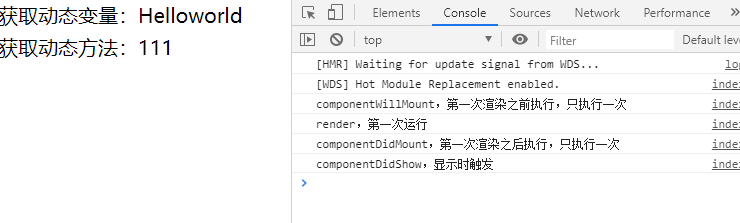
2.index.js文件内容介绍
import Taro, { Component } from '@tarojs/taro'

import { View, Text } from '@tarojs/components'

import './index.scss'

export default class Index extends Component {

  config = {

    navigationBarTitleText: '首页'

  }

  componentWillMount () {

    console.log('componentWillMount,第一次渲染之前执行,只执行一次')

   }

  componentDidMount () {

    console.log('componentDidMount,第一次渲染之后执行,只执行一次')

  }

  componentWillUnmount () {

    console.log('componentWillUnmount,卸载时执行')

  }

  componentWillUpdate () {

    console.log('componentWillUpdate,state数据将要更新')

  }

  componentDidUpdate () {

    console.log('componentDidUpdate,state数据更新过后')

  }

  shouldComponentUpdate (nextProps,nextState) {

    // 检查此次setState是否要进行render调用,返回true调用,false不调用

    // 一般用来多次的setState调用时,提升render性能

    // 判断状态

    if(nextState.state.text == '李四')

      return true;

  }

  componentWillReceiveProps(nextProps){

    // 会在父组件传递给子组件的参数发生改变时触发

  }

  // componentDidShow与componentDidHide在reactjs不存在,是taro为了兼容小程序实现的

  componentDidShow () {

    console.log('componentDidShow,显示时触发')

  }

  componentDidHide () {

    console.log('componentDidHide,隐藏时触发')

  }

  state = {

    name:'Helloworld'

  }

  getName () {

    return 111;

  }

  render () {

    console.log('render,第一次运行')

    return (

      <View className='index'>

        <View>获取动态变量:{this.state.name}</View>

        <View>获取动态方法:{this.getName()}</View>

      </View>

    )

  }

}
3.tarojs的生命周期
tarojs有六个生命周期
4.setState更新异步问题
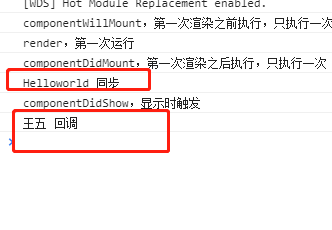
setState方法有两个参数, 第一个时对象,第二个时回调函数
  componentDidMount () {

    console.log('componentDidMount,第一次渲染之后执行,只执行一次')

    this.setState({name:'王五'},()=>{

      console.log(this.state.name,'回调')

    })

    console.log(this.state.name,'同步')

  }
由运行结果可以看出,setState方法是异步的
每天一点点之 taro 框架 - 生命周期 & state的更多相关文章
- 每天一点点之 taro 框架开发 - taro路由及传参
1.路由 taro的路由是自带的,不需要我们额外配置,只需要我们在app.js下config中配置pages即可 class App extends Component { config = { pa ...
- 3) drf 框架生命周期 请求模块 渲染模块 解析模块 自定义异常模块 响应模块(以及二次封装)
一.DRF框架 1.安装 pip3 install djangorestframework 2.drf框架规矩的封装风格 按功能封装,drf下按不同功能不同文件,使用不同功能导入不同文件 from r ...
- Libgdx 开发指南(1.1) 应用框架——生命周期
生命周期 Libgdx应用有一个定义好的生命周期,控制着整个应用的状态,例如creation, pausing, resuming, disposing ApplicationListener 开发者 ...
- 每天一点点之 taro 框架开发 - 事件处理与样式表
1.方法调用 state = { name:'张三' } test(){ this.state.name } <button onClick={ this.test.bind(this) } / ...
- 每天一点点之 taro 框架开发 - taro调用组件传值
1.调用组件 组件文件 import Taro, { Component } from '@tarojs/taro' import { View } from '@tarojs/components' ...
- 每天一点点之 taro 框架开发 - taro静态资源引入
1.说明: taro中客园自由的引用静态资源,不需要安装任何的loader 引用样式文件 通过ES6的import引入 2.引用js文件 import { functionName } from '. ...
- Laravel 入口文件解读及生命周期
这里只贴index.php的代码, 深入了解的请访问 https://laravel-china.org/articles/10421/depth-mining-of-laravel-life- ...
- React State&生命周期
State&生命周期 State&生命周期 到目前为止我们只学习了一种方法来更新UI. 我们调用ReactDOM.render()来改变输出: function tick(){ con ...
- 【技术博客】Flutter—使用网络请求的页面搭建流程、State生命周期、一些组件的应用
Flutter-使用网络请求的页面搭建流程.State生命周期.一些组件的应用 使用网络请求的页面搭建流程 在开发APP时,我们常常会遇到如下场景:进入一个页面后,要先进行网络调用,然后使用调用返 ...
随机推荐
- 解题报告:luogu P5536 【XR-3】核心城市
题目链接:P5536 [XR-3]核心城市 这题是某次月赛题. 这题我完全是看标签猜的. 优先选择直径中点即可,这里重要的是互通,很容易想到用堆维护可选的,预处理直径和距叶节点距离即可(最近),实质上 ...
- 一个自己实现的Vector(只能处理基本类型数据)
一个自己实现的Vector(只能处理基本类型数据) string 类型不行 bool char* int double float long long 等基本s类型可用 使用模板类实现.底层为数组实现 ...
- sklearn的train_test_split()各函数参数含义解释(非常全)
sklearn之train_test_split()函数各参数含义(非常全) 在机器学习中,我们通常将原始数据按照比例分割为“测试集”和“训练集”,从 sklearn.model_selection ...
- 吴裕雄--天生自然JAVAIO操作学习笔记:字符编码与对象序列化
public class CharSetDemo01{ public static void main(String args[]){ System.out.println("系统默认编码: ...
- 初级入门 --- 认识 WebGL
WebGL 是什么? WebGL 是一组基于 JavaScript 语言的图形规范,浏览器厂商按照这组规范进行实现,为 Web 开发者提供一套3D图形相关的 API. 这些 API 能够让 Web 开 ...
- 收藏了一篇很有用的博客 “npm的安装教程”
暂时贴上这一篇博客的地址,感谢原作者 https://www.cnblogs.com/goldlong/p/8027997.html 使用之前,我们先来掌握3个东西是用来干什么的. npm: Node ...
- NO17 第二关考试: 返回上次目录和ls -lrt倒序看文件--删除7天前的日志--查看日志更新--记录行号
第二题:不用cd /ildboy命令如何回到上一次的目录: 假如当前目录是: [root@localhost oldboy]# pwd/oldboy现在因为需要进入到了/tmp目录下进行操作,执行的命 ...
- 编程题:求单链表倒数第k位的值(最后一位为倒数第0位)好未来
#!/usr/bin/env python class Node(object): def __init__(self,elem,next_=None): self.elem = elem self. ...
- vue :style 动态绑定style
<div class="right userPicture" :style="[{'background':`url(${userImg}) no-repeat c ...
- 链表题目汇总(python3)
1.从头到尾打印链表 输入一个链表,按链表值从尾到头的顺序返回一个ArrayList. # -*- coding:utf-8 -*- class ListNode: def __init__(self ...