
吴裕雄--天生自然 python数据分析:健康指标聚集分析(健康分析)
# This Python 3 environment comes with many helpful analytics libraries installed

# It is defined by the kaggle/python docker image: https://github.com/kaggle/docker-python

# For example, here's several helpful packages to load in

import numpy as np # linear algebra

import pandas as pd # data processing, CSV file I/O (e.g. pd.read_csv)

# Input data files are available in the "../input/" directory.

# For example, running this (by clicking run or pressing Shift+Enter) will list the files in the input directory
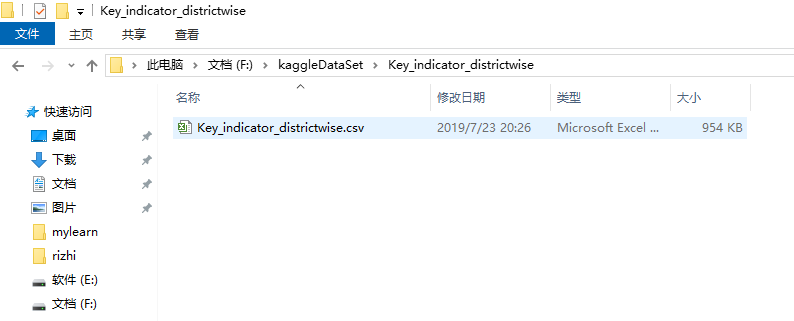
df=pd.read_csv('F:\\kaggleDataSet\\Key_indicator_districtwise\\Key_indicator_districtwise.csv')

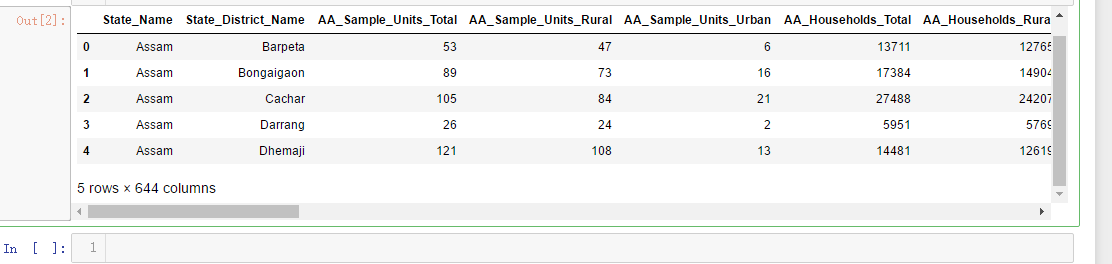
df.head()
x=df['AA_Sample_Units_Total']

y=df['AA_Sample_Units_Rural']

z=df['AA_Population_Urban']

import matplotlib.pyplot as plt

import seaborn as sns

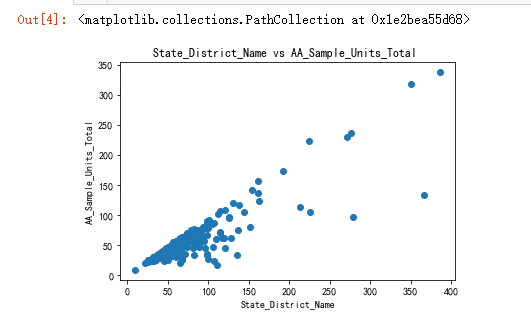
plt.title('State_District_Name vs AA_Sample_Units_Total ')

plt.xlabel('State_District_Name')

plt.ylabel('AA_Sample_Units_Total')

plt.scatter(x,y)
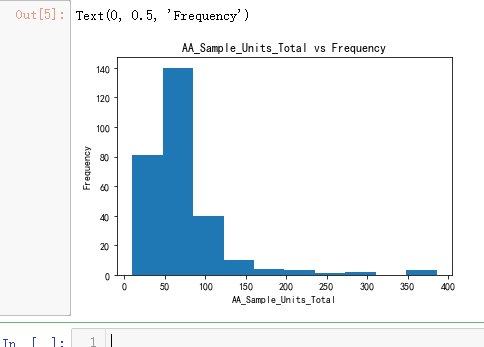
plt.hist(x)

plt.title('AA_Sample_Units_Total vs Frequency')

plt.xlabel('AA_Sample_Units_Total')

plt.ylabel('Frequency')
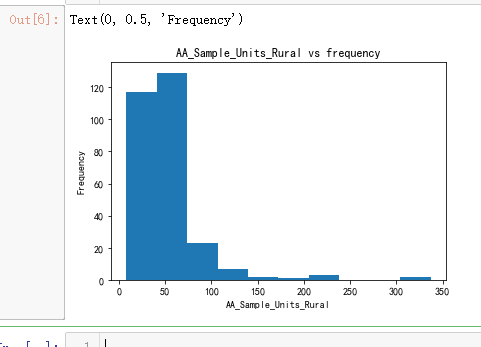
plt.hist(y)

plt.title('AA_Sample_Units_Rural vs frequency')

plt.xlabel('AA_Sample_Units_Rural')

plt.ylabel('Frequency')
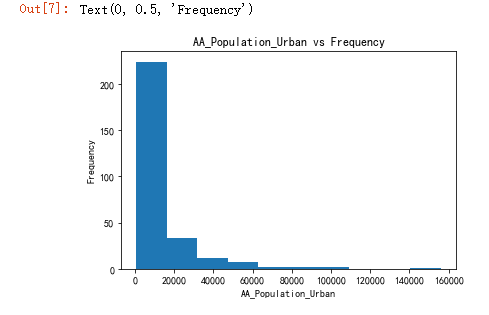
plt.hist(z)

plt.title('AA_Population_Urban vs Frequency')

plt.xlabel('AA_Population_Urban')

plt.ylabel('Frequency')
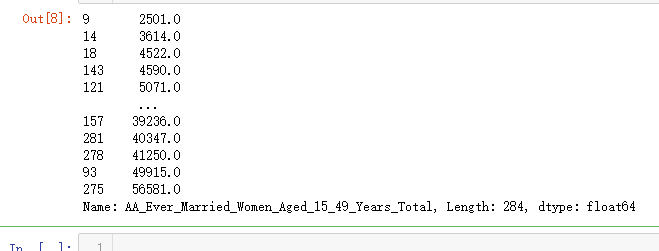
q=df['AA_Ever_Married_Women_Aged_15_49_Years_Total']

q

w=q.sort_values()

w
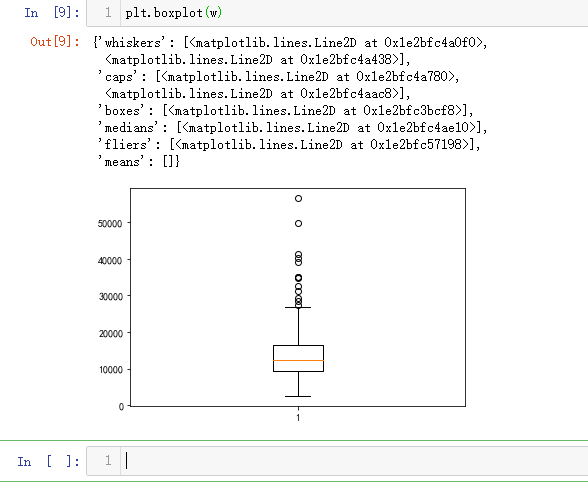
plt.boxplot(w)
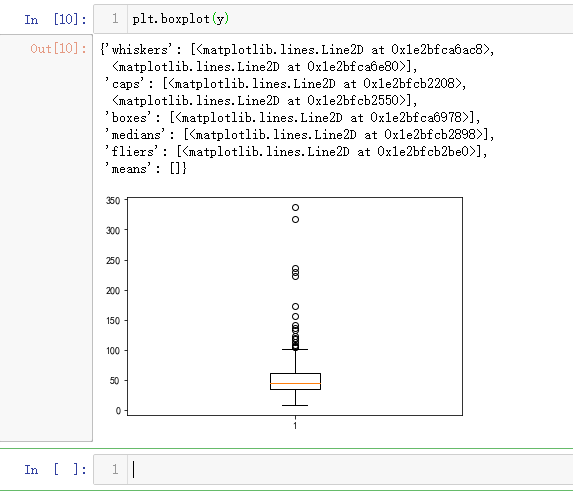
plt.boxplot(y)
import matplotlib.pyplot as plt

import numpy as np

from sklearn import datasets, linear_model, metrics

# load the boston dataset

boston = datasets.load_boston(return_X_y=False)

# defining feature matrix(X) and response vector(y)

X = boston.data

y = boston.target

# splitting X and y into training and testing sets

from sklearn.model_selection import train_test_split

X_train, X_test, y_train, y_test = train_test_split(X, y, test_size=0.4,

                                                    random_state=1)

# create linear regression object

reg = linear_model.LinearRegression()

# train the model using the training sets

reg.fit(X_train, y_train)

# regression coefficients

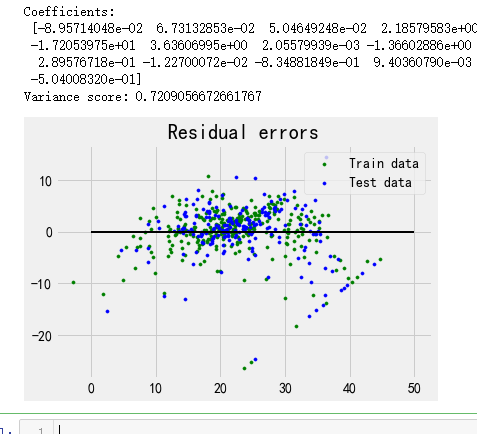
print('Coefficients: \n', reg.coef_)

# variance score: 1 means perfect prediction

print('Variance score: {}'.format(reg.score(X_test, y_test)))

# plot for residual error

## setting plot style

plt.style.use('fivethirtyeight')

## plotting residual errors in training data

plt.scatter(reg.predict(X_train), reg.predict(X_train) - y_train,

            color = "green", s = 10, label = 'Train data')

## plotting residual errors in test data

plt.scatter(reg.predict(X_test), reg.predict(X_test) - y_test,

            color = "blue", s = 10, label = 'Test data')

## plotting line for zero residual error

plt.hlines(y = 0, xmin = 0, xmax = 50, linewidth = 2)

## plotting legend

plt.legend(loc = 'upper right')

## plot title

plt.title("Residual errors")

## function to show plot

plt.show()
吴裕雄--天生自然 python数据分析:健康指标聚集分析(健康分析)的更多相关文章
- 吴裕雄--天生自然 PYTHON数据分析:基于Keras的CNN分析太空深处寻找系外行星数据
#We import libraries for linear algebra, graphs, and evaluation of results import numpy as np import ...
- 吴裕雄--天生自然 PYTHON数据分析:人类发展报告——HDI, GDI,健康,全球人口数据数据分析
import pandas as pd # Data analysis import numpy as np #Data analysis import seaborn as sns # Data v ...
- 吴裕雄--天生自然 PYTHON数据分析:糖尿病视网膜病变数据分析(完整版)
# This Python 3 environment comes with many helpful analytics libraries installed # It is defined by ...
- 吴裕雄--天生自然 PYTHON数据分析:所有美国股票和etf的历史日价格和成交量分析
# This Python 3 environment comes with many helpful analytics libraries installed # It is defined by ...
- 吴裕雄--天生自然 python数据分析:葡萄酒分析
# import pandas import pandas as pd # creating a DataFrame pd.DataFrame({'Yes': [50, 31], 'No': [101 ...
- 吴裕雄--天生自然 python数据分析:医疗费数据分析
import numpy as np import pandas as pd import os import matplotlib.pyplot as pl import seaborn as sn ...
- 吴裕雄--天生自然 python数据分析:基于Keras使用CNN神经网络处理手写数据集
import pandas as pd import numpy as np import matplotlib.pyplot as plt import matplotlib.image as mp ...
- 吴裕雄--天生自然 PYTHON数据分析:钦奈水资源管理分析
df = pd.read_csv("F:\\kaggleDataSet\\chennai-water\\chennai_reservoir_levels.csv") df[&quo ...
- 吴裕雄--天生自然 PYTHON数据分析:医疗数据分析
import numpy as np # linear algebra import pandas as pd # data processing, CSV file I/O (e.g. pd.rea ...
随机推荐
- HTML引入文件/虚拟目录/绝对路径与相对路径
此篇引见 相对路径和绝对路径的区别 1.绝对路径 使用方法:而绝对路径可以使用“\”或“/”字符作为目录的分隔字符 绝对路径是指文件在硬盘上真正存在的路径.例如 <body backround= ...
- python-day2爬虫基础之爬虫基本架构
今天主要学习了爬虫的基本架构,下边做一下总结: 1.首先要有一个爬虫调度端,来启动爬虫.停止爬虫或者是监视爬虫的运行情况,在爬虫程序中有三个模块,首先是URL管理器来对将要爬取的URL以及爬取过的UR ...
- macbook 安装laravel5.4
1.安装composer php -r "copy('https://install.phpcomposer.com/installer', 'composer-setup.php');&q ...
- SQL触发器笔记
触发器(Trigger)是在对表进行插入.更新.删除等操作时自动执行的存储过程. 触发器是一种特殊的存储过程,它在执行语言事件时自动生效,采用事件驱动机制.当某个触发事件发生时,定义在触发器中的功能将 ...
- 第04项目:淘淘商城(SpringMvc+Spring+Mybatis) 的学习实践总结【第三天】
淘淘商城(SpringMVC+Spring+Mybatis) 是传智播客在2015年9月份录制的,几年过去了.由于视频里课上老师敲的代码和项目笔记有些细节上存在出入,只有根据日志报错信息作出适当的调 ...
- Opencv笔记(五)——把鼠标当画笔
学习目标: 学习使用 OpenCV 处理鼠标事件 学会使用函数cv2.setMouseCallback() 简单演示: 首先我们来创建一个鼠标事件回调函数,但鼠标事件发生是他就会被执 ...
- 吴裕雄--天生自然 JAVA开发学习: 泛型
public class GenericMethodTest { // 泛型方法 printArray public static < E > void printArray( E[] i ...
- css3应用
画出一个禁行标志 border-radius: 50%; width: 100px; height: 100px; border: 10px solid red; background: linear ...
- python 元祖参数和map参数
1.对于元组形参数, def func(a,b,c): pass 可以采用一个元组的形式调用, params = (1,2,'c') 如果直接传递运行会抛出异常,正确的调用形式为 func(*para ...
- 郑宇以城市计算研究膺选 MIT 科技创新35俊杰 (TR35)
MIT 科技创新35俊杰 (TR35)"> 编者按:<MIT Technology Review>于8月22日发布了令人瞩目的2013年全球杰出青年创新者(MIT TR35 ...