
19 Flutter仿京东商城项目 商品详情 底部浮动导航布局 商品页面布局
效果:
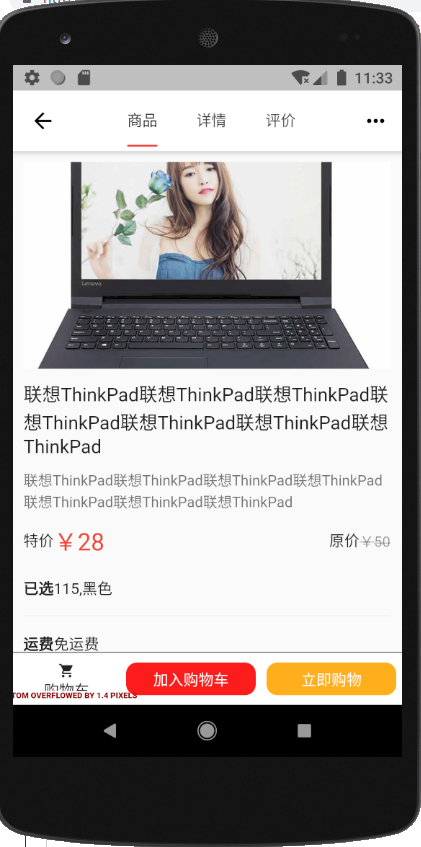
widget/JdButton.dart
import 'package:flutter/material.dart';

import '../services/ScreenAdaper.dart';

class JdButton extends StatelessWidget {

  final Color color;

  final String text;

  final Object cb;

  JdButton({Key key,this.color=Colors.black,this.text='按钮',this.cb=null}) : super(key: key);

  @override

  Widget build(BuildContext context) {

    return InkWell(

      onTap:this.cb,

      child: Container(

        margin: EdgeInsets.all(),

        padding: EdgeInsets.all(),

        height: ScreenAdaper.height(),

        width: double.infinity,

        decoration: BoxDecoration(

            color: color,

            borderRadius: BorderRadius.circular()),

        child: Center(

          child: Text(text, style: TextStyle(color: Colors.white)),

        ),

      ),

    );

  }

}
pages/ProductContent.dart
import 'package:flutter/material.dart';

import '../services/ScreenAdaper.dart';

import 'ProductContent/ProductContentFirst.dart';

import 'ProductContent/ProductContentSecond.dart';

import 'ProductContent/ProductContentThird.dart';

import '../widget/JdButton.dart';

class ProductContentPage extends StatefulWidget {

  final Map arguments;

  ProductContentPage({Key key, this.arguments}) : super(key: key);

  _ProductContentPageState createState() => _ProductContentPageState();

}

class _ProductContentPageState extends State<ProductContentPage> {

  @override

  Widget build(BuildContext context) {

    return DefaultTabController(

      length: ,

      child: Scaffold(

        appBar: AppBar(

          title: Row(

            mainAxisAlignment: MainAxisAlignment.center,

            children: <Widget>[

              Container(

                width: ScreenAdaper.width(),

                child: TabBar(

                  indicatorColor: Colors.red,

                  indicatorSize: TabBarIndicatorSize.label,

                  tabs: <Widget>[

                    Tab(

                      child: Text('商品'),

                    ),

                    Tab(

                      child: Text('详情'),

                    ),

                    Tab(

                      child: Text('评价'),

                    )

                  ],

                ),

              )

            ],

          ),

          actions: <Widget>[

            IconButton(

              icon: Icon(Icons.more_horiz),

              onPressed: () {

                showMenu(

                    context: context,

                    position: RelativeRect.fromLTRB(

                        ScreenAdaper.width(), , , ),

                    items: [

                      PopupMenuItem(

                        child: Row(

                          children: <Widget>[Icon(Icons.home), Text('首页')],

                        ),

                      ),

                      PopupMenuItem(

                        child: Row(

                          children: <Widget>[Icon(Icons.search), Text('搜索')],

                        ),

                      ),

                    ]);

              },

            )

          ],

        ),

        body: Stack(

          children: <Widget>[

            TabBarView(

              children: <Widget>[

                ProductContentFirst(),

                ProductContentSecond(),

                ProductContentThird()

              ],

            ),

            Positioned(

              width: ScreenAdaper.width(),

              height: ScreenAdaper.height(),

              bottom: ,

              child: Container(

                decoration: BoxDecoration(

                    border: Border(

                        top: BorderSide(color: Colors.black54, width: )),

                    color: Colors.white),

                child: Row(

                  children: <Widget>[

                    Container(

                      padding: EdgeInsets.only(top: ScreenAdaper.height()),

                      width: ,

                      height: ScreenAdaper.height(),

                      child: Column(

                        children: <Widget>[

                          Icon(

                            Icons.shopping_cart,

                            size: ,

                          ),

                          Text('购物车')

                        ],

                      ),

                    ),

                    Expanded(

                      flex: ,

                      child: JdButton(

                        color: Color.fromRGBO(, , , 0.9),

                        text: "加入购物车",

                        cb: (){

                          print('加入购物车');

                        },

                      ),

                    ),

                    Expanded(

                      flex: ,

                      child: JdButton(

                        color: Color.fromRGBO(, , , 0.9),

                        text: "立即购物",

                        cb: (){

                          print('立即购物');

                        },

                      ),

                    )

                  ],

                ),

              ),

            )

          ],

        ),

      ),

    );

  }

}
pages/ProductContent/ProductContentFirst.dart
import 'package:flutter/material.dart';

import '../../services/ScreenAdaper.dart';

class ProductContentFirst extends StatefulWidget {

  ProductContentFirst({Key key}) : super(key: key);

  _ProductContentFirstState createState() => _ProductContentFirstState();

}

class _ProductContentFirstState extends State<ProductContentFirst> {

  @override

  Widget build(BuildContext context) {

    return Container(

      padding: EdgeInsets.all(),

      child:ListView(

        children: <Widget>[

          AspectRatio(

            aspectRatio: /,

            child: Image.network("https://www.itying.com/images/flutter/p1.jpg",fit: BoxFit.cover,)

          ),

          Container(

            padding: EdgeInsets.only(top: ),

            child: Text("联想ThinkPad联想ThinkPad联想ThinkPad联想ThinkPad联想ThinkPad联想ThinkPad联想ThinkPad",style: TextStyle(

              color: Colors.black87,

              fontSize: ScreenAdaper.size()

            )),

          ),

          Container(

            padding: EdgeInsets.only(top: ),

            child: Text("联想ThinkPad联想ThinkPad联想ThinkPad联想ThinkPad联想ThinkPad联想ThinkPad联想ThinkPad",style: TextStyle(

              color: Colors.black54,

              fontSize: ScreenAdaper.size()

            )),

          ),

          Container(

            padding: EdgeInsets.only(top:),

            child: Row(

              children: <Widget>[

                Expanded(

                  flex: ,

                  child: Row(

                    children: <Widget>[

                      Text('特价'),

                      Text('¥28',style: TextStyle(

                        color: Colors.red,

                        fontSize: ScreenAdaper.size()

                      ))

                    ],

                  ),

                ),

                Expanded(

                  flex: ,

                  child: Row(

                    mainAxisAlignment: MainAxisAlignment.end,

                    children: <Widget>[

                      Text('原价'),

                      Text('¥50',style: TextStyle(

                        color: Colors.black38,

                        fontSize: ScreenAdaper.size(),

                        decoration: TextDecoration.lineThrough

                      ))

                    ],

                  ),

                )

              ],

            ),

          ),

          //筛选:

          Container(

             margin: EdgeInsets.only(top:),

            height: ScreenAdaper.height(),

            child: Row(

              children: <Widget>[

                Text('已选',style: TextStyle(

                  fontWeight: FontWeight.bold

                )),

                Text('115,黑色')

              ],

            ),

          ),

          Divider(),

          Container(

            height: ScreenAdaper.height(),

            child: Row(

              children: <Widget>[

                Text('运费',style: TextStyle(

                  fontWeight: FontWeight.bold

                )),

                Text('免运费')

              ],

            ),

          ),

          Divider()

        ],

      )

    );

  }

}
pages/ProductContent/ProductContentSecond.dart
import 'package:flutter/material.dart';

class ProductContentSecond extends StatefulWidget {

  ProductContentSecond({Key key}) : super(key: key);

  _ProductContentSecondState createState() => _ProductContentSecondState();

}

class _ProductContentSecondState extends State<ProductContentSecond> {

  @override

  Widget build(BuildContext context) {

    return Container(

       child: Text('商品详情'),

    );

  }

}
pages/ProductContent/ProductContentThird.dart
import 'package:flutter/material.dart';

class ProductContentThird extends StatefulWidget {

  ProductContentThird({Key key}) : super(key: key);

  _ProductContentThirdState createState() => _ProductContentThirdState();

}

class _ProductContentThirdState extends State<ProductContentThird> {

  @override

  Widget build(BuildContext context) {

    return Container(

       child: Text('商品评论'),

    );

  }

}
19 Flutter仿京东商城项目 商品详情 底部浮动导航布局 商品页面布局的更多相关文章
- 01-02 Flutter仿京东商城项目 功能分析、底部导航Tab切换以及路由配置、架构搭建:(Flutter仿京东商城项目 首页布局以及不同终端屏幕适配方案)
Flutter和Dart交流学习群:交流群:452892873 01Flutter仿京东商城项目 功能分析.底部导航Tab切换以及路由配置.架构搭建 02Flutter仿京东商城项目 首页布局以及不同 ...
- 18 Flutter仿京东商城项目 商品详情顶部tab切换 顶部下拉菜单 底部浮动导航
ProductContent.dart import 'package:flutter/material.dart'; import '../services/ScreenAdaper.dart'; ...
- 42 Flutter仿京东商城项目 修改默认收货地址 显示默认收货地址
CheckOut.dart import 'package:flutter/material.dart'; import '../services/ScreenAdapter.dart'; impor ...
- 41 Flutter 仿京东商城项目签名验证 增加收货地址、显示收货地址 事件广播
加群452892873 下载对应41课文件,运行方法,建好项目,直接替换lib目录 AddressAdd.dart import 'package:dio/dio.dart'; import 'pac ...
- 36 Flutter仿京东商城项目 用户登录 退出登录 事件广播更新状态
Login.dart import 'dart:convert'; import 'package:dio/dio.dart'; import 'package:flutter/material.da ...
- 20 Flutter仿京东商城项目 商品详情 底部弹出筛选属性 以及筛选属性页面布局
ProductContentFirst.dart import 'package:flutter/material.dart'; import '../../widget/JdButton.dart' ...
- 22 Flutter仿京东商城项目 inappbrowser 加载商品详情、保持页面状态、以及实现属性筛选业务逻辑
加群452892873 下载对应21可文件,运行方法,建好项目,直接替换lib目录,在往pubspec.yaml添加上一下扩展. cupertino_icons: ^0.1.2 flutter_swi ...
- 21 Flutter仿京东商城项目 商品详情 请求接口渲染数据 商品属性数据渲染
加群452892873 下载对应21可文件,运行方法,建好项目,直接替换lib目录,在往pubspec.yaml添加上一下扩展. cupertino_icons: ^0.1.2 flutter ...
- 13 Flutter仿京东商城项目 商品列表筛选以及上拉分页加载更多
ProductList.dart import 'package:flutter/material.dart'; import '../services/ScreenAdaper.dart'; imp ...
随机推荐
- 文件格式 rdp
auto connect:i:1full address:s:公网访问IP地址username:s:Administrator
- flask例子
1.例子: https://blog.csdn.net/z564359805/article/details/83474387 def get_embedding(bc,query_list,ba ...
- 透过字节码生成审视Java动态代理运作机制
对于动态代理我想应该大家都不陌生,就是可以动态去代理实现某个接口的类来干一些我们自己想要的功能,但是在字节码层面它的表现是如何的呢?既然目前刚好在研究字节码相关的东东,有必要对其从字节码角度来审视一下 ...
- Java基础 FileReader-FileWriter / 缓冲字符输入输出流 / 缓冲字节输入输出流 三种方式 进行文本文件的复制
易错的地方: /** 出错的地方: * 1.缓冲流儿输出时,务必:flush();不然可能输出不尽! * 2. bw缓冲字符输出流,记得这里! bw.write(b,0,len); * 3.字符流不能 ...
- 【Java 基础实验_Bank项目_06】单例模式(Static Bank) , 查询异常输出
基于上一个实验Banking_5 ,代码先全部复制过来. 笔记心得: 1.SavingAccount() 需要两种构造方法,接受单个参数和两个的 2.Account 有两个类型 SavingAccou ...
- 用python计算最高投标限价
题目是文绉绉的说法,背景来于群里提问,是一份文件里面关于最高投标限价的确定. 最高投标限价下浮率在开标前在开标现场采取逐标段摇珠方式确定,摇珠操作办法如下:在下浮率摇珠范围内,以0.1%为以一档次增序 ...
- 如何比较js 浮点数
浮点数的定义,非整数的Number类型无法用 ==(===也不行) 来比较,这就是为什么在JavaScript中,0.1+0.2不能=0.3: console.log( 0.1 + 0.2 == 0. ...
- 201812-4 数据中心(kruskal)
考场上的时候被题目完全蒙住了,当时状态也不好,前几次考试每次考试当天就头晕感冒流鼻涕 好的,以上都是借口,自己没有好好复习才是真的... 题目: 好的,以上题目简述就是:给你一个无向连通图,求它的最小 ...
- IIS上传限制大小
加入下面的配置即可 <?xml version="1.0" encoding="UTF-8"?> <configuration> < ...
- Tinkoff Internship Warmup Round 2018 and Codeforces Round #475 (Div. 1) 963B 964D B Destruction of a Tree
题 OvO http://codeforces.com/contest/963/problem/B CF 963B 964D 解 对于题目要求,显然一开始的树,要求度数为偶数的节点个数为奇数个,通过奇 ...