
『Python』Python 调用 ZoomEye API 批量获取目标网站IP

#### 20160712 更新
原API的访问方式是以 HTTP 的方式访问的,根据官网最新文档,现在已经修改成 HTTPS 方式,测试可以正常使用API了。
0x 00 前言
ZoomEye 的 API 在前几天正式对外部开发,这对网络渗透人员来说是一件开心的事
可以说“妈妈再也不用担心批量测(x)试(zhan)没有资源了。”
官方的 API 帮助文档在下面:
看了下,使用方法是先提交账户,密码获得一个唯一的访问令牌(access_token)
然后每次调用 API 的时候在 HTTP 的 Headers 里加上格式化后的 access_token 就可以使用了
官方文档为了方便使用给出的是 cURL 方式调用 API ,在这里我给出一个用 Python 调用 API 的 Demo
0x 01 Code
该 Demo 抓取 ZoomEye 上 搜索 dedecms 的所有结果并把前 100 个IP保存到 文件中
# coding: utf-8

# author  : evilclay

# datetime: 20160330

# http://www.cnblogs.com/anka9080/p/ZoomEyeAPI.html

import os

import requests

import json

access_token = ''

ip_list = []

def login():

    """

        输入用户米密码 进行登录操作

    :return: 访问口令 access_token

    """

    user = raw_input('[-] input : username :')

    passwd = raw_input('[-] input : password :')

    data = {

        'username' : user,

        'password' : passwd

    }

    data_encoded = json.dumps(data)  # dumps 将 python 对象转换成 json 字符串

    try:

        r = requests.post(url = 'https://api.zoomeye.org/user/login',data = data_encoded)

        r_decoded = json.loads(r.text) # loads() 将 json 字符串转换成 python 对象

        global access_token

        access_token = r_decoded['access_token']

    except Exception,e:

        print '[-] info : username or password is wrong, please try again '

        exit()

def saveStrToFile(file,str):

    """

        将字符串写如文件中

    :return:

    """

    with open(file,'w') as output:

        output.write(str)

def saveListToFile(file,list):

    """

        将列表逐行写如文件中

    :return:

    """

    s = '\n'.join(list)

    with open(file,'w') as output:

        output.write(s)

def apiTest():

    """

        进行 api 使用测试

    :return:

    """

    page = 1

    global access_token

    with open('access_token.txt','r') as input:

        access_token = input.read()

    # 将 token 格式化并添加到 HTTP Header 中

    headers = {

        'Authorization' : 'JWT ' + access_token,

    }

    # print headers

    while(True):

        try:

            r = requests.get(url = 'https://api.zoomeye.org/host/search?query="dedecms"&facet=app,os&page=' + str(page),

                         headers = headers)

            r_decoded = json.loads(r.text)

            # print r_decoded

            # print r_decoded['total']

            for x in r_decoded['matches']:

                print x['ip']

                ip_list.append(x['ip'])

            print '[-] info : count ' + str(page * 10)

        except Exception,e:

            # 若搜索请求超过 API 允许的最大条目限制 或者 全部搜索结束,则终止请求

            if str(e.message) == 'matches':

                print '[-] info : account was break, excceeding the max limitations'

                break

            else:

                print  '[-] info : ' + str(e.message)

        else:

            if page == 10:

                break

            page += 1

def main():

    # 访问口令文件不存在则进行登录操作

    if not os.path.isfile('access_token.txt'):

        print '[-] info : access_token file is not exist, please login'

        login()

        saveStrToFile('access_token.txt',access_token)

    apiTest()

    saveListToFile('ip_list.txt',ip_list)

if __name__ == '__main__':

    main()
0x 03 运行测试

打开 access_token.txt 文件:

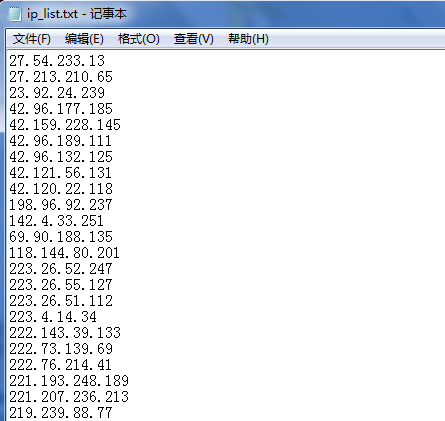
打开 ip_list.txt 文件:
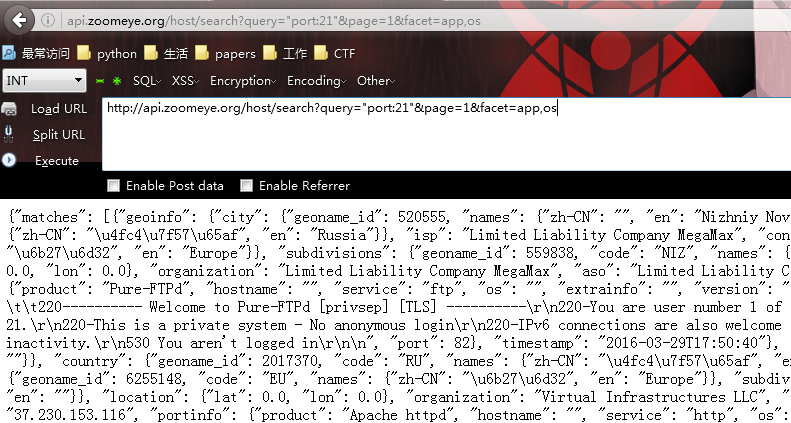
题外话: 使用 Firefox 的 Modify Headers 添加上 Authentication 这个 头信息后在浏览器里可以
直接看到返回的 JSON 字符串结果,如下
『Python』Python 调用 ZoomEye API 批量获取目标网站IP的更多相关文章
- 调用ZoomEye API获取信息
最近在提高自己编程能力,拿一些实用的小工具练下.该脚本为python语言,主要涉及模块urllib,json,os模块. 功能:调用ZoomEye API获取信息 import urllib.requ ...
- 【Python项目】简单爬虫批量获取资源网站的下载链接
简单爬虫批量获取资源网站的下载链接 项目链接:https://github.com/RealIvyWong/GotDownloadURL 1 由来 自己在收集剧集资源的时候,这些网站的下载链接还要手动 ...
- shell中调用jenkins API批量运行历史任务
shell中调用jenkins API批量运行jenkins带参数的任务: #!/bin/sh #startdate=20150127 startdate=20150201 while [ " ...
- 『009』Python
『004』索引-Language Python 准备更新中
- 谷歌、腾讯、百度相应API批量获取地理位置坐标信息及其优缺点
目录: 申请ak 批量获取地理位置 目的:通过给定的地理位置名称(如:北京市海淀区上地十街十号),获取经纬度信息. 1.申请ak 以百度Geocoding API为例:http://lbsyun.ba ...
- 『Python』为什么调用函数会令引用计数+2
一.问题描述 Python中的垃圾回收是以引用计数为主,分代收集为辅,引用计数的缺陷是循环引用的问题.在Python中,如果一个对象的引用数为0,Python虚拟机就会回收这个对象的内存. sys.g ...
- Python调用zabbix API批量添加主机 (读取Excel)
本文转载自:http://blog.mreald.com/178 Zabbix可以通过自发现添加主机,不过有时候不准确,通过API添加会更加准确! 脚本使用的跟zabbix相关的内容.参考的是zabb ...
- Python利用百度地图api批量获取地址经纬度
1.pip安装xlrd,xlwt,requests模块. 2.在工程目录处放置地点Excel文件. python2.7.13代码: #coding:utf-8 import xlrd import x ...
- python链式调用REST API把参数放到URL中
需求格式:GET /users/:user/repos 程序: class Chain(object): def __init__(self,path=''): self._path=path def ...
随机推荐
- Android中调用Paint的measureText()方法取得字符串显示的宽度值
1 public static float GetTextWidth(String text, float Size) { //第一个参数是要计算的字符串,第二个参数是字提大小 2 T ...
- 在eclipse下编译hadoop2.0源码
Hadoop是一个分布式系统基础架构,由apache基金会维护并更新.官网地址: http://hadoop.apache.org/ Hadoop项目主要包括以下4个模块: Hadoop Common ...
- freemarker入门教程
FreeMarker的模板文件并不比HTML页面复杂多少,FreeMarker模板文件主要由如下4个部分组成: 1,文本:直接输出的部分 2,注释:<#-- ... -->格式部分,不会输 ...
- Mybatis-Generator 详解 http://www.cnblogs.com/jtzfeng/p/5254798.html
Mybatis-Generator 自动生成Dao.Model.Mapping相关文档 最近在学习mybatis,结果在写Mapping的映射文件时insert语句一直报错,于是想看看标准的映射文件是 ...
- ios-简单算法
#import "ViewController.h" @interface ViewController () @end @implementation ViewControlle ...
- Codeforces 437B The Child and Set
题目链接:Codeforces 437B The Child and Set 開始是想到了这样的情况,比方lowbit之后从大到小排序后有这么几个数,200.100,60.50.S = 210.那先选 ...
- poj2586 Y2K Accounting Bug(贪心)
转载请注明出处:http://blog.csdn.net/u012860063?viewmode=contents 题目链接:http://poj.org/problem?id=2586 ------ ...
- Change value of string array at debug eclipse--转
Question: I have an application, but to test something, I need to change value of a String[]. But wh ...
- [转] nginx+FastCGI+c++
from: http://www.cnblogs.com/xiaouisme/archive/2012/08/01/2618398.html 一 安装 目的:不需支持php等.就html就行了.步骤: ...
- 安卓扫码:简单的ZXing使用记录
ZXing是Google提供的条形码.二维码等的生成.解析的库.最近工作需求去研究了一下,主要是研究怎么扫描二维码(QRCode).网上教程也不少,但大多看了不明所以,甚至看了半天都不知道解码到底从哪 ...