
CBOW and Skip-gram model
转自:https://iksinc.wordpress.com/tag/continuous-bag-of-words-cbow/
清晰易懂。
Vector space model is well known in information retrieval where each document is represented as a vector. The vector components represent weights or importance of each word in the document. The similarity between two documents is computed using the cosine similarity measure.
Although the idea of using vector representation for words also has been around for some time, the interest in word embedding, techniques that map words to vectors, has been soaring recently. One driver for this has been Tomáš Mikolov’s Word2vec algorithm which uses a large amount of text to create high-dimensional (50 to 300 dimensional) representations of words capturing relationships between words unaided by external annotations. Such representation seems to capture many linguistic regularities. For example, it yields a vector approximating the representation for vec(‘Rome’) as a result of the vector operation vec(‘Paris’) – vec(‘France’) + vec(‘Italy’).
Word2vec uses a single hidden layer, fully connected neural network as shown below. The neurons in the hidden layer are all linear neurons. The input layer is set to have as many neurons as there are words in the vocabulary for training. The hidden layer size is set to the dimensionality of the resulting word vectors. The size of the output layer is same as the input layer. Thus, assuming that the vocabulary for learning word vectors consists of V words and N to be the dimension of word vectors, the input to hidden layer connections can be represented by matrix WI of size VxN with each row representing a vocabulary word. In same way, the connections from hidden layer to output layer can be described by matrix WO of size NxV. In this case, each column of WO matrix represents a word from the given vocabulary. The input to the network is encoded using “1-out of -V” representation meaning that only one input line is set to one and rest of the input lines are set to zero.
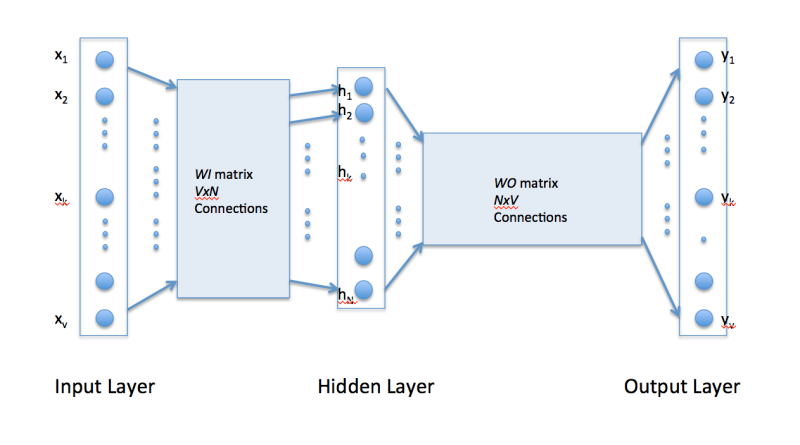
To get a better handle on how Word2vec works, consider the training corpus having the following sentences:
“the dog saw a cat”, “the dog chased the cat”, “the cat climbed a tree”
The corpus vocabulary has eight words. Once ordered alphabetically, each word can be referenced by its index. For this example, our neural network will have eight input neurons and eight output neurons. Let us assume that we decide to use three neurons in the hidden layer. This means that WI and WO will be 8×3 and 3×8 matrices, respectively. Before training begins, these matrices are initialized to small random values as is usual in neural network training. Just for the illustration sake, let us assume WI and WO to be initialized to the following values:
WI =
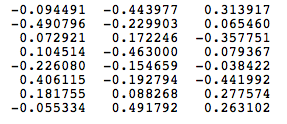
W0 =

Suppose we want the network to learn relationship between the words “cat” and “climbed”. That is, the network should show a high probability for “climbed” when “cat” is inputted to the network. In word embedding terminology, the word “cat” is referred as the context word and the word “climbed” is referred as the target word. In this case, the input vector X will be [0 1 0 0 0 0 0 0]t. Notice that only the second component of the vector is 1. This is because the input word is “cat” which is holding number two position in sorted list of corpus words. Given that the target word is “climbed”, the target vector will look like [0 0 0 1 0 0 0 0 ]t.
With the input vector representing “cat”, the output at the hidden layer neurons can be computed as
Ht = XtWI = [-0.490796 -0.229903 0.065460]
It should not surprise us that the vector H of hidden neuron outputs mimics the weights of the second row of WImatrix because of 1-out-of-V representation. So the function of the input to hidden layer connections is basically to copy the input word vector to hidden layer. Carrying out similar manipulations for hidden to output layer, the activation vector for output layer neurons can be written as
HtWO = [0.100934 -0.309331 -0.122361 -0.151399 0.143463 -0.051262 -0.079686 0.112928]
Since the goal is produce probabilities for words in the output layer, Pr(wordk|wordcontext) for k = 1, V, to reflect their next word relationship with the context word at input, we need the sum of neuron outputs in the output layer to add to one. Word2vec achieves this by converting activation values of output layer neurons to probabilities using the softmax function. Thus, the output of the k-th neuron is computed by the following expression where activation(n) represents the activation value of the n-th output layer neuron:
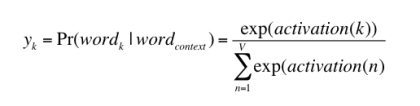
Thus, the probabilities for eight words in the corpus are:
0.143073 0.094925 0.114441 0.111166 0.149289 0.122874 0.119431 0.144800
The probability in bold is for the chosen target word “climbed”. Given the target vector [0 0 0 1 0 0 0 0 ]t, the error vector for the output layer is easily computed by subtracting the probability vector from the target vector. Once the error is known, the weights in the matrices WO and WI
can be updated using backpropagation. Thus, the training can proceed by presenting different context-target words pair from the corpus. In essence, this is how Word2vec learns relationships between words and in the process develops vector representations for words in the corpus.
Continuous Bag of Words (CBOW) Learning
The above description and architecture is meant for learning relationships between pair of words. In the continuous bag of words model, context is represented by multiple words for a given target words. For example, we could use “cat” and “tree” as context words for “climbed” as the target word. This calls for a modification to the neural network architecture. The modification, shown below, consists of replicating the input to hidden layer connections C times, the number of context words, and adding a divide by C operation in the hidden layer neurons.
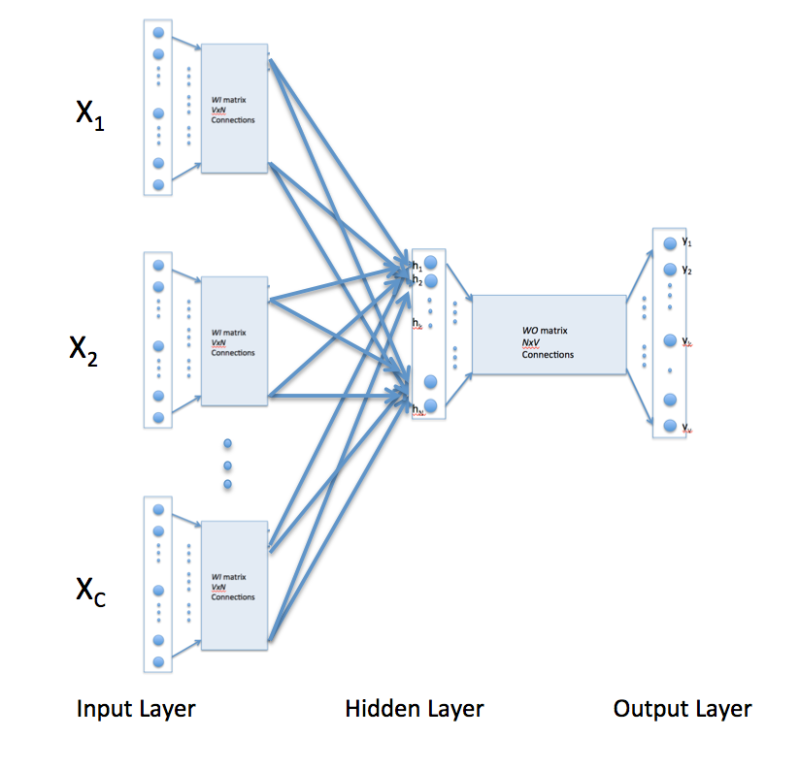
With the above configuration to specify C context words, each word being coded using 1-out-of-V representation means that the hidden layer output is the average of word vectors corresponding to context words at input. The output layer remains the same and the training is done in the manner discussed above.
Skip-Gram Model
Skip-gram model reverses the use of target and context words. In this case, the target word is fed at the input, the hidden layer remains the same, and the output layer of the neural network is replicated multiple times to accommodate the chosen number of context words. Taking the example of “cat” and “tree” as context words and “climbed” as the target word, the input vector in the skim-gram model would be [0 0 0 1 0 0 0 0 ]t, while the two output layers would have [0 1 0 0 0 0 0 0] t and [0 0 0 0 0 0 0 1 ]t as target vectors respectively. In place of producing one vector of probabilities, two such vectors would be produced for the current example. The error vector for each output layer is produced in the manner as discussed above. However, the error vectors from all output layers are summed up to adjust the weights via backpropagation. This ensures that weight matrix WO for each output layer remains identical all through training.
In above, I have tried to present a simplistic view of Word2vec. In practice, there are many other details that are important to achieve training in a reasonable amount of time. At this point, one may ask the following questions:
1. Are there other methods for generating vector representations of words? The answer is yes and I will be describing another method in my next post.
2. What are some of the uses/advantages of words as vectors. Again, I plan to answer it soon in my coming posts.
CBOW and Skip-gram model的更多相关文章
- tensorflow在文本处理中的使用——CBOW词嵌入模型
代码来源于:tensorflow机器学习实战指南(曾益强 译,2017年9月)——第七章:自然语言处理 代码地址:https://github.com/nfmcclure/tensorflow-coo ...
- DeepLearning.ai学习笔记(五)序列模型 -- week2 自然语言处理与词嵌入
一.词汇表征 首先回顾一下之前介绍的单词表示方法,即one hot表示法. 如下图示,"Man"这个单词可以用 \(O_{5391}\) 表示,其中O表示One_hot.其他单词同 ...
- tensorflow在文本处理中的使用——Doc2Vec情感分析
代码来源于:tensorflow机器学习实战指南(曾益强 译,2017年9月)——第七章:自然语言处理 代码地址:https://github.com/nfmcclure/tensorflow-coo ...
- tensorflow在文本处理中的使用——skip-gram模型
代码来源于:tensorflow机器学习实战指南(曾益强 译,2017年9月)——第七章:自然语言处理 代码地址:https://github.com/nfmcclure/tensorflow-coo ...
- Paddle Graph Learning (PGL)图学习之图游走类模型[系列四]
Paddle Graph Learning (PGL)图学习之图游走类模型[系列四] 更多详情参考:Paddle Graph Learning 图学习之图游走类模型[系列四] https://aist ...
- NLP学习(4)----word2vec模型
一. 原理 哈弗曼树推导: https://www.cnblogs.com/peghoty/p/3857839.html 负采样推导: http://www.hankcs.com/nlp/word2v ...
- 关于 word2vec 如何工作的问题
2019-09-07 22:36:21 问题描述:word2vec是如何工作的? 问题求解: 谷歌在2013年提出的word2vec是目前最常用的词嵌入模型之一.word2vec实际是一种浅层的神经网 ...
- word2vec (CBOW、分层softmax、负采样)
本文介绍 wordvec的概念 语言模型训练的两种模型CBOW+skip gram word2vec 优化的两种方法:层次softmax+负采样 gensim word2vec默认用的模型和方法 未经 ...
- Tensorflow 的Word2vec demo解析
简单demo的代码路径在tensorflow\tensorflow\g3doc\tutorials\word2vec\word2vec_basic.py Sikp gram方式的model思路 htt ...
- Coursera, Deep Learning 5, Sequence Models, week2, Natural Language Processing & Word Embeddings
Word embeding 给word 加feature,用来区分word 之间的不同,或者识别word之间的相似性. 用于学习 Embeding matrix E 的数据集非常大,比如 1B - 1 ...
随机推荐
- 滚动条美化实践(原生js,iscroll,nicescroll)
近期需要改造项目中的滚动条,使原滚动条在三大浏览器下表现相同,分享一下自己的改造经历: 项目中的滚动条分布在网页的各个小窗口中,使用的是-webkit-scrollbar制作,在-webkit内核的浏 ...
- 解决sea.js引用jQuery提示$ is not a function的问题
在使用sea.js的如下写法引用jQuery文件时, //main.jsdefine(function(require,exports,module){ var $ = require('jquery ...
- DOM节点属性
节点属性 在文档对象模型 (DOM) 中,每个节点都是一个对象.DOM 节点有三个重要的属性 : 1. nodeName : 节点的名称 2. nodeValue :节点的值 3. nodeType ...
- arcgis arcengine Using environment settings
In this topic About using environment settings Environment settings summary table About using enviro ...
- SharePoint 2013 图文开发系列之InfoPath入门
本文主要介绍SharePoint 2013中,简单发布InfoPath表单,并添加后台代码,示例比较简单,主要描述的是一个创建InfoPath的过程,而非多么深奥的后台代码,希望能够给初学者带来帮助. ...
- 如何通过ArcMap Add-in机制实现十字叉线地理配准工具
下图为自定义的ArcMap Add-in实现的十字叉线位图地理配准功能演示.
- Sharepoint学习笔记—ECM系列--文档集(Document Set)的实现
文档集是 SharePoint Server 2010 中的一项新功能,它使组织能够管理单个可交付文档或工作产品(可包含多个文档或文件).文档集是特殊类型的文件夹,它合并了唯一的文档集属性以及文件夹和 ...
- 一起来学习Android自定义控件2-简单的写字板控件
概述 上一篇文章我们对自定义控件进行了一个大体的知识介绍.今天就来学习自定义一个简单的写字板控件. 先来看看效果图 就是简单的根据手指写下的轨迹去画出内容 实现 在上一篇文章里提到了android官方 ...
- Cannot set a credential for principal 'sa'. (Microsoft SQL Server,错误: 15535)
在SQL SERVER 2008上上禁用sa登录时,遇到下面错误:"Cannot set a credential for principal 'sa'. (Microsoft SQL Se ...
- 完全卸载oracle11g步骤
完全卸载oracle11g步骤:1. 开始->设置->控制面板->管理工具->服务 停止所有Oracle服务.2. 开始->程序->Oracle - OraHome ...