
material(一)
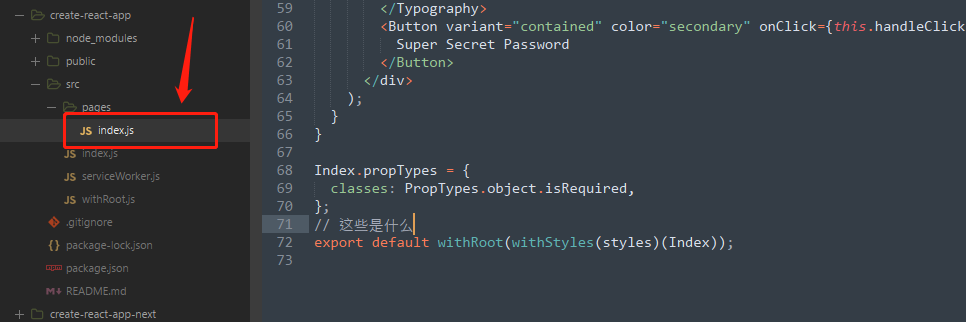
项目目录如下
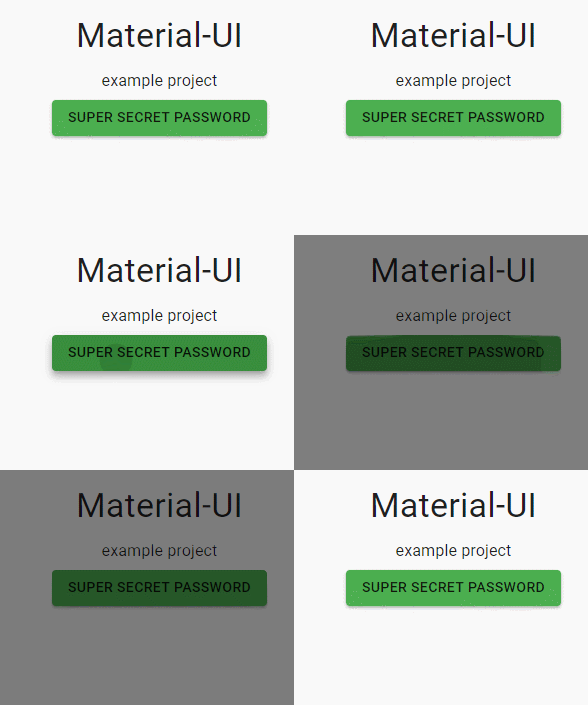
逻辑代码
import React from 'react';

import PropTypes from 'prop-types';

import Button from '@material-ui/core/Button';

import Dialog from '@material-ui/core/Dialog';

import DialogTitle from '@material-ui/core/DialogTitle';

import DialogContent from '@material-ui/core/DialogContent';

import DialogContentText from '@material-ui/core/DialogContentText';

import DialogActions from '@material-ui/core/DialogActions';

import Typography from '@material-ui/core/Typography';

import { withStyles } from '@material-ui/core/styles';

import withRoot from '../withRoot';

const styles = theme => ({

  root: {

    textAlign: 'center',

    paddingTop: theme.spacing.unit * 20,

  },

});

class Index extends React.Component {

  state = {

    open: false,

  };

  handleClose = () => {

    this.setState({

      open: false,

    });

  };

  handleClick = () => {

    this.setState({

      open: true,

    });

  };

  render() {

    const { classes } = this.props;

    const { open } = this.state;

    return (

      <div className={classes.root}>

        <Dialog open={open} onClose={this.handleClose}>

          <DialogTitle>Super Secret Password</DialogTitle>

          <DialogContent>

            <DialogContentText>1-2-3-4-5</DialogContentText>

          </DialogContent>

          <DialogActions>

            <Button color="primary" onClick={this.handleClose}>

              OK

            </Button>

          </DialogActions>

        </Dialog>

        <Typography variant="h4" gutterBottom>

          Material-UI

        </Typography>

        <Typography variant="subtitle1" gutterBottom>

          example project

        </Typography>

        <Button variant="contained" color="secondary" onClick={this.handleClick}>

          Super Secret Password

        </Button>

      </div>

    );

  }

}

Index.propTypes = {

  classes: PropTypes.object.isRequired,

};

// 这些是什么

export default withRoot(withStyles(styles)(Index));
index.js
//serviceWorker.js

import React from 'react';

import ReactDOM from 'react-dom';

import Index from './pages/index';

import * as serviceWorker from './serviceWorker';

// 直接render的是index

ReactDOM.render(<Index />, document.querySelector('#root'));

// If you want your app to work offline and load faster, you can change

// unregister() to register() below. Note this comes with some pitfalls.

// Learn more about service workers: http://bit.ly/CRA-PWA

serviceWorker.unregister();
// This optional code is used to register a service worker.

// register() is not called by default.

// This lets the app load faster on subsequent visits in production, and gives

// it offline capabilities. However, it also means that developers (and users)

// will only see deployed updates on subsequent visits to a page, after all the

// existing tabs open on the page have been closed, since previously cached

// resources are updated in the background.

// To learn more about the benefits of this model and instructions on how to

// opt-in, read http://bit.ly/CRA-PWA

const isLocalhost = Boolean(

  window.location.hostname === 'localhost' ||

    // [::1] is the IPv6 localhost address.

    window.location.hostname === '[::1]' ||

    // 127.0.0.1/8 is considered localhost for IPv4.

    window.location.hostname.match(/^127(?:\.(?:25[0-5]|2[0-4][0-9]|[01]?[0-9][0-9]?)){3}$/),

);

export function register(config) {

  if (process.env.NODE_ENV === 'production' && 'serviceWorker' in navigator) {

    // The URL constructor is available in all browsers that support SW.

    const publicUrl = new URL(process.env.PUBLIC_URL, window.location.href);

    if (publicUrl.origin !== window.location.origin) {

      // Our service worker won't work if PUBLIC_URL is on a different origin

      // from what our page is served on. This might happen if a CDN is used to

      // serve assets; see https://github.com/facebook/create-react-app/issues/2374

      return;

    }

    window.addEventListener('load', () => {

      const swUrl = `${process.env.PUBLIC_URL}/service-worker.js`;

      if (isLocalhost) {

        // This is running on localhost. Let's check if a service worker still exists or not.

        checkValidServiceWorker(swUrl, config);

        // Add some additional logging to localhost, pointing developers to the

        // service worker/PWA documentation.

        navigator.serviceWorker.ready.then(() => {

          console.log(

            'This web app is being served cache-first by a service ' +

              'worker. To learn more, visit http://bit.ly/CRA-PWA',

          );

        });

      } else {

        // Is not localhost. Just register service worker

        registerValidSW(swUrl, config);

      }

    });

  }

}

function registerValidSW(swUrl, config) {

  navigator.serviceWorker

    .register(swUrl)

    .then(registration => {

      registration.onupdatefound = () => {

        const installingWorker = registration.installing;

        if (installingWorker == null) {

          return;

        }

        installingWorker.onstatechange = () => {

          if (installingWorker.state === 'installed') {

            if (navigator.serviceWorker.controller) {

              // At this point, the updated precached content has been fetched,

              // but the previous service worker will still serve the older

              // content until all client tabs are closed.

              console.log(

                'New content is available and will be used when all ' +

                  'tabs for this page are closed. See http://bit.ly/CRA-PWA.',

              );

              // Execute callback

              if (config && config.onUpdate) {

                config.onUpdate(registration);

              }

            } else {

              // At this point, everything has been precached.

              // It's the perfect time to display a

              // "Content is cached for offline use." message.

              console.log('Content is cached for offline use.');

              // Execute callback

              if (config && config.onSuccess) {

                config.onSuccess(registration);

              }

            }

          }

        };

      };

    })

    .catch(error => {

      console.error('Error during service worker registration:', error);

    });

}

function checkValidServiceWorker(swUrl, config) {

  // Check if the service worker can be found. If it can't reload the page.

  fetch(swUrl)

    .then(response => {

      // Ensure service worker exists, and that we really are getting a JS file.

      const contentType = response.headers.get('content-type');

      if (

        response.status === 404 ||

        (contentType != null && contentType.indexOf('javascript') === -1)

      ) {

        // No service worker found. Probably a different app. Reload the page.

        navigator.serviceWorker.ready.then(registration => {

          registration.unregister().then(() => {

            window.location.reload();

          });

        });

      } else {

        // Service worker found. Proceed as normal.

        registerValidSW(swUrl, config);

      }

    })

    .catch(() => {

      console.log('No internet connection found. App is running in offline mode.');

    });

}

export function unregister() {

  if ('serviceWorker' in navigator) {

    navigator.serviceWorker.ready.then(registration => {

      registration.unregister();

    });

  }

}
//withRoot.js

import React from 'react';

import { MuiThemeProvider, createMuiTheme } from '@material-ui/core/styles';

import purple from '@material-ui/core/colors/purple';

import green from '@material-ui/core/colors/green';

import CssBaseline from '@material-ui/core/CssBaseline';

// A theme with custom primary and secondary color.

// It's optional.

const theme = createMuiTheme({

  palette: {

    primary: {

      light: purple[300],

      main: purple[500],

      dark: purple[700],

    },

    secondary: {

      light: green[300],

      main: green[500],

      dark: green[700],

    },

  },

  typography: {

    useNextVariants: true,

  },

});

// 类似于app

function withRoot(Component) {

  function WithRoot(props) {

    return (

      <MuiThemeProvider theme={theme}>

        {/* CssBaseline kickstart an elegant, consistent, and simple baseline to build upon. */}

        <CssBaseline />

        <Component {...props} />

      </MuiThemeProvider>

    );

  }

  return WithRoot;

}

export default withRoot;
material(一)的更多相关文章
- Material Design Reveal effect(揭示效果) 你可能见过但是叫不出名字的小效果
Material Design Reveal effect(揭示效果) 你可能见过但是叫不出名字的小效果 前言: 每次写之前都会来一段(废)话.{心塞...} Google Play首页两个tab背景 ...
- Cesium原理篇:Material
Shader 首先,在本文开始前,我们先普及一下材质的概念,这里推荐材质,普及材质的内容都是截取自该网站,我觉得他写的已经够好了.在开始普及概念前,推荐一首我此刻想到的歌<光---陈粒>. ...
- 解决Android中No resource found that matches android:TextAppearance.Material.Widget.Button.Inverse问题
解决Android中No resource found that matches android:TextAppearance.Material.Widget.Button.Inverse问题http ...
- 让低版本的 Android 项目显示出 Material 风格的点击效果
每天都被不同的需求纠缠的生活是幸福而又不幸的,这不我们家亲爱的设计师们又让我们在低版本的 Android 平台上实现一下类似于 Material Design 的点击效果. 虽然大家都知道 Mater ...
- Material Design Animation
Material Design Animation Authentic motion 真实的运动 运动以一种优美流动的形式描述了空间关系,功能和目的. Mass and weight: 质量和重量 在 ...
- Material Design 概念,环境和基本属性
Material Design 概念,环境和基本属性 Material Design是随Android 5.0推出的一种设计概念, 涉及到了跨平台和设备的视觉,动态,交互设计等方面. 设计概念 M ...
- Android Material Design 兼容库的使用
Android Material Design 兼容库的使用 mecury 前言:近来学习了Android Material Design 兼容库,为了把这个弄懂,才有了这篇博客,这里先推荐两篇博客: ...
- Google Material Design的图标字体使用教程
使用教程 1. 打开Material icons下载页 2. 选择要下载的图标 (目前不能多选>_<) 3.选择要下载的格式即可 图标字体使用教程 [方法一] STEP 1: 引入字体文件 ...
- Material Design学习笔记
Wiki->移动开发->Android->Material Design-原质化设计 (友情链接:http://wiki.jikexueyuan.com/project/materi ...
- ANDROID L——Material Design详解(UI控件)
转载请注明本文出自大苞米的博客(http://blog.csdn.net/a396901990),谢谢支持! Android L: Google已经确认Android L就是Android Lolli ...
随机推荐
- 转 Python多版本管理-pyenv
#######for linux https://www.cnblogs.com/saneri/p/7642316.html 经常遇到这样的情况: 系统自带的Python是2.x,自己需要Python ...
- python_案例综合:教材记录管理
class Book(): def __init__(self,ISBN,Ftile,Author,Publisher): self.ISBN = ISBN self.Ftile = Ftile se ...
- java多线程(二)
线程的阻塞状态: 参考java多线程(一)多线程的生命周期图解,多线程的五种状态. 1.1 join(),如果在A线程体里面执行了B线程的join()方法,那么A线程阻塞,直到B线程生命周期结 ...
- 搜索提示(search suggest)文献阅读
Learning to Personalize Query Auto-Completion 样本 正例用用户的sug点击,其余是负例 特征 用户历史特征: query历史频次,候选和用户历史输入的ng ...
- The function getUserId must be used with a prefix when a default namespace is not specified 解决办法
The function getUserId must be used with a prefix when a default namespace is not specified 解决方法: 1. ...
- jQuery Validate使用说明
jQuery Validate 导入 js 库 <script src="./jquery-validation/lib/jquery-1.8.3.js" type=&quo ...
- win8中如何设定editplus为txt默认打开程序
设定EditPlus为TXT默认打开方式吧. 首选,打开我们的EditPlus 接着,点击[工具]菜单,点击[参数设置]这个菜单项 来到设定界面 找到[设置&语法]这个选项,然后可以看到里面有 ...
- C语言的各种输入情况介绍(ACM中常用到)
1.最简单的输入输出形式: 计算a+b的值: scanf("%d%d",&a,&b); printf("%d\n",a+b);--------- ...
- Android内存监测工具使用
用 Heap监测应用进程使用内存情况的步骤如下:1. 启动eclipse后,切换到DDMS透视图,并确认Devices视图.Heap视图都是打开的:2. 将手机通过USB链接至电脑,链接时需要确认手机 ...
- Assembly测试
using UnityEngine; using System.Collections; using System.Collections.Generic; using System.Reflecti ...