
ASP.NET MVC 之表格分页
简单效果图:(框架:MVC+NHibernate)
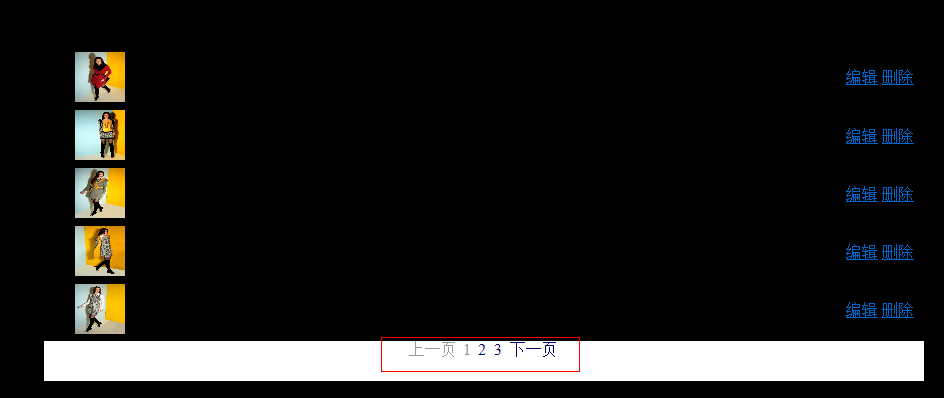
要点:
(1)首先建立表格分页Model(GridModel.cs)
(2)然后建立数据展示页(PageCloth.cshtml)
(3)再建分页版页(_Pager.cshtml)
(4)建立分页链接功能(_SmartLink.cshtml)
(5)调用分页功能(HomeController.cs)
详细步骤:
1、建立表格分页Model(GridModel.cs)
using System;

using System.Collections.Generic;

using System.Linq;

using System.Web;

using Entity;

using System.Runtime.Serialization;

namespace BLUS.Models

{

    public class GridModel

    {

        /// <summary>

        /// 总记录数

        /// </summary>

        public int TotalRecordCount { set; get; }

        /// <summary>

        /// 页大小-每页显示几条记录

        /// </summary>

        public int PageSiae { set; get; }

        /// <summary>

        /// 当前第几页

        /// </summary>

        public int CurrentPageIndex { set; get; }

        /// <summary>

        /// 总页数

        /// </summary>

        public int PageCount

        {

            get

            {

                return TotalRecordCount % PageSiae ==  ? TotalRecordCount / PageSiae : TotalRecordCount / PageSiae + ;

            }

        }

        /// <summary>

        /// 默认分页,页大小5,当前第一页

        /// </summary>

        public GridModel()

        {

            this.PageSiae = ;

            this.CurrentPageIndex = ;

        }

        public IList<Cloth> Clothes

        {

            get;

            set;

        }

    }

}
2、然后建立数据展示页(PageCloth.cshtml)
@model BLUS.Models.GridModel

@{

    Layout = null;

}

<!DOCTYPE html>

<html>

<head>

    <meta name="viewport" content="width=device-width" />

    <title>GetClothByGenreId</title>

    <link href="../../Content/Manage.css" rel="stylesheet" type="text/css" />

</head>

<body>

    <div style=" width:880px;">

        <table style=" width:100%;">

            <tr>

                <th class="width25">

                    序号

                </th>

                <th class="width65">

                    图片

                </th>

                <th class="width700">

                    描述

                </th>

                <th class="width50">

                    价格

                </th>

                <th class="width80">

                    操作

                </th>

            </tr>

            <tbody>

                @{

                    int n = ;

                    foreach (var cloth in Model.Clothes)

                    {

                        n += ;

                    <tr>

                        <td>

                            @n

                        </td>

                        <td>

                            <img  style=" width:50px; height:50px;" alt="@cloth.Title" src="../FlashImageUpload/ImageList/@cloth.ImgName" />

                        </td>

                        <td>

                            @cloth.Title

                        </td>

                        <td>

                            @cloth.Price

                        </td>

                        <td>

                            @Html.ActionLink("编辑", "ClothEdit", "Home", new { clothId = cloth.ClothId }, null)

                            @Html.ActionLink("删除", "ClothDel", "Home", new { clothId = cloth.ClothId }, null)

                        </td>

                    </tr>

                    }

                }

            </tbody>

        </table>

        <div style=" width:880px; height:40px;  background-color:White; text-align:center;">

         @Html.Partial("_Pager", Model)

         </div>

    </div>

</body>

</html>
3、再建分页版页(_Pager.cshtml)
@model BLUS.Models.GridModel

@{

    ViewBag.Title = "_Pager";

}

<div>

    @{

        // 创建上一页链接

        Html.RenderPartial("_SmartLink", Model,

            new ViewDataDictionary {

                { "Text", "上一页" },

                { "PageIndex", Model.CurrentPageIndex -  },

                { "Selected", false },

                { "Inactive", Model.CurrentPageIndex ==  }

            });

        //获取第一页和最后一页

        var startPageIndex = Math.Max(, Model.CurrentPageIndex - Model.PageCount / );

        var endPageIndex = Math.Min(Model.PageCount, Model.CurrentPageIndex + Model.PageCount / );

        // 添加中间的页码 如: 上一页 1 2 3 4 下一页

        for (var i = startPageIndex; i <= endPageIndex; i++)

        {

            Html.RenderPartial("_SmartLink", Model,

                new ViewDataDictionary {

                    { "Text", i },

                    { "PageIndex", i },

                    { "Selected", i == Model.CurrentPageIndex },

                    { "Inactive", i == Model.CurrentPageIndex }

                });

        }

        // 创建下一页

        Html.RenderPartial("_SmartLink", Model,

            new ViewDataDictionary {

                { "Text", "下一页" },

                { "PageIndex", Model.CurrentPageIndex +  },

                { "Selected", false },

                { "Inactive", Model.CurrentPageIndex == Model.PageCount }

            });

    }

</div>
4、建立分页链接功能(_SmartLink.cshtml)
@model BLUS.Models.GridModel

@{

    ViewBag.Title = "_SmartLink";

}

<style type="text/css">

a.pagerButton, a.pagerButton:visited

{

    border: solid 0px black;

    padding: 1px;

    text-decoration: none;

    color: #;

    margin: 0px 1px 0px 1px;

}

a.pagerButton:hover

{

    border: solid 1px red;

    color: Black;

}

a.pagerButtonCurrentPage

{

    border: solid 1px #00a;

    padding: 1px;

    text-decoration: none;

    color: White;

    background-color: #;

    margin: 0px 1px 0px 1px;

}

.pagerButtonDisabled

{

    border: none;

    color: #;

    padding: 1px;

}

</style>

@{

    //文本编写器

    var razorWriter = ViewContext.Writer;

    //判断当前链接是否选中

    if ((bool)ViewData["Inactive"])

    {

        //将当前的Text输出 加入了css样式 该样式可以写在样式表、母版页、当前页中

        razorWriter.Write(string.Format("<span class=\"{0}\">{1}</span>", "pagerButtonDisabled", ViewData["Text"]));

    }

    else

    {

        //路由参数

        var routeData = new RouteValueDictionary { { "page", ViewData["PageIndex"].ToString() }, { "pageSize", Model.PageSiae }, { "generId",Model.Clothes[].GenreId.GenreId } };

        var htmlAttributes = new Dictionary<string, object>();

        //判断是否为选中状态 添加CSS样式

        if ((bool)ViewData["Selected"])

        {

            htmlAttributes.Add("class", "pagerButtonCurrentPage");

        }

        else

        {

            htmlAttributes.Add("class", "pagerButton");

        }

        var linkMarkup = Html.ActionLink(

                ViewData["Text"].ToString(),                                    // 超链接文本

                Html.ViewContext.RouteData.Values["action"].ToString(),         // Action

                Html.ViewContext.RouteData.Values["controller"].ToString(),     // Controller

                routeData,                                                      // 路由参数

                htmlAttributes                                                  // HTML属性适用于超链接

            ).ToHtmlString();

        razorWriter.Write(linkMarkup);

    }

}
5、调用分页功能(HomeController.cs)
  public ActionResult PageCloth(int page = , int pageSize = , int generId = )

        {

            string sql = "SELECT * FROM Cloth WHERE GenreId={0}";

            sql = string.Format(sql, generId);

            var model = new GridModel

            {

                CurrentPageIndex = page,

                PageSiae = pageSize,

                //确定记录总数(才能计算出PageCount页数)

                TotalRecordCount = clothlService.GetListBySql(sql).Count()

            };

            model.Clothes = clothlService.GetListByPage(model, generId);

            return View(model);

        }
附:
(1)数据展示页引入分页功能:

(2)分页版页加入链接:
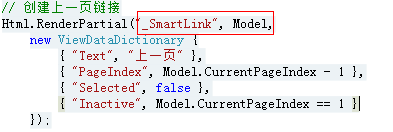
(3)分页链接 响应路径:
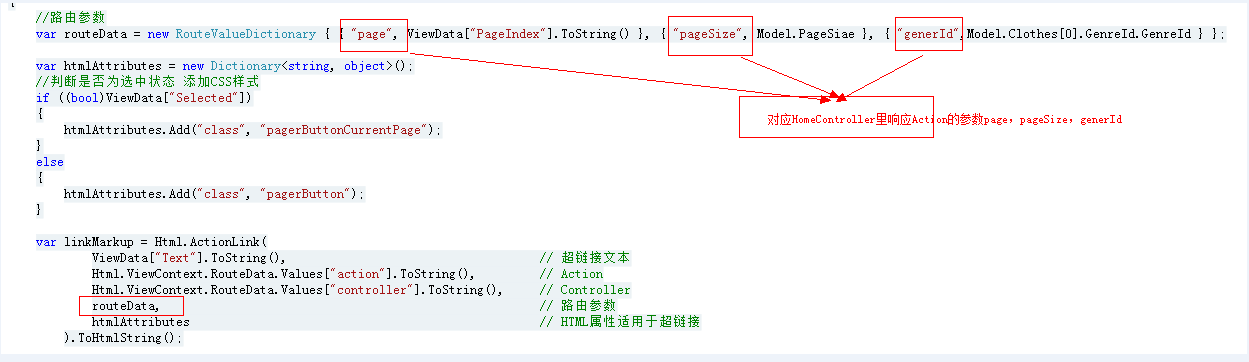
(4)注意各页面之间的数据Model传递。
ASP.NET MVC 之表格分页的更多相关文章
- ASP.NET MVC利用PagedList分页(二)PagedList+Ajax+JsRender
(原文) 昨天在ASP.NET MVC利用PagedList分页(一)的 最后一节提到,一个好的用户体验绝对不可能是点击下一页后刷新页面,所以今天来说说利用Ajax+PagedList实现无刷新(个人 ...
- asp.net mvc easyui datagrid分页
提到 asp.net mvc 中的分页,很多是在用aspnetpager,和easyui datagrid结合的分页却不多,本文介绍的是利用easyui 中默认的分页控件,实现asp.net mvc分 ...
- ASP.NET MVC利用PagedList分页(一)
前几天看见博客园上有人写ASP.NET MVC的分页思想,这让我不禁想起了PagedList.PagedList是NuGet上提供的一个分页的类库,能对任何IEnumerable<T>进行 ...
- ASP.NET MVC 简单的分页思想与实现
首先我们通过VS创建一个空的基于Razor视图引擎的ASP.NET MVC3 Web应用程序,命名为JohnConnor.Web 对创建过程或Razor不太了解的看官,请移步 ASP.NET MVC ...
- asp.net mvc多条件+分页查询解决方案
开发环境vs2010 css:bootstrap js:jquery bootstrap paginator 原先只是想做个mvc的分页,但是一般的数据展现都需要检索条件,而且是多个条件,所以就变成了 ...
- 实现Asp.Net MVC无刷新分页
整个过程主要就是:一开始进入页面是,在页面加载完成之后直接通过$(function(){ LoadRegisterUserInfo(1,10,0,0);//加载注册用户信息 });无条件加载数据,调 ...
- asp.net mvc 导出表格
适合使用的场合: .net 中从前台中的table导出成excel文件,兼容各种浏览器. 使用工具: org.in2bits.MyXls.dll 从前台获取表格的thead和表格的tbody,将其转化 ...
- Asp.NET MvC EF实现分页
打开Visual Studio 2017 选择 项目----->管理nuget包 其他版本也有 输入paged 下载安装 pagedList和pagedList.mvc 在model文件新建一 ...
- Asp.net Mvc使用PagedList分页
git:https://github.com/troygoode/PagedList 1. Nuget 安装package watermark/2/text/aHR0cDovL2Jsb2cuY3Nkb ...
随机推荐
- rac_进行grid自检时提示运行runfixup.sh脚本一例
原创作品,出自 "深蓝的blog" 博客,欢迎转载,转载时请务必注明下面出处,否则追究版权法律责任. 深蓝的blog:http://blog.csdn.net/huangyanlo ...
- 从反编译的角度去观察C#6.0
1. 自动属性初始化 (Initializers for auto-properties) 1.1 C#6.0 之前的写法 public class FirstExperience { private ...
- ASP.NET优化性能方法之一禁用调试模式(转)
若要设置 ASP.NET 应用程序的调试模式,必须编辑应用程序的 Web.config 配置文件. 通常,ASP.NET 应用程序的 Web.config 文件与应用程序位于相同的 URL 位置上. ...
- C#中new和override的区别
override是指“覆盖”,是指子类覆盖了父类的方法.子类的对象无法再访问父类中的该方法.(签名必须相同) new是指“隐藏”,是指子类隐藏了父类的方法,当然,通过一定的转换,可以在子类的对象中访问 ...
- 《第一行代码》学习笔记15-UI(4)
1.ListView允许用户通过手指上下滑动的方式将屏幕外的数据滚动到屏幕内,同时屏幕上原有的数据则会滚动出屏幕. 2.数组中的数据无法直接传递给ListView,得借助适配器来完成.此处使用Arra ...
- asp.net获取ip地址的方法
在ASP中使用 Request.ServerVariables("REMOTE_ADDR") 来取得客户端的IP地址,但如果客户端是使用代理服务器来访问,那取到的就是代理服务器的I ...
- adb安装和卸载apk的方式
昨天在使用adb卸载程序,结果死活卸载不了.我输入的命令和系统提示如下: D:\testApk>adb uninstall HelloWorld Failure 后来发现原来卸载程序时,只adb ...
- mysql索引之普通索引
1,普通索引的创建 普通索引可以在建表的时候创建 sql : create table temp2(id int(10) not null auto_increment ,title varchar( ...
- 如何向java后台的对象中传数组
1.后台对象的参数需要是是list对象 /* * copyright : GLOBALROAM Ptd Ltd * VmCreateInfo.java * Author: * zhangpengyan ...
- 微信JS-SDK 接口调用与 php 遇到的坑
问题:config:invalid signature一直爆这个错误 解决: 看我把这些坑都总结了一下:要命的invalid signature. https://segmentfault.com/q ...