
UITableView点击每个Cell,Cell的子内容的收放
关于点击TableviewCell的子内容收放问题,拿到它的第一个思路就是,
方法一:
运用UITableview本身的代理来处理相应的展开收起:
1.代理:- (void)tableView:(UITableView *)tableView didSelectRowAtIndexPath:(NSIndexPath *)indexPath
2. 需要声明一个全局BOOL变量isOpen,记录当前cell的状态(展开/收起),声明一个NSInterge类型selectedIndexRow,记录选择的cell的row,切记初始化相应的属性。
(ps:在网上看到很多文章都是这样,但是真的用的时候,发现,我们需要另外声明一个NSIndexPath类型的selectedIndex,或者用到时候自己运用记录的row生成也可,也许确实是我自己多此一举)
3.首先,我们需要理清自己需求的逻辑关系,什么时候展开/收起,展开收起时它的高度,个数等等有什么变化------->来进行代理,数据源方法的书写
下面也是展示tableview时的调用顺序
1>://返回cell个数
- (NSInteger)tableView:(UITableView *)tableView numberOfRowsInSection:(NSInteger)section
2>://返回每行的高度
- (CGFloat)tableView:(UITableView *)tableView heightForRowAtIndexPath:(NSIndexPath *)indexPath
3>://请求数据元代理为tableView插入需要的cell
- (UITableViewCell *)tableView:(UITableView *)tableView cellForRowAtIndexPath:(NSIndexPath *)indexPath
4>://监听点击的cell
- (void)tableView:(UITableView *)tableView didSelectRowAtIndexPath:(NSIndexPath *)indexPath
代码:
#pragma mark --------- UITableViewDelegate && UITableViewDataSource -----
-(NSInteger)tableView:(UITableView *)tableView numberOfRowsInSection:(NSInteger)section
{
return self.scoreDataArray.count;//根据自己的具体需要返回
}
//计算高度---根据需求,动态计算内容的高度
-(CGFloat)tableView:(UITableView *)tableView heightForRowAtIndexPath:(NSIndexPath *)indexPath
{
//indexPath.row == selectedIndex.row &&
NSLog(@"heightForRow %ld",(long)selectedIndex.row);
if (indexPath.row == selectedIndex.row && selectedIndex != nil)
{
if (isOpen == YES)
{
//内部内容直接忽略即可
YunGangScoreData *data = [[YunGangScoreData alloc] init];
//data = self.scoreDataArray[indexPath.row];
data = self.scoreDataArray[selectedIndex.row];
if (data.detailTypeArray.count>0)
{
self.cellHeight = 60+data.detailTypeArray.count*40;
return self.cellHeight;
}
return 60;
}
else
{
return 60;
}
}
return 60;
}
-(UITableViewCell *)tableView:(UITableView *)tableView cellForRowAtIndexPath:(NSIndexPath *)indexPath
{
//indexPath.row == selectedIndex.row &&
NSLog(@"cellForRow %ld",(long)selectedIndex.row);
if (indexPath.row == selectedIndex.row && selectedIndex != nil)
{//内部内容直接忽略即可
//如果是展开
if (isOpen == YES)
{
YunGangScoreTableViewCell *cell = [tableView dequeueReusableCellWithIdentifier:@"YunGangScoreTableViewCell"];
cell.selectionStyle = UITableViewCellSelectionStyleNone;
cell.data = self.scoreDataArray[selectedIndex.row];
cell.isOpen = YES;
return cell;
}
else
{//收起
YunGangScoreTableViewCell *cell = [tableView dequeueReusableCellWithIdentifier:@"YunGangScoreTableViewCell"];
cell.selectionStyle = UITableViewCellSelectionStyleNone;
cell.data = self.scoreDataArray[selectedIndex.row];
cell.isOpen = NO;
return cell;
}
}
else//不是自身
{
YunGangScoreTableViewCell *cell = [tableView dequeueReusableCellWithIdentifier:@"YunGangScoreTableViewCell"];
cell.selectionStyle = UITableViewCellSelectionStyleNone;
cell.data = self.scoreDataArray[indexPath.row];
cell.isOpen = NO;
return cell;
}
}
-(void)tableView:(UITableView *)tableView didSelectRowAtIndexPath:(NSIndexPath *)indexPath
{
//将索引加到数组中
NSArray *indexPaths = [NSArray arrayWithObject:indexPath];
//判断选中不同row状态时候
//我自己加上的,看好多文章没有,可能我错了,selectedIndex = indexPath;
NSLog(@"%ld",(long)selectedIndex.row);
if (selectedIndex != nil && indexPath.row == selectedIndex.row)
{//将选中的和所有索引都加进数组中
// indexPaths = [NSArray arrayWithObjects:indexPath,selectedIndex, nil];
isOpen = !isOpen;
}
else if (selectedIndex != nil && indexPath.row != selectedIndex.row)
{
indexPaths = [NSArray arrayWithObjects:indexPath, selectedIndex,nil];
isOpen = YES;
}
//记下选中的索引
selectedIndex = indexPath;
//刷新
[tableView reloadRowsAtIndexPaths:indexPaths withRowAnimation:UITableViewRowAnimationFade];
}
大致运用的就这些内容,自己看着调试下。。。
方法二: 我试了上面方法,发现可能出现刷新等问题,也就换了下面的
这里用section当做第一个cell,然后加载view到section上,添加手势来作为点击事件,展开的内容加载cell(第二个)
直接上代码:
1.声明属性:
//cell收放,以及记录cell的selectedIndex
NSMutableDictionary *_showDic;//用来判断分组展开与收缩的
int index;
2.用section的个数来展示未点击时的tableview内容
3计算点击每个section之后展开的cell的个数
4.这里自己根据需求,以及返回的内容来计算点开后的cell应该拥有的高度
5.加载点击之后的cell内容,同时传递点击的那个section的数据信息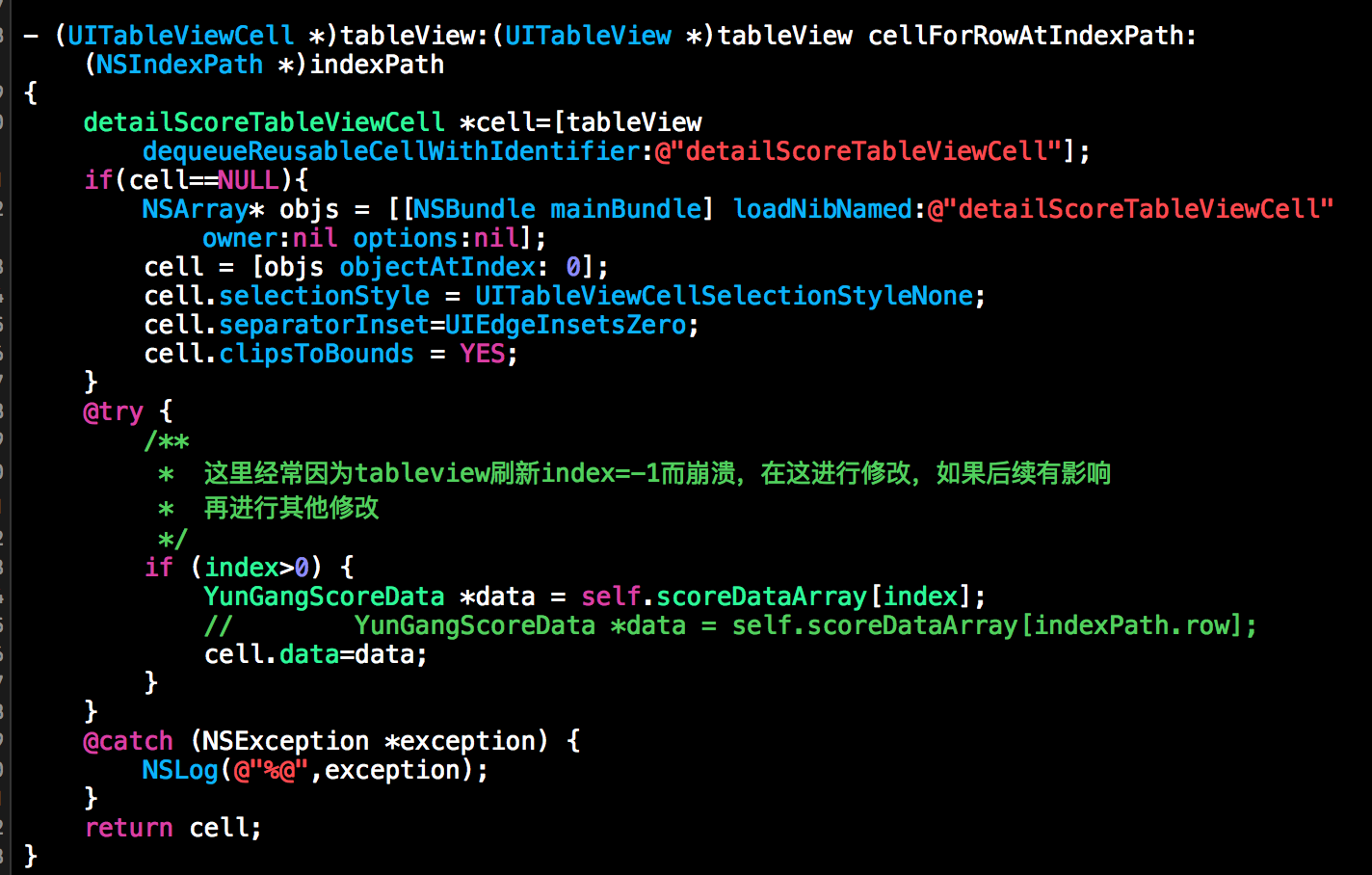
这里刷新数据是只刷新点开一个情况,如果点开多个,数据改变应该是下面,而在cell里面赋值则不需要了

6.根据需要计算每一个section需要的高度(我这里最后一个有需要)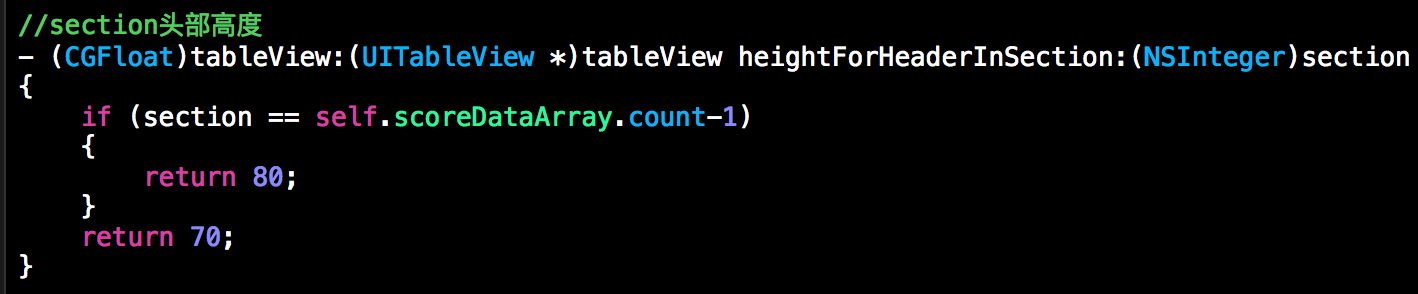
7.加载每个section的内容,需要注意,这里加载的view继承
UITableViewHeaderFooterView
-(UIView *)tableView:(UITableView *)tableView viewForHeaderInSection:(NSInteger)section
{
NSArray* objs = [[NSBundle mainBundle] loadNibNamed:@"YunGangScoreTableViewCell" owner:nil options:nil];
YunGangScoreTableViewCell* cell = [objs objectAtIndex: 0];
if (self.scoreDataArray.count>0)
{//确保有数据
YunGangScoreData *data = self.scoreDataArray[section];
cell.data = data;
}
// 单击的 Recognizer ,收缩分组cell
cell.tag = section;
UITapGestureRecognizer *singleRecognizer = [[UITapGestureRecognizer alloc] initWithTarget:self action:@selector(SingleTap1:)];
singleRecognizer.numberOfTapsRequired = 1; //点击的次数 =1:单击
[singleRecognizer setNumberOfTouchesRequired:1];//1个手指操作
[cell addGestureRecognizer:singleRecognizer];//添加一个手势监测;
return cell;
}
同时,为了适配问题,我们需要在自定义的view中改变这个view的frame

8.点击手势的事件以及处理

9,需要注意的是,每次请求数据,刷新tableview的时候,需要清空_showDic

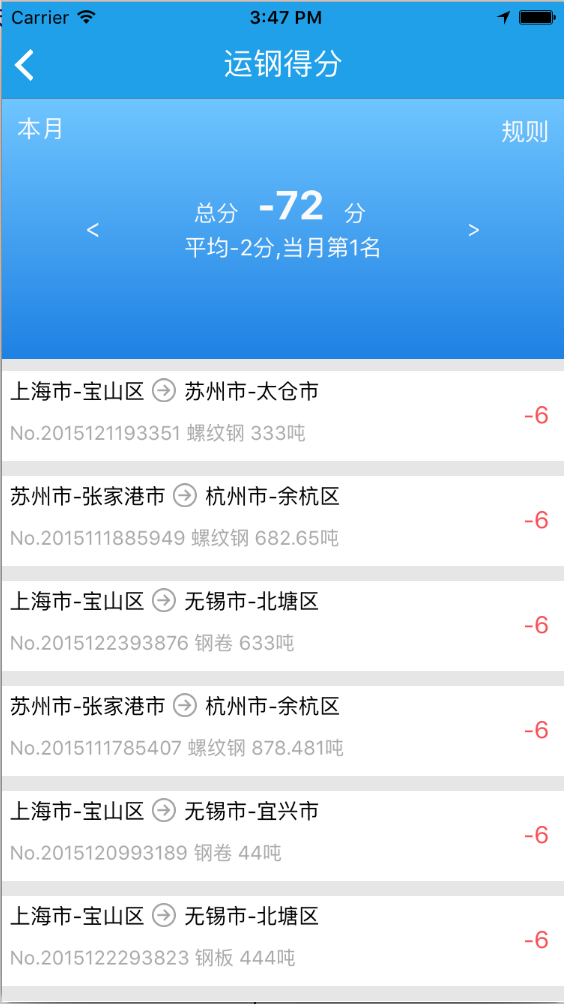
其他的内容,就自己根据需要添加修改就可以了,两种方法经过测试,第一种展示都没问题,刷新之后貌似存在混乱,如果需要使用就要好好修改下,第二种方法,测试可以使用,不存在什么大问题,满足需求,下面把效果图贴上:

UITableView点击每个Cell,Cell的子内容的收放的更多相关文章
- UITableview中怎么找到每个cell
一个朋友问我:我在每个cell中都添加了两个按钮(记为btnA和btnB),点击btnA时,对应的cell中添加一个子控件,再点击btnB时,对应的cell中的子控件就移除,怎么做到? 百度了一下,发 ...
- 手势响应 ,避免点击多个cell同时响应同一手势多次,只响应第一个cell
http://www.cnblogs.com/wfwenchao/articles/3700205.html UIView除了负责展示内容给用户外还负责响应用户事件.本章主要介绍UIView用户交互相 ...
- IOS之UI -- UITableView -- 2 -- 等高的Cell
内容大纲: 1.纯代码 添加子控件 2.Autolayout纯代码 -- Masonry框架的使用 3.自定义等高的cell -- storyboard的使用(更加简单) 4.静态cell 等高的Ce ...
- UI学习笔记---第十一天UITableView表视图高级-自定义cell
自定义cell,多类型cell混合使用,cell自适应高度 自定义cell就是创建一个UITableViewCell的子类 把cell上的空间创建都封装在子类中,简化viewController中的代 ...
- iOS - UITableView中有两种重用Cell的方法
UITableView中有两种重用Cell的方法: - (id)dequeueReusableCellWithIdentifier:(NSString *)identifier; - (id)dequ ...
- iOS UITableView点击按钮滚到顶部
#import <UIKit/UIKit.h> @interface AppDelegate : UIResponder <UIApplicationDelegate> @pr ...
- 在 cell 中获取 textFlied内容的使用
当您读到这里时,建议先下载demo,不懂再参考博客.在iOS项目开发中,容易遇到各种个人信息填写.比如微信中设置个人信息,等.这种方式是进行控制器跳转,代理或者block传值,这种比较容易,符合常规的 ...
- [RN] React Native中使用 react-native-scrollable-tab-view嵌套在ScrollView里,导致 子内容 在安卓上无法显示
React Native中使用 react-native-scrollable-tab-view嵌套在ScrollView里,导致 子内容 在安卓上无法显示 问题: 0.9.0 或 0.8.0 版本的 ...
- 点击每个li输出里面的内容(前端很常问的面试题之一)
点击每个li输出里面的内容(前端很常问的面试题之一) 前端 面试 JavaScript <!DOCTYPE html> <html lang="en"> & ...
随机推荐
- ASP.NET Web API Model-ModelMetadata
ASP.NET Web API Model-ModelMetadata 前言 前面的几个篇幅主要围绕控制器的执行过程,奈何执行过程中包含的知识点太庞大了,只能一部分一部分的去讲解,在上两篇中我们看到在 ...
- 关于安装安卓SDK出现无法更新问题时的解决办法
近日,如果安装过安卓的同学可能知道,大家在使用Android SDK升级或者安装SDK的时候,出现了访问Failed to fetch URL http://dl-ssl.google.com/and ...
- ABP框架 - 设置管理
文档目录 本节内容: 简介 关于ISettingStore 定义设置 setting scope(设置范围) 重写设置定义 获取设置值 服务端 客户端 修改设置 关于缓存 简介 每个应用必需存储一些设 ...
- [转] STM32各种时钟的区别
[原创]:http://m.oschina.net/blog/129357 我在原创的基础又从另一位博主处引用了一些内容. 时钟系统是处理器的核心,所以在学习STM32所有外设之前,认真学习时钟系统是 ...
- PHP日志压缩下载
主要实现了在后台查看日志列表及打包下载功能. 由于用到了PHP压缩功能,特此记录下. 压缩下载类: Hzip.php <?php /** * Created by PhpStorm. * @au ...
- C#设计模式-状态者模式
一. 状态者(State)模式 每个对象都有其对应的状态,而每个状态又对应一些相应的行为,如果某个对象有多个状态时,那么就会对应很多的行为.那么对这些状态的判断和根据状态完成的行为,就会导致多重条件语 ...
- 你可能不知道的陷阱, IEnumerable接口
1. IEnumerable 与 IEnumerator IEnumerable枚举器接口的重要性,说一万句话都不过分.几乎所有集合都实现了这个接口,Linq的核心也依赖于这个万能的接口.C语言的 ...
- C# 复制幻灯片(包括格式、背景、图片等)到同/另一个PPT文档
C# 复制幻灯片(包括格式.背景.图片等)到同/另一个PPT文档 复制幻灯片是使用PowerPoint过程中的一个比较常见的操作,在复制一张幻灯片时一般有以下两种情况: 在同一个PPT文档内复制 从一 ...
- 分布式系统理论进阶 - Paxos
引言 <分布式系统理论基础 - 一致性.2PC和3PC>一文介绍了一致性.达成一致性需要面临的各种问题以及2PC.3PC模型,Paxos协议在节点宕机恢复.消息无序或丢失.网络分化的场景下 ...
- web开发调试神器——fiddler的使用
好累 以后再写 http://docs.telerik.com/fiddler/knowledgebase/autoresponder