
postgresql基于备份点PITR恢复
实验目的:
01、基于备份点直接恢复数据库
02、基于备份点后续增量wal日志恢复到特定的时间点
实验环境:
centos7
postgresql9.5
01、安装postgresql9.5
注意:源码编译操作性更加强,也可以rpm安装
02、初始化数据库及创建归档目录
su - postgres
[postgres@lab-210 ~]$ mkdir archivedir
[postgres@lab-210 ~]$ initdb -D data1 -E utf-8
03、修改postgresql配置
开启归档
tee <<-'EOF' >>data1/postgresql.auto.conf
listen_addresses = '*'
port = 5432
wal_level = hot_standby
max_wal_senders = 2
archive_mode = on
archive_command = 'cp %p /home/postgres/archivedir/%f'
logging_collector = on
EOF
添加host认证
tee <<-'EOF' >>data1/pg_hba.conf
local replication repl trust
host replication repl 172.24.0.0/16 trust
EOF
04、启动数据,添加repl账户
[postgres@lab-210 ~]$ pg_ctl -D data1/ start
server starting
[postgres@lab-210 ~]$ LOG: redirecting log output to logging collector process
HINT: Future log output will appear in directory "pg_log".
[postgres@lab-210 ~]$
[postgres@lab-210 ~]$ ss -lnt |grep 5432
LISTEN 0 128 *:5432 *:*
LISTEN 0 128 :::5432 :::*
postgres=# create user repl with password '123123' replication login;
CREATE ROLE
postgres=#
postgres=# \du
List of roles
Role name | Attributes | Member of
-----------+------------------------------------------------------------+-----------
postgres | Superuser, Create role, Create DB, Replication, Bypass RLS | {}
repl | Replication | {}
05、创建基线备份
postgres=# create table tab1(uuid int);
CREATE TABLE
postgres=# insert into tab1 values (1),(100);
INSERT 0 2
postgres=# select * from tab1;
uuid
------
1
100
(2 rows)
mkdir data2 //plain形式
[postgres@lab-210 ~]$ pg_basebackup -h 172.24.0.210 -p 5432 -U repl -Fp -Xs -Pv -D data2/
mkdir base //压缩的形式
[postgres@lab-210 ~]$ pg_basebackup -h 172.24.0.210 -p 5432 -U repl -Ft -Pv -D base/
06、新增数据
postgres=# \dt
List of relations
Schema | Name | Type | Owner
--------+------+-------+----------
public | tab1 | table | postgres
(1 row)
postgres=# create table tab2(uuid int);
CREATE TABLE
postgres=# insert into tab2 select generate_series(1,100);
INSERT 0 100
postgres=#
postgres=# select count(1) from tab2;
count
-------
100
(1 row)
postgres=# select pg_switch_xlog();
pg_switch_xlog
----------------
0/A018090
(1 row)
[postgres@lab-210 ~]$ pg_ctl -D data1/ stop
waiting for server to shut down.... done
server stopped
07、基于创建点直接恢复
[postgres@lab-210 base]$ cat backup_label //创建备份点的时间戳记录
START WAL LOCATION: 0/9000028 (file 000000010000000000000009)
CHECKPOINT LOCATION: 0/9000060
BACKUP METHOD: streamed
BACKUP FROM: master
START TIME: 2019-11-02 19:11:40 UTC
LABEL: pg_basebackup base backup
[postgres@lab-210 base]$ cat recovery.conf //恢复
restore_command = 'cp /home/postgres/archivedir/%f "%p"'
recovery_target_time='2019-11-02 19:11:40 UTC'
[postgres@lab-210 base]$ ll pg_xlog/ //基于pg_basearchive备份xlog已经处理了
total 0
drwx------. 2 postgres postgres 6 Nov 2 19:11 archive_status
[postgres@lab-210 ~]$ chmod 700 base
[postgres@lab-210 ~]$ pg_ctl -D base start
server starting
[postgres@lab-210 ~]$ cat base/pg_log/postgresql-2019-11-02_192416.log
LOG: database system was interrupted; last known up at 2019-11-02 19:11:40 UTC
LOG: starting point-in-time recovery to 2019-11-02 19:11:40+00
LOG: restored log file "000000010000000000000009" from archive
LOG: redo starts at 0/9000028
LOG: consistent recovery state reached at 0/9000130
LOG: restored log file "00000001000000000000000A" from archive
LOG: recovery stopping before commit of transaction 1833, time 2019-11-02 19:13:24.96014+00
LOG: redo done at 0/A013C20
cp: cannot stat ‘/home/postgres/archivedir/00000002.history’: No such file or directory
LOG: selected new timeline ID: 2 //创建新的时间线,开天地
LOG: archive recovery complete
cp: cannot stat ‘/home/postgres/archivedir/00000001.history’: No such file or directory
LOG: MultiXact member wraparound protections are now enabled
LOG: database system is ready to accept connections
LOG: autovacuum launcher started
[postgres@lab-210 ~]$ ll base
total 64
-rw-------. 1 postgres postgres 206 Nov 2 19:11 backup_label.old //备份点文件
......
-rw-rw-r--. 1 postgres postgres 105 Nov 2 19:24 recovery.done //恢复配置文件
验证恢复情况
[postgres@lab-210 ~]$ psql
psql (9.5.19)
Type "help" for help.
postgres=# \dt
List of relations
Schema | Name | Type | Owner
--------+------+-------+----------
public | tab1 | table | postgres
(1 row)
postgres=# select * from tab1;
uuid
------
1
100
(2 rows)
08、基于基线实现全量恢复

注意:基于备份点,还是存在新增的归档日志
[postgres@lab-210 ~]$ mkdir data3
[postgres@lab-210 ~]$ tar xf base.tar -C data3
[postgres@lab-210 data3]$ cat recovery.conf ###默认恢复存储存的归档文件
restore_command = 'cp /home/postgres/archivedir/%f "%p"'
[postgres@lab-210 ~]$ chmod 700 data3
[postgres@lab-210 ~]$ pg_ctl -D data3/ start
[postgres@lab-210 ~]$ psql
psql (9.5.19)
Type "help" for help.
postgres=# \dt
List of relations
Schema | Name | Type | Owner
--------+------+-------+----------
public | tab1 | table | postgres
public | tab2 | table | postgres
(2 rows)
[postgres@lab-210 pg_log]$ cat postgresql-2019-11-02_193834.log
LOG: database system was interrupted; last known up at 2019-11-02 19:11:40 UTC //备份点创建的时间
LOG: starting archive recovery
LOG: restored log file "000000010000000000000009" from archive
LOG: redo starts at 0/9000028
LOG: consistent recovery state reached at 0/9000130
LOG: restored log file "00000001000000000000000A" from archive
LOG: restored log file "00000001000000000000000B" from archive
cp: cannot stat ‘/home/postgres/archivedir/00000001000000000000000C’: No such file or directory
LOG: redo done at 0/B000060
LOG: last completed transaction was at log time 2019-11-02 19:14:49.458612+00 //事务发生的最后时间,恢复的目标点
LOG: restored log file "00000001000000000000000B" from archive
LOG: restored log file "00000002.history" from archive
cp: cannot stat ‘/home/postgres/archivedir/00000003.history’: No such file or directory
LOG: selected new timeline ID: 3
LOG: archive recovery complete //恢复完毕
cp: cannot stat ‘/home/postgres/archivedir/00000001.history’: No such file or directory
LOG: MultiXact member wraparound protections are now enabled
LOG: database system is ready to accept connections
LOG: autovacuum launcher started
PS:清理归档点旧的日志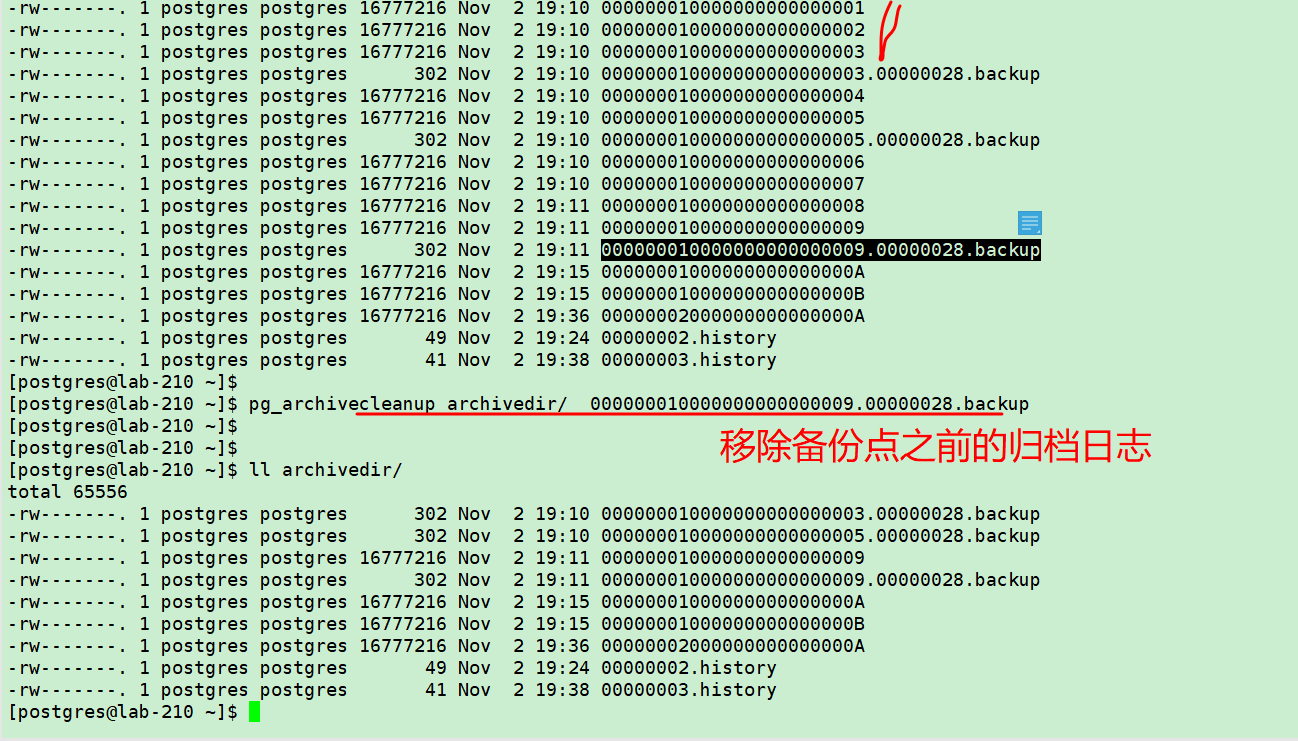
postgresql基于备份点PITR恢复的更多相关文章
- PostgreSQL的备份和恢复
关于PostgreSQL的备份和恢复详细信息请参阅<PostgreSQL中文文档>. 备份: #pg_dump --username=postgres v70_demo > v70_ ...
- Postgresql在线备份和恢复
1.实验环境 OS: RedHat Linux Enterprisedb 6.3 DB: postgresql 9.3 PGHOME: /opt/PostgreSQL/9.3 PGDATA: /opt ...
- 基于全备份+binlog方式恢复数据
基于全备份+binlog方式恢复数据 将bkxt从库的全备份在rescs5上恢复一份,用cmdb操作 恢复全备后执行如下操作 set global read_only=OFF; stop slave; ...
- 执行PDB的PITR恢复失败的说明
Oracle 12.1版本中,UNDO表空间仅存在CDB级别(共享UNDO),来自于AskScuti博客园. Oracle 12.2版本开始,UNDO表空间同时可以存在每个PDB级别(本地UNDO). ...
- 表空间基于时间点的恢复(TSPITR)
环境:RHEL 6.4 + Oracle 11.2.0.4 准备模拟环境 1. 验证表空间的依赖性 2. 确定执行TSPITR后会丢失的对象 3. 自动执行TSPITR Reference 准备模拟环 ...
- 使用zfs进行pg的pitr恢复测试
前段时间做了一下zfs做pg的增量恢复测试,mark一下. 服务器信息: 主机:192.168.173.43 备机:192.168.173.41 主备使用流复制搭建,在备机上面进行了zfs快照备份. ...
- Oracle之表空间基于时间点的恢复
记一次优化过程中:一次误操作,在不影响其他表空间的情况下:采用表空间基于时间点的恢复(TSPITR)方法恢复数据的过程. 1.TSPITR恢复原理 TSPITR目前最方便的方法是使用RMAN进行 ...
- POSTGRESQL 完美备份还原
1.POSTGRESQL 完美备份还原 进入到Postgresql下的bin文件夹,会看到不少的exe文件,这就是PostgreSQL内置的工具了.里面会找到pg_dump.exe.我们实际使用的就是 ...
- 通过恢复目录(Catalogue)进行PDB级别的PITR恢复
数据库版本:Oracle 12.2.0.1 本篇为<执行PDB的PITR恢复失败的说明 (文档 ID 2435452.1)>的证明篇,通过当前控制文件,无法在PDB级别进行PITR(Poi ...
随机推荐
- 恐怖的AVL树
学习参考:http://www.cnblogs.com/Camilo/p/3917041.html 今天闲来无事打算学习AVL树,并以AVL树的插入作为切入点. 不知不觉,我就在电脑前编了4个小时…… ...
- RNN循环神经网络实现预测比特币价格过程详解
http://c.biancheng.net/view/1950.html 本节将介绍如何利用 RNN 预测未来的比特币价格. 核心思想是过去观察到的价格时间序列为未来价格提供了一个很好的预估器.给定 ...
- centos7中将tomcat注册为系统服务
一.准备环境 操作系统:CentOS Linux release 7.6.1810 (Core) tomcat:apache-tomcat-8.5.41.tar.gz 二.编辑catalina.sh ...
- Cannot read lifecycle mapping metadata for artifact org.apache.maven.plugins:mav问题
1.导致问题原因:从装系统,从win7改到win10 由于重装了系统,打开eclipse时,maven验证会出错,点击pom文件,会发现有红色的Cannot read lifecycle mappin ...
- 【caffe编译】 fatal error: hdf5.h: 没有那个文件或目录
src/caffe/layers/hdf5_output_layer.cpp:3:18: fatal error: hdf5.h: 没有那个文件或目录 查找文件 locate hdf5.h 修改Mak ...
- 每日一问:谈谈对 MeasureSpec 的理解
作为一名 Android 开发,正常情况下对 View 的绘制机制基本还是耳熟能详的,尤其对于经常需要自定义 View 实现一些特殊效果的同学. 网上也出现了大量的 Blog 讲 View 的 onM ...
- sort排序与二分查找
#include<iostream> #include<vector> #include<algorithm> #include<string> usi ...
- 基于ZYNQ 的UART中断实验之串口写数据到DDR3中
1.参考 UG585 网络笔记 2.理论知识 参见上一次实验:基于ZYNQ 的UART中断实验 3.实验目的 练习使用UART的中断实验,并将接收到的数据写入到DDR3中. 4.实验过程 建立工程,设 ...
- 饱了吗-web前端个人总结
一.引言 1.0 项目源代码整合 饱了吗前端web:传送门 饱了吗web和app后端:传送门 饱了吗app前端:传送门 饱了吗web展示:传送门 1.1 编写背景 web端开发人员较少,正好以前学习过 ...
- 65 TCP连接中,流的关闭会造成Socket的关闭
转自:https://blog.csdn.net/u012525096/article/details/76924627 今天写安卓向服务器发送图片,过程为:客户端发送数据->服务器接收.处理数 ...