
WebAPI HelpPage帮助页
WebAPI HelpPage是个插件,根据代码的注释生成API说明页,一目了然。
下面开始安装和配置
1.添加引用
先选择管理NuGet程序包,搜索 Microsoft.AspNet.WebApi.HelpPage 然后当然是安装啦~~~
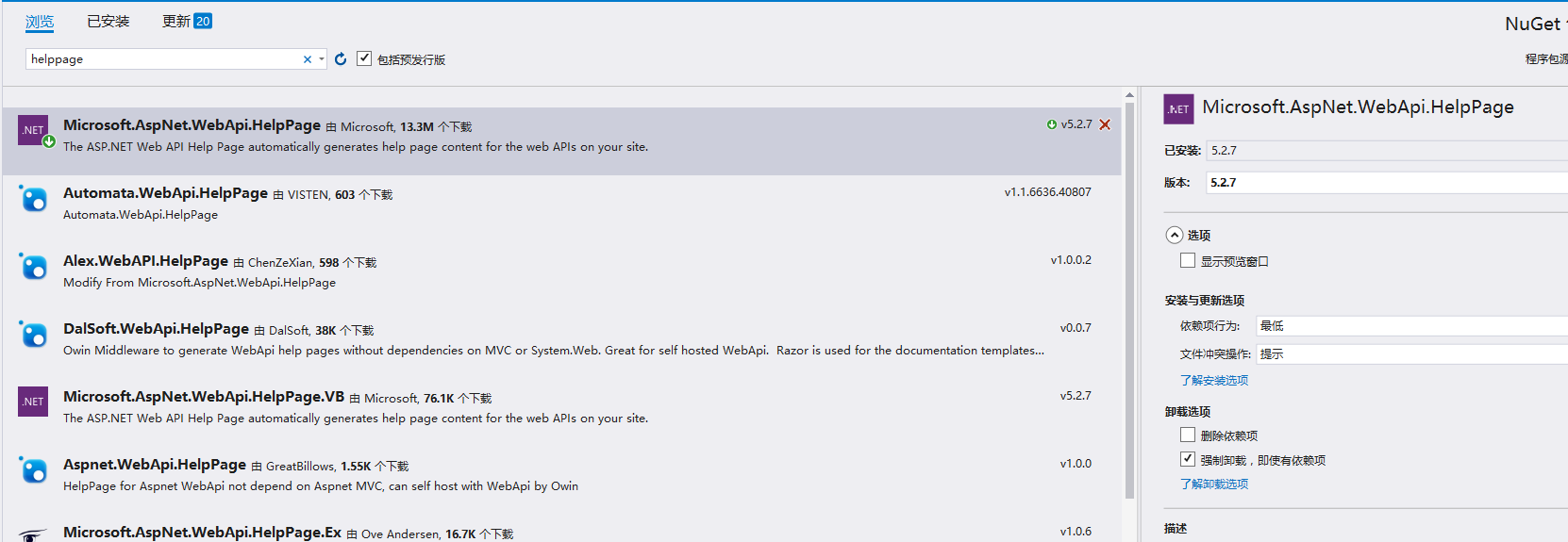
安装完成后我们看项目下是不是多出了一个文件夹Areas ,就是它

2.添加扩展
到了这步,我们先了解下App_Start 下的 HelpPageConfig.cs ,打开后一堆注释,一个Register方法,它用来注册HelpPage页面需要展示的API的文档的。
默认支持单文档导入,我们建立一个支持多文件注册类
using APIDemo.Areas.HelpPage.ModelDescriptions;

using System;

using System.Collections.Generic;

using System.Linq;

using System.Reflection;

using System.Web;

using System.Web.Http.Controllers;

using System.Web.Http.Description;

namespace APIDemo.Areas.HelpPage.App_Start

{

    public class MultiXmlDocumentationProvider : IDocumentationProvider, IModelDocumentationProvider

    {

        private readonly XmlDocumentationProvider[] Providers;

        public MultiXmlDocumentationProvider(params string[] paths)

        {

            this.Providers = paths.Select(p => new XmlDocumentationProvider(p)).ToArray();

        }

        public string GetDocumentation(MemberInfo subject)

        {

            return this.GetFirstMatch(p => p.GetDocumentation(subject));

        }

        public string GetDocumentation(Type subject)

        {

            return this.GetFirstMatch(p => p.GetDocumentation(subject));

        }

        public string GetDocumentation(HttpControllerDescriptor subject)

        {

            return this.GetFirstMatch(p => p.GetDocumentation(subject));

        }

        public string GetDocumentation(HttpActionDescriptor subject)

        {

            return this.GetFirstMatch(p => p.GetDocumentation(subject));

        }

        public string GetDocumentation(HttpParameterDescriptor subject)

        {

            return this.GetFirstMatch(p => p.GetDocumentation(subject));

        }

        public string GetResponseDocumentation(HttpActionDescriptor subject)

        {

            return this.GetFirstMatch(p => p.GetDocumentation(subject));

        }

        private string GetFirstMatch(Func<XmlDocumentationProvider, string> expr)

        {

            return this.Providers

                .Select(expr)

                .FirstOrDefault(p => !String.IsNullOrWhiteSpace(p));

        }

    }

}
然后修改HelpPageConfig.cs文件中的代码,注意XML地址:
 namespace APIDemo.Areas.HelpPage

{

  public static class HelpPageConfig

    {

        [SuppressMessage("Microsoft.Globalization", "CA1303:Do not pass literals as localized parameters",

            MessageId = "APIDemo.Areas.HelpPage.TextSample.#ctor(System.String)",

            Justification = "End users may choose to merge this string with existing localized resources.")]

        [SuppressMessage("Microsoft.Naming", "CA2204:Literals should be spelled correctly",

            MessageId = "bsonspec",

            Justification = "Part of a URI.")]

        public static void Register(HttpConfiguration config)

        {

     //config.SetSampleForMediaType(

            //    new TextSample("Binary JSON content. See http://bsonspec.org for details."),

            //    new MediaTypeHeaderValue("application/bson"));

            config.SetDocumentationProvider(new MultiXmlDocumentationProvider(

        HttpContext.Current.Server.MapPath("~/bin/APIDemo.xml")));

    }

  }

}
3.XML文档文件设置
"~/bin/APIDemo.xml"这个文件需要我们在属性下设置的,让其生成相关xml文件
右击项目=》属性=》生成=》勾选XML文档文件,填写地址,把上面的地址填进去。
4.注册
进入到Global.asax的Application_Start方法看看有没有注册上Area
 protected void Application_Start()

        {

            AreaRegistration.RegisterAllAreas();

            GlobalConfiguration.Configure(WebApiConfig.Register);

            FilterConfig.RegisterGlobalFilters(GlobalFilters.Filters);

            RouteConfig.RegisterRoutes(RouteTable.Routes);

            BundleConfig.RegisterBundles(BundleTable.Bundles);

        }
然后就可以建立控制器测试下好了没,下面是我的控制器
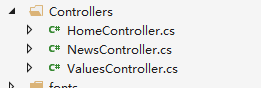
 public class NewsController : ApiController

    {

        /// <summary>

        /// 说明写这里

        /// </summary>

        /// <returns></returns>

       public IEnumerable<News> GetAllNews()

        {

            var news = NewsRepository.GetAllNews();

            return news;

        }

    }
运行:
其实看Areas文件夹下的控制器文件夹,有一个HelpController的控制器,生成了几个 Action
 public ActionResult Index()

        {

            ViewBag.DocumentationProvider = Configuration.Services.GetDocumentationProvider();

            return View(Configuration.Services.GetApiExplorer().ApiDescriptions);

        }

        public ActionResult Api(string apiId)

        {

            if (!String.IsNullOrEmpty(apiId))

            {

                HelpPageApiModel apiModel = Configuration.GetHelpPageApiModel(apiId);

                if (apiModel != null)

                {

                    return View(apiModel);

                }

            }

            return View(ErrorViewName);

        }

        public ActionResult ResourceModel(string modelName)

        {

            if (!String.IsNullOrEmpty(modelName))

            {

                ModelDescriptionGenerator modelDescriptionGenerator = Configuration.GetModelDescriptionGenerator();

                ModelDescription modelDescription;

                if (modelDescriptionGenerator.GeneratedModels.TryGetValue(modelName, out modelDescription))

                {

                    return View(modelDescription);

                }

            }

            return View(ErrorViewName);

        }
我们可以看到Index, 访问它就可以呈现下面的页面了。
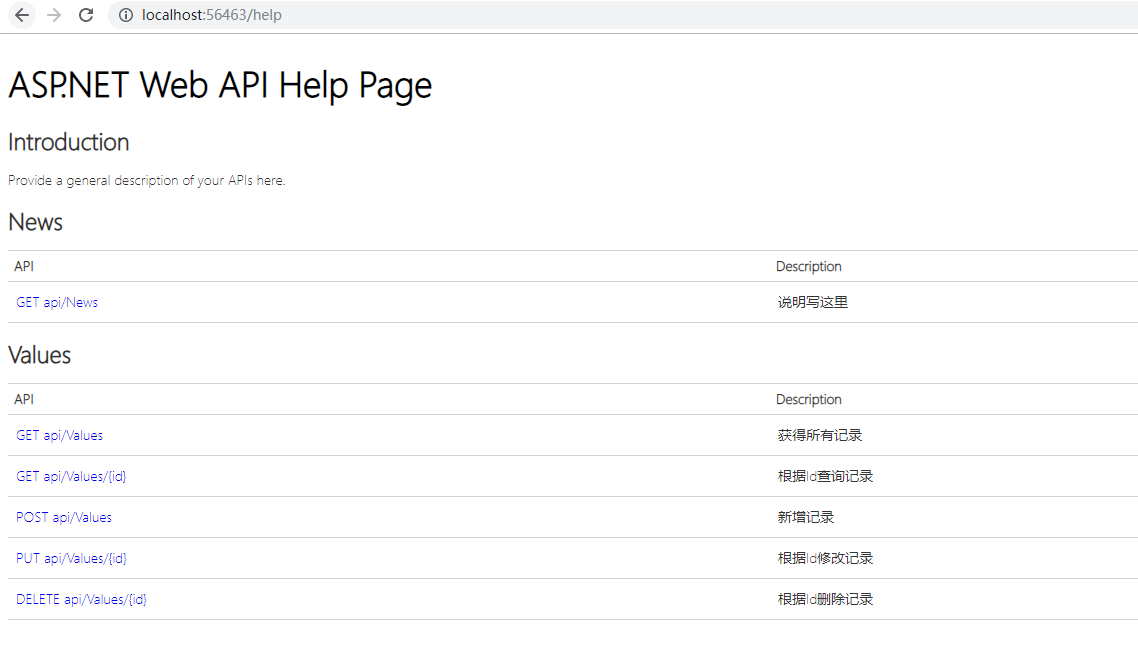
到这里就成功了,API列下有访问的地址,Description列下面是说明。

WebAPI HelpPage帮助页的更多相关文章
- WebApi 之HelpPage帮助页
1.创建解决方案 2.选择类型-Web API 3.设置项目生成XML路径 同时修改HelpPageConfig,代码调用XML文件位置 3.编写WebApi接口代码 4.启动项目 查看接口 5.测试 ...
- WebApi中帮助页Description的中文显示
转自:http://edi.wang/post/2013/10/28/auto-generate-help-document-aspnet-webapi 我选择Web API的一个重要原因就是因为可以 ...
- WebAPI HelpPage支持Area
WebAPI原生的HelpPage文档并不支持Area的生成,需进行如下改造: WebApiConfig: public static class WebApiConfig { public stat ...
- .Net Core WebAPI开启静态页,设置主页
1.使用场景 默认创建的.Net Core WebAPI应用在运行时是没有页面显示的,效果如下: 那么,如果想要给API设置一个主页,应该怎么做呢?这就需要用到本文提供的方法. 2.设置方法 (1)首 ...
- ASP.NET Web API 2系列(三):查看WebAPI接口的详细说明及测试接口
引言 前边两篇博客介绍了Web API的基本框架以及路由配置,这篇博客主要解决在前后端分离项目中,为前端人员提供详细接口说明的问题,主要是通过修改WebApi HelpPage相关代码和添加WebAp ...
- ASP.Net WebAPI中添加helppage帮助页面
一.自动创建带帮助的WebAPI 1.首先创建项目的时候选择WebAPI,如下图所示,生成的项目会自动生成帮助文档. 2.设置调用XML文档的代码 3.设置项目注释XML文档生成目录,项目——属性—— ...
- 1.3为WebApi创建帮助文档
当你创建一个网络 API 时,它很有用来创建一个帮助页,以便其他开发人员将知道如何调用您的 API.您可以创建的所有文档手动,但它是自动生成尽可能多地更好. 为了简化这一任务,ASP.NET Web ...
- Web API使用记录系列(二)HelpPage优化与WebApiTestClient
继续使用记录的第二节,HelpPage的优化与测试工具WebApiTestClient的使用. 之前没怎么整理博客,都是记录一下笔记,真正好好整理发现没想像的那么简单.不管怎么说还是培养下写博客的习惯 ...
- Asp.net WebApi添加帮助文档
一.创建一个空的WebApi站点 二.新增一个名为Test的API控制器,实现部分方法(方法和类要添加文档说明注释) 1. 添加一个用户数据模型UserInfo.cs,代码如下: /// <su ...
随机推荐
- JAVAWEB复习day01
一.基础知识 1.一个html文件开始和结束的标签<html></html> 2.html的两部分<head>设置相关信息</head>,<bod ...
- Linux---进程控制类命令
1.查看系统中的进程命令 (1)ps (2)top 2.控制系统中的进程命令 (1)kill (2)killall (3)nice (4)renice 3.进程后台运行命令 (1)& 4.进程 ...
- lf 前后端分离 (3) 中间建跨域
一.关于中间建跨域 为了减少跨域代码冗余,采用中间件 from django.utils.deprecation import MiddlewareMixin class CorsMiddleware ...
- Linux终端执行shell脚本,提示权限不够
在学习dubbo过程中,上传自己写的脚本,执行的时候提示“权限不够”,从网上了解到是因为没有为脚本赋权限 解决方法是使用chmod命令为shell脚本赋予权限 chmod 777 ./service- ...
- Flask框架之功能详解
1|0浏览目录 配置文件 路由系统 视图 请求相关 响应 模板渲染 session 闪现 中间件 蓝图(blueprint) 特殊装饰器 1|1配置文件 知识点 给你一个路径 "settin ...
- [Tkinter 教程12] 布局管理 (Pack Place Grid)
简介: 本文讲述如何使用 tkinter 的布局管理 (被称作 layout managers 或 geometry managers). tkinter 有三种布局管理方式: pack grid p ...
- COSO企业风险管理框架及其在大宗商品行业的应用
https://mp.weixin.qq.com/s/P1NDvqsz0GNObm1pb47mfg 中国期货市场交易量领先全球,期权.互换等新的衍生品工具逐步引入,场外衍生品服务商正在涌现.越来越多的 ...
- ABP 不包裹返回的数据
告诉abp不包裹返回的数据,返回的数据是什么 就是什么 不用再多包裹一次了. 用在 如:别人需要你提供接口 且给你指定了返回的数据结构. 源码:
- [RN] React Native ScrollView去掉自带的间隔
React Native ScrollView去掉自带的间隔 使用ScrollView时,自带了一个类似marginTop的效果,将其去掉 <ScrollView automaticallyAd ...
- 【转】机器学习实战之K-Means算法
一,引言 先说个K-means算法很高大上的用处,来开始新的算法学习.我们都知道每一届的美国总统大选,那叫一个竞争激烈.可以说,谁拿到了各个州尽可能多的选票,谁选举获胜的几率就会非常大.有人会说,这跟 ...