
Spring boot + mybatis + orcale
接着上次的实现, 添加 mybatis 查询 orcale 数据库
第一步: 新建几个必须的包, 结果如下

第二步: 在service包下新建personService.java 根据名字查person方法接口
package com.example.first.service;

import com.example.first.entity.Person;

public interface personService {

    Person queryPersonByName(String name);

}
第三步: 在serviceImpl包下新建personServiceImpl.java 实现personService.java接口
package com.example.first.serviceImpl;

import com.example.first.personDao.personMapperDao;

import com.example.first.entity.Person;

import com.example.first.service.personService;

import org.springframework.beans.factory.annotation.Autowired;

import org.springframework.stereotype.Service;

import org.springframework.transaction.annotation.Transactional;

@Service

@Transactional

public class personServiceImpl implements personService {

    @Autowired

    personMapperDao personMapperDao;

    @Override

    public Person queryPersonByName(String name) {

        Person person = personMapperDao.findByName(name);

        return person;

    }

}
第四步: personDao下新建personMapperDao.java 有一个查询person的方法
package com.example.first.personDao;

import com.example.first.entity.Person;

import org.apache.ibatis.annotations.Mapper;

@Mapper

public interface personMapperDao {

    Person findByName(String name);

}
第五步: 在resource下新建personMapper.xml
<?xml version="1.0" encoding="UTF-8" ?>

<!DOCTYPE mapper PUBLIC "-//mybatis.org//DTD Mapper 3.0//EN" "http://mybatis.org/dtd/mybatis-3-mapper.dtd" >

<mapper namespace="com.example.first.personDao.personMapperDao">

    <resultMap id="findPerson" type="com.example.first.entity.Person">

        <result property="name" column="name"/>

        <result property="age" column="age"/>

    </resultMap>

    <select id="findByName" resultMap="findPerson">

        select name,age from person where name = #{name}

    </select>

</mapper>
第六步: 在application.properties 中添加数据源 , mapper文件路径 和实体路径
spring.jpa.database=oracle

spring.datasource.driver-class-name=oracle.jdbc.driver.OracleDriver

spring.datasource.url=jdbc:oracle:thin:@//192.168.3.177:1521/orcl

spring.datasource.username=liguang_dev

spring.datasource.password=123456

spring.jpa.hibernate.ddl-auto=update

mybatis.mapperLocations=classpath:/mapper/*.xml

mybatis.typeAliasesPackag= com.example.first.entity

spring.thymeleaf.prefix=classpath:/templates/

spring.thymeleaf.suffix=.html

spring.thymeleaf.mode = HTML5
第七步: 在pom文件中添加依赖
<?xml version="1.0" encoding="UTF-8"?>

<project xmlns="http://maven.apache.org/POM/4.0.0" xmlns:xsi="http://www.w3.org/2001/XMLSchema-instance"

    xsi:schemaLocation="http://maven.apache.org/POM/4.0.0 http://maven.apache.org/xsd/maven-4.0.0.xsd">

    <modelVersion>4.0.0</modelVersion>

    <groupId>com.example.first</groupId>

    <artifactId>springboot</artifactId>

    <version>0.0.1-SNAPSHOT</version>

    <packaging>jar</packaging>

    <name>springboot</name>

    <description>Demo project for Spring Boot</description>

    <parent>

        <groupId>org.springframework.boot</groupId>

        <artifactId>spring-boot-starter-parent</artifactId>

        <version>1.5.6.RELEASE</version>

        <relativePath/> <!-- lookup parent from repository -->

    </parent>

    <properties>

        <project.build.sourceEncoding>UTF-8</project.build.sourceEncoding>

        <project.reporting.outputEncoding>UTF-8</project.reporting.outputEncoding>

        <java.version>1.8</java.version>

    </properties>

    <dependencies>

        <dependency>

            <groupId>org.springframework.boot</groupId>

            <artifactId>spring-boot-starter-web</artifactId>

        </dependency>

        <dependency>

            <groupId>org.springframework.boot</groupId>

            <artifactId>spring-boot-starter-test</artifactId>

            <scope>test</scope>

        </dependency>

        <dependency>

            <groupId>org.springframework.boot</groupId>

            <artifactId>spring-boot-starter-thymeleaf</artifactId>

        </dependency>

        <!--orcale数据库依赖-->

        <dependency>

            <groupId>oracle</groupId>

            <artifactId>ojdbc7</artifactId>

            <version>1.0.0.1</version>

        </dependency>

        <!--mybatis依赖-->

        <dependency>

            <groupId>org.mybatis.spring.boot</groupId>

            <artifactId>mybatis-spring-boot-starter</artifactId>

            <version>1.1.1</version>

        </dependency>

        <dependency>

            <groupId>org.springframework.boot</groupId>

            <artifactId>spring-boot-starter-jdbc</artifactId>

        </dependency>

    </dependencies>

    <build>

        <plugins>

            <plugin>

                <groupId>org.springframework.boot</groupId>

                <artifactId>spring-boot-maven-plugin</artifactId>

            </plugin>

        </plugins>

    </build>

</project>
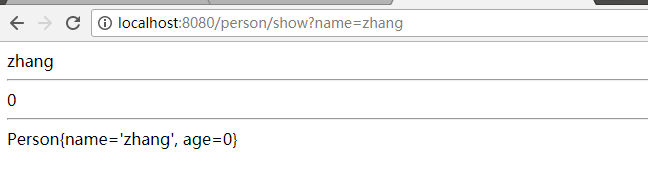
第八步:浏览器输入http://localhost:8080/person/show?name=zhang
Spring boot + mybatis + orcale的更多相关文章
- Spring boot + mybatis + orcale实战(干货)
废话少说,直接上步骤: 第一步:安装好IDEA(此处省略) 第二步:在IDEA新建springboot工程 第三步:在springboot工程的pom.xml添加oracle和mybait依赖 < ...
- spring boot + mybatis + druid
因为在用到spring boot + mybatis的项目时候,经常发生访问接口卡,服务器项目用了几天就很卡的甚至不能访问的情况,而我们的项目和数据库都是好了,考虑到可能时数据库连接的问题,所以我打算 ...
- Spring Boot入门教程2-1、使用Spring Boot+MyBatis访问数据库(CURD)注解版
一.前言 什么是MyBatis?MyBatis是目前Java平台最为流行的ORM框架https://baike.baidu.com/item/MyBatis/2824918 本篇开发环境1.操作系统: ...
- spring boot + mybatis + druid配置实践
最近开始搭建spring boot工程,将自身实践分享出来,本文将讲述spring boot + mybatis + druid的配置方案. pom.xml需要引入mybatis 启动依赖: < ...
- spring boot+mybatis+quartz项目的搭建完整版
1. 利用spring boot提供的工具(http://start.spring.io/)自动生成一个标准的spring boot项目架构 2. 因为这里我们是搭建spring boot+mybat ...
- 快速搭建一个Spring Boot + MyBatis的开发框架
前言:Spring Boot的自动化配置确实非常强大,为了方便大家把项目迁移到Spring Boot,特意总结了一下如何快速搭建一个Spring Boot + MyBatis的简易文档,下面是简单的步 ...
- spring boot mybatis 打成可执行jar包后启动UnsatisfiedDependencyException异常
我的spring boot + mybatis项目在idea里面执行正常,但发布测试环境打成可执行jar包后就启动失败,提示错误如下: [ ERROR] [2018-08-30 17:23:48] o ...
- Spring Boot + Mybatis + Redis二级缓存开发指南
Spring Boot + Mybatis + Redis二级缓存开发指南 背景 Spring-Boot因其提供了各种开箱即用的插件,使得它成为了当今最为主流的Java Web开发框架之一.Mybat ...
- Spring Boot + Mybatis 实现动态数据源
动态数据源 在很多具体应用场景的时候,我们需要用到动态数据源的情况,比如多租户的场景,系统登录时需要根据用户信息切换到用户对应的数据库.又比如业务A要访问A数据库,业务B要访问B数据库等,都可以使用动 ...
随机推荐
- 【API知识】ElementUI一些问题的解决方案
前言 本人并不是前端开发人员,不过前端的界面和交互也没少写.以下整理一下我在使用elementUI过程中遇到的问题和对应的解决方案. 正文 1.表格字段过长省略 elmentUI的table-colu ...
- 【Spark笔记】Windows10 本地搭建单机版Spark开发环境
0x00 环境及软件 1.系统环境 OS:Windows10_x64 专业版 2.所需软件或工具 JDK1.8.0_131 spark-2.3.0-bin-hadoop2.7.tgz hadoop-2 ...
- IceCTF 图片隐写
blue monday 下载一个文件,知道是MIDI文件,后缀改为.mid可以直接播放 一开始以为是两种乐器构成摩斯密码,后来在winhex里看字符发现了每一段的第一个字母恰好有flag的形式,于是提 ...
- 因 URL 意外地以“/HelloWorld”结束,请求格式无法识别。
WebService中发布之后出现这个错误, 解决方法: web.config文件中的 <system.web> 节点下加入:<webServices> <prot ...
- Memcached部署和用法
一.Memcached简介 Memcached 是一个高性能的分布式内存对象缓存系统,用于动态Web应用以减轻数据库负载.它通过在内存中缓存数据和对象来减少读取数据库的次数,从而提高动态.数据库驱动网 ...
- [android] notification入门
通知栏,对话框,Toast是我们接触的三个提示框,通知栏是在系统的应用com.adnroid.systemui当中的 接触的几个Manger,getSystemService()方法得到的,参数: A ...
- C# 填充Excel
1.添加引用 Microsoft.Office.Interop.Excel; 2.使用命名空间 using Microsoft.Office.Interop.Excel; 3.填充EXCEL单元格方法 ...
- HTML5 template元素
前言 转自http://www.zhangxinxu.com/wordpress/2014/07/hello-html5-template-tag/ 在单页面应用,我们对页面的无刷新有了更高的要求,H ...
- html的标签分类————body内标签系列
超链接标签 <a href="" target="_blank">text</a>,此类标签通常是超链接.其中href后面跟进的是超链接 ...
- 爬虫 scrapy 笔记
scrapy 基础 1. 创建一个spider项目 a) Scrapy startproject project_name [project_dir] b) Cd p ...