
How to use VS2012 remote debug Windows Azure Cloud Services
Background:
Windows Azure Cloud Services 可以在本地调试,使用Visual Studio 2012 + 模拟器 Emulator。但是模拟器的工作状态和环境和真实的云环境还是有区别的。
所以有些问题,需要远程调试(Remote Debug)
Steps:
1、Local :Install IDE Visual Studio 2012 at local
2、Remote Machine:远程机器需要安装Remote Tools for Visual Studio 2012 Update 2
下载地址:rtools_setup_x64.exe 选择正确的操作系统版本(32位的工具只能Debug 32位的程序,64位的调试64位程)。
Note:一般远程调试,准备上述就可以了。Cloud Service的Instance安装Remote Tools可以放在Setup WebRole 或者WorkRole 的时候同时安装Debug工具。
3. Upload rtools_setup_x64.exe to storage blob container named "Tools".
4. Cloud Service
1)Create Cloud Service with a webrole instance(asp.net mvc4 with empty template).
2) Write code to install Remote Tools in Role OnStart method. Will be attached the detail code about how to implement method StartStopDebugService().
public override bool OnStart()
{
// For information on handling configuration changes
// see the MSDN topic at http://go.microsoft.com/fwlink/?LinkId=166357.
RoleEnvironment.Changing += RoleEnvironmentChanging;
RoleEnvironment.Changed += RoleEnvironmentChanged;
try
{
StartStopDebugService();
}
catch (Exception ex)
{
//Trace Startup Exception
Trace.TraceError(ex.Message);
throw;
}
return base.OnStart();
}
3)Configuration
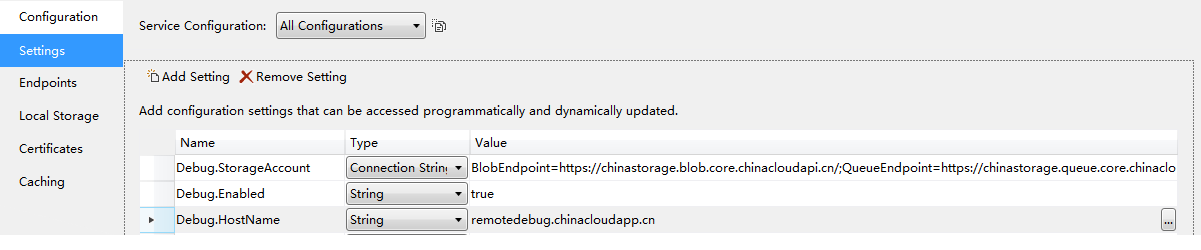
Double click webrole under cloud service porject to edit properties.
Settings:
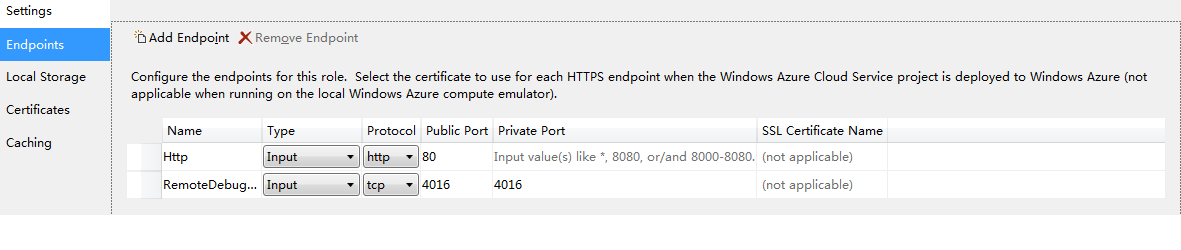
Endpoint:
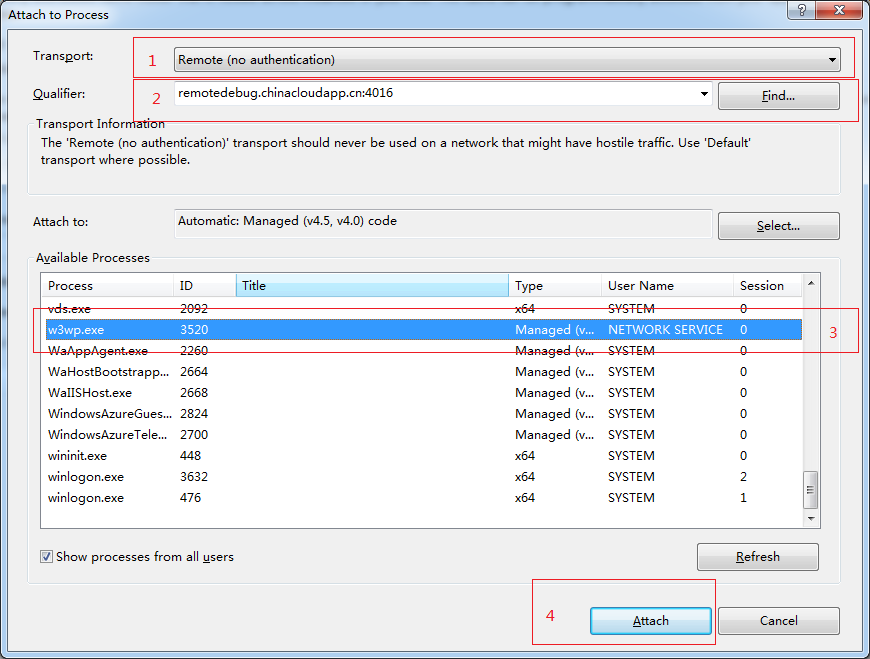
The endpoint RemoteDebugger with public port 4016 is used for local Visual Studio connecting to the remote debugger process.
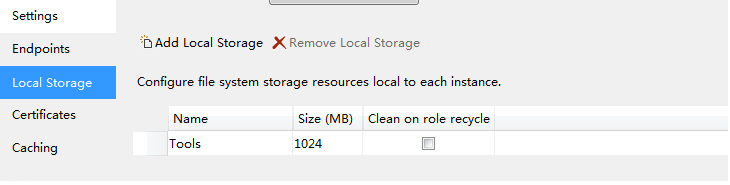
Local Storage:
When web role starting, it will download remote tool from storage blob contrainer to local storage, and then install it.
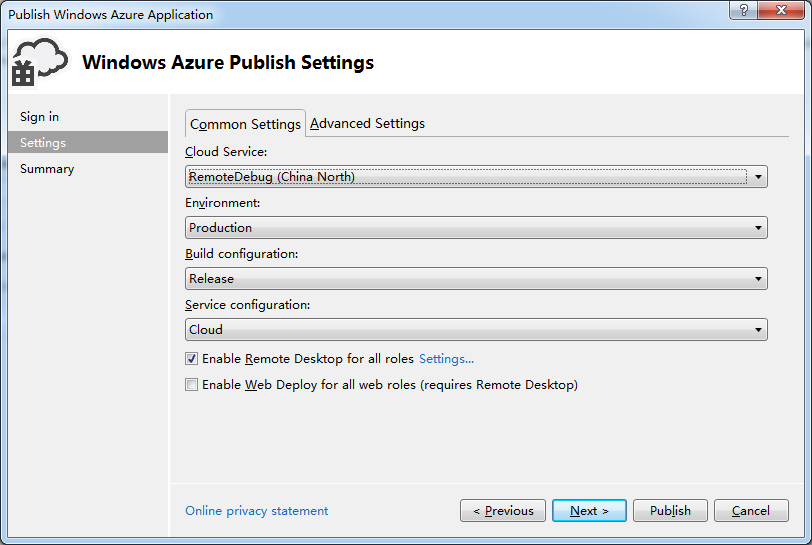
5. Publish cloud service
Configurate publish settings with default.
6. Debug
1) Open website of the cloud service
2) Set breakpoints in VS
3) Open Debug->Attach to process
if w3wp.exe process doesn't in the available prcesses list, please refesh website.
7. Source Code
I have removed reference packages from the solution, if you want build successfully, you should add them yourself.
7. Enjoy debuging.
If you have any question, feel free to ask me by repling comment.
How to use VS2012 remote debug Windows Azure Cloud Services的更多相关文章
- Windows Azure Cloud Service (38) 微软IaaS与PaaS比较
<Windows Azure Platform 系列文章目录> 最近一直想总结Azure IaaS和PaaS的区别与比较,写个博文详细说明一下.建议读者在阅读之前,先熟悉微软PaaS和Ia ...
- Windows Azure Cloud Service (11) PaaS之Web Role, Worker Role(上)
<Windows Azure Platform 系列文章目录> 本文是对Windows Azure Platform (六) Windows Azure应用程序运行环境内容的补充. 我们知 ...
- Windows Azure Cloud Service (36) 在Azure Cloud Service配置SSL证书
<Windows Azure Platform 系列文章目录> 在某些时候,我们需要在Azure PaaS Cloud Service配置HTTPS连接.本章将介绍如何在本地创建证书,然后 ...
- Windows Azure Cloud Service (39) 如何将现有Web应用迁移到Azure PaaS平台
<Windows Azure Platform 系列文章目录> 本文将简单介绍,如何将企业内现有的ASP.NET应用程序迁移到Azure PaaS平台. 因为在迁移过程中,可能需要对现有的 ...
- Windows Azure Cloud Service (42) 使用Azure In-Role Cache缓存(1)Co-located Role
<Windows Azure Platform 系列文章目录> Update 2016-01-12 https://azure.microsoft.com/zh-cn/documentat ...
- Windows Azure Cloud Service (43) 使用Azure In-Role Cache缓存(2)Dedicated Role
<Windows Azure Platform 系列文章目录> Update 2016-01-12 https://azure.microsoft.com/zh-cn/documentat ...
- Windows Azure Cloud Service (47) 修改Cloud Service时区
<Windows Azure Platform 系列文章目录> 本文介绍内容适合于Azure Global和Azure China 我们在使用Cloud Service的时候,会发现默认的 ...
- [SDK2.2]Windows Azure Cloud Service (35) 使用VS2013发布Azure Cloud Service
<Windows Azure Platform 系列文章目录> 好久没有更新BLOG了,今天我们继续Windows Azure相关的内容. 笔者最近把Visual Studio升级到了20 ...
- Windows Azure Cloud Service (1) 用户手册
<Windows Azure Platform 系列文章目录> 下载地址 Cloud Service用户手册
随机推荐
- 第八篇 :微信公众平台开发实战Java版之如何网页授权获取用户基本信息
第一部分:微信授权获取基本信息的介绍 我们首先来看看官方的文档怎么说: 如果用户在微信客户端中访问第三方网页,公众号可以通过微信网页授权机制,来获取用户基本信息,进而实现业务逻辑. 关于网页授权回调域 ...
- 虚拟机LVM扩容
1.先在Vmware上,把虚拟机硬盘做扩展 2.现在打开虚拟机发现系统的磁盘空间已经扩了,但是硬盘分区可用空间没变,还是原来的30G [root@localhost ~]# fdisk -l Disk ...
- JS高级程序设计2nd部分知识要点7
例子: <!DOCTYPE html> <html lang="en"> <head> <meta charset="UTF- ...
- [分享]一个String工具类,也许你的项目中会用得到
每次做项目都会遇到字符串的处理,每次都会去写一个StringUtil,完成一些功能. 但其实每次要的功能都差不多: 1.判断类(包括NULL和空串.是否是空白字符串等) 2.默认值 3.去空白(tri ...
- Linux SELinux命令
getsebool与setsebool工具 说明:SELinux规范了许多boolean数值清单档案,提供开启或关闭功能存取项目,而这些值都存放在/selinux/booleans/目录内相关档案,这 ...
- paypal IPN 接口返回INVALID参数可能问题
工作于浏览器Chrome时,登录IPN Simulator页发送测试数据,payment_date栏位值中出现乱码,导致无法返回正确的VERIFIED,在此记录.
- UI设计实战篇——利用Bootstrap框架制作查询页面的界面
Bootstrap框架是一个前端UI设计的框架,它提供了统一的UI界面,简化了设计界面UI的过程(缺点是定制了界面,调整的余地不是太大).尤其是现在的响应时布局(我的理解是页面根据不同的分辨率,采用不 ...
- 如何利用ZBrush中的DynaMesh创建身体(一)
之前的ZBrush教程中我们用Extract抽出功能演示了头发的立体雕刻方法,本讲将对已完成的头部模型添加躯干,使用DynaMesh创建身体的方法,以及人体比例和结构的介绍. 查看详细的视频教程可直接 ...
- Linux平台Java调用so库-JNI使用例子
1.确保gcc编译器已安装 2.编写HelloJNI.java代码,用native声明需要用C实现的函数.如果源程序是包含在package里的话,应该建立同样的文件夹结构,比如/home/swan/t ...
- 最常用的DOS命令
ping:利用它可以检查网络是否能够连通,用好它可以很好地帮助我们分析判定网络故障,如ping 127.0.0.1tracert:跟踪路由,查询到相应网站的服务器之间所需经过的路由器个数,如trace ...