
canvas 时钟动画
平时在公司不忙的时候,就喜欢写一些小效果什么的,一来复习复习,二来可以发现一些问题。
今天在群里看别人发了一手表的图片,卧槽...妥妥的工作好多年的节奏,后来想想还是做好自己的事情算了,想那多干啥,就画了一个手表....
效果图,没有录制gif的
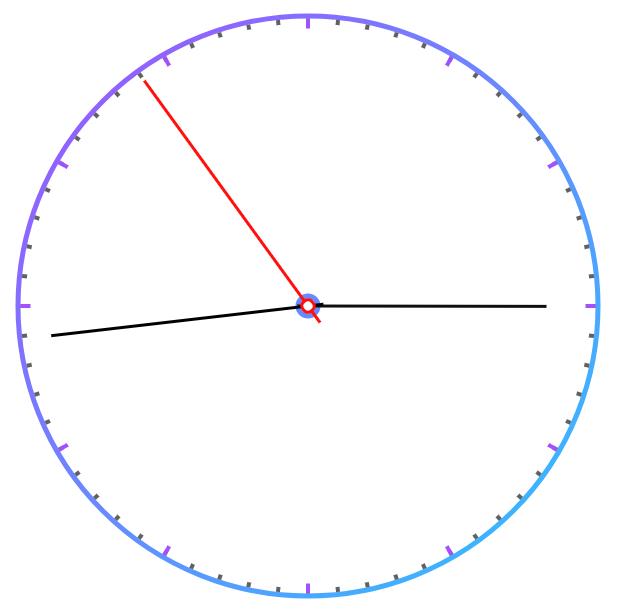
直接上代码:
html
<!DOCTYPE HTML>

<html>

    <head>

        <meta http-equiv="Content-Type" content="text/html; charset=utf-8">

        <title>canvas clock</title>

        <script type="text/javascript" src="percent.js"></script>

    </head>

    <body>

        <canvas id="canvas" width="600" height="600"></canvas>

    </body>

</html>

<script type="text/javascript">

    clock.canvasClock();

</script>
js
var clock=(function(){

    function _canvasClock(){

        var cvs=document.getElementById('canvas');

        var ctx=cvs.getContext('2d');

        var PI=Math.PI;

        var lineWidth=5;                                             //线宽

        var gradient=ctx.createLinearGradient(10,10,580,580);        //设置圆的颜色渐变

        gradient.addColorStop("0","#a251ff");

        gradient.addColorStop(1,"#2ec2ff");

        ctx.fillStyle = '#ef6670';

        ctx.fillRect(0,0,600,600);

        var drawBig=function(){

            var time=new Date();

            var second=time.getSeconds();                            //秒

            var Minute=time.getMinutes();                            //分

            var hour=time.getHours();                                //时

            //hour=hour+Minute/60;

            hour=hour>12?hour-12:hour;                               //表盘只有12小时

            ctx.clearRect(0,0,600,600);                              //清空给定矩形内的指定像素

            //画圆

            ctx.beginPath();

            ctx.lineWidth=lineWidth;

            ctx.strokeStyle=gradient;

            ctx.arc(300,300,290,0, PI * 2,false);

            ctx.stroke();

            ctx.closePath();

            ctx.beginPath();

            ctx.lineWidth=lineWidth;

            ctx.strokeStyle=gradient;

            ctx.arc(300,300,10,0, PI * 2,false);

            ctx.stroke();

            ctx.closePath();

            for(var i=0;i<60;i++){

                ctx.save();                         //保存之前画布状态

                ctx.lineWidth=4;                   //设置分针的粗细

                ctx.strokeStyle="#616161";          //设置分针的颜色

                ctx.translate(300,300);             //画布圆点设置

                ctx.rotate(i*PI/30);                //角度*Math.PI/180=弧度,设置旋转角度

                ctx.beginPath();                    //开始一条路径

                ctx.moveTo(0,-287);                 //相对画布圆点路径的起点

                ctx.lineTo(0,-283);                 //相对画布圆点路径的终点

                ctx.closePath();                    //结束一条路径

                ctx.stroke();                       //实际地绘制出通过 moveTo()和 lineTo()方法定义的路径

                ctx.restore();                      //restore() 方法将绘图状态置为保存值

            }

            for(var i=0;i<12;i++){

                ctx.save();

                ctx.lineWidth=4;

                ctx.strokeStyle=gradient;

                ctx.translate(300,300);

                ctx.rotate(i*PI/6);

                ctx.beginPath();

                ctx.moveTo(0,-287);

                ctx.lineTo(0,-278);

                ctx.closePath();

                ctx.stroke();

                ctx.restore();

            }

            //时针

            ctx.save();

            ctx.lineWidth=3;

            ctx.strokeStyle="#0f0f0f";

            ctx.translate(300,300);

            ctx.rotate(hour*PI/6+second*PI/108000);

            ctx.beginPath();

            ctx.moveTo(0,-238);

            ctx.lineTo(0,10);

            ctx.closePath();

            ctx.stroke();

            ctx.restore();

            //分针

            ctx.save();

            ctx.lineWidth=3;

            ctx.strokeStyle="#010101";

            ctx.translate(300,300);

            ctx.rotate(Minute*PI/30+second*PI/1800);

            ctx.beginPath();

            ctx.moveTo(0,-258);

            ctx.lineTo(0,15);

            ctx.closePath();

            ctx.stroke();

            ctx.restore();

            //秒针

            ctx.save();

            ctx.strokeStyle="#ff100d";

            ctx.lineWidth=3;

            ctx.translate(300,300);

            ctx.rotate(second*PI/30);

            ctx.beginPath();

            ctx.moveTo(0,-278);

            ctx.lineTo(0,20);

            ctx.closePath();

            ctx.stroke();

            ctx.beginPath();                        //时针分针秒针交点

            ctx.arc(0,0,6,0,2*PI,false);

            ctx.closePath();

            ctx.fillStyle="#fff";

            ctx.fill();

            ctx.stroke();

            ctx.restore();

            requestAnimationFrame(drawBig);            //实现动画修改的接口

        };

        drawBig();

        setInterval(drawBig,1000);                    //每1s重绘一次

    };

    return{

        canvasClock:_canvasClock,

    }

}())
本来准备封装一下的,要下班时来任务了,飞了....
canvas 时钟动画的更多相关文章
- 15个超强悍的CSS3圆盘时钟动画赏析
在网页上,特别是个人博客中经常会用到时钟插件,一款个性化的时钟插件不仅可以让页面显得美观,而且可以让访客看到当前的日期和时间.今天我们给大家收集了15个超强悍的圆盘时钟动画,很多都是基于CSS3,也有 ...
- 使用Canvas制作时钟动画
复习Javascript到Canvas的知识点,看到一个使用Canvas绘制的静态时钟例子,便想将其变成动态显示系统时间的时钟动画.另外再配上数字显示的时钟,一个小的时钟模块的诞生了!目前的界面还比较 ...
- Coffeescript实现canvas时钟
前言 参照Mozilla 官方教程,要在Canvas上画动画时钟,思路非常有意思. 把动画看作是多个帧组成,定时每个时间点在Canvas上画一帧来实现动画.而Mozilla 官方教程画图实现的思路有意 ...
- 14款超时尚的HTML5时钟动画
时钟动画在网页应用中也非常广泛,在一些个人博客中,我们经常会看到一些相当个性化的HTML5时钟动画.今天我们向大家分享了14款形态各异的超时尚HTML5时钟动画,其中有圆盘时钟.3D时钟.个性化时钟等 ...
- 14款形态各异的超时尚HTML5时钟动画
14款超时尚的HTML5时钟动画(附源码) 时钟动画在网页应用中也非常广泛,在一些个人博客中,我们经常会看到一些相当个性化的HTML5时钟动画.今天我们向大家分享了14款形态各异的超时尚HTML5 ...
- 使用Canvas实现动画效果 | DKlogs -- 设计 | 生活
使用Canvas实现动画效果 | DKlogs -- 设计 | 生活 使用Canvas实现动画效果
- 》》canvas时钟
<!DOCTYPE html> <html> <head> <meta charset="utf-8" /> <title&g ...
- 原生js之canvas时钟组件
canvas一直是前端开发中不可或缺的一种用来绘制图形的标签元素,比如压缩上传的图片.比如刮刮卡.比如制作海报.图表插件等,很多人在面试的过程中也会被问到有没有接触过canvas图形绘制. 定义 ca ...
- iOS中的时钟动画
iOS 动画效果非常多,我们在开发中可能会遇到很多动画特效,我们就会用到核心动画框架CoreAnimation,核心动画里面的动画效果有很多,都是在QuartzCore.framework框架里面,今 ...
随机推荐
- Go变量逃逸分析
目录 什么是逃逸分析 为什么要逃逸分析 逃逸分析是怎么完成的 逃逸分析实例 总结 写过C/C++的同学都知道,调用著名的malloc和new函数可以在堆上分配一块内存,这块内存的使用和销毁的责任都在程 ...
- JAVA设计模式—观察者模式和Reactor反应堆模式
被观察者(主题)接口 定义主题对象接口 /**抽象主题角色: 这个主题对象在状态上发生变化时,会通知所有观察者对象 也叫事件对象 */ public interface Subject { //增加一 ...
- [Swift]LeetCode16. 最接近的三数之和 | 3Sum Closest
Given an array nums of n integers and an integer target, find three integers in nums such that the s ...
- [Swift]LeetCode128. 最长连续序列 | Longest Consecutive Sequence
Given an unsorted array of integers, find the length of the longest consecutive elements sequence. Y ...
- [Swift]LeetCode853. 车队 | Car Fleet
N cars are going to the same destination along a one lane road. The destination is target miles awa ...
- Vue入门手册整理
目录 第一章.环境搭建 第二章.目录结构 第三章.Vue调试 第四章.定义页面 附录资料 第一章.环境搭建 1.1.准备: npm: 6.9.0 (npm > 3.0) node: v10.15 ...
- 浅谈React
浅谈react react是什么?其官网给出了明确定义:A JavaScript library for building user interfaces,一个用于构建用户界面的JavaScript库 ...
- 前端(各种demo)一:css实现三角形,css实现梯形,pop弹层,css伪类before,after使用,svg使用(持续更新中)
各种demo: 1.css实现正方形 思路:width为0:height为0:使用boder-width为正方形的边长的一半,不占任何字节:border-style为固体:border-color为正 ...
- java多线程(4)---volatile关键字
volatile关键字 一旦一个共享变量(类的成员变量.类的静态成员变量)被volatile修饰之后,那么就具备了两层语义: 1)保证了不同线程对这个变量进行操作时的可见性,即一个线程修改了某个变量的 ...
- Jquery Live方法
$("button").live("click",function(){ $("p").slideToggle();}); ive() 方法 ...