
[Jenkins][git]构建时提示Caused by: hudson.plugins.git.GitException: Command "/usr/bin/git reset --hard" returned status code 128:
---------------------
如需转载,转载请注明出处。
---------------------
今日发现所有IOS构建相关的job全部失败,并提示如下错误:
ERROR: Error fetching remote repo 'origin'

hudson.plugins.git.GitException: Failed to fetch from http://git.xxxx/ios/xxxx-ios.git

    at hudson.plugins.git.GitSCM.fetchFrom(GitSCM.java:810)

    at hudson.plugins.git.GitSCM.retrieveChanges(GitSCM.java:1066)

    at hudson.plugins.git.GitSCM.checkout(GitSCM.java:1097)

    at hudson.scm.SCM.checkout(SCM.java:485)

    at hudson.model.AbstractProject.checkout(AbstractProject.java:1269)

    at hudson.model.AbstractBuild$AbstractBuildExecution.defaultCheckout(AbstractBuild.java:604)

    at jenkins.scm.SCMCheckoutStrategy.checkout(SCMCheckoutStrategy.java:86)

    at hudson.model.AbstractBuild$AbstractBuildExecution.run(AbstractBuild.java:529)

    at hudson.model.Run.execute(Run.java:1741)

    at hudson.model.FreeStyleBuild.run(FreeStyleBuild.java:43)

    at hudson.model.ResourceController.execute(ResourceController.java:98)

    at hudson.model.Executor.run(Executor.java:410)

Caused by: hudson.plugins.git.GitException: Command "/usr/bin/git reset --hard" returned status code 128:

stdout:

stderr: error: bad signature

fatal: index file corrupt

    at org.jenkinsci.plugins.gitclient.CliGitAPIImpl.launchCommandIn(CliGitAPIImpl.java:1719)

    at org.jenkinsci.plugins.gitclient.CliGitAPIImpl.launchCommandIn(CliGitAPIImpl.java:1695)

    at org.jenkinsci.plugins.gitclient.CliGitAPIImpl.launchCommandIn(CliGitAPIImpl.java:1691)

    at org.jenkinsci.plugins.gitclient.CliGitAPIImpl.launchCommand(CliGitAPIImpl.java:1321)

    at org.jenkinsci.plugins.gitclient.CliGitAPIImpl.reset(CliGitAPIImpl.java:372)

    at org.jenkinsci.plugins.gitclient.CliGitAPIImpl.clean(CliGitAPIImpl.java:670)

    at hudson.plugins.git.GitAPI.clean(GitAPI.java:311)

    at sun.reflect.NativeMethodAccessorImpl.invoke0(Native Method)

    at sun.reflect.NativeMethodAccessorImpl.invoke(NativeMethodAccessorImpl.java:62)

    at sun.reflect.DelegatingMethodAccessorImpl.invoke(DelegatingMethodAccessorImpl.java:43)

    at java.lang.reflect.Method.invoke(Method.java:498)

    at hudson.remoting.RemoteInvocationHandler$RPCRequest.perform(RemoteInvocationHandler.java:884)

    at hudson.remoting.RemoteInvocationHandler$RPCRequest.call(RemoteInvocationHandler.java:859)

    at hudson.remoting.RemoteInvocationHandler$RPCRequest.call(RemoteInvocationHandler.java:818)

    at hudson.remoting.UserRequest.perform(UserRequest.java:152)

    at hudson.remoting.UserRequest.perform(UserRequest.java:50)

    at hudson.remoting.Request$2.run(Request.java:332)

    at hudson.remoting.InterceptingExecutorService$1.call(InterceptingExecutorService.java:68)

    at java.util.concurrent.FutureTask.run(FutureTask.java:266)

    at java.util.concurrent.ThreadPoolExecutor.runWorker(ThreadPoolExecutor.java:1142)

    at java.util.concurrent.ThreadPoolExecutor$Worker.run(ThreadPoolExecutor.java:617)

    at hudson.remoting.Engine$1$1.run(Engine.java:85)

    at java.lang.Thread.run(Thread.java:745)

    at ......remote call to qa-ios4-macpro(Native Method)

    at hudson.remoting.Channel.attachCallSiteStackTrace(Channel.java:1416)

    at hudson.remoting.UserResponse.retrieve(UserRequest.java:252)

    at hudson.remoting.Channel.call(Channel.java:781)

    at hudson.remoting.RemoteInvocationHandler.invoke(RemoteInvocationHandler.java:249)

    at com.sun.proxy.$Proxy76.clean(Unknown Source)

    at org.jenkinsci.plugins.gitclient.RemoteGitImpl.clean(RemoteGitImpl.java:453)

    at hudson.plugins.git.extensions.impl.CleanBeforeCheckout.decorateFetchCommand(CleanBeforeCheckout.java:32)

    at hudson.plugins.git.GitSCM.fetchFrom(GitSCM.java:806)

    ... 11 more

ERROR: null
解决思路:
其实遇到这种问题的原因有很多,大致如下:
1. Linux/Mac的权限问题:确保启动Jenkins服务的用户自身有Jenkins所在目录的权限。(比如用非root用户权限进行操作)
2. 账号权限问题:确保Job里选择的Credentials账号有权限,GIT对应的SSH配置存在。
3. 工程目录损坏问题:在workspace工程目录下,尝试git命令是否可用。

发现提示:
error: bad signature
fatal: index file corrupt
说明:
index file在git中指的是.git/index这个文件。这个文件保存的是暂存区的信息,也就是索引信息。
可以通过 git ls-files --stage 来查看暂存区的内容。
通过错误信息fatal:index file corrupt,可以看出这个文件已经损坏。 可以通过git reset来恢复。
解决方法:
1. 进入工程目录下:/Users/Shared/Jenkins/Home/jenkins/workspace/xxxx-ios/.git
2. 删除或重命名.git目录下的index文件:rm -f .git/index或mv .git/index.bak
3. 重新生成index文件:git reset
4. 检查是否可用:git status

再次构建,成功,cheers~
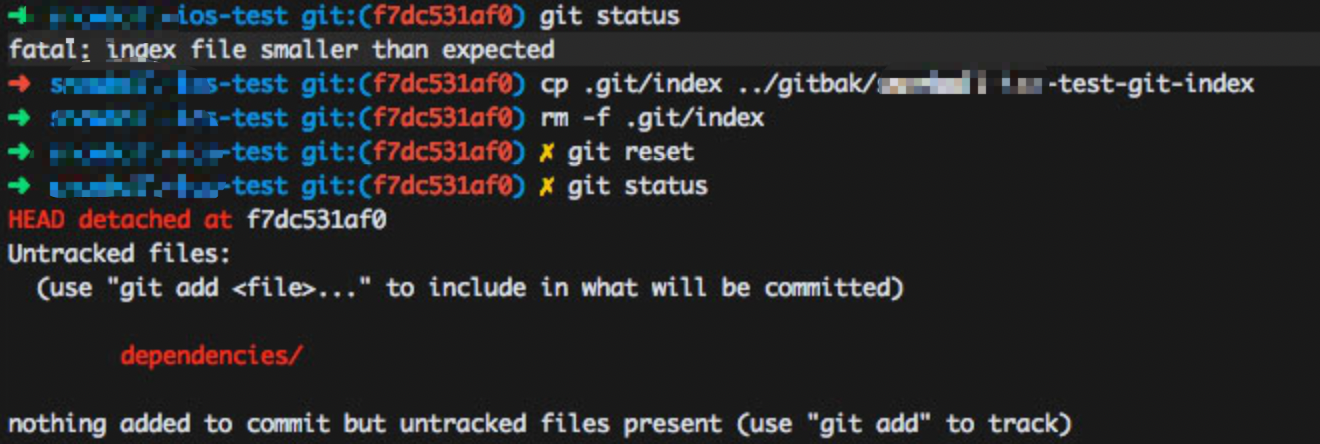
今日发现,提交代码后,Jenkins没有自动构建,进入相应工程目录后发现:

提示如下:
fatal: index file smaller than expected
使用本文所写的方法即可解决。
[Jenkins][git]构建时提示Caused by: hudson.plugins.git.GitException: Command "/usr/bin/git reset --hard" returned status code 128:的更多相关文章
- jenkins连接gitlab,提示returned status code 128,附解决办法
在项目中配置git仓库地址,报无权限 Failed to connect to repository : Command "D:\Program Files\Git\mingw64\bin\ ...
- Jenkins连接git时出现“Failed to connect to repository : Command ... HEAD" returned status code 128:”的问题解决
网上说的解决方法如下: 其实生成ssh时不应该使用当前用户去生成ssh,而是使用jenkins这个用户去生成ssh,然后再去git服务器上配置你生成key,最后再jenkins上配置返回给你的key. ...
- jenkins+git部署环境,出现Failed to connect to repository : Command "git ls-remote -h http://gitlab.xxxxx.git HEAD" returned status code 128stdout: stderr: fatal: repository 'http://gitlab.xxxxx.git' not fou
1.部署jenkins+git源码管理的方式,源码管理报128stdout 源码管理出现如下错误: Failed to connect to repository : Command "gi ...
- Git提交时提示‘The file will have its original line endings in your working directory’
Git提交时提示'The file will have its original line endings in your working directory' Git出现错误 git add -A ...
- 使用intellij的svn时提示出错: Can't use Subversion command line client: svn.Errors found while svn working copies detection.
使用Intellij的svn时提示出错:Can't use Subversion command line client: svn. Errors found while svn working co ...
- 更新Mac OSX XCode后Git 不能使用提示Can't start Git: /usr/bin/git
更新Mac OSX XCode后Git 不能使用提示Can't start Git: /usr/bin/git 解决办法: 终端运行 sudo xcodebuild -license 同意协议就好了.
- git 源码安装后报错/usr/bin/git: No such file or directory
现象 今天源码安装一个git后,执行git命令后报如下错误: $ git --version -bash: /usr/bin/git: No such file or directory 分析过程 开 ...
- Jenkins构建时提示maven版本问题
在使用Jenkins进行项目构建的时候出现下面问题 [INFO] Scanning for projects... [WARNING] [WARNING] Some problems were enc ...
- [Jenkins]Jenkins构建时提示java.io.IOException: No space left on device
突然发现Jenkins的Job全部都停了,打开Jenkins发现所有的slave机器,均提示: 点开Dead(!),提示Thread has died,如下图: 看图好像说是Jenkins所在的服务器 ...
随机推荐
- Git与SVN的区别(面试常问)
1.Git是分布式的,而SVN不是分布式的 2.Git把内容按元数据方式存储,而SVN是按文件 3.Git没有一个全局版本号,SVN有,目前为止这是SVN相比Git缺少的最大的一个特征 4.Git的内 ...
- 图解HTTP第六章
HTTP 报文 1>HTTP 报文 2>HTTP 请求报文 在请求中,HTTP 报文由方法.URI.HTTP 版本.HTTP 首部字段.报文主体(不一定需要)等部分构成. 3>HTT ...
- .gitignore语法
没嘛用 “#”表示注释 “!”表示取消忽略 空行不作匹配 若匹配语句中无“/ ” ,便将其视为一个 glob匹配,如'abc'可以匹配 ' abc' , 'cd/abc' , 'ef/abcde.tx ...
- Hibernate中的实体规则、对象状态和进阶-一级缓存
一.hibernate中的实体规则 1.实体类创建的注意事项 2.主键类型 3.主键生成策略 (1)代理主键 (2)自然主键 二.hibernate中的对象状态 1.对象分为三种状态 2.三种状态的转 ...
- JAVA 8 主要新特性 ----------------(七)新时间日期 API -----LocalDate
一.改版原因 1.老板的Date和Calander存在问题,日期操作名称混乱,有的在text下,有的在util下,包名混乱 2.Simple包混乱,致命错误线程不安全. ...
- 消除blur属性的边框
直接设置样式为: outline:none <!DOCTYPE html> <html lang="en"> <head> <meta ...
- 汇总java生态圈常用技术框架、开源中间件,系统架构及经典案例等
转自:http://www.51testing.com/html/83/n-3718883.html 有人认为编程是一门技术活,要有一定的天赋,非天资聪慧者不能及也.非也,这是近几年,对于技术这碗饭有 ...
- Python mayavi库及mayavi管线
Mayavi库的基本元素Mayavi库中主要有两大部分功能 一类是用于处理图形可视化和图形操作的mlab模块 一类是操作管线对象窗口对象的apimlab包含 绘图函数:实现已有的数据进行可视化显示,可 ...
- Spring——事务
Spring事务 事务的ACID特性 原子性(Atomicity):在事务中的操作,要么都执行,要么都不执行! 一致性(Consistency):数据从一种状态,同时到达另一种状态. 持久性(Dura ...
- 一招让 IOS 自动化化快的飞起
前言 最近在做IOS自动化测试,IOS的Appium环境都配置OK,Demo脚本运行没有问题,多开执行没有问题,IOS安卓统一平台调度集成没有问题,可以进行自动化测试.课时真正执行用例时发现个严重问题 ...