
eclipse升级Android SDK Tool版本到25.2.5后运行项目报错Unable to build: the file dx.jar was not loaded from the SDK folder
概述
由于最近通过SDK-Manager更新了build-tools,当要用到dx.jar这个包时,自动调用最新版本Android SDK build-tools中dx.jar,但是运行android项目时Console却提示:

解决方案
解决办法就是:确保dx.jar这个文件在build-tools\lib和选择的Andriod SDK Tools版本一致就可以。
我用的 Android SDk build-tools 最新版本是 28.0.3,安装的Andriod SDK Tools版本是25.2.5,两个版本要一致,所以我用Android SDk build-tools 25.0.3版本的dx.jar文件覆盖最新版本28.0.3中的dx.jar文件,然后重启Eclipse就可以了。
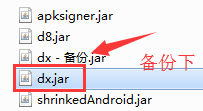
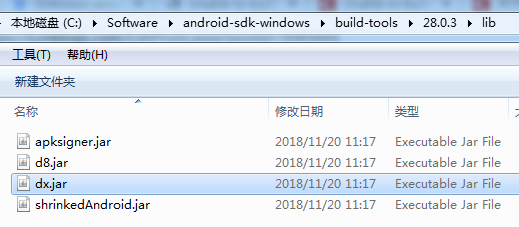
备注:dx.jar文件所在目录:{sdk安装目录}\build-tools\{版本号}\lib
比如:
参考资料
Unable to build: the file dx.jar was not loaded from the SDK folder
Unable to build: the file dx.jar was not loaded from the SDK folder!
关于解决Eclipse报错显示Unable to build: the file dx.jar was not loaded from the SDK folder
eclipse升级Android SDK Tool版本到25.2.5后运行项目报错Unable to build: the file dx.jar was not loaded from the SDK folder的更多相关文章
- Unable to build: the file dx.jar was not loaded from the SDK folder
eclipse 运行 android 时失败了,提示 Unable to build: the file dx.jar was not loaded from the SDK folder! 解决办法 ...
- Unknown error: Unable to build: the file dx.jar was not loaded from the SDK folder!
Eclipse 编译没问题,但是运行就出现这个报错:Unknown error: Unable to build: the file dx.jar was not loaded from the SD ...
- [转]Unable to build: the file dx.jar was not loaded from the SDK folder!
本文转自:http://www.developerbits.com/tag/unable-to-build-the-file-dx-jar-was-not-loaded-from-the-sdk-fo ...
- 升级adt插件后,eclipse突然出现Unable to build: the file dx.jar was not loaded from the SDK folder 错误
旧版的SDK管理器里面最高只能安装Android 3.2 API,需要更新SDK管理器版本后才能安装Android 4.0.Android 4.1,方法如下: http://blog.csdn.net ...
- Android开发导出apk报错:Unable to build: the file dx.jar was not loaded from the SDK folder
问题背景 此问题一般出现在,同时使用了Eclipse和Android Studio,eclipse是不会去下载最新的Android的相关tools,但是studio有时候会自动更新最新的build-t ...
- 解决Unknown error: Unable to build: the file dx.jar was not loaded from the SDK folder!
解决Unknown error: to the dx.jar the SDK folder!最近渐渐迁移到Android Studio来了,更新过Android SDK Manager里的东西后,打开 ...
- Android Studio运行项目报错:Error:null value in entry: annotationProcessorOutputFolder=null的解决方案
一般是在Android studio异常退出(比如强制关机)后,重新打开后运行项目出现该问题. 解决方案 删除项目根目录的.gradle文件夹,然后Clean Project —— Rebulid ...
- 创建好Android Application Project 后运行就报错。
如图: 这个问题有可能是有可能是没导入Android support库,简单了解一下: google提供了Android Support Library package 系列的包来保证来高版本sdk开 ...
- eclipse导入web项目报错 Cannot find the class file for javax.servlet.ServletContext.
当eclipse中新导入的Java Project的时候,往往会碰到各种各样的问题,下面是个典型的问题: Cannot find the class file for javax.servlet.Se ...
随机推荐
- Python软件目录结构规范
设计项目目录结构和'代码编码风格'一样, 是为了达到以下两点: 可读性高 可维护性高 目录组织方式 Stackoverflow上有一些比较好的范式.
- 关于xpath相对路径前加点与不加点的区别
转自:https://blog.csdn.net/qingmu_9923/article/details/51771602 最近在用selenium做web工程自动化测试的相关项目,会经常用到元素定位 ...
- Java 读书笔记 (八) 修饰符
Java语言提供了很多修饰符,主要分为以下两类: 访问修饰符 非访问修饰符 访问控制修饰符 default (即缺省,什么也不写): 在同一包内可见,不使用任何修饰符.使用对象.类.接口.变量.方法. ...
- api_request.go
&& !strings.HasPrefix(endpoint, "https") { endpoint, err = httpsEndpoi ...
- NSQ源码剖析之nsqd
NSQ简介 NSQ 是实时的分布式消息处理平台,其设计的目的是用来大规模地处理每天数以十亿计级别的消息.NSQ 具有分布式和去中心化拓扑结构,该结构具有无单点故障.故障容错.高可用性以及能够保证消息的 ...
- C语言文件 "w+"与"wb+"区别
这是我今天碰到的问题,现在已经解决, 希望我的整理能够帮助到你们! w+以纯文本方式读写,而wb+是以二进制方式进行读写. mode说明: w 打开只写文件,若文件存在则文件长度清为0,即该文件内容会 ...
- eclipse 内存优化
eclipse.ini配置如下: -Dfile.encoding=UTF-8-Xms512m-Xmx512m-Xmn170m-Xverify:none 注意-Xmn是-Xmx的三分之一关系 可以根据自 ...
- shell的嵌入命令大全
围绕以下几点展开学习: 1.什么是shell的嵌入命令? 2.为什么使用shell? 3.怎样使用shell嵌入命令? 1.什么是shell的嵌入命令: ♦这些命令是在实际的Bourne shell里 ...
- 这可能是史上最好的 Java8 新特性 Stream 流教程
本文翻译自 https://winterbe.com/posts/2014/07/31/java8-stream-tutorial-examples/ 作者: @Winterbe 欢迎关注个人微信公众 ...
- 半小时入门Thrift
当一个单体软件产品体量达到一定程序,都会想到拆分为不同的模块(当今这么流行微服务).拆分后一定会存在进程之间的交互(简称:PRC),那么thrift就是facebook推出一款开源的rpc框架,且还跨 ...