
Ubuntu 18.04配置机场客户端
最近把自己的笔记本电脑安装成ubuntu18.04操作系统,为了更方便的查找文档,所以需要配置一下机场(v2ray)的客户端方便查找资料,以下是配置步骤:
1、下载并执行一键脚本:
bash <(curl -L -s https://install.direct/go.sh)
这个是安装v2ray的一键脚本:
#!/bin/bash

# This file is accessible as https://install.direct/go.sh
# Original source is located at github.com/v2ray/v2ray-core/release/install-release.sh

# If not specify, default meaning of return value:
# : Success
# : System error
# : Application error
# : Network error

CUR_VER=""
NEW_VER=""
ARCH=""
VDIS="
ZIPFILE="/tmp/v2ray/v2ray.zip"
V2RAY_RUNNING=

CMD_INSTALL=""
CMD_UPDATE=""
SOFTWARE_UPDATED=

SYSTEMCTL_CMD=$(command -v systemctl >/dev/null)
SERVICE_CMD=$(command -v service >/dev/null)

CHECK=""
FORCE=""
HELP=""

#######color code########
RED="31m"      # Error message
GREEN="32m"    # Success message
YELLOW="33m"   # Warning message
BLUE="36m"     # Info message

#########################
 ]];do
    key="$1"
    case $key in
        -p|--proxy)
        PROXY="-x ${2}"
        shift # past argument
        ;;
        -h|--help)
        HELP="
        ;;
        -f|--force)
        FORCE="
        ;;
        -c|--check)
        CHECK="
        ;;
        --remove)
        REMOVE="
        ;;
        --version)
        VERSION="$2"
        shift
        ;;
        -l|--local)
        LOCAL="$2"
        LOCAL_INSTALL="
        shift
        ;;
        *)
                # unknown option
        ;;
    esac
    shift # past argument or value
done

###############################
colorEcho(){
    COLOR=$
    echo -e "\033[${COLOR}${@:2}\033[0m"
}

sysArch(){
    ARCH=$(uname -m)
    if [[ "$ARCH" == "i686" ]] || [[ "$ARCH" == "i386" ]]; then
        VDIS="
    elif [[ "$ARCH" == *"armv7"* ]] || [[ "$ARCH" == "armv6l" ]]; then
        VDIS="arm"
    elif [[ "$ARCH" == *"armv8"* ]] || [[ "$ARCH" == "aarch64" ]]; then
        VDIS="arm64"
    elif [[ "$ARCH" == *"mips64le"* ]]; then
        VDIS="mips64le"
    elif [[ "$ARCH" == *"mips64"* ]]; then
        VDIS="mips64"
    elif [[ "$ARCH" == *"mipsle"* ]]; then
        VDIS="mipsle"
    elif [[ "$ARCH" == *"mips"* ]]; then
        VDIS="mips"
    elif [[ "$ARCH" == *"s390x"* ]]; then
        VDIS="s390x"
    fi
    return
}

downloadV2Ray(){
    rm -rf /tmp/v2ray
    mkdir -p /tmp/v2ray
    colorEcho ${BLUE} "Downloading V2Ray."
    DOWNLOAD_LINK="https://github.com/v2ray/v2ray-core/releases/download/${NEW_VER}/v2ray-linux-${VDIS}.zip"
    curl ${PROXY} -L -H "Cache-Control: no-cache" -o ${ZIPFILE} ${DOWNLOAD_LINK}
     ];then
        colorEcho ${RED} "Failed to download! Please check your network or try again."
        return
    fi
    return
}

installSoftware(){
    COMPONENT=$
    if [[ -n `command -v $COMPONENT` ]]; then
        return
    fi

    getPMT
     ]]; then
        colorEcho ${RED} "The system package manager tool isn't APT or YUM, please install ${COMPONENT} manually."
        return
    fi
     ]]; then
        colorEcho ${BLUE} "Updating software repo"
        $CMD_UPDATE
        SOFTWARE_UPDATED=
    fi

    colorEcho ${BLUE} "Installing ${COMPONENT}"
    $CMD_INSTALL $COMPONENT
     ]]; then
        colorEcho ${RED} "Failed to install ${COMPONENT}. Please install it manually."
        return
    fi
    return
}

# return : not apt, yum, or zypper
getPMT(){
    if [[ -n `command -v apt-get` ]];then
        CMD_INSTALL="apt-get -y -qq install"
        CMD_UPDATE="apt-get -qq update"
    elif [[ -n `command -v yum` ]]; then
        CMD_INSTALL="yum -y -q install"
        CMD_UPDATE="yum -q makecache"
    elif [[ -n `command -v zypper` ]]; then
        CMD_INSTALL="zypper -y install"
        CMD_UPDATE="zypper ref"
    else
        return
    fi
    return
}

extract(){
    colorEcho ${BLUE}"Extracting V2Ray package to /tmp/v2ray."
    mkdir -p /tmp/v2ray
     -d "/tmp/v2ray/"
     ]]; then
        colorEcho ${RED} "Failed to extract V2Ray."
        return
    fi
    return
}

# : new V2Ray. : no. : not installed. : check failed. : don't check.
getVersion(){
    if [[ -n "$VERSION" ]]; then
        NEW_VER="$VERSION"
        return
    else
        VER=`/usr/bin/v2ray/v2ray -version >/dev/null`
        RETVAL="$?"
        CUR_VER=` | cut -d " " -f2`
        TAG_URL="https://api.github.com/repos/v2ray/v2ray-core/releases/latest"
        NEW_VER=`curl ${PROXY} -s ${TAG_URL} --connect-timeout | grep 'tag_name' | cut -d\" -f4`
         ]] || [[ $NEW_VER == "" ]]; then
            colorEcho ${RED} "Failed to fetch release information. Please check your network or try again."
            return
         ]];then
            return
        elif [[ "$NEW_VER" != "$CUR_VER" ]];then
            return
        fi
        return
    fi
}

stopV2ray(){
    colorEcho ${BLUE} "Shutting down V2Ray service."
    if [[ -n "${SYSTEMCTL_CMD}" ]] || [[ -f "/lib/systemd/system/v2ray.service" ]] || [[ -f "/etc/systemd/system/v2ray.service" ]]; then
        ${SYSTEMCTL_CMD} stop v2ray
    elif [[ -n "${SERVICE_CMD}" ]] || [[ -f "/etc/init.d/v2ray" ]]; then
        ${SERVICE_CMD} v2ray stop
    fi
     ]]; then
        colorEcho ${YELLOW} "Failed to shutdown V2Ray service."
        return
    fi
    return
}

startV2ray(){
    if [ -n "${SYSTEMCTL_CMD}" ] && [ -f "/lib/systemd/system/v2ray.service" ]; then
        ${SYSTEMCTL_CMD} start v2ray
    elif [ -n "${SYSTEMCTL_CMD}" ] && [ -f "/etc/systemd/system/v2ray.service" ]; then
        ${SYSTEMCTL_CMD} start v2ray
    elif [ -n "${SERVICE_CMD}" ] && [ -f "/etc/init.d/v2ray" ]; then
        ${SERVICE_CMD} v2ray start
    fi
     ]]; then
        colorEcho ${YELLOW} "Failed to start V2Ray service."
        return
    fi
    return
}

copyFile() {
    NAME=$
    ERROR=`>&`
     ]]; then
        colorEcho ${YELLOW} "${ERROR}"
        return
    fi
    return
}

makeExecutable() {
    chmod +x "/usr/bin/v2ray/$1"
}

installV2Ray(){
    # Install V2Ray binary to /usr/bin/v2ray
    mkdir -p /usr/bin/v2ray
    copyFile v2ray
     ]]; then
        colorEcho ${RED} "Failed to copy V2Ray binary and resources."
        return
    fi
    makeExecutable v2ray
    copyFile v2ctl && makeExecutable v2ctl
    copyFile geoip.dat
    copyFile geosite.dat

    # Install V2Ray server config to /etc/v2ray
    if [[ ! -f "/etc/v2ray/config.json" ]]; then
        mkdir -p /etc/v2ray
        mkdir -p /var/log/v2ray
        cp "/tmp/v2ray/v2ray-${NEW_VER}-linux-${VDIS}/vpoint_vmess_freedom.json" "/etc/v2ray/config.json"
         ]]; then
            colorEcho ${YELLOW} "Failed to create V2Ray configuration file. Please create it manually."
            return
        fi
        let PORT=$RANDOM+
        UUID=$(cat /proc/sys/kernel/random/uuid)

        sed -i "s/10086/${PORT}/g" "/etc/v2ray/config.json"
        sed -i "s/23ad6b10-8d1a-40f7-8ad0-e3e35cd38297/${UUID}/g" "/etc/v2ray/config.json"

        colorEcho ${BLUE} "PORT:${PORT}"
        colorEcho ${BLUE} "UUID:${UUID}"
    fi
    return
}

installInitScript(){
    if [[ -n "${SYSTEMCTL_CMD}" ]];then
        if [[ ! -f "/etc/systemd/system/v2ray.service" ]]; then
            if [[ ! -f "/lib/systemd/system/v2ray.service" ]]; then
                cp "/tmp/v2ray/v2ray-${NEW_VER}-linux-${VDIS}/systemd/v2ray.service" "/etc/systemd/system/"
                systemctl enable v2ray.service
            fi
        fi
        return
    elif [[ -n "${SERVICE_CMD}" ]] && [[ ! -f "/etc/init.d/v2ray" ]]; then
        installSoftware "daemon" || return $?
        cp "/tmp/v2ray/v2ray-${NEW_VER}-linux-${VDIS}/systemv/v2ray" "/etc/init.d/v2ray"
        chmod +x "/etc/init.d/v2ray"
        update-rc.d v2ray defaults
    fi
    return
}

Help(){
    echo "./install-release.sh [-h] [-c] [--remove] [-p proxy] [-f] [--version vx.y.z] [-l file]"
    echo "  -h, --help            Show help"
    echo "  -p, --proxy           To download through a proxy server, use -p socks5://127.0.0.1:1080 or -p http://127.0.0.1:3128 etc"
    echo "  -f, --force           Force install"
    echo "      --version         Install a particular version, use --version v3.15"
    echo "  -l, --local           Install from a local file"
    echo "      --remove          Remove installed V2Ray"
    echo "  -c, --check           Check for update"
    return
}

remove(){
    if [[ -n "${SYSTEMCTL_CMD}" ]] && [[ -f "/etc/systemd/system/v2ray.service" ]];then
        if pgrep "v2ray" > /dev/null ; then
            stopV2ray
        fi
        systemctl disable v2ray.service
        rm -rf "/usr/bin/v2ray" "/etc/systemd/system/v2ray.service"
         ]]; then
            colorEcho ${RED} "Failed to remove V2Ray."
            return
        else
            colorEcho ${GREEN} "Removed V2Ray successfully."
            colorEcho ${BLUE} "If necessary, please remove configuration file and log file manually."
            return
        fi
    elif [[ -n "${SYSTEMCTL_CMD}" ]] && [[ -f "/lib/systemd/system/v2ray.service" ]];then
        if pgrep "v2ray" > /dev/null ; then
            stopV2ray
        fi
        systemctl disable v2ray.service
        rm -rf "/usr/bin/v2ray" "/lib/systemd/system/v2ray.service"
         ]]; then
            colorEcho ${RED} "Failed to remove V2Ray."
            return
        else
            colorEcho ${GREEN} "Removed V2Ray successfully."
            colorEcho ${BLUE} "If necessary, please remove configuration file and log file manually."
            return
        fi
    elif [[ -n "${SERVICE_CMD}" ]] && [[ -f "/etc/init.d/v2ray" ]]; then
        if pgrep "v2ray" > /dev/null ; then
            stopV2ray
        fi
        rm -rf "/usr/bin/v2ray" "/etc/init.d/v2ray"
         ]]; then
            colorEcho ${RED} "Failed to remove V2Ray."
            return
        else
            colorEcho ${GREEN} "Removed V2Ray successfully."
            colorEcho ${BLUE} "If necessary, please remove configuration file and log file manually."
            return
        fi
    else
        colorEcho ${YELLOW} "V2Ray not found."
        return
    fi
}

checkUpdate(){
    echo "Checking for update."
    VERSION=""
    getVersion
    RETVAL="$?"
     ]]; then
        colorEcho ${BLUE} "Found new version ${NEW_VER} for V2Ray.(Current version:$CUR_VER)"
     ]]; then
        colorEcho ${BLUE} "No new version. Current version is ${NEW_VER}."
     ]]; then
        colorEcho ${YELLOW} "No V2Ray installed."
        colorEcho ${BLUE} "The newest version for V2Ray is ${NEW_VER}."
    fi
    return
}

main(){
    #helping information
    [[ " ]] && Help && return
    [[ " ]] && checkUpdate && return
    [[ " ]] && remove && return

    sysArch
    # extract local file
     ]]; then
        echo "Installing V2Ray via local file"
        installSoftware unzip || return $?
        rm -rf /tmp/v2ray
        extract $LOCAL || return $?
        FILEVDIS=`ls /tmp/v2ray |grep v2ray-v |cut -d "-" -f4`
        SYSTEM=`ls /tmp/v2ray |grep v2ray-v |cut -d "-" -f3`
        if [[ ${SYSTEM} != "linux" ]]; then
            colorEcho ${RED} "The local V2Ray can not be installed in linux."
            return
        elif [[ ${FILEVDIS} != ${VDIS} ]]; then
            colorEcho ${RED} "The local V2Ray can not be installed in ${ARCH} system."
            return
        else
            NEW_VER=`ls /tmp/v2ray |grep v2ray-v |cut -d "-" -f2`
        fi
    else
        # download via network and extract
        installSoftware "curl" || return $?
        getVersion
        RETVAL="$?"
         ]] && [[ " ]]; then
            colorEcho ${BLUE} "Latest version ${NEW_VER} is already installed."
            return
         ]]; then
            return
        else
            colorEcho ${BLUE} "Installing V2Ray ${NEW_VER} on ${ARCH}"
            downloadV2Ray || return $?
            installSoftware unzip || return $?
            extract ${ZIPFILE} || return $?
        fi
    fi
    if pgrep "v2ray" > /dev/null ; then
        V2RAY_RUNNING=
        stopV2ray
    fi
    installV2Ray || return $?
    installInitScript || return $?
     ]];then
        colorEcho ${BLUE} "Restarting V2Ray service."
        startV2ray
    fi
    colorEcho ${GREEN} "V2Ray ${NEW_VER} is installed."
    rm -rf /tmp/v2ray
    return
}

main
v2ray的配置文件:
{
  "log": {
    "access": "",
    "error": "",
    "loglevel": "warning"
  },
  "inbound": {
    ,
    "listen": "127.0.0.1",
    "protocol": "socks",
    "domainOverride": [
      "tls",
      "http"
    ],
    "settings": {
      "auth": "noauth",
      "udp": true,
      "ip": "127.0.0.1",
      "clients": null
    },
    "streamSettings": null
  },
  "outbound": {
    "tag": "agentout",
    "protocol": "vmess",
    "settings": {
      "vnext": [
        {
          "address": "x.x.x.x",
          ,
          "users": [
            {
              "id": "50dd4d0c-a0fe-4d85-9b07-bcd7cbb",
              ,
              "email": "t@t.tt",
              "security": "aes-128-gcm"
            }
          ]
        }
      ],
      "servers": null
    },
    "streamSettings": {
      "network": "tcp",
      "security": "",
      "tlsSettings": null,
      "tcpSettings": null,
      "kcpSettings": null,
      "wsSettings": null,
      "httpSettings": null
    },
    "mux": {
      "enabled": true
    }
  },
  "inboundDetour": null,
  "outboundDetour": [
    {
      "protocol": "freedom",
      "settings": {
        "response": null
      },
      "tag": "direct"
    },
    {
      "protocol": "blackhole",
      "settings": {
        "response": {
          "type": "http"
        }
      },
      "tag": "blockout"
    }
  ],
  "dns": {
    "servers": [
      "8.8.8.8",
      "8.8.4.4",
      "localhost"
    ]
  },
  "routing": {
    "strategy": "rules",
    "settings": {
      "domainStrategy": "IPIfNonMatch",
      "rules": [
        {
          "type": "field",
          "port": null,
          "outboundTag": "direct",
          "ip": null,
          "domain": [
            "geosite:cn"
          ]
        },
        {
          "type": "field",
          "port": null,
          "outboundTag": "direct",
          "ip": [
            "geoip:cn"
          ],
          "domain": null
        },
        {
          "type": "field",
          "port": null,
          "outboundTag": "direct",
          "ip": [
            "0.0.0.0/8",
            "10.0.0.0/8",
            "100.64.0.0/10",
            "127.0.0.0/8",
            "169.254.0.0/16",
            "172.16.0.0/12",
            "192.0.0.0/24",
            "192.0.2.0/24",
            "192.168.0.0/16",
            "198.18.0.0/15",
            "198.51.100.0/24",
            "203.0.113.0/24",
            "::1/128",
            "fc00::/7",
            "fe80::/10"
          ],
          "domain": null
        }
      ]
    }
  }
}
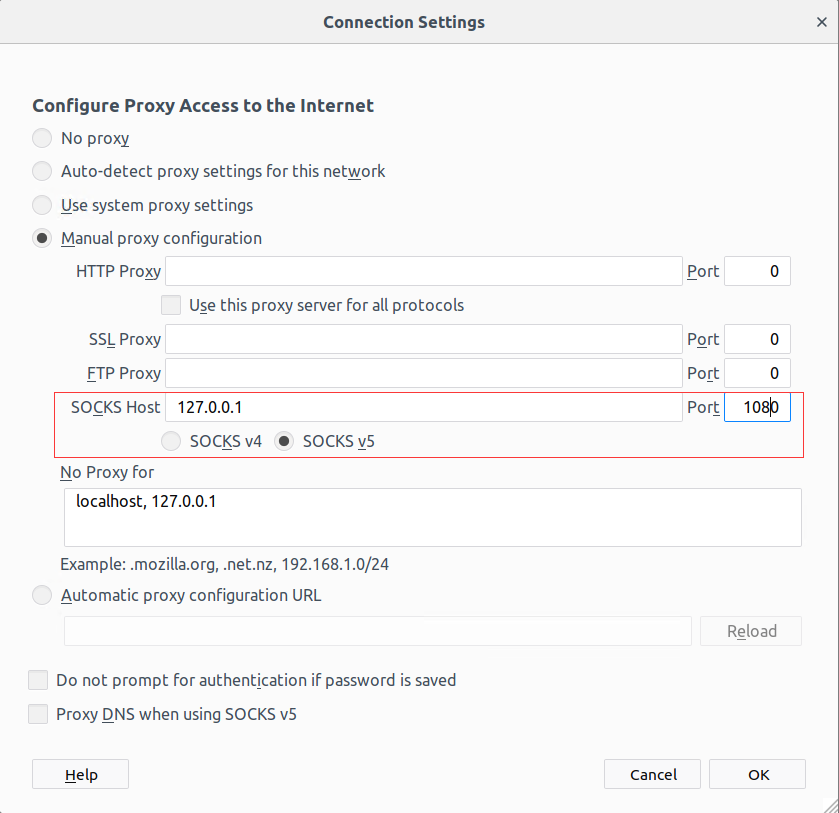
将此v2ray的配置文件放在/etc/varay/下,保存为config.json,在ubuntu自带的firefox的代理中配置socks5代理(在电脑系统代理处也可以配置socks5代理),保存:
启动v2ray: service v2ray start
查看是否正常启动:

保存,配置完成,非常简单快捷,5分钟就能搞定
Ubuntu 18.04配置机场客户端的更多相关文章
- ubuntu 18.04 配置 rc.local
ubuntu 18.04 配置 rc.local:https://blog.csdn.net/a912952381/article/details/81205095 Ubuntu /etc/rc.lo ...
- Ubuntu 18.04 配置
Ubuntu 18.04 配置IP-静态(UB与其他linux os不同) sudo netplan generate sudo vim /etc/netplan/50-cloud-init.yaml ...
- ubuntu 18.04配置静态ip,解决无法上网问题,解决resolv.conf配置文件被覆盖
Netplan 是 Ubuntu 17.10 中引入的一种新的命令行网络配置实用程序,用于在 Ubuntu 系统中轻松管理和配置网络设置. 它允许您使用 YAML 格式的描述文件来抽像化定义网络接口的 ...
- ubuntu 18.04 配置远程ssh/远程ftp/远程vnc登陆
18.04相比过去采用了新的桌面,配置环境稍微有一些不同了. 首先是远程登录,windows用Tera Trem连接,ip地址得自己根据实际情况来. ubuntu上,sudo apt-get inst ...
- Ubuntu 18.04 配置 adb
Reference1: https://www.jianshu.com/p/377c6fb6e590 Reference2: https://blog.csdn.net/ppggxn/articl ...
- ubuntu 18.04 配置notebook远程连接的坑
jupyter-notebook的安装不在此说明 在网上搜了很多方案都不行,好不容易从坑里爬出来 以下为远程连接配置方法 1.生成配置文件 jupyter notebook --generate-co ...
- Ubuntu 16.04 配置 L2tp 客户端
#install lib -dev libsecret--dev libgtk--dev libglib2.-dev xl2tpd strongswan #install network-manage ...
- Ubuntu 18.04 美化配置
网上很多关于Ubuntu 18.04 美化的配置,但每个人遇见的问题都有些不太一样, 现将本人配置的过程整理如下 更新源为阿里云 找到Software & Updates,将源更新为阿里云的源 ...
- 如何在Ubuntu 18.04上安装和配置Apache 2 Web服务器(转)
如何在Ubuntu 18.04上安装和配置Apache 2 Web服务器 什么是Apache Web Server? Apache或Apache HTTP服务器是一个免费的开源Web服务器,由Apac ...
随机推荐
- python中的函数的执行分类
author:headsen chen date: 2018-03-21 17:42:13 notice:This article created by headsen chen himself ...
- 【BZOJ2797】[Poi2012]Squarks 暴力乱搞
[BZOJ2797][Poi2012]Squarks Description 设有n个互不相同的正整数{X1,X2,...Xn},任取两个Xi,Xj(i≠j),能算出Xi+Xj.现在所有取法共n*(n ...
- 【BZOJ3585/3339】mex 莫队算法+分块
[BZOJ3585]mex Description 有一个长度为n的数组{a1,a2,...,an}.m次询问,每次询问一个区间内最小没有出现过的自然数. Input 第一行n,m. 第二行为n个数. ...
- Android中的TextView实现多行显示省略号以及下划线的实现
android:lines="2" android:ellipsize="end" 显示两行,多余部分…显示 textView.getPaint().setFl ...
- 基于Consul+Upsync+Nginx实现动态负载均衡
基于Consul+Upsync+Nginx实现动态负载均衡 1.Consul环境搭建 下载consul_0.7.5_linux_amd64.zip到/usr/local/src目录 cd /usr/l ...
- chrome不支持字体12px
如果网页字体小于12px的话,人眼看着会不太舒服,所以chrome的最小字体为12px. 如果想要缩小字体,可以尝试用CSS3中的 transform: scale(相应的缩小倍数)来实现. 不过不推 ...
- java 从服务器下载文件并保存到本地
昨天在做一个项目时,用到了从服务器上下载文件并保存到本地的知识,以前也没有接触过,昨天搞了一天,这个小功能实现了,下面就简单的说一下实现过程: 1.基础知识 当我们想要下载网站上的某 ...
- 后台curl网络请求
<?php //前端进行网络请求 ajax //后台进行网络请求用到两种方式 curl socket //进行网络请求的步骤 //1.初始化一个curl //2.对curl进行配置 // ...
- django-luffycity-购物车接口
一 基本功能 -添加购物车 -详见代码 -修改课程价格策略 -put或者patch {"course_id": "1", "policy_id&qu ...
- linux中执行定时任务对oracle备份(crontab命令)
执行定时任务对oracle表数据备份: 1.创建sh脚本 [oracle@localhost ~]$ vi bak.sh 2.添加脚本内容 #!/bin/bash #:本脚本自动备份7天的数据库,每次 ...