
iOS:提示框(警告框)控件UIActionSheet的详解
提示框(警告框)控件2:UIActionSheet
typedef NS_ENUM(NSInteger, UIActionSheetStyle) {
UIActionSheetStyleAutomatic = -1, //iOS系统自动默认的风格
UIActionSheetStyleDefault = UIBarStyleDefault,// 默认风格,灰色背景上显示白色文字
UIActionSheetStyleBlackTranslucent = UIBarStyleBlackTranslucent //透明黑色背景,白色文字
UIActionSheetStyleBlackOpaque = UIBarStyleBlackOpaque, //纯黑背景,白色文字
};
属性:
@property(nonatomic,assign) id<UIActionSheetDelegate> delegate; // 代理
@property(nonatomic,copy) NSString *title; //标题
@property(nonatomic) UIActionSheetStyle actionSheetStyle; //风格类型
@property(nonatomic,readonly) NSInteger numberOfButtons; //按钮数量
@property(nonatomic) NSInteger cancelButtonIndex; //取消按钮的索引
@property(nonatomic) NSInteger destructiveButtonIndex; //红色按钮索引
@property(nonatomic,readonly) NSInteger firstOtherButtonIndex; //其他第一个按钮索引
@property(nonatomic,readonly,getter=isVisible) BOOL visible; //是否可见
方法:
※创建实例的初始化方法
- (instancetype)initWithTitle:(NSString *)title delegate:(id<UIActionSheetDelegate>)delegate cancelButtonTitle:(NSString *)cancelButtonTitle destructiveButtonTitle:(NSString *)destructiveButtonTitle otherButtonTitles:(NSString *)otherButtonTitles, ...("Use UIAlertController instead.”);
※添加按钮,返回它的索引
- (NSInteger)addButtonWithTitle:(NSString *)title;
※返回指定索引的按钮文字
- (NSString *)buttonTitleAtIndex:(NSInteger)buttonIndex;
※显示在工具栏
- (void)showFromToolbar:(UIToolbar *)view;
※显示在导航栏
- (void)showFromTabBar:(UITabBar *)view;
※显示在工具栏按钮上
- (void)showFromBarButtonItem:(UIBarButtonItem *)item animated:(BOOL)animated ;
※在指定区域和视图上显示
- (void)showFromRect:(CGRect)rect inView:(UIView *)view animated:(BOOL)animated;
※在视图上显示
- (void)showInView:(UIView *)view;
※按钮消失
- (void)dismissWithClickedButtonIndex:(NSInteger)buttonIndex animated:(BOOL)animated;
代理方法:
@protocol UIActionSheetDelegate <NSObject>
@optional
//点击一个按钮时触发的方法
- (void)actionSheet:(UIActionSheet *)actionSheet clickedButtonAtIndex:(NSInteger)buttonIndex;
// 如果没有定义的委托,我们模拟一个点击取消按钮
- (void)actionSheetCancel:(UIActionSheet *)actionSheet;
//将要显示警告框时触发的方
- (void)willPresentActionSheet:(UIActionSheet *)actionSheet;
//已经显示提示框时触发的方法
- (void)didPresentActionSheet:(UIActionSheet *)actionSheet;
//提示框将要消失时触发的方法
- (void)actionSheet:(UIActionSheet *)actionSheet willDismissWithButtonIndex:(NSInteger)buttonIndex;
//提示框已经消失时触发的方法
- (void)actionSheet:(UIActionSheet *)actionSheet didDismissWithButtonIndex:(NSInteger)buttonIndex;
@end
举例如下:类实现协议
@interface ViewController ()<UIActionSheetDelegate>
1. //实例化
    //创建提示框实例

    UIActionSheet *actionSheet = [[UIActionSheet alloc]initWithTitle:@"title" delegate:self cancelButtonTitle:@"cance" destructiveButtonTitle:@"destructive" otherButtonTitles:@"button1", @"button2",nil];
2. //设置风格
    //设置风格

    actionSheet.actionSheetStyle = UIActionSheetStyleBlackTranslucent;
3. //设置代理
    //设置代理

    actionSheet.delegate = self;
4. //在视图上显示
    //在视图上显示

    [actionSheet showInView:self.view];
实现代理方法:
#pragma mark-<UIActionSheetDelegate>
1.点击按钮时触发事件
//点击一个按钮时触发的方法

- (void)actionSheet:(UIActionSheet *)actionSheet clickedButtonAtIndex:(NSInteger)buttonIndex

{

    NSLog(@"actionSheet: clickedButtonAtIndex:");

}
2.取消提示框时触发的事件
// 如果没有定义的委托,我们模拟一个点击取消按钮

- (void)actionSheetCancel:(UIActionSheet *)actionSheet

{

    NSLog(@"actionSheetCancel:");

}
3.提示框将要显示时触发的事件
//将要显示警告框时触发的方

- (void)willPresentActionSheet:(UIActionSheet *)actionSheet

{

    NSLog(@"willPresentActionSheet:");

}
4.显示提示框时触发的方法
//已经显示提示框时触发的方法

- (void)didPresentActionSheet:(UIActionSheet *)actionSheet

{

    NSLog(@"didPresentActionSheet:");

}
5.提示框将要消失时触发的方法
//提示框将要消失时触发的方法

- (void)actionSheet:(UIActionSheet *)actionSheet willDismissWithButtonIndex:(NSInteger)buttonIndex

{

    NSLog(@"actionSheet: willDismissWithButtonIndex:");

}
6.提示框消失时触发的方法
//提示框已经消失时触发的方法

- (void)actionSheet:(UIActionSheet *)actionSheet didDismissWithButtonIndex:(NSInteger)buttonIndex

{

    NSLog(@"actionSheet: didDismissWithButtonIndex:");

}
演示结果如下:
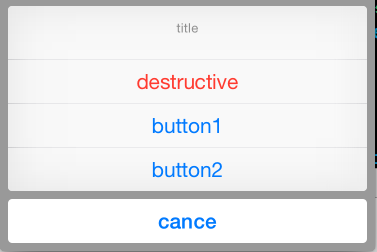
代理方法调用情况如下:
程序运行起来, 没有点击按钮时:
-- ::29.647 提示框UIActionSheet[:] willPresentActionSheet:
点击任意按钮时:
-- ::18.882 提示框UIActionSheet[:] actionSheet: clickedButtonAtIndex:

-- ::18.883 提示框UIActionSheet[:] actionSheet: willDismissWithButtonIndex:

-- ::19.297 提示框UIActionSheet[:] actionSheet: didDismissWithButtonIndex:
iOS:提示框(警告框)控件UIActionSheet的详解的更多相关文章
- 《手把手教你》系列技巧篇(三十八)-java+ selenium自动化测试-日历时间控件-下篇(详解教程)
1.简介 理想很丰满现实很骨感,在应用selenium实现web自动化时,经常会遇到处理日期控件点击问题,手工很简单,可以一个个点击日期控件选择需要的日期,但自动化执行过程中,完全复制手工这样的操作就 ...
- iOS:提示框(警告框)控件UIAlertView的详解
提示框(警告框)控件:UIAlertView 功能:当点击按钮或标签等时,弹出一个提示框,显示必要的提示,然后通过添加的按钮完成需要的功能. 类型:typedef NS_ENUM(NSInte ...
- iOS:网页视图控件UIWebView的详解
网页视图控件:UIWebView 功能:它是继承于UIView的,是一个内置的浏览器控件,以用来浏览从网络下载下来的网页或者本地上加载下来的文档. 枚举: //网页视图导航类型 typedef NS_ ...
- iOS:选择器控件UIPickerView的详解和演示
选择器控件UIPickerView: 功能:它能够创建一个类似于密码锁式的单列或多列的选择菜单,用户可以通过它设置的代理来选择需要菜单中的任意的数据.例如创建日历.字体表(类型.大小.颜色).图库等. ...
- iOS:下拉刷新控件UIRefreshControl的详解
下拉刷新控件:UIRefreshControl 1.具体类信息: @interface UIRefreshControl : UIControl //继承控制类 - (instancetype)ini ...
- iOS:图像选取器控制器控件UIImagePickerController的详解
图像选择控制器:UIImagePickerController 功能:用于选取相册或相机等里面的照片. @interface UIImagePickerController : UINavigatio ...
- delphi控件属性大全-详解-简介
http://blog.csdn.net/u011096030/article/details/18716713 button 组件: CAPTION 属性 :用于在按钮上显示文本内容 Cancel ...
- 【VB技巧】VB ListView 控件功能使用详解
来源:http://lcx.cc/?i=494 ListView控件 在工具箱上击鼠标右键,选择快捷菜单的Components(部件)项,在控件列表中选择Microsoft Windows Commo ...
- 转 VB ListView控件各种操作详解
Private Sub Form_Load() ListView1.ListItems.Clear '清空列表 ListView1.ColumnHeaders.Clear '清空列表头 ListVie ...
随机推荐
- WPF 获取计算机字体
//加载计算机上可用的字体 public void LoadFonts(object ietfLanguageTag) { try { var sysFonts = Fonts.SystemFontF ...
- 【WPF】ListView自定义分页
XAML: <Grid> <Grid.RowDefinitions> <RowDefinition Height="*"/> <RowDe ...
- Python模块-xml
XML的例子 import xml.etree.ElementTree as ET tree = ET.parse("test.xml") root = tree.getroot( ...
- 单纯用JS做的分页插件
最近公司需要用到分页插件,由于市面上大多都是jQuery的分页插件,而且项目中有自己的工具类,所以说我在工具类中又添加了不依赖jQuery的分页插件,而且分页插件来说对DOM的操作也不是很多,就是用J ...
- jquery选择器详细说明
jquery中选择器感觉是用的特别多并且特别方便的一个方法,今天就在这里详细的记载下大多数常用的选择器,一起学习探讨. 首先介绍的是css3的选择器,其中包括了标签选择器(div),ID选择器(#ID ...
- 关于 devbridge
目前据我所知最好用的 autocomplete 插件就是 jquery-ui 的 autocomplete 以及 devbridge 的 autocomplete 插件. 我最终选择了 devbrid ...
- 【BZOJ 2179】 2179: FFT快速傅立叶 (FFT)
2179: FFT快速傅立叶 Time Limit: 10 Sec Memory Limit: 259 MBSubmit: 3308 Solved: 1720 Description 给出两个n位 ...
- 【BZOJ 4103】 4103: [Thu Summer Camp 2015]异或运算 (可持久化Trie)
4103: [Thu Summer Camp 2015]异或运算 Time Limit: 20 Sec Memory Limit: 512 MBSubmit: 474 Solved: 258 De ...
- Linux进程守护——Supervisor 使用记录
0.旁白 Supervisor是个父进程,你要守护的进程会以Supervisor的子进程形式存在,所以老子才可以管儿子 官网链接:http://supervisord.org/ [5.参数]那块不要看 ...
- 【9.23校内测试】【抽屉原理】【乱搞??(找众数】【Trie】
看到题目一开始想到的是一道求子集和的异或和,可以用$bitset$实现求子集和.然而这道题如果要强算子集和肯定是带不动的,况且还要算方案,所以尝试去找题目中的性质. 看到整除,很容易想到如果是一段区间 ...