
WCF简介-01
WCF Windows Communication Foundation
1.1 新建一个"空白解决方案"
1.2 在解决方案中添加类库IBLL
1.2.1 添加接口IUserInfoService
using System;

using System.Collections.Generic;

using System.Linq;

using System.ServiceModel;

using System.Text;

using System.Threading.Tasks;

namespace IBLL

{

    [ServiceContract]

   public  interface IUserInfo

    {

        [OperationContract]

        int Add(int a ,int b);

    }

}
IUserInfo
1.2.2 添加引用 System.ServiceModel
1.3 添加类库BLL
1.3.1 添加引用IBLL
1.3.2 添加类UserInfoService实现接口IBLL
using IBLL;

using System;

using System.Collections.Generic;

using System.Linq;

using System.Text;

using System.Threading.Tasks;

namespace BLL

{

   public class UserInfoService:IUserInfoService

    {

        public int Add(int a, int b)

        {

            return a + b;

        }

    }

}
UserInfoService
1.4 将WCF布置到控制台程序
1.4.1 添加控制台程序Host
1.4.2 添加引用BLL和IBLL
1.4.3 修改App.config文件
<?xml version="1.0" encoding="utf-8" ?>

<configuration>

  <system.serviceModel>

    <services>

      <service name="BLL.UserInfoService" behaviorConfiguration="behaviorConfiguration">

        <host>

          <baseAddresses>

            <add baseAddress="http://localhost:8000/"/>

          </baseAddresses>

        </host>

        <endpoint address="" binding="basicHttpBinding" contract="IBLL.IUserInfoService"></endpoint>

      </service>

    </services>

    <behaviors>

      <serviceBehaviors>

        <behavior name="behaviorConfiguration">

          <serviceMetadata httpGetEnabled="true"/>

        </behavior>

      </serviceBehaviors>

    </behaviors>

  </system.serviceModel>

</configuration>
App.config
1.4.4 添加引用System.ServiceModel
using System;

using System.Collections.Generic;

using System.Linq;

using System.ServiceModel;

using System.Text;

using System.Threading.Tasks;

namespace Host

{

    class Program

    {

        static void Main(string[] args)

        {

            using (ServiceHost host = new ServiceHost(typeof(BLL.UserInfoService)))

            {

                host.Open();

                Console.WriteLine("服务启动成功!");

                Console.ReadKey();

            }

        }

    }

}
Main
1.4.5 进入debug目录,以管理员身份启动

1.4.6 启动客户端测试服务程序
VS安装目录下F:\Program Files (x86)\Microsoft Visual Studio 12.0\Common7\IDE\WcfTestClient.exe

2 客户端程序
2.1 控制台程序-新建控制台程序
F:\Users\home\Documents\Visual Studio 2013\WCFDemo\Solution1\Client
svcutil http://localhost:8000/?wsdl /o:UserInfoServiceClient.cs

2.2 将生成的文件包括到项目中

2.3 勇output.config文件替换掉App.config文件(删App,将output重命名)
2.4 添加引用BLL,IBLL和ServiceModel
2.5 client 中main方法
using System;

using System.Collections.Generic;

using System.Linq;

using System.Text;

using System.Threading.Tasks;

namespace Client

{

    class Program

    {

        static void Main(string[] args)

        {

            UserInfoServiceClient client = new UserInfoServiceClient();

            int sum = client.Add(,);

            Console.WriteLine(sum);

            Console.ReadKey();

        }

    }

}
Main
2.6 改造自动生成的
//------------------------------------------------------------------------------

// <auto-generated>

//     此代码由工具生成。

//     运行时版本:4.0.30319.42000

//

//     对此文件的更改可能会导致不正确的行为,并且如果

//     重新生成代码,这些更改将会丢失。

// </auto-generated>

//------------------------------------------------------------------------------

//[System.CodeDom.Compiler.GeneratedCodeAttribute("System.ServiceModel", "4.0.0.0")]

//[System.ServiceModel.ServiceContractAttribute(ConfigurationName="IUserInfoService")]

//public interface IUserInfoService

//{

//    [System.ServiceModel.OperationContractAttribute(Action="http://tempuri.org/IUserInfoService/Add", ReplyAction="http://tempuri.org/IUserInfoService/AddResponse")]

//    int Add(int a, int b);

//    [System.ServiceModel.OperationContractAttribute(Action="http://tempuri.org/IUserInfoService/Add", ReplyAction="http://tempuri.org/IUserInfoService/AddResponse")]

//    System.Threading.Tasks.Task<int> AddAsync(int a, int b);

//}

using IBLL;

[System.CodeDom.Compiler.GeneratedCodeAttribute("System.ServiceModel", "4.0.0.0")]

public interface IUserInfoServiceChannel : IUserInfoService, System.ServiceModel.IClientChannel

{

}

[System.Diagnostics.DebuggerStepThroughAttribute()]

[System.CodeDom.Compiler.GeneratedCodeAttribute("System.ServiceModel", "4.0.0.0")]

public partial class UserInfoServiceClient : System.ServiceModel.ClientBase<IUserInfoService>, IUserInfoService

{

    public UserInfoServiceClient()

    {

    }

    public UserInfoServiceClient(string endpointConfigurationName) :

            base(endpointConfigurationName)

    {

    }

    public UserInfoServiceClient(string endpointConfigurationName, string remoteAddress) :

            base(endpointConfigurationName, remoteAddress)

    {

    }

    public UserInfoServiceClient(string endpointConfigurationName, System.ServiceModel.EndpointAddress remoteAddress) :

            base(endpointConfigurationName, remoteAddress)

    {

    }

    public UserInfoServiceClient(System.ServiceModel.Channels.Binding binding, System.ServiceModel.EndpointAddress remoteAddress) :

            base(binding, remoteAddress)

    {

    }

    public int Add(int a, int b)

    {

        return base.Channel.Add(a, b);

    }

    //public System.Threading.Tasks.Task<int> AddAsync(int a, int b)

    //{

    //    return base.Channel.AddAsync(a, b);

    //}

}
UserInfoServiceClient
2.7 分别启动两个exe文件
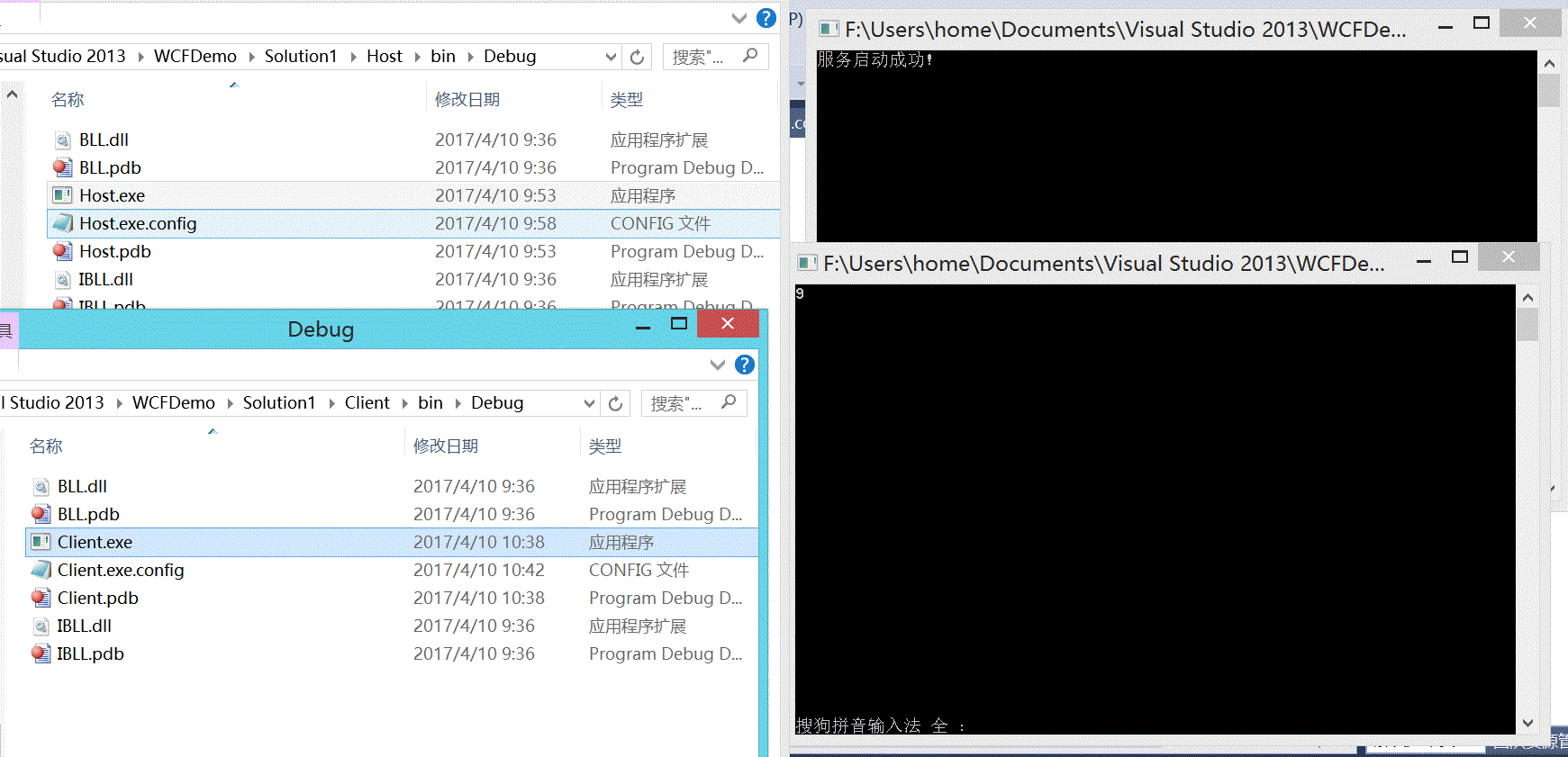
3 我们也可以自己建立一个客户端
3.1 创键控制台应用程序
3.2 添加服务引用

3.3 运行结果

WCF简介-01的更多相关文章
- WCF学习——WCF简介(三)
一.WCF简介 1.什么是WCF? WCF的全称是:Windows Communication Foundation.从本质上来说,它是一套软件开发包,是微软公司推出的符合SOA思想的技术框架. 2. ...
- 第1章WCF简介(WCF全面解析读书笔记2)
第1章 WCF简介 面向服务架构(SOA)是近年来备受业界关注的一个主题,它代表了软件架构的一种方向.顺应SOA发展潮流,微软于2006年年底推出了一种新的分布式通信框架Windows Communi ...
- WCF全面解析第一章 WCF 简介
1.WCF中的 "A","B","C" 介绍 我们先看个生活中的例子,某一天,公司的领导让你去送一份合同文件,送文件的过程你可以选择的交通方 ...
- WCF简介
WCF(Windows communication Foundation),顾名思义,就是在windows平台下解决通信的基础框架.WCF做为.NET Framework 3.0的一个组件发布出来的, ...
- WCF学习笔记(一):WCF简介
转:http://www.cnblogs.com/wengyuli/archive/2009/11/04/1595693.html MSDN上关于WCF给出如下注解: 设计 Windows Commu ...
- wcf例子01
一.概述 Windows Communication Foundation(WCF)是由微软发展的一组数据通信的应用程序开发接口,可以翻译为Windows通讯接口,它是.NET框架的一部分.由 .NE ...
- mysql高可用架构 -> MHA简介-01
作者简介 松信嘉範:MySQL/Linux专家2001年索尼公司入职2001年开始使用oracle2004年开始使用MySQL2006年9月-2010年8月MySQL从事顾问2010年-2012年 D ...
- Redis系列---redis简介01
一. 本章我们将用简短的几句话来帮助你快速的了解什么是redis,初学者不必深究 1 Redis简介 Remote Dictionary Server(Redis)是一个开源的使用ANSI C语言编写 ...
- 小步前进之WCF简介
WCF 前言 什么是WCF? 契约 合约 前言 在 .NET Framework2.0 以及前版本中,微软发展了 Web Service..NET Remoting 等通信支持. 如果要进行通信,对于 ...
随机推荐
- windows下boost编译(vs2010)
1.首先在官网上下一个boost的版本( http://www.boost.org): 2.解压到D:\mine (D:\mine\boost_1_66_0) 3.编译安装boost boost_1_ ...
- MySQL邮件使用情况统计方法
邮件使用情况统计方法如下: ) AS domain, COUNT(DISTINCT [column_name]) AS mail_count, COUNT([column_name]) AS mail ...
- 注解 和 xml 配置的优缺点【转】
java annotation(注解) 的优点缺点 Annotation和xml各自作为配置项的优点与缺点. Annotation 一.Annotation 的优点 1.保存在 class 文件中,降 ...
- ZOJ 4019 Schrödinger's Knapsack
Schrödinger's Knapsack Time Limit: 1 Second Memory Limit: 65536 KB DreamGrid has a magical knap ...
- QT_地图导航 源码下载
https://github.com/douzujun/MyMapView 主要算法讲解: 1. 计算最短路径(dijkstra算法) Step1: (1)找到最短路径已经确定的顶点,从它已经确定的顶 ...
- AWT和Swing的关系
1.AWT和Swing都是java中的包. 2.AWT(Abstract Window Toolkit):抽象窗口工具包,早期编写图形界面应用程序的包,AWT是通过调用操作系统的native方法实现的 ...
- 01-VS充当IIS的配置步骤
一. 背景 在实际开发中,经常会遇到需要在线调试,比如:第三方支付的回调.App接口借助PostMan工具测试,需要在代码上直接加断点,来进行调试,VS默认是不支持这种方式,需要手动配置一下,才能达到 ...
- Linux安装mysql过程(转+完善)
http://blog.csdn.net/jerome_s/article/details/52883234yum 安装MySQL 1. 检查安装情况 查看有没有安装过: ...
- 通过COM组件方式实现java调用C#写的DLL文件 转
最近一段时间单位在做一个Web项目,工程师用JAVA语言,需要公用人员信息,统一用户名和密码,原有的平台中是用C#语言开发的,在网上查找解决方法,通过JAVA调用C#的DLL文件实现.网上资料很多,自 ...
- 网络类型IPv4和IPv6什么意思?区别?
在windows 7以上系统中,在设置本地IP地址的时候经常会看到同事含有IPV4协议项与IPV6协议项,并不同于以往windows xp系统中仅有TCP/IP协议项,不少朋友都觉得比较奇怪,询问编辑 ...