
Nginx的基础配置管理
Nginx的基本功能
1.静态资源的web服务器
2.http协议反向代理服务器
3.tcp/udp协议的请求转发
安装nginx

yum install epel-release

yum install nginx

systemctl start nginx

#查看nginx帮助

[root@localhost ~]# nginx -h

nginx version: nginx/1.12.

检查配置文件语法

[root@localhost ~]# nginx -t

nginx: the configuration file /etc/nginx/nginx.conf syntax is ok

nginx: configuration file /etc/nginx/nginx.conf test is successful
安装配置
Nginx配置文件管理
主配置文件结构: 四大配置段
主配置段即全局配置段,对http,mail,stream都有效
每个段负责一种功能配置,不能把不同的配置段和不同功能混合配置 如 http配置段就只能配置和http协议相关配置而不能配置mail和stream的信息
user nginx;

worker_processes auto;

error_log /var/log/nginx/error.log;

pid /run/nginx.pid;

# Load dynamic modules. See /usr/share/nginx/README.dynamic.

include /usr/share/nginx/modules/*.conf;

events {

    worker_connections 1024;

}
主配置段
http配置段 http/https协议相关配置
http {

    log_format  main  '$remote_addr - $remote_user [$time_local] "$request" '

                      '$status $body_bytes_sent "$http_referer" '

                      '"$http_user_agent" "$http_x_forwarded_for"';

    access_log  /var/log/nginx/access.log  main;

    sendfile            on;

    tcp_nopush          on;

    tcp_nodelay         on;

    keepalive_timeout   ;

    types_hash_max_size ;

    include             /etc/nginx/mime.types;

    default_type        application/octet-stream;

    # Load modular configuration files from the /etc/nginx/conf.d directory.

    # See http://nginx.org/en/docs/ngx_core_module.html#include

    # for more information.

    include /etc/nginx/conf.d/*.conf;

    server {

        listen       80 default_server;

        listen       [::]:80 default_server;

        server_name  _;

        root         /usr/share/nginx/html;

        # Load configuration files for the default server block.

        include /etc/nginx/default.d/*.conf;

        location / {

        }

        error_page 404 /404.html;

            location = /40x.html {

        }

        error_page 500 502 503 504 /50x.html;

            location = /50x.html {

        }

    }

}
http配置段
mail配置段 mail协议相关配置段
{ mail 协议相关配置段 }
mail配置段
stream配置段 stream服务器相关配置段
stream

  {

     stream 服务器相关配置段

  }
stream配置段
http协议相关配置
 #nginx对配置文件的配置项目所处的位置要求比较严格,有严格的嵌套关系

 # for more information.

   http{

   #如果需要添加自定义虚拟主机配置,必须在此处指定目录

   #因为server必须位于http{}里面

   include /etc/nginx/conf.d/*.conf;

   include /etc/nginx/conf.d/vhosts/*.conf;

    server {

        listen       80 default_server;

        listen       [::]:80 default_server;

        server_name  _;

        root         /usr/share/nginx/html;

        # Load configuration files for the default server block.

        #此处不能添加自定义虚拟主机配置文件 这里添加的是对默认虚拟主机的配置

        #server{}中不能再添加server{} 否则会报语法错误

        include /etc/nginx/default.d/*.conf;

        location / {

        }

  }
自定义虚拟主机配置
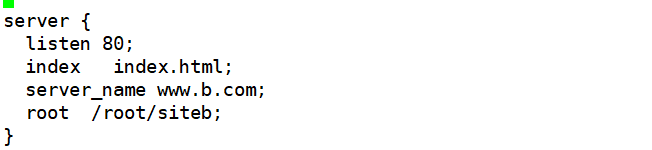
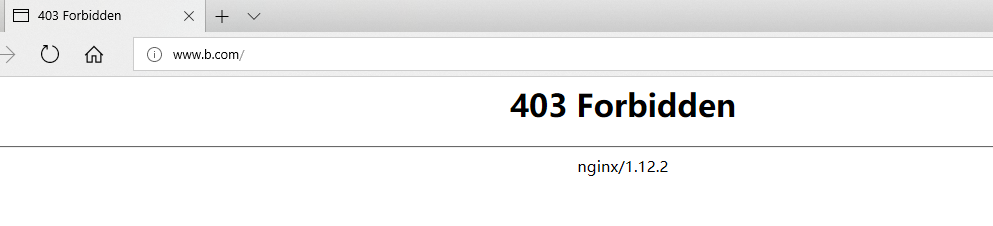
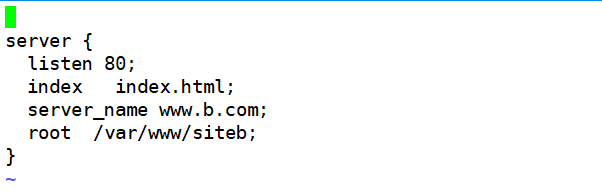
nginx的虚拟主机根目录不能指向/root目录,必须在nginx用户有权限读取的目录
错误示例:
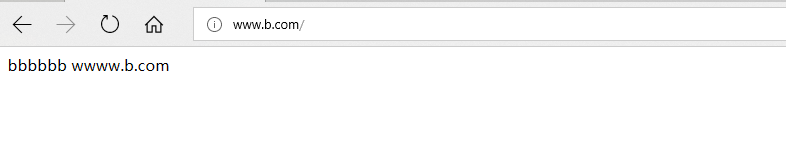
正确示例:
mkdir /etc/nginx/conf.d/vhosts

[root@localhost vhosts]# ls

  a.conf  b.conf  c.conf

[root@localhost vhosts]# vi a.conf

 server {

        listen       ;

        server_name  www.a.com;

        root         /var/www/sitea;

        index       index.html;

 }

[root@localhost vhosts]# vi b.conf

server {

  listen ;

  index   index.html;

  server_name www.b.com;

  root  /var/www/siteb;

}

[root@localhost vhosts]# nginx -s reload

[root@localhost www]# pwd

/var/www

[root@localhost www]# ls

sitea  siteb  sitec

[root@localhost www]# cd sitea

[root@localhost sitea]# ls

index.html
基于主机名配置多个主机
location可以定义匹配到的某个资源位置,针对这个位置做单独的处理

 server {

        listen       ;

        server_name  www.a.com;

        root         /var/www/sitea;

        index       index.html;

        location /news {

           root /var/www/siteb/;

           #这里表示访问www.a.com/news的时候跳转到/www/siteb/news/index.html 并不是直接访问siteb目录下的index.html siteb目录下必须存在news目录 否则会提示404

        }

       location /news {

        alias /var/www/siteb/;

        #访问www.a.com/news的时候跳转到/www/siteb/index.html

      }

 }

 location /images/

      {

         如果uri不存在就用default.gif代替返回

         try_files $uri   /images/default.gif;

      }
location和alias配置
hash运算设置网站上传目录
[root@localhost ~]# sha1sum anaconda-ks.cfg

fe9da4faa341470772d182a1e3f42b288ce43f9a  anaconda-ks.cfg

[root@localhost ~]# mkdir a/9f//useruploadfile

[root@localhost ~]# echo ** | bc
hash目录
通过对上传的文件名进行哈希运算得到hash值,hash值是一串16进制的字符串.每个字符所占的范围是0-f16种可能,所以如果文件目录设计模式为1-2-2.代表取最后一个字符作为第一级总目录名称,取倒数2和3个字符作为二级目录名称,取倒数4和5个字符作为三级目录名称,总共可以生成100多万的目录组合.每个文件夹存放100个文件就可以存储上亿个文件.
因为文件系统查找文件是通过查找inode表来实现文件定位的,如果把上亿个文件都存储在同一个目录将会大大的降低文件查找效率,所以采取hash值为文件目录的方式会大大提高文件查找效率.
网站压力性能测试
[root@localhost ~]# yum install httpd-tools

[root@localhost ~]# ab -c  -n  http://www.a.com

ab: invalid URL  #不能只写http://www.a.com

Usage: ab [options] [http[s]://]hostname[:port]/path

[root@localhost ~]# ab -c  -n  http://www.a.com/index.html
ab命令测试
Nginx动态增加编译模块
[root@hz-ds-itssjjd--- ~]# nginx -V

nginx version: nginx/1.14.

built by gcc 4.4.  (Red Hat 4.4.-) (GCC)

built with OpenSSL 1.0.1e-fips  Feb

TLS SNI support enabled

configure arguments: --prefix=/usr/local/nginx --with-stream --with-http_stub_status_module --with-http_ssl_module --with-http_realip_module --with-http_gzip_static_module --with-pcre=/usr/local/src/pcre-8.41 --with-zlib=/usr/local/src/zlib-1.2.

在nginx源码的目录下执行

cd /usr/local/src/nginx

./configure --prefix=/usr/local/nginx --with-stream --with-http_stub_status_module --with-http_ssl_module --with-http_realip_module --with-http_gzip_static_module  --with-pcre=/usr/local/src/pcre-8.41 --with-zlib=/usr/local/src/zlib-1.2. --add-module=/opt/tools/lua-nginx-module-master

[root@hz-ds-itssjjd--- nginx-1.14.]# ls

auto  CHANGES  CHANGES.ru  conf  configure  contrib  html  LICENSE  Makefile  man  objs  objs2  README  src

[root@hz-ds-itssjjd--- nginx-1.14.]# pwd

/usr/local/src/nginx-1.14.

[root@hz-ds-itssjjd--- nginx-1.14.]# cd objs

[root@hz-ds-itssjjd--- objs]# ls

addon  autoconf.err  Makefile  nginx  nginx.  ngx_auto_config.h  ngx_auto_headers.h  ngx_modules.c  ngx_modules.o  src

把objs目录下的nginx拷贝到nginx之前安装好的目录下 替换到原来的二进制文件
Nginx的基础配置管理的更多相关文章
- Linux架构之Nginx Web基础1
第41章 Nginx Web基础入门 41.1 Nginx部署 41.1.1 Nginx的安装方式 源码编译 官方仓库 epel仓库 优点 规范 安装简单 安装简单 便于管理 配置易读 缺 ...
- nginx 的基础配置[转]
nginx 的基础配置 分类: 工具软件2013-11-13 23:26 11人阅读 评论(0) 收藏 举报 目录(?)[-] 管理配置文件 全局配置 虚拟机server配置 location配置 ...
- nginx的基础应用
nginx的基础应用 一.简介 今天我们将介绍一些nginx的简单应用,启动.停止nginx,重载nginx的配置,nginx配置文件的格式,如何配置nginx服务静态资源,如何配置nginx作为反向 ...
- nginx的基础应用(续)
nginx的基础应用(续) 一.简介 上一篇文章我们介绍了nginx的基础应用,其中讲到了nginx作为代理服务器的使用,但是漏了一个重要的,也是使用非常普遍的特性--负载均衡.今天,我们将这段内容补 ...
- Tengine是由淘宝网发起的Web服务器项目。它在Nginx的基础上,针对大访问量网站的需求,添加了很多高级功能和特性
简介 Tengine是由淘宝网发起的Web服务器项目.它在Nginx的基础上,针对大访问量网站的需求,添加了很多高级功能和特性.Tengine的性能和稳定性已经在大型的网站如淘宝网,天猫商城等得到了很 ...
- Nginx——1.基础知识
Nginx——1.基础知识 作为高速.轻量.高性能等优点集于一身的服务器,Nginx在近些年迅速发展并不断扩大市场份额,甚至在最近其市场份额一举超过微软的IIS,跃身到第二位,仅次于Apache. 但 ...
- nginx实现基础web
目录 nginx实现基础web 什么是lnmp lnmp架构如何工作 Nginx与Fast-CGO详细工作流程 LNMP环境准备 一,部署LNMP 1.使用nginx官方源 2.创建nginx用户 3 ...
- Nginx web基础入门
目录 Nginx web基础入门 如何升级nginx或者添加功能 使用systemd管理nginx nginx相关配置文件 nginx的配置文件详解 日志格式 game日志记录实战 日志切割 手写虚拟 ...
- Nginx 常用基础模块
目录 Nginx 常用基础模块 Nginx日志管理 nginx日志切割 Nginx目录索引 Nginx状态监控 Nginx访问控制 Nginx访问限制 Nginx 请求限制配置实战 Nginx Loc ...
随机推荐
- [Python] 07 - Statements --> Functions
故事背景 一.阶级关系 1. Programs are composed of modules.2. Modules contain statements.3. Statements contain ...
- ios开发之--关于UIView的autoresizingMask属性的研究
在 UIView 中有一个autoresizingMask的属性,它对应的是一个枚举的值(如下),属性的意思就是自动调整子控件与父控件中间的位置,宽高. enum { UIViewAutoresizi ...
- Servlet知识点回顾
一.Servlet生命周期 服务器调用一个Servlet的8个步骤: 1.在服务器启动时,当Servlet被配置好或者被客户首次请求时,由服务器加载servlet,这一步相当于下列代码: Class ...
- EF中的预先加载和延迟加载
延迟加载(Lazy Loading):当实体第一次被读取时,相关数据不会被获取,只会读取本身.延迟加载的数据不会一次性查出来,而是一条一条的查询,这样就会多次请求数据库进行查询. 预先加载<Ea ...
- 常见的压缩文件格式案例tarZ
在AIX上最常见的压缩文件就是.tar压缩格式的文件了. 而除了tar文件以外,有时会遇到数据是用其它的压缩文件格式,所以偶顺手整理了一些常见的压缩文件格式,在AIX要怎么解压缩 : 一. .tar ...
- vmware 中安装Ghost XP 版本心得
安装是肯定是选择 ISO映像文件,第一次进入真能进入Ghost选择界面, 无论你第一次 进入的是pe 或 一键分区还是 ghost到C盘最后你再重启就总是让你按任意键或Ctrl+Alt+Del 自然想 ...
- spring @Order标记
@Order标记定义了组件的加载顺序. @Order标记从spring 2.0出现,但是在spring 4.0之前,@Order标记只支持AspectJ的切面排序.spring 4.0对@Order做 ...
- [security][modsecurity] modsecurity 规则说明/中文/转发
原文转发以防丢失. 地址: http://www.catssec.com:8090/exploit/?p=691 转来细读之后,并没有太多的参考价值 :( modsecurity规则手册 通用格式 ...
- [hardware][intel] intel全系列网卡调研
除了公司用,我自己还要买一块家用. 但是在这一切开始之前,还需要搞清楚PCIE到底咋回事. 一, 总线 https://zh.wikipedia.org/wiki/%E6%80%BB%E7%BA%BF ...
- RHEL6.2的安装文档
1 Installing RHEL 6.2 1.1 开始安装 选择“Install or upgrade an existing system”: 1.2 光盘检测 选择“Skip”跳过安装介质的检查 ...