
nginx源码包安装
一、下载码源包
1. 获得源码包途径
官方网站,可以获得最新的软件包
Nginx: www.nginx.org
2.具体实例展示(tengine)
下载源码包,准备软件包
准备编译环境如编译器gcc、make
# yum -y install gcc make zlib-devel pcre pcre-devel openssl-devel
(pcre: 支持正则表达式,地址重写rewrite)
解压(下载在真机上的,rz上传,rz在vm虚拟机不可用,在xsheel、final shell可用)
# useradd www(用root用户的话权限太大)
# tar xvf tengine-2.2.0.tar.gz
# cd tengine-2.2.0
配置
./configure --prefix=/srv/nginx --with-file-aio --with-http_auth_request_module --with-http_ssl_module --with-http_v2_module --with-http_realip_module --with-http_addition_module --with-http_xslt_module=dynamic --with-http_geoip_module=dynamic --with-http_sub_module --with-http_dav_module --with-http_flv_module --with-http_mp4_module --with-http_gunzip_module --with-http_gzip_static_module --with-http_random_index_module --with-http_secure_link_module --with-http_degradation_module --with-http_slice_module --with-http_stub_status_module --with-http_perl_module=dynamic --with-pcre --with-pcre-jit --with-stream=dynamic --with-stream_ssl_module
编译
# make
安装
# make install
二、码源安装过程错误
error1:
the HTTP XSLT module requires the libxml2/libxslt
libraries. You can either do not enable the module or install the libraries.
解决方案:
# yum -y install libxml2 libxml2-dev libxslt-devel
error2:
perl module ExtUtils::Embed is required
解决方案:
#yum -y install perl-devel perl-ExtUtils-Embed
error3:
the GeoIP module requires the GeoIP library.
You can either do not enable the module or install the library.
解决方案:
# yum -y install GeoIP GeoIP-devel GeoIP-data
三、安装完成还有一堆麻烦事
1、启动测试报错
# /srv/nginx/sbin/nginx
nginx: [emerg] bind() to 0.0.0.0:80 failed (98: Address already in use)
nginx: [emerg] bind() to 0.0.0.0:80 failed (98: Address already in use)
nginx: [emerg] bind() to 0.0.0.0:80 failed (98: Address already in use)
nginx: [emerg] bind() to 0.0.0.0:80 failed (98: Address already in use)
nginx: [emerg] bind() to 0.0.0.0:80 failed (98: Address already in use)
nginx: [emerg] still could not bind()
2、systemctl 查看状态
# systemctl status nginx (restart也不行)
Unit nginx.service could not be found.
# chmod +x /usr/lib/systemd/system/nginx.service
#vim /usr/lib/systemd/system/nginx.service
[Unit] //对服务的说明
Description=nginx - high performance web server //描述服务
After=network.target remote-fs.target nss-lookup.target //描述服务类别
[Service] //服务的一些具体运行参数的设置
Type=forking //后台运行的形式
PIDFile=/srv/nginx/logs/nginx.pid //PID文件的路径
ExecStartPre=/srv/nginx/sbin/nginx -t -c /srv/nginx/conf/nginx.conf //启动准备
ExecStart=/srv/nginx/sbin/nginx -c /srv/nginx/conf/nginx.conf //启动命令
ExecReload=/srv/nginx/sbin/nginx -s reload //重启命令
ExecStop=/srv/nginx/sbin/nginx -s stop //停止命令
ExecQuit=/srv/nginx/sbin/nginx -s quit //快速停止
PrivateTmp=true //给服务分配临时空间
[Install]
WantedBy=multi-user.target //服务用户的模式
4、启动服务
#systemctl daemon-reload
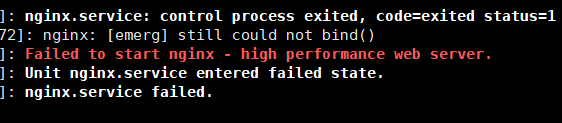
5、还是报错
# systemctl status nginx.service -l
6、# ps aux|grep nginx
root 11675 0.0 0.1 46088 1156 ? Ss 02:20 0:00 nginx: master process /srv/ngin/sbin/nginx
nobody 11676 0.0 0.2 46548 2180 ? S 02:20 0:00 nginx: worker process
root 28181 0.0 0.0 112660 968 pts/0 R+ 02:35 0:00 grep --color=auto nginx
# kill -9 11675
# kill -9 11676
# ps aux|grep nginx
root 28183 0.0 0.0 112660 964 pts/0 R+ 02:35 0:00 grep --color=auto nginx
# systemctl restart nginx
# systemctl status nginx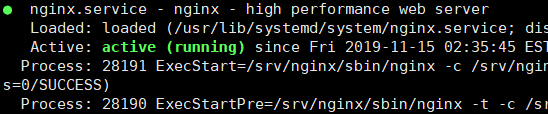
# /srv/nginx/sbin/nginx -v
nginx version: nginx/1.14.2
至此大功告成
nginx源码包安装的更多相关文章
- 部署企业本地yum源及源码包安装
YUM命令 yum list //列出每个软件包(包括未安装和已安装) rpm -q repolist //列出所以仓库名称 info //查看软件信息 rpm -qi install //安装 rp ...
- CentOS源码包安装apache、nginx服务
1.通过官网下载apache.nginx源码包 2.进入apache源码包所在目录,解压tar -xf httpd-2.4.12.tar.gz 3.cd httpd-2.4.12 4.阅读README ...
- centos 7 源码包安装、卸载nginx
1.源码包安装之前,首页安装依赖包 yum -y install gcc gcc-c++ make libtool zlib zlib-devel openssl openssl-devel pcre ...
- yum 仓库搭建与源码包安装实战
目录 一.yum 仓库自建示例: 二.源码包安装实践 基础环境 服务端配置 下载及安装fpm软件 客户端: 一.yum 仓库自建示例: 1.安装ftp服务 yum -y install vsftpd ...
- Linux进阶之Linux破解密码、yum源配置、防火墙设置及源码包安装
一.老师语录: 所有要求笔试的公司都是垃圾公司 笔试(是考所有的涉及到的点) 要有自己的卖点.专长(给自己个标签)(至少一个) 生产环境中,尽量使用mv(mv到一个没用的目录下),少使用rm 二.防火 ...
- Linux之源码包安装软件
安装准备 安装c语言编辑器 gcc 压缩包 node-v6.2.0-linux-x64.tar.gz 源码包保存位置 /usr/local/src/ 源码包安装位置 /us ...
- Apache源码包安装和子配置文件介绍--update.2014-12-5
安装apache: 官网:http://httpd.apache.org/download.cgi#apache24 1.wget http://mirror.bit.edu.cn/apache//h ...
- Zabbix源码包安装
Zabbix源码包安装 Cenos5.3 Basic server 安装顺序 Libxml2 Libmcrypt Zlib Libpng Jpeg:需要创建目录jpeg /bin /lib / ...
- Lamp源码包安装实录
Lamp源码包安装实录 附件中是安装步骤,下载站点里包含视频(http://down.51cto.com/data/460776) 本文出自 "李晨光原创技术博客" 博客,请务必保 ...
随机推荐
- nicstat命令安装与分析
nicstat安装包下载与安装: wget https://downloads.sourceforge.net/project/nicstat/nicstat-1.95.tar.gz tar -zxv ...
- GlusterFS 分布式文件系统
简介 官方文档:https://docs.gluster.org/en/latest/Quick-Start-Guide/Architecture/ Glusterfs是一个开源的分布式文件系统,是S ...
- 【洛谷P4173】残缺的字符串
题目大意:给定一个文本串和一个模板串,串中含有通配符,求文本串中有多少个位置可以与文本串完全匹配. 题解:利用卷积求解字符串匹配问题. 通配符字符串匹配的数值表示为 \[\sum\limits_{i ...
- char()和VARCHAR()的主要区别是什么?
1.char的长度是不可变的,而varchar的长度是可变的 字段b:类型char(10), 值为:abc,存储为:abc (abc+7个空格) 字段d:类型varch ...
- 【Python网络爬虫三】 爬取网页新闻
学弟又一个自然语言处理的项目,需要在网上爬一些文章,然后进行分词,刚好牛客这周的是从一个html中找到正文,就实践了一下.写了一个爬门户网站新闻的程序 需求: 从门户网站爬取新闻,将新闻标题,作者,时 ...
- Matlab复习
Matlab是刚好两年前(大三)接触的,那时一些课程(遥感图像处理.计量地理学......)要涉及简单的数学建模的问题.Matlab在那些资深的开发者看来可能是一门有点边缘化的东西,虽然也能做开发,能 ...
- JAVA笔记11-Final关键字
相当于C++中的const (1)final的变量值(成员变量.局部变量(形参))不可被改变: (2)final的方法不能被重写: (3)final的类不能被继承.
- 《剑指offer》算法题第三天
今日题目: 斐波那契数列 青蛙跳台阶问题(及其变种:变态跳台阶) 矩形覆盖 旋转数组的最小数字 矩阵中的路径 机器人的运动范围 细心的同学会发现,第1,2,3题其实对应的是<剑指>书上的同 ...
- 配置zookeeper开机自启动
第一种.修改vim /etc/rc.local文件 vim /etc/rc.local 加入: export JAVA_HOME=/usr/local/JAVA/ --JDK安装路径/data/zoo ...
- XSS中的同源和跨域的问题
学习自https://www.cnblogs.com/-qing-/p/10966047.html 也谈谈同源策略和跨域问题 1 同源策略 所谓同源策略,指的是浏览器对不同源的脚本或者文本的访问方式进 ...