
hadoop2.7.3+spark2.0.1+scala2.11.8集群部署
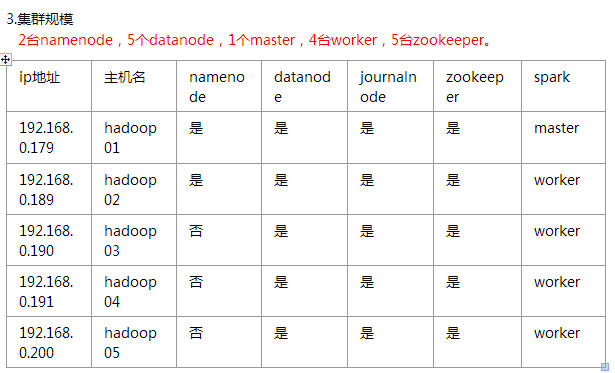
一、环境

soft soft nproc 102400
root soft nproc unlimited
soft soft nofile 102400
soft hard nofile 102400
#将SELINUX=enforcing改为SELINUX=disabled
五、安装hadoop
#配置hadoop-env.sh
export JAVA_HOME=/home/hadoop/jdk1.8.0_101
#编辑core-site.xml
<?xml version="1.0" encoding="UTF-8"?>

<?xml-stylesheet type="text/xsl" href="configuration.xsl"?>

<!--

  Licensed under the Apache License, Version 2.0 (the "License");

  you may not use this file except in compliance with the License.

  You may obtain a copy of the License at

    http://www.apache.org/licenses/LICENSE-2.0

  Unless required by applicable law or agreed to in writing, software

  distributed under the License is distributed on an "AS IS" BASIS,

  WITHOUT WARRANTIES OR CONDITIONS OF ANY KIND, either express or implied.

  See the License for the specific language governing permissions and

  limitations under the License. See accompanying LICENSE file.

-->

<!-- Put site-specific property overrides in this file. -->

<configuration>

  <property>

    <name>fs.defaultFS</name>

    <value>hdfs://base</value>

  </property>

  <property>

    <name>hadoop.tmp.dir</name>

    <value>/home/hadoop/data/hadoopdata/tmp</value>

  </property>

  <!-- 指定zookeeper地址 -->

  <property>

	<name>ha.zookeeper.quorum</name>

	<value>n1:2181,n2:2181,n3:2181,n4:2181,n5:2181</value>

  </property>

  <property>

    <name>fs.hdfs.impl</name>

    <value>org.apache.hadoop.hdfs.DistributedFileSystem</value>

    <description>The FileSystem for hdfs: uris.</description>

  </property>

</configuration>
#编辑hdfs-site.xml
<?xml version="1.0" encoding="UTF-8"?>

<?xml-stylesheet type="text/xsl" href="configuration.xsl"?>

<!--

  Licensed under the Apache License, Version 2.0 (the "License");

  you may not use this file except in compliance with the License.

  You may obtain a copy of the License at

    http://www.apache.org/licenses/LICENSE-2.0

  Unless required by applicable law or agreed to in writing, software

  distributed under the License is distributed on an "AS IS" BASIS,

  WITHOUT WARRANTIES OR CONDITIONS OF ANY KIND, either express or implied.

  See the License for the specific language governing permissions and

  limitations under the License. See accompanying LICENSE file.

-->

<!-- Put site-specific property overrides in this file. -->

<configuration>

<property>

  <!-- 开几个备份 -->

    <name>dfs.replication</name>

    <value>3</value>

  </property>

  <property>

    <name>dfs.namenode.name.dir</name>

    <value>file:///home/hadoop/data/hadoopdata/name</value>

  </property>

  <property>

    <name>dfs.datanode.data.dir</name>

    <value>/home/hadoop/data/hadoopdata/disk1</value>

	<final>true</final>

  </property>

  <property>

    <name>dfs.nameservices</name>

    <value>base</value>

  </property>

  <property>

    <name>dfs.ha.namenodes.base</name>

    <value>n1,n2</value>

  </property>

  <property>

    <name>dfs.namenode.rpc-address.base.n1</name>

    <value>n1:8020</value>

  </property>

  <property>

    <name>dfs.namenode.rpc-address.base.n2</name>

    <value>n2:8020</value>

  </property>

  <property>

    <name>dfs.namenode.http-address.base.n1</name>

    <value>n1:50070</value>

  </property>

  <property>

    <name>dfs.namenode.http-address.base.n2</name>

    <value>n2:50070</value>

  </property>

  <property>

    <name>dfs.namenode.shared.edits.dir</name>

    <value>qjournal://n1:8485;n2:8485;n3:8485;n4:8485;n5:8485/base</value>

  </property>

  <property>

    <name>dfs.client.failover.proxy.provider.base</name>

    <value>org.apache.hadoop.hdfs.server.namenode.ha.ConfiguredFailoverProxyProvider</value>

  </property>

  <property>

    <name>dfs.ha.fencing.methods</name>

    <value>sshfence</value>

  </property>

  <property>

    <name>dfs.ha.fencing.ssh.private-key-files</name>

    <value>/home/hadoop/.ssh/id_rsa</value>

  </property>

  <property>

    <name>dfs.journalnode.edits.dir</name>

    <value>/home/hadoop/app/hadoop-2.7.3/journal</value>

  </property>

    <property>

        <name>dfs.ha.automatic-failover.enabled</name>

        <value>true</value>

    </property>

    <property>

        <name>ha.zookeeper.quorum</name>

	<value>n1:2181,n2:2181,n3:2181,n4:2181,n5:2181</value>

    </property>

    <property>

        <!--指定ZooKeeper超时间隔,单位毫秒 -->

        <name>ha.zookeeper.session-timeout.ms</name>

        <value>2000</value>

    </property>

<property>

    <name>fs.hdfs.impl.disable.cache</name>

    <value>true</value>

</property>

</configuration>
#编辑mapred-site.xml
<configuration>

 <property>

    <name>mapreduce.framework.name</name>

    <value>yarn</value>

 </property>

 <property>

    <name>mapreduce.map.memory.mb</name>

    <value>8000</value>

 </property>

 <property>

    <name>mapreduce.reduce.memory.mb</name>

    <value>8000</value>

 </property>

 <property>

    <name>mapreduce.map.java.opts</name>

    <value>-Xmx8000m</value>

 </property>

 <property>

    <name>mapreduce.reduce.java.opts</name>

    <value>-Xmx8000m</value>

 </property>

 <property>

   <name>mapred.task.timeout</name>

   <value>1800000</value> <!-- 30 minutes -->

 </property>

</configuration>
#编辑yarn-site.xml
<?xml version="1.0"?>

<!--

  Licensed under the Apache License, Version 2.0 (the "License");

  you may not use this file except in compliance with the License.

  You may obtain a copy of the License at

    http://www.apache.org/licenses/LICENSE-2.0

  Unless required by applicable law or agreed to in writing, software

  distributed under the License is distributed on an "AS IS" BASIS,

  WITHOUT WARRANTIES OR CONDITIONS OF ANY KIND, either express or implied.

  See the License for the specific language governing permissions and

  limitations under the License. See accompanying LICENSE file.

-->

<configuration>

    <property>

        <name>yarn.resourcemanager.connect.retry-interval.ms</name>

        <value>2000</value>

    </property>

    <property>

        <name>yarn.resourcemanager.ha.automatic-failover.enabled</name>

        <value>true</value>

    </property>

    <!-- 开启RM高可靠 -->

	<property>

	    <name>yarn.resourcemanager.ha.enabled</name>

	    <value>true</value>

	</property>

	<!-- 指定RM的cluster id -->

	<property>

	    <name>yarn.resourcemanager.cluster-id</name>

	    <value>yrc</value>

	</property>

	<!-- 指定RM的名字 -->

	<property>

	    <name>yarn.resourcemanager.ha.rm-ids</name>

	    <value>rm1,rm2</value>

	</property>

	<!-- 分别指定RM的地址 -->

	<property>

	    <name>yarn.resourcemanager.hostname.rm1</name>

	    <value>n1</value>

	</property>

	<property>

	    <name>yarn.resourcemanager.hostname.rm2</name>

	    <value>n2</value>

	</property>

	<property>

        <name>yarn.resourcemanager.ha.id</name>

        <value>rm2</value>

	</property>

	<!-- 指定zk集群地址 -->

	<property>

	    <name>yarn.resourcemanager.zk-address</name>

	    <value>n1:2181,n2:2181,n3:2181,n4:2181,n5:2181</value>

	</property>

    <property>

        <name>yarn.nodemanager.aux-services</name>

        <value>mapreduce_shuffle</value>

    </property>

    <property>

        <name>yarn.log-aggregation-enable</name>

        <value>true</value>

    </property>

    <property>

        <name>yarn.log-aggregation.retain-seconds</name>

        <value>86400</value>

    </property>

    <property>

        <name>yarn.nodemanager.vmem-pmem-ratio</name>

        <value>3</value>

    </property>

    <property>

        <name>yarn.nodemanager.resource.memory-mb</name>

        <value>57000</value>

    </property>

    <property>

        <name>yarn.scheduler.minimum-allocation-mb</name>

        <value>4000</value>

    </property>

    <property>

        <name>yarn.scheduler.maximum-allocation-mb</name>

        <value>10000</value>

    </property>

</configuration>
#编辑slaves文件
n1
n2
n3
n4
n5
#将hadoop目录scp到其他主机
六、启动
启动所有zookeeper,查看状态是否成功
启动所有journalnode
hadoop-daemons.sh start journalnode
#hadoop01上执行
hdfs namenode -format #namenode 格式化
hdfs zkfc -formatZK #格式化高可用
sbin/hadoop-daemon.sh start namenode #启动namenode
#备份节点执行
hdfs namenode -bootstrapStandby #同步主节点和备节点之间的元数据
停止所有journalnode,namenode
启动hdfs和yarn相关进程
./start-dfs.sh
./start-yarn.sh
备份节点手动启动resourcemanager
#先更改备份节点的yarn-site.xml文件
<property>

        <name>yarn.resourcemanager.ha.id</name>

        <value>rm2</value>          #这里改成node的id,否则会报端口已占用的错误

</property>
./yarn-daemon.sh start resourcemanager
七、检查
[root@n1 ~]# jps
16016 Jps
24096 DFSZKFailoverController
19859 QuorumPeerMain
22987 NameNode
18878 Datanode
29397 ResourceManager
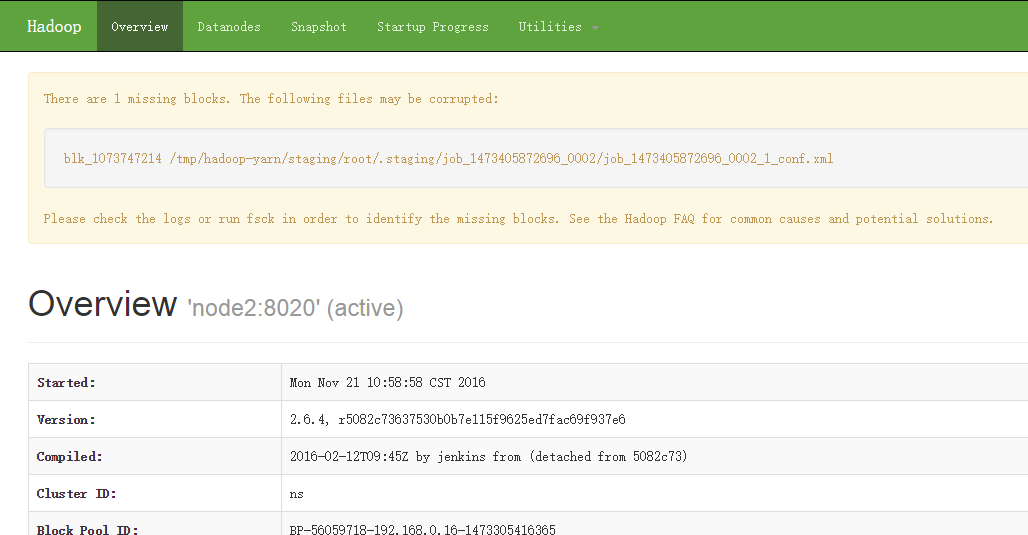
#浏览器访问
http://ip:50070
hadoop2.7.3+spark2.0.1+scala2.11.8集群部署的更多相关文章
- 安装Scala-2.11.7——集群学习日记
前言 在安装Spark之前,我们需要安装Scala语言的支持.在此我选择的是scala-2.11.7版本. scala-2.11.7下载 为了方便,我现在我的SparkMaster主机上先安装,把目录 ...
- kafka 0.10.2 cetos6.5 集群部署
安装 zookeeper http://www.cnblogs.com/xiaojf/p/6572351.html安装 scala http://www.cnblogs.com/xiaojf/p/65 ...
- Redis3.0.1 Stable版本的集群部署(Mac)
本文档基于如下原始文档(CentOS)创建: http://blog.csdn.net/xu470438000/article/details/42971091 修改了一些路径的错误,补全了一些命令执 ...
- redis-5.0.5 集群部署
之前写过一套基于redis-4.0.6版本的测试集群部署 https://www.cnblogs.com/mrice/p/10730309.html 最近生产环境需要部署一套redis-5.0.5版本 ...
- Ubuntu14.04或16.04下安装JDK1.8+Scala+Hadoop2.7.3+Spark2.0.2
为了将Hadoop和Spark的安装简单化,今日写下此帖. 首先,要看手头有多少机器,要安装伪分布式的Hadoop+Spark还是完全分布式的,这里分别记录. 1. 伪分布式安装 伪分布式的Hadoo ...
- Kafka设计解析(十七)Kafka 0.11客户端集群管理工具AdminClient
转载自 huxihx,原文链接 Kafka 0.11客户端集群管理工具AdminClient 很多用户都有直接使用程序API操作Kafka集群的需求.在0.11版本之前,kafka的服务器端代码(即添 ...
- 超详细从零记录Hadoop2.7.3完全分布式集群部署过程
超详细从零记录Ubuntu16.04.1 3台服务器上Hadoop2.7.3完全分布式集群部署过程.包含,Ubuntu服务器创建.远程工具连接配置.Ubuntu服务器配置.Hadoop文件配置.Had ...
- 保姆级教程,带你认识大数据,从0到1搭建 Hadoop 集群
大数据简介,概念部分 概念部分,建议之前没有任何大数据相关知识的朋友阅读 大数据概论 什么是大数据 大数据(Big Data)是指无法在一定时间范围内用常规软件工具进行捕捉.管理和处理的数据集合,是需 ...
- Hadoop 2.6.0 集群部署
Hadoop的集群部署和单节点部署类似,配置文件不同,另外需要修改网络方面的配置 首先,准备3台虚拟机,系统为CentOS 6.6,其中一台为namenode 剩余两台为 datanode: 修改主机 ...
随机推荐
- em(倍)与px的区别
在国内网站中,包括三大门户,以及“引领”中国网站设计潮流的蓝色理想,ChinaUI等都是使用了px作为字体单位.只有百度好歹做了个可调的表率.而 在大洋彼岸,几乎所有的主流站点都使用em作为字体单位, ...
- 从零开始用electron整个跨平台桌面应用---基础配置篇
1.安装node.npm node以及npm都需要是最新版本(版本过低有坑) 2.安装淘宝镜像cnpm(建议,下载较快) npm install -g cnpm --registry=https:// ...
- 全宇宙首本 VS Code 中文书,来了!
大家好!我是韩骏,VS Code 中文社区创始人,VS Code 的代码贡献者.2013 年,毕业于上海交通大学软件学院,现在是微软开发平台事业部的软件工程师.写过 20 多款 VS Code 插件, ...
- 手把手教你部署 Redis Cluster
环境准备 阿里云申请3台ECS,如下: 序号 内网IP OS A 172.16.190.78 CentOS 7.6 B 172.16.242.36 CentOS 7.6 C 172.16.190.77 ...
- I/O模式及select、 poll、 epoll
I/O多路复用技术 复用技术(multiplexing)并不是新技术而是一种设计思想,在通信和硬件设计中存在频分复用.时分复用.波分复用.码分复用等.在日常生活中复用的场景也非常多.从本质上来说,复用 ...
- Vmware - 安装并启动 Centos 8
下载 Linux 安装包 https://mirrors.aliyun.com/centos/8.1.1911/isos/x86_64/ 不同版本的 Centos https://mirrors.al ...
- html5中二进制对象Blob的使用——Blob与ArrayBuffer、TypeArray和String的相互转换
在网页开发中遇到这样一个问题,在使用select的时候,想让里面的文字水平居中.首先想到的是text-align:center;但是发现在Chrome浏览器下不兼容,需要使用到text-align-l ...
- Layui数据表格加入自定义扩展方法(重新渲染Render当前页数据)
具体开发中遇到的问题如下, 数据表格的重新渲染或重新加载会导致当前操作的分页 或 配置被清空.我正在操作第5页,重新渲染后就回到了最原始第1页. 需要达到的效果是: 不调用接口,仅仅只是从table. ...
- sql语句-根据动态参数去拼sql
1.查询 我们有的时候会有根据参数当条件去查找sql,但是参数有的需要有的不需要应该怎么办呢? 就比如这种的 这时候我们可以遍历传进来的参数 request.form会获取他所填写的参数 show = ...
- ubuntu docker安装与部署java,mysql,nginx镜像
docker 安装与部署java,mysql,nginx docker 配置 安装docker $ sudo apt-get remove docker docker-engine docker.io ...