
如何才能将Faster R-CNN训练起来?
如何才能将Faster R-CNN训练起来?
首先进入 Faster RCNN 的官网啦,即:https://github.com/rbgirshick/py-faster-rcnn#installation-sufficient-for-the-demo
先用提供的 model 自己测试一下效果嘛。。。
按照官网安装教程,安装基本需求。
Installation (sufficient for the demo)
Clone the Faster R-CNN repository
# Make sure to clone with --recursive

git clone --recursive https://github.com/rbgirshick/py-faster-rcnn.git
We'll call the directory that you cloned Faster R-CNN into
FRCN_ROOTIgnore notes 1 and 2 if you followed step 1 above.
Note 1: If you didn't clone Faster R-CNN with the
--recursiveflag, then you'll need to manually clone thecaffe-fast-rcnnsubmodule:git submodule update --init --recursive
Note 2: The
caffe-fast-rcnnsubmodule needs to be on thefaster-rcnnbranch (or equivalent detached state). This will happen automatically if you followed step 1 instructions.Build the Cython modules
cd $FRCN_ROOT/lib

make
Build Caffe and pycaffe
cd $FRCN_ROOT/caffe-fast-rcnn

# Now follow the Caffe installation instructions here:

#   http://caffe.berkeleyvision.org/installation.html

# If you're experienced with Caffe and have all of the requirements installed

# and your Makefile.config in place, then simply do:

make -j8 && make pycaffe
Download pre-computed Faster R-CNN detectors
cd $FRCN_ROOT

./data/scripts/fetch_faster_rcnn_models.sh
This will populate the
$FRCN_ROOT/datafolder withfaster_rcnn_models. Seedata/README.mdfor details. These models were trained on VOC 2007 trainval.
Demo
After successfully completing basic installation, you'll be ready to run the demo.
To run the demo
cd $FRCN_ROOT

./tools/demo.py
The demo performs detection using a VGG16 network trained for detection on PASCAL VOC 2007.
你自己要下载一个 caffe-master,因为这个检测方法就是调用 caffe的啦,自己下载了,然后放到(注意,是拷贝内容):
./py-faster-rcnn-master/caffe-fast-rcnn/
然而,情况总是不太顺利啊,遇到了如下问题:
执行 demo 的过程中,遇到的首个问题是:
wangxiao@GTX980:~/Desktop/py-faster-rcnn-master$ ./tools/demo.py
Traceback (most recent call last):
File "./tools/demo.py", line 18, in <module>
from fast_rcnn.test import im_detect
File "/home/wangxiao/Desktop/py-faster-rcnn-master/tools/../lib/fast_rcnn/test.py", line 16, in <module>
import caffe
File "/home/wangxiao/Desktop/py-faster-rcnn-master/tools/../caffe-fast-rcnn/python/caffe/__init__.py", line 1, in <module>
from .pycaffe import Net, SGDSolver, NesterovSolver, AdaGradSolver, RMSPropSolver, AdaDeltaSolver, AdamSolver
File "/home/wangxiao/Desktop/py-faster-rcnn-master/tools/../caffe-fast-rcnn/python/caffe/pycaffe.py", line 15, in <module>
import caffe.io
File "/home/wangxiao/Desktop/py-faster-rcnn-master/tools/../caffe-fast-rcnn/python/caffe/io.py", line 2, in <module>
import skimage.io
ImportError: No module named skimage.io
wangxiao@GTX980:~/Desktop/py-faster-rcnn-master$
解决方法是: sudo easy_install -U scikit-image
那么,就这样完了?? 噢,no,并不是:
wangxiao@GTX980:~/Desktop/py-faster-rcnn-master/tools$ ./demo.py
/usr/local/lib/python2.7/dist-packages/matplotlib-2.0.0b3-py2.7-linux-x86_64.egg/matplotlib/font_manager.py:279: UserWarning: Matplotlib is building the font cache using fc-list. This may take a moment.
warnings.warn('Matplotlib is building the font cache using fc-list. This may take a moment.')
Traceback (most recent call last):
File "./demo.py", line 127, in <module>
'fetch_faster_rcnn_models.sh?').format(caffemodel))
IOError: /home/wangxiao/Desktop/py-faster-rcnn-master/data/faster_rcnn_models/VGG16_faster_rcnn_final.caffemodel not found.
Did you run ./data/script/fetch_faster_rcnn_models.sh?
因为你测试的时候,没有提供给他测试的 model啊,ok,执行这句吧,下载一个模型:
./data/script/fetch_faster_rcnn_models.sh
速度还是有点慢的,耐心等候啊,少年!


然后,
wangxiao@GTX980:~/Desktop/py-faster-rcnn-master/tools$ ./demo.py
WARNING: Logging before InitGoogleLogging() is written to STDERR
W0729 10:57:41.107311 7997 _caffe.cpp:122] DEPRECATION WARNING - deprecated use of Python interface
W0729 10:57:41.107381 7997 _caffe.cpp:123] Use this instead (with the named "weights" parameter):
W0729 10:57:41.107398 7997 _caffe.cpp:125] Net('/home/wangxiao/Desktop/py-faster-rcnn-master/models/pascal_voc/VGG16/faster_rcnn_alt_opt/faster_rcnn_test.pt', 1, weights='/home/wangxiao/Desktop/py-faster-rcnn-master/data/faster_rcnn_models/VGG16_faster_rcnn_final.caffemodel')
[libprotobuf ERROR google/protobuf/text_format.cc:245] Error parsing text-format caffe.NetParameter: 350:21: Message type "caffe.LayerParameter" has no field named "roi_pooling_param".
F0729 10:57:41.132531 7997 upgrade_proto.cpp:79] Check failed: ReadProtoFromTextFile(param_file, param) Failed to parse NetParameter file: /home/wangxiao/Desktop/py-faster-rcnn-master/models/pascal_voc/VGG16/faster_rcnn_alt_opt/faster_rcnn_test.pt
*** Check failure stack trace: ***
Aborted
wangxiao@GTX980:~/Desktop/py-faster-rcnn-master/tools$
我更新了一下系统,但是提示我无法更新啊。。。
wangxiao@GTX980:~$ sudo apt-get update
[sudo] password for wangxiao:
E: Type 'Reading' is not known on line 1 in source list /etc/apt/sources.list.d/bazel.list
E: The list of sources could not be read.
进去这个路径,将这个文件删掉,即可,即:sudo rm /etc/apt/sources.list.d/bazel.list
之前出现各种蛋疼的情况主要是因为:不能自己从caffe官网下的那个caffe来用,而应该是从作者自己的 github上来下。
然后加到对应的文件夹进行编译,就不会出现这些问题了。
至于训练的话,有两种方式,一种是: end-to-end,即:
在终端执行:选择 GPU-0,网络为: ZF 数据集为: pascal_voc
./experiments/scripts/faster_rcnn_end2end.sh 0 ZF pascal_voc
那么,就可以跑了 。。。
不像 matlab版本那么蛋疼,跑一下,就会自动关闭matlab一次,╮(╯▽╰)╭ 伤不起 。。。
这是最终跑出来的结果:mAP 是:59.09 %
Saving cached annotations to /home/wangxiao/Desktop/py-faster-rcnn-master/data/VOCdevkit2007/annotations_cache/annots.pkl
AP for aeroplane = 0.6043
AP for bicycle = 0.7138
AP for bird = 0.5504
AP for boat = 0.4721
AP for bottle = 0.3404
AP for bus = 0.6633
AP for car = 0.7369
AP for cat = 0.7021
AP for chair = 0.3631
AP for cow = 0.6086
AP for diningtable = 0.6191
AP for dog = 0.6469
AP for horse = 0.7789
AP for motorbike = 0.6782
AP for person = 0.6489
AP for pottedplant = 0.3073
AP for sheep = 0.5715
AP for sofa = 0.5015
AP for train = 0.7026
AP for tvmonitor = 0.6089
Mean AP = 0.5909
~~~~~~~~
Results:
0.604
0.714
0.550
0.472
0.340
0.663
0.737
0.702
0.363
0.609
0.619
0.647
0.779
0.678
0.649
0.307
0.571
0.502
0.703
0.609
0.591
~~~~~~~~
--------------------------------------------------------------
Results computed with the **unofficial** Python eval code.
Results should be very close to the official MATLAB eval code.
Recompute with `./tools/reval.py --matlab ...` for your paper.
-- Thanks, The Management
--------------------------------------------------------------
real 5m25.471s
user 5m11.620s
sys 0m35.848s
Matlab 版本碰到过如下的问题:
1. 找不到 ZF文件夹下面的 test.prototxt 文件:

fast_rcnn startup done
GPU 1: free memory 3786178560
Use GPU 1
Error using CHECK_FILE_EXIST (line 4)
/home/wangxiao/Desktop/matlab-faster_rcnn-master/experiments/models/rpn_prototxts/ZF/test.prototxt does not exist
Error in caffe.get_net (line 21)
CHECK_FILE_EXIST(model_file);
Error in caffe.Net (line 31)
self = caffe.get_net(varargin{:});
Error in proposal_calc_output_size (line 10)
caffe_net = caffe.Net(test_net_def_file, 'test');
Error in script_faster_rcnn_VOC2007_ZF>proposal_prepare_anchors (line 91)
[output_width_map, output_height_map] ...
Error in script_faster_rcnn_VOC2007_ZF (line 41)
[conf_proposal.anchors, conf_proposal.output_width_map, conf_proposal.output_height_map] ...
解决方案是:没有下载那个文件,囧,下载地址:https://onedrive.live.com/download?resid=36FEC490FBC32F1A!113&authkey=!AIzdm0sD_SmhUQ4&ithint=file%2czip
2. 将上一个问题搞定后,有出现新的,这个有点摸不着头脑了:

fast_rcnn startup done
GPU 1: free memory 3761143808
Use GPU 1
No appropriate method, property, or field reshape_as_input for class caffe.Net.
Error in proposal_calc_output_size (line 28)
caffe_net.reshape_as_input(net_inputs);
Error in script_faster_rcnn_VOC2007_ZF>proposal_prepare_anchors (line 91)
[output_width_map, output_height_map] ...
Error in script_faster_rcnn_VOC2007_ZF (line 41)
[conf_proposal.anchors, conf_proposal.output_width_map, conf_proposal.output_height_map]
...
解决方法是:可能是你 caffe 版本不对,重新从 faster rcnn 官网上下载,然后编译 。。。
3. 更蛋疼的是这个问题,表面上看,正在运行,但是 这个时候你看看终端上的显示:
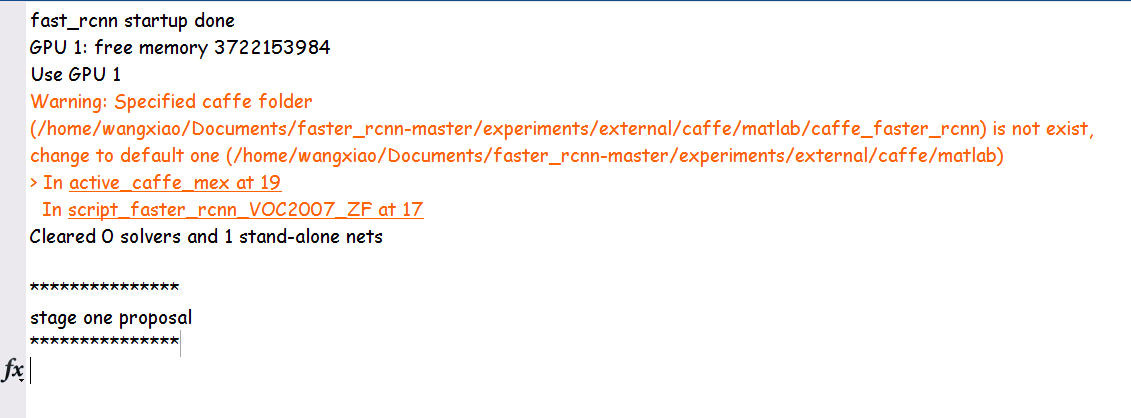

File not found: ./models/rpn_prototxts/ZF/train_vali.prototxt
但是,这个文件明明就放在那里啊。。。无语。。。
解决方案是:由于下载的model中,关于 prototxt文件中路径的问题,请改为绝对路径,如下图所示,且用”/“作为分隔符,因为下载了的分隔符是不对的,所以,一直找不到这个文件,哎,坑啊。。。。

搞完之后,就可以继续正常的运行了。。。
fast_rcnn startup done

GPU 1: free memory 3676987392

Use GPU 1

Warning: Specified caffe folder

(/home/wangxiao/Documents/faster_rcnn-master/experiments/external/caffe/matlab/caffe_faster_rcnn) is not exist,

change to default one (/home/wangxiao/Documents/faster_rcnn-master/experiments/external/caffe/matlab)

> In active_caffe_mex at 19

  In script_faster_rcnn_VOC2007_ZF at 17

Cleared 0 solvers and 1 stand-alone nets

***************

stage one proposal

***************

conf:

                      batch_size: 256

                    bg_thresh_hi: 0.3000

                    bg_thresh_lo: 0

                       bg_weight: 1

         drop_boxes_runoff_image: 1

                     feat_stride: 16

                     fg_fraction: 0.5000

                       fg_thresh: 0.7000

                     image_means: [224x224x3 single]

                   ims_per_batch: 1

                        max_size: 1000

                        rng_seed: 6

                          scales: 600

                  target_only_gt: 1

                     test_binary: 0

    test_drop_boxes_runoff_image: 0

                   test_max_size: 1000

               test_min_box_size: 16

                        test_nms: 0.3000

                     test_scales: 600

                     use_flipped: 1

                         use_gpu: 1

                         anchors: [9x4 double]

                output_width_map: [901x1 containers.Map]

               output_height_map: [901x1 containers.Map]

opts:

           cache_name: 'faster_rcnn_VOC2007_ZF_stage1_rpn'

                 conf: [1x1 struct]

               do_val: 1

           imdb_train: {[1x1 struct]}

             imdb_val: [1x1 struct]

             net_file: '/home/wangxiao/Documents/faster_rcnn-master/experiments/models/pre_trained_models/ZF/ZF...'

          roidb_train: {[1x1 struct]}

            roidb_val: [1x1 struct]

    snapshot_interval: 10000

      solver_def_file: '/home/wangxiao/Documents/faster_rcnn-master/experiments/models/rpn_prototxts/ZF/solver_...'

         val_interval: 2000

            val_iters: 500

Preparing training data...Starting parallel pool (parpool) using the 'local' profile ... connected to 4 workers.

Done.

Preparing validation data...Done.

------------------------- Iteration 2000 -------------------------

Training : err_fg 0.521, err_bg 0.0187, loss (cls 0.242 + reg 0.0218)

Testing  : err_fg 0.487, err_bg 0.0131, loss (cls 0.203 + reg 0.0167)

------------------------- Iteration 4000 -------------------------

Training : err_fg 0.495, err_bg 0.0187, loss (cls 0.209 + reg 0.0206)

Testing  : err_fg 0.458, err_bg 0.0143, loss (cls 0.182 + reg 0.0158)

------------------------- Iteration 6000 -------------------------

Training : err_fg 0.462, err_bg 0.0205, loss (cls 0.196 + reg 0.0189)

Testing  : err_fg 0.409, err_bg 0.0229, loss (cls 0.177 + reg 0.0184)

------------------------- Iteration 8000 -------------------------

Training : err_fg 0.46, err_bg 0.0196, loss (cls 0.19 + reg 0.0194)

Testing  : err_fg 0.404, err_bg 0.0163, loss (cls 0.165 + reg 0.0151)

------------------------- Iteration 10000 -------------------------

Training : err_fg 0.437, err_bg 0.0202, loss (cls 0.179 + reg 0.0189)

Testing  : err_fg 0.413, err_bg 0.0154, loss (cls 0.168 + reg 0.0158)

Saved as /home/wangxiao/Documents/faster_rcnn-master/experiments/output/rpn_cachedir/faster_rcnn_VOC2007_ZF_stage1_rpn/voc_2007_trainval/iter_10000
4. Faster RCNN 运行出现问题:
fast_rcnn startup done
Error using gpuDevice (line 26)
An unexpected error occurred during CUDA execution. The CUDA error was:
cannot set while device is active in this process
Error in auto_select_gpu (line 15)
g = gpuDevice(i);
Error in script_faster_rcnn_VOC2007_ZF (line 16)
opts.gpu_id = auto_select_gpu;

答:如果之前正常运行,突然出现这个问题,重启你的 matlab,然后以 sudo 开启,重新跑一下就没事了。。。
5. 下面是今天重新跑 faster RCNN 遇到的一个问题:

解决方案是:
数据集的名字或者文件夹不存在,额,将数据集加上就行了...
6. 之前一直很纳闷,script_faster_rcnn_VOC0712_VGG16.m 这个脚本的数据集该怎么设置? 是分别单独设置两个文件夹,还是将其放到一个文件夹中???
看到这个代码,我终于恍然大悟 ...

7.
如何才能将Faster R-CNN训练起来?的更多相关文章
- CNN训练Cifar-10技巧
关于数据集 Cifar-10是由Hinton的两个大弟子Alex Krizhevsky.Ilya Sutskever收集的一个用于普适物体识别的数据集.Cifar是加拿大政府牵头投资的一个先进科学项目 ...
- Faster RCNN算法训练代码解析(2)
接着上篇的博客,我们获取imdb和roidb的数据后,就可以搭建网络进行训练了. 我们回到trian_rpn()函数里面,此时运行完了roidb, imdb = get_roidb(imdb_name ...
- Faster RCNN算法训练代码解析(1)
这周看完faster-rcnn后,应该对其源码进行一个解析,以便后面的使用. 那首先直接先主函数出发py-faster-rcnn/tools/train_faster_rcnn_alt_opt.py ...
- 自主搭建CNN训练时遇到的问题
1.训练太慢 用nimibatch代替fullbatch https://www.cnblogs.com/guoyaohua/p/8724433.html 2.过拟合 最直接的解决过拟合问题的办法是增 ...
- 使用卷积神经网络CNN训练识别mnist
算的的上是自己搭建的第一个卷积神经网络.网络结构比较简单. 输入为单通道的mnist数据集.它是一张28*28,包含784个特征值的图片 我们第一层输入,使用5*5的卷积核进行卷积,输出32张特征图, ...
- 神经网络CNN训练心得--调参经验
1.样本要随机化,防止大数据淹没小数据 2.样本要做归一化.关于归一化的好处请参考:为何需要归一化处理3.激活函数要视样本输入选择(多层神经网络一般使用relu)4.mini batch很重要,几百是 ...
- CNN训练中的技巧
转自: http://weibo.com/p/1001603816330729006673 说明:这个翻译应该是来自原文:http://yyue.blogspot.hk/2015/01/a-brief ...
- Faster RCNN算法训练代码解析(3)
四个层的forward函数分析: RoIDataLayer:读数据,随机打乱等 AnchorTargetLayer:输出所有anchors(这里分析这个) ProposalLayer:用产生的anch ...
- ubuntu14.04上实现faster rcnn_TF的demo程序及训练过程
安装环境:Ubuntu14.04.显卡Tesla K40C+GeForce GT 705.tensorflow1.0.0.pycharm5.0 说明:原文见博客园,有问题原文下留言,不定期回复.本文作 ...
随机推荐
- CSS网页布局:网站整体居中 转
body{ margin:0 auto; padding:0 auto; text-align:center;} 只设置body属性对ie浏览器有效果,但是对火狐等不起作用 body{ ...
- AS启动模拟器报'mksdcard.exe' is missing from the SDK tools folder.异常、启动模拟器失败
这个问题是因为SDK下的tools文件夹中找不到mksdcard.exe程序所以无法启动模拟器,下载android-sdk_r20-windows.zip压缩包解压缩后将tools文件覆盖到SDK的t ...
- CWNP宣布中国首位CWNE获得者——朱志立(Kevin Zhu)
CWNP宣布中国首位CWNE获得者——朱志立(Kevin Zhu) Kevin Zhu获得了全球CWNE认证无线网络专家的第134号,CWNE被公认为IT行业最难获取的10大认证之一. [ ...
- Non-constant Fields in Case Labels
Non-constant Fields in Case Labels in android library project http://tools.android.com/tips/non-cons ...
- hdu 2053
Ps:找规律题....凡是平方数都是开...WA了一次..数组给的太小?...后来给到3000..就AC了 代码: #include "stdio.h"long long dp[3 ...
- leetcode 229 Majority Element II
这题用到的基本算法是Boyer–Moore majority vote algorithm wiki里有示例代码 1 import java.util.*; 2 public class Majori ...
- python中的函数调用绑定,静态方法和类方法
在C++的类中,有两种函数:普通成员函数和静态成员函数,差别是成员函数通过类实例调用,而静态成员函数通过类名调用.本质上,成员函数在调用的时候会默认把this指针作为第一个参数传入,而静态成员函数不需 ...
- 【LeetCode】Best Time to Buy and Sell Stock IV
Best Time to Buy and Sell Stock IV Say you have an array for which the ith element is the price of a ...
- IOS 作业项目(4)步步完成 画图 程序(中)
一,承接上文,继续本文 [UIButton buttonWithType:UIButtonTypeRoundedRect]; 如此声明的按钮才会有点击闪动的效果!如果直接frame方式声明就不会有. ...
- select2美化下拉单
http://www.51xuediannao.com/js/jquery/select2.html http://www.51xuediannao.com/demo.php