
利用ITextSharp导出PDF文件
最近项目中需要导出PDF文件,最后上网搜索了一下,发现ITextSharp比较好用,所以做了一个例子:
public string ExportPDF()

        {

            //ITextSharp Usage

            //Steps:1. Add content to cell;2. Add cell to table;3. Add table to document;4. Add document to rectangle;

            string sAbsolutePath = ControllerContext.HttpContext.Server.MapPath(this.path);

            string FileName = string.Format("Notice_{0}.pdf", DateTime.Now.ToString("yyyyMMddHHmmss"));

            BaseFont bf = BaseFont.CreateFont("C:/WINDOWS/Fonts/Arial.TTF", BaseFont.IDENTITY_H, BaseFont.NOT_EMBEDDED);

            Rectangle rec = new Rectangle(, );

            Document document = new Document(rec);

            document.SetMargins(10f, 10f, 10f, 10f);

            PdfWriter pdfwriter = PdfWriter.GetInstance(document,

                    new System.IO.FileStream(sAbsolutePath + "\\" + FileName, System.IO.FileMode.Create)

                );

            document.Open();

            Font font = new Font(bf);

            try

            {

                PdfPTable pdftable = new PdfPTable();

                pdftable.HorizontalAlignment = ;

                //Set cell width

                float[] cellwidth = { 3f, 5f, 5f, 3.5f, 5f };

                pdftable.SetWidths(cellwidth);

                //Header

                Font PDFFontA = FontFactory.GetFont("Arial", , Font.BOLD);

                Font PDFFontB = FontFactory.GetFont("Arial", , Font.BOLD);

                Font PDFFontC = FontFactory.GetFont("Arial", );

                //Image Object

                Image jpeg = Image.GetInstance(HttpContext.Server.MapPath("../images/buddy.jpg"));

                PdfPCell cell = new PdfPCell(jpeg);

                cell.FixedHeight = 40f;

                cell.Colspan = ;

                cell.Rowspan = ;

                cell.Border = ;

                pdftable.AddCell(cell);

                cell = new PdfPCell(new Phrase(("Did You Know?"), PDFFontB));

                cell.Colspan = ;

                cell.Rowspan = ;

                cell.Border = ;

                cell.BackgroundColor = new BaseColor(, , );//RGB Color Value

                cell.HorizontalAlignment = ;

                pdftable.AddCell(cell);

                cell = new PdfPCell(new Phrase("\nTitle: Hello World!\nDate: " + DateTime.Now.ToString("MM/dd/yyyy") + "\n\n", PDFFontC));

                cell.Colspan = ;

                cell.Rowspan = ;

                cell.Border = ;

                cell.BackgroundColor = new BaseColor(, , );//RGB Color Value

                cell.HorizontalAlignment = ;

                pdftable.AddCell(cell);

                cell = new PdfPCell(new Phrase("Notice", PDFFontA));

                cell.BackgroundColor = new BaseColor(, , );//RGB Color Value

                cell.Colspan = ;

                cell.Padding = 5f;

                cell.HorizontalAlignment = ;

                pdftable.AddCell(cell);

                string[] AssHeader = { "DateTime", "Name", "Description", "Icon", "Notes"};

                for (int i = ; i < AssHeader.Length; i++)

                {

                    cell = new PdfPCell(new Phrase(AssHeader[i], PDFFontB));

                    cell.HorizontalAlignment = ;

                    cell.VerticalAlignment = Element.ALIGN_MIDDLE;

                    cell.BackgroundColor = new BaseColor(, , );

                    cell.PaddingBottom = 4f;

                    cell.PaddingTop = 4f;

                    pdftable.AddCell(cell);

                }

                for (int i = ; i < ; i++)

                {

                    cell = new PdfPCell(new Phrase(new DateTime().ToShortDateString(), PDFFontC));

                    cell.HorizontalAlignment = ;

                    cell.VerticalAlignment = Element.ALIGN_MIDDLE;

                    cell.PaddingBottom = 4f;

                    cell.PaddingTop = 4f;

                    pdftable.AddCell(cell);

                    cell = new PdfPCell(new Phrase("Jack Chean", PDFFontC));

                    cell.HorizontalAlignment = ;

                    cell.VerticalAlignment = Element.ALIGN_MIDDLE;

                    cell.PaddingBottom = 4f;

                    cell.PaddingTop = 4f;

                    pdftable.AddCell(cell);

                    cell = new PdfPCell(new Phrase("Just for my testing!!", PDFFontC));

                    cell.HorizontalAlignment = ;

                    cell.VerticalAlignment = Element.ALIGN_MIDDLE;

                    cell.PaddingBottom = 4f;

                    cell.PaddingTop = 4f;

                    pdftable.AddCell(cell);

                    cell = new PdfPCell(new Phrase("ICON", PDFFontC));

                    cell.HorizontalAlignment = ;

                    cell.VerticalAlignment = Element.ALIGN_MIDDLE;

                    cell.PaddingBottom = 4f;

                    cell.PaddingTop = 4f;

                    pdftable.AddCell(cell);

                    cell = new PdfPCell(new Phrase("For Tom!", PDFFontC));

                    cell.HorizontalAlignment = ;

                    cell.VerticalAlignment = Element.ALIGN_MIDDLE;

                    cell.PaddingBottom = 4f;

                    cell.PaddingTop = 4f;

                    pdftable.AddCell(cell);

                }

                //Very important

                //You can display the header in each page through this properity:HeaderRows

                pdftable.HeaderRows = ;

                document.Add(pdftable);

                //Pager

                float tableheight = pdftable.CalculateHeights();

                if (tableheight <  && tableheight > )

                {

                    document.NewPage();

                }

                document.NewPage();

                document.Close();

            }

            catch (Exception ex)

            {

                document.Add(new Paragraph(ex.Message.ToString(), font));

            }

            return FileName;

        }
最后的显示效果:
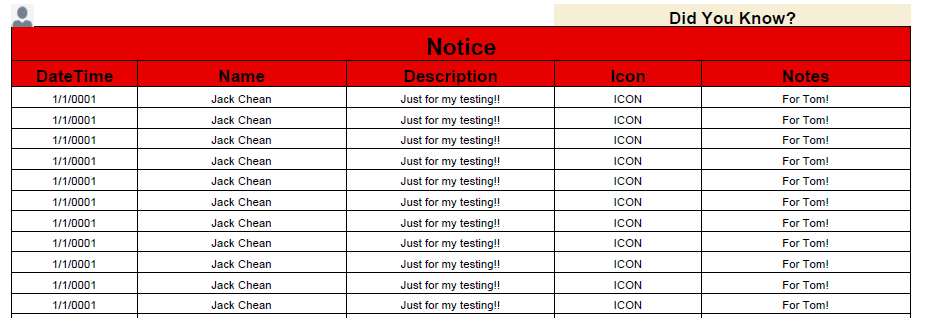
参考文章:http://blog.csdn.net/adgjlxxx/article/details/43307227
利用ITextSharp导出PDF文件的更多相关文章
- C# 利用ITextSharp导出PDF文件
最近项目中需要导出PDF文件,最后上网搜索了一下,发现ITextSharp比较好用,所以做了一个例子: public string ExportPDF() { //ITextSharp Usage / ...
- .Net导出pdf文件,C#实现pdf导出
最近碰见个需求需要实现导出pdf文件,上网查了下代码资料总结了以下代码.可以成功的实现导出pdf文件. 在编码前需要在网上下载个itextsharp.dll,此程序集是必备的.楼主下载的是5.0版本, ...
- ITextSharp导出PDF表格和图片(C#)
文章主要介绍使用ITextSharp导出PDF表格和图片的简单操作说明,以下为ITextSharp.dll下载链接 分享链接:http://pan.baidu.com/s/1nuc6glj 密码:3g ...
- 纯前端导出pdf文件
纯前端js导出pdf,已经用于生产环境. 工具: 1.html2canvas,一种让html转换为图片的工具. 2.pdfmake或者jspdf ,一种生成.编辑pdf,并且导出pdf的工具. pdf ...
- .Net导出pdf文件,C#实现pdf导出 转载 http://www.cnblogs.com/hmYao/p/5842958.html
导出pdf文件. 在编码前需要在网上下载个itextsharp.dll,此程序集是必备的.楼主下载的是5.0版本,之前下了个5.4的似乎不好用. 下载之后直接添加引用. <%@ Page Lan ...
- asp.net2.0导出pdf文件完美解决方案【转载】
asp.net2.0导出pdf文件完美解决方案 作者:清清月儿 PDF简介:PDF(Portable Document Format)文件格式是Adobe公司开发的电子文件格式.这种文件格式与操作系统 ...
- iTextSharp - 建立PDF文件
原文 iTextSharp - 建立PDF文件 01 using iTextSharp.text; 02 using iTextSharp.text.pdf; 03 ... 04 private vo ...
- 史上最全的springboot导出pdf文件
最近项目有一个导出报表文件的需求,我脑中闪过第一念头就是导出pdf(产品经理没有硬性规定导出excel还是pdf文件),于是赶紧上网查看相关的资料,直到踩了无数的坑把功能做出来了才知道其实导出exce ...
- 利用FR导出PDF汉字乱码的处理
利用FR导出pdf,然后在unigui中显示,发现汉字乱码,改成gb2312,不乱码,但不自动折行,最后是改成DefaultCharSet搞定.FR版本:5.4.6 后记:有的浏览器中还是乱码,把字体 ...
随机推荐
- DLL数据共享在不同处定义效果不同..
DLL头文件: #ifndef _DLL_SAMPLE_H #define _DLL_SAMPLE_H #pragma data_seg("ShareReadAndWrite") ...
- P2680 运输计划
http://www.luogu.org/problem/show?pid=2680#sub 题目背景 公元 2044 年,人类进入了宇宙纪元. 题目描述 L 国有 n 个星球,还有 n-1 条双向航 ...
- linux(centos)下SVN服务器如何搭建
检测是否符合pptp的搭建环境的要求 使用下面的指令: 123 cat /dev/net/tun如果这条指令显示结果为下面的文本,则表明通过:cat: /dev/net/tun: File descr ...
- zookeeper系列之二—zookeeper历史
Zookeeper是什么? Zookeeper是一个分布式的,开放源码的分布式应用程序协调服务,是Google的Chubby的一个开源版本.它是为分布式应用提供一致性服务的软件,提供的功能包括:配置服 ...
- BZOJ 3550 Vacation(最小费用最大流)
题目链接:http://www.lydsy.com:808/JudgeOnline/problem.php?id=3550 题意:给出3×n个数字,从中选出一些数字,要求每连续的n个数字中选出的数字个 ...
- JAVA题目
1.在项目中创建Number类,判断字符串"mingrikejijiavabu"中字符"i"出现了几次,并将结果输出. 方法一: public class Nu ...
- [HDOJ2717]Catch That Cow
Catch That Cow Time Limit: 5000/2000 MS (Java/Others) Memory Limit: 32768/32768 K (Java/Others)To ...
- 对MSP430单片机__delay_cycles精确延时的说明及改正
在这里, 我来讨论一下关于MSP430单片机使用__delay_cycles延时的问题. IAR for MSP430编译器提供了一个编译器内联的精确延时函数(并非真正的函数)以提供用户精确延时使用, ...
- 设置三思LED的IP地址跟端口号
出厂设置是:202.11.11.01 初始端口号是:2929 设置虚拟机的ip跟LED的ip在一个网段上,在虚拟机上telnet命令,登陆到LED上面. 在/etc/init.d/rcS文件中, #! ...
- XPah学习
资料1: 来源:http://www.cnblogs.com/ChengDong/archive/2012/06/28/2567744.html 示例Xml: <?xml version=&qu ...